
How to Track UTM Parameters in HubSpot Forms: Hidden Fields, GCLID, and CRM Attribution
HubSpot is where many teams expect lead attribution to become real. The form submission arrives, the contact is created, the lifecycle stage updates, the sales team gets notified, and everyone assumes the source data came along for the ride.
Then someone opens the contact record and sees the expensive version of silence: no campaign, no keyword, no ad click ID, no first-touch source, and no reliable way to connect the lead back to spend.
That is why HubSpot UTM tracking has to be treated as an implementation path, not just a reporting setting.
If you searched for how to track UTM parameters in HubSpot Forms, the practical answer is:
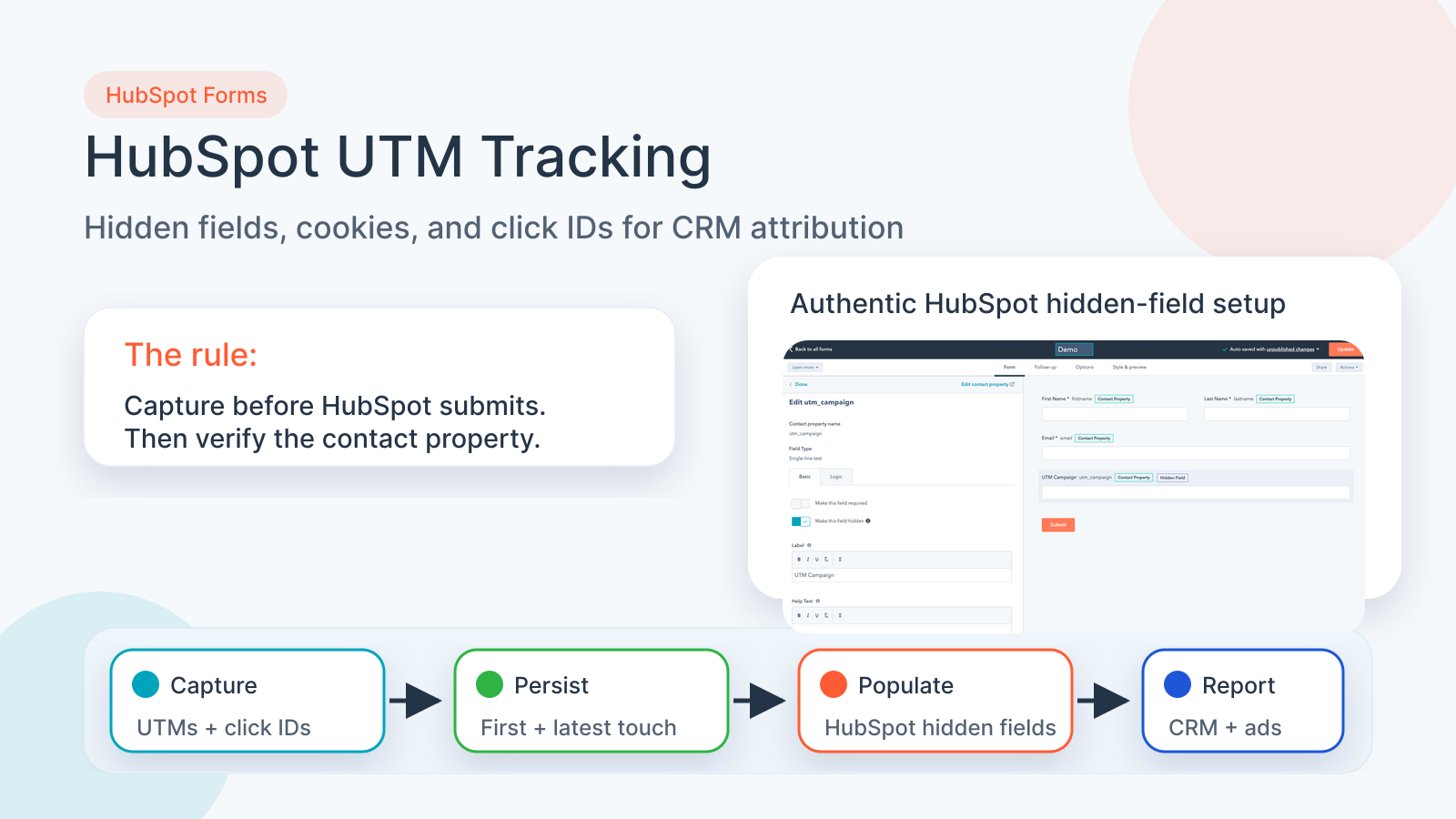
Create matching HubSpot contact properties, add them as hidden fields, capture UTMs and click IDs before the form loads, populate the hidden fields before submission, then verify the values on the contact record and every downstream workflow.
This guide covers HubSpot forms, embedded forms, hidden fields, contact properties, query string parameters, cookies, onFormReady, first-touch/latest-touch attribution, gclid, gbraid, wbraid, fbclid, msclkid, Google Ads offline conversions, Meta CAPI, and CRM reporting.
If HubSpot UTM tracking is not working
- The landing page URL has
utm_source,utm_campaign, orgclid, but the HubSpot contact has blank attribution fields. - HubSpot Forms creates the contact, but sales only sees Original source, Direct traffic, Offline sources, or a vague lifecycle stage.
- Hidden fields exist in the HubSpot form, but they are not populated when the visitor submits.
- A WordPress, Webflow, Shopify, Framer, or custom page embeds a HubSpot form, and the form does not receive the parent page attribution context.
- Google Ads sends
gclid,gbraid, orwbraid, but the qualified lead cannot be imported cleanly as an offline conversion. - Meta Ads sends
fbclid, but you cannot connect the lead to Meta CAPI, lead quality, or pipeline. - A cookie banner, CMP, GTM Consent Mode, cache plugin, or delayed script changes whether fields populate before form submit.
- HubSpot workflow, Zapier, Make, Salesforce sync, or reporting dashboards do not receive the same values shown on the original form page.
Most HubSpot attribution failures are not HubSpot reporting problems. They are capture, timing, or field-mapping problems.
How HubSpot UTM tracking should work
Start with the attribution chain, not the HubSpot field
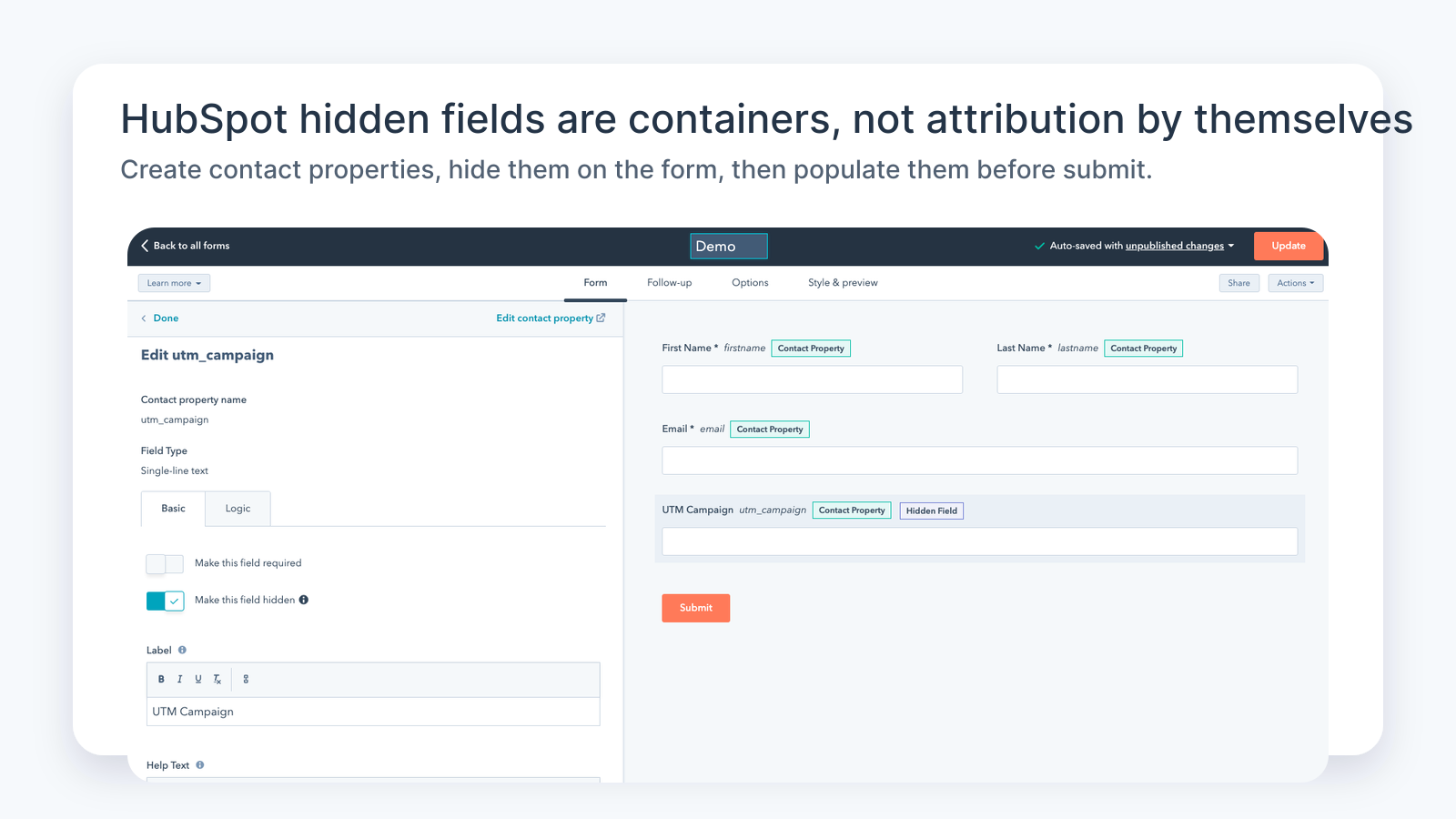
A HubSpot hidden field is only a container. It does not magically know where the visitor came from.
Reliable HubSpot UTM tracking has seven steps:
- Tag your campaign URLs in Google Ads, Meta Ads, LinkedIn Ads, Microsoft Ads, email, affiliates, partner links, QR codes, and any paid landing page.
- Capture UTM parameters, click IDs, landing page, referrer, and first-touch/latest-touch values when the visitor arrives.
- Persist those values in first-party storage so they survive navigation, reloads, delayed form loads, and multi-step journeys.
- Create matching HubSpot contact properties for the attribution data you need.
- Add those contact properties to the HubSpot form as hidden fields.
- Populate the hidden fields before the HubSpot form submits.
- Map and verify the values on the contact, deal, workflow, notification, CRM sync, and ad-platform feedback path.
Most teams only do steps 4 and 5. They create a hidden field called UTM Campaign, hide it, and assume the job is done.
But a hidden field with no value is still blank data.
The HubSpot fields you should create first
Create dedicated HubSpot contact properties for the values you actually want sales, marketing, and reporting to use.
A practical starting schema looks like this:
| HubSpot contact property | Suggested internal name | Why it matters |
|---|---|---|
| UTM Source | utm_source | Platform or source, such as google, facebook, linkedin, newsletter, partner, or ai_search. |
| UTM Medium | utm_medium | Channel, such as cpc, paid_social, organic, email, referral, or affiliate. |
| UTM Campaign | utm_campaign | Campaign name or campaign ID used in ad reporting. |
| UTM Content | utm_content | Creative, ad, placement, button, or variant. |
| UTM Term | utm_term | Keyword, audience, or targeting label. |
| Google Click ID | gclid | Needed for Google Ads offline conversion and enhanced conversion workflows. |
| Google BRAID | gbraid / wbraid | Important for iOS and privacy-safe Google Ads attribution. |
| Facebook Click ID | fbclid | Useful for Meta Ads attribution and Meta CAPI workflows. |
| Microsoft Click ID | msclkid | Useful for Microsoft Ads offline conversion workflows. |
| First Landing Page | handl_landing_page | Explains where the user first entered the site. |
| First Referrer | handl_referrer | Helps separate organic, referral, AI search, and direct-looking traffic. |
| First Touch Source | first_utm_source | Protects original acquisition source from later overwrites. |
| Latest Touch Source | latest_utm_source | Shows the most recent campaign before conversion. |
The exact names can vary, but consistency matters. If the website stores utm_campaign, the HubSpot hidden field uses utm_campaign, and the CRM sync expects utm_campaign, the whole path is easier to test.
If one system calls it utm_campaign, another calls it Campaign Name, and another calls it Campaign__c, somebody eventually maps the wrong field.
HubSpot query-string auto-population is useful, but it is not enough
HubSpot documents that form fields can be auto-populated through query strings when the page URL includes the right field/property values.
That is helpful when the final form page URL still has the parameters:
/demo/?utm_source=google&utm_medium=cpc&utm_campaign=spring_demo_offerBut that does not cover every real funnel.
UTM values can disappear before the form submits because:
- The visitor lands on one page and submits on another.
- The page has redirects that drop query strings.
- The HubSpot form is embedded after the page loads.
- The field name does not match the query parameter.
- A cache layer serves HTML before server-side values can change.
- Consent management delays or blocks the capture script.
- The visitor returns later without UTMs in the URL.
- The form is in an iframe or embed context where the parent page has the data, but the form does not.
So yes: query-string auto-population can help. But for serious attribution, use it as one layer, not the whole system.
The stronger pattern is: capture once, persist in first-party storage, then populate HubSpot hidden fields at form-ready time.
The HandL UTM Grabber pattern for HubSpot embedded forms
The UTM Grabber HubSpot documentation shows a practical implementation pattern:
- Create HubSpot contact properties for the UTM and click ID values.
- Add those properties to the HubSpot form.
- Mark the fields as hidden.
- Embed the HubSpot form on the WordPress or landing page.
- Use the form-ready callback to read the stored values and populate matching hidden fields.
- Submit a tagged test URL.
- Confirm that HubSpot contact properties contain the values.
The important part is timing.
HubSpot embedded forms are rendered by JavaScript. If your tracking script tries to fill a field before the HubSpot form exists, nothing gets written. If your form submits before the attribution cookie is available, the contact is created without the source data.
That is why the form-ready step matters.
A simplified version of the pattern looks like this:
<script charset="utf-8" type="text/javascript" src="//js.hsforms.net/forms/v2.js"></script>
<script>
  hbspt.forms.create({
    region: "na1",
    portalId: "PORTAL_ID",
    formId: "FORM_ID",
    onFormReady: function(form) {
      form.serializeArray().map(function(field) {
        var value = Cookies.get(field.name);
        if (value && value !== '') {
          form.find('input[name="' + field.name + '"]').val(value).change();
        }
      });
    }
  });
</script>
Do not copy that blindly into every site without QA. The real implementation depends on your form version, cookie library, consent rules, page builder, cache setup, and naming schema.
The principle is what matters:
When the HubSpot form is ready, write the stored attribution value into the matching hidden field before the user submits.
What to test before you trust HubSpot attribution
Use a real test URL, not just a form preview.
Example:
https://example.com/demo/?utm_source=google&utm_medium=cpc&utm_campaign=hubspot_test&utm_content=ad_a&utm_term=crm_tracking&gclid=test-gclid&fbclid=test-fbclidThen submit the form as a logged-out visitor and verify the full path:
- Does the browser URL receive the UTM parameters?
- Does UTM Grabber store the values in first-party cookies/local storage?
- Does the HubSpot embed load on the page?
- Do the hidden fields populate before submission?
- Does the HubSpot submission show the values?
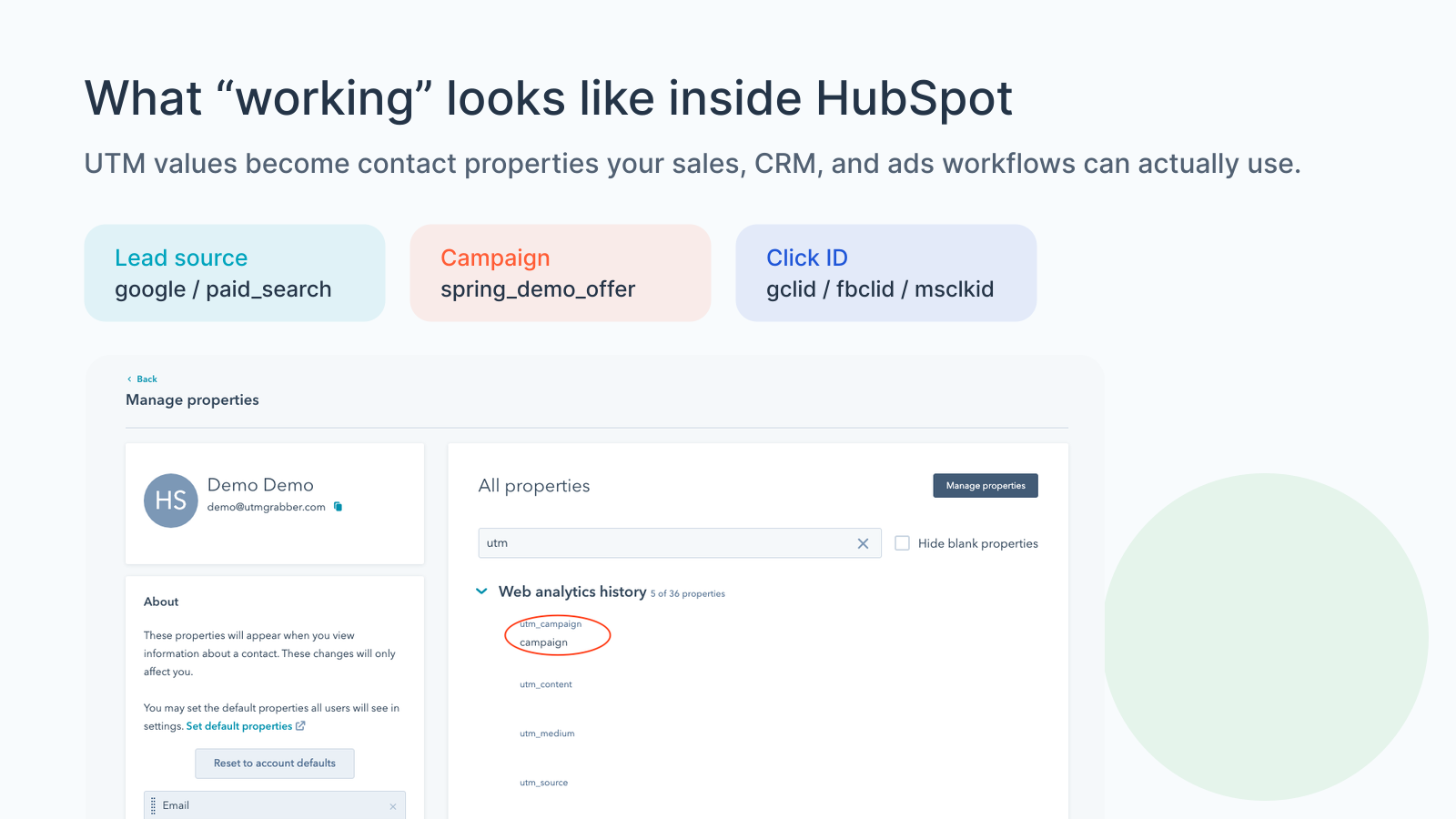
- Does the contact property show the same values?
- Does the workflow enrollment use the right fields?
- Does Zapier, Make, Salesforce, Slack, email notification, or the data warehouse receive the values?
- Do first-touch values remain protected after a second visit?
- Do latest-touch values update when a new campaign should take credit?
If any step fails, do not jump to dashboards. Fix the step where the data disappears.
HubSpot original source is not the same as campaign attribution
HubSpot has native source analytics and original source properties. Those can be useful.
But native source is not always enough for paid media and CRM attribution.
Your revenue team usually needs more detail:
- Which Google Ads campaign created the lead?
- Which Meta ad creative created the lead?
- Which keyword or audience created better opportunities?
- Which landing page created sales-qualified leads?
- Which original source should be protected from overwrite?
- Which latest touch helped convert a returning visitor?
- Which click ID should be sent back to the ad platform?
A broad source value such as Paid Search, Direct, Organic Search, Referral, or Offline Source is not enough when you are trying to decide where to spend money next.
For HubSpot, the clean setup is:
Use HubSpot native source fields for broad channel context, and use dedicated UTM/click ID properties for campaign-level attribution.
HubSpot, Google Ads offline conversions, and enhanced conversions for leads
If HubSpot is where lead quality is determined, it can become part of your Google Ads feedback loop.
For example:
- Google Ads sends a visitor with
gclid,gbraid, orwbraid. - UTM Grabber captures the click ID and campaign context.
- The HubSpot form writes those values to contact properties.
- Sales qualifies the lead, books the appointment, or marks the deal as won.
- The qualified event is imported back to Google Ads as an offline conversion or enhanced conversion for leads.
Google's enhanced conversions for leads documentation emphasizes first-party customer data, form interactions, offline imports, and continuing to send GCLID when available. The Google Ads API documentation also notes that offline conversion imports and enhanced conversions for leads are moving toward Data Manager/API changes starting June 15, 2026.
The practical takeaway is simple:
If HubSpot loses the click ID at the form step, your offline conversion workflow is weaker before it even starts.
For HubSpot lead gen, preserve at least:
-
gclid -
gbraid -
wbraid - conversion timestamp
- conversion name
- email and/or phone when policy allows
- consent state when required
- order ID or lead ID for dedupe when appropriate
- landing page and session attributes when available
HubSpot and Meta CAPI lead quality
Meta Ads has the same basic problem from a different angle.
A visitor can click a Meta ad, land on your site, submit a HubSpot form, and become a high-quality lead. But if the form and CRM do not preserve fbclid, _fbc, _fbp, email, phone, event name, event time, and a clean event ID strategy where applicable, Meta has less signal for matching and optimization.
That does not mean you should send every possible piece of data everywhere.
It means you should define the clean event path:
- Capture the Meta click/source context.
- Store it in a first-party way where policy allows.
- Pass the useful fields into HubSpot.
- Trigger server-side events only for real conversion moments.
- Keep lead events simple and consistent.
- Avoid ten different versions of Lead, Form Submit, Booked, Qualified, and Demo Request.
HubSpot should not be a black hole between the ad click and the optimization signal.
Common HubSpot UTM tracking mistakes
Mistake: Creating hidden fields but never filling them
A hidden field is not attribution. It is a place attribution can be written.
Mistake: Using labels instead of internal property names
The label can say UTM Campaign, but the internal property name is what your script and query-string logic need to match.
Mistake: Only testing the HubSpot form preview
Preview mode is not the same as a live landing page with caching, consent, scripts, redirects, and real embeds.
Mistake: Forgetting click IDs
UTMs are human-readable. Click IDs help ad platforms match conversions back to clicks. Capture both.
Mistake: Overwriting first-touch data
If every new visit overwrites the original source, you lose acquisition attribution. Use first-touch and latest-touch fields intentionally.
Mistake: Letting consent and GTM change the result
If cookies, storage, or scripts depend on consent, test the accepted, denied, and default states. Attribution that works only after you personally accept the banner is not production-ready.
Mistake: Ignoring multi-step forms and meeting links
A visitor may land on one page, click to a calendar, then submit. If the handoff is not tested, campaign data can disappear between steps.
Mistake: Assuming HubSpot-to-Salesforce sync fixes missing values
A sync can move data. It cannot recover values that were never captured.
The HubSpot UTM tracking QA checklist
For each high-value HubSpot form, run this checklist:
- Campaign URLs include
utm_source,utm_medium,utm_campaign, and relevant click IDs. - Redirects preserve query strings.
- UTM Grabber captures and persists first-touch and latest-touch values.
- HubSpot contact properties exist for every value you need.
- Internal names are consistent across cookies, hidden fields, workflows, and CRM mappings.
- Hidden fields are actually hidden on the form.
- Embedded forms populate fields after the form is ready.
- Values appear on the HubSpot submission and contact record.
- Workflows, lists, notifications, Zapier, Make, Salesforce, or other destinations receive the same values.
- First-touch values are protected from overwrite.
- Latest-touch values update intentionally.
- Google Ads click IDs are available for offline conversion or enhanced conversion workflows.
- Meta click/source values are available for CAPI or lead-quality analysis where policy allows.
- Consent, cache, GTM, optimization plugins, and logged-out tests have been checked.
What good HubSpot attribution looks like
A clean HubSpot tracking setup lets you answer questions that actually affect revenue:
- Which campaign created the contact?
- Which campaign created the qualified lead?
- Which campaign created the booked meeting?
- Which campaign created the deal?
- Which campaign created the customer?
- Which ad platform should get feedback?
- Which landing page deserves more budget?
- Which keywords or audiences are creating low-quality leads?
- Which forms are leaking attribution?
That is the point of HubSpot UTM tracking.
Not prettier fields. Not another dashboard.
Cleaner decisions from the same lead record.
What broken HubSpot attribution costs
- Sales teams cannot see why a lead entered the CRM.
- Marketing teams over-credit Direct, Organic, or generic Paid Search.
- Google Ads does not receive clean qualified-lead feedback.
- Meta Ads cannot connect CRM quality back to lead source.
- HubSpot reports show contacts, but not the campaign journey that created them.
- Salesforce, Zapier, Make, Slack, and email notifications inherit blank or inconsistent fields.
- Agencies spend hours reconciling what should have been captured at form submit.
A HubSpot contact with no source is a budget decision waiting to go wrong.
The practical HubSpot standard
- HubSpot contact properties exist for UTM, click ID, landing page, referrer, first-touch, and latest-touch values.
- Hidden fields are present on the form and mapped to the right internal property names.
- UTM Grabber captures the values before HubSpot submits.
- First-touch values are protected from accidental overwrite.
- Latest-touch values update only when that is the intended rule.
- Click IDs are preserved for Google Ads, Meta Ads, Microsoft Ads, and offline conversion workflows.
- HubSpot workflows, lists, notifications, CRM syncs, and exports all receive the same attribution values.
Once this works on one form, repeat the same QA for every high-value landing page, embed, meeting flow, and CRM handoff.
Why teams keep losing HubSpot source data
How HandL UTM Grabber helps HubSpot attribution
UTM Grabber helps WordPress and external landing pages preserve campaign context before the HubSpot form creates the contact.
- Capture UTMs, click IDs, referrer, landing page, first-touch, and latest-touch values.
- Persist values so the form page can still use them after redirects or return visits.
- Populate HubSpot hidden fields when field names match the captured values.
- Preserve Google Ads, Meta Ads, Microsoft Ads, and CRM attribution context.
- Make it easier to map clean source data into HubSpot contacts, workflows, Salesforce, Zapier, Make, and offline conversion workflows.
Who should care about HubSpot UTM tracking
- B2B teams using HubSpot Forms for demo requests, consultations, downloads, webinars, audits, and quote requests.
- Agencies managing Google Ads, Meta Ads, LinkedIn Ads, Microsoft Ads, and CRM reporting for clients.
- WordPress, Webflow, Framer, Shopify, or custom sites embedding HubSpot forms.
- RevOps teams syncing HubSpot to Salesforce, data warehouses, Slack, Zapier, Make, or BI dashboards.
- Founders who need to know which campaigns create qualified pipeline, not just submissions.
If HubSpot is where you judge lead quality, attribution belongs in the form implementation, not only the dashboard.
What real users are saying
Related references
- UTM Tracking for HubSpot
- Salesforce UTM Tracking
- GoHighLevel UTM Tracking
- WPForms UTM Tracking
- Elementor UTM Tracking
- Contact Form 7 UTM Tracking
- HIPAA Conversion Tracking: Meta CAPI, Google Ads, and PHI
Sources checked:
- UTM Grabber docs: How to Track UTMs in HubSpot Form
- UTM Grabber docs: Native WP Shortcodes
- HubSpot Knowledge Base: Auto-populate form fields with a query string
- HubSpot Knowledge Base: Create and edit properties
- HubSpot Developers: Legacy forms and form callbacks
- HubSpot Developers: Global form events
- Google Ads Help: Configure the Google tag for enhanced conversions for leads
- Google Ads API: Manage offline conversions
Bring one HubSpot form and one tagged campaign URL. We will help you find where the attribution disappears and how to preserve it before the contact is created.