
Contact Form 7 UTM Tracking: Hidden Fields, Mail Tags, Zapier, and CRM Attribution
If you use Contact Form 7 for lead generation, the submission itself is only half the story. The real business question is usually: which ad, keyword, campaign, landing page, or referral created this lead?
That is where many WordPress attribution setups break. A visitor lands with utm_source, utm_medium, utm_campaign, utm_content, utm_term, gclid, gbraid, wbraid, fbclid, or Meta click data in the URL, but the Contact Form 7 email, Zapier task, Make scenario, HubSpot contact, Salesforce lead, or CRM record arrives with no campaign context.
This is not just a Contact Form 7 problem. It is a tracking handoff problem: capture the click data, store it reliably, populate the hidden fields, include the mail tags, send the payload to automation, map the fields into the CRM, and test the live funnel after caching and consent tools are active.
For most teams, the cleanest Contact Form 7 UTM tracking setup is to use HandL UTM Grabber's native Contact Form 7 field generator and then QA the entire route from URL to CRM.
If this is what you are trying to fix
- You search how to track UTM parameters in Contact Form 7 because form submissions say "unknown source."
- The landing page URL has UTMs, but Contact Form 7 hidden fields are empty when the form submits.
- The form email works, but UTM parameters do not show up in the Contact Form 7 Mail tab output.
- Zapier, Make, HubSpot, Salesforce, Zoho, or another CRM receives the lead, but the lead source, campaign, and click ID fields are blank.
- You added hidden fields manually, but used field names that do not match the mail tags or CRM properties.
- Google Ads traffic has
gclid,gbraid, orwbraid, but those IDs never reach your offline conversion upload. - Meta Ads traffic has
fbclid,fbc, orfbpcontext, but the data is not available for Meta CAPI, deduplication, or campaign analysis. - Caching, a consent management platform, GTM Consent Mode, or delayed JavaScript changes when the tracking values are available.
These are not random reporting annoyances. They are attribution-chain failures that can be reproduced and fixed.
How Contact Form 7 UTM tracking should work
Start with the full attribution chain
A reliable Contact Form 7 UTM setup has seven parts:
- Capture the first landing URL, UTM parameters, click IDs, referrer, and landing page.
- Persist the values in first-party storage so they survive reloads, navigation, and delayed form submissions.
- Populate hidden Contact Form 7 fields before the visitor submits.
- Include the corresponding Contact Form 7 mail tags in the Mail tab if you rely on email notifications.
- Send the same values through Zapier, Make, webhook, CRM, email platform, or custom automation.
- Map every field into the destination object, such as lead, contact, deal, opportunity, or submission.
- QA the live public page after cache, consent, optimization, and minification settings are active.
Most broken setups only check one step. Someone adds a hidden field in the Contact Form 7 editor, sends a test email, and assumes attribution is done. But the business result depends on the full chain.
A hidden field is not attribution. A hidden field is only one container in the attribution handoff.
The recommended method: use the UTM Fields generator
The current UTM Grabber Contact Form 7 workflow is designed to remove the manual field-name mistakes that usually create silent data loss.
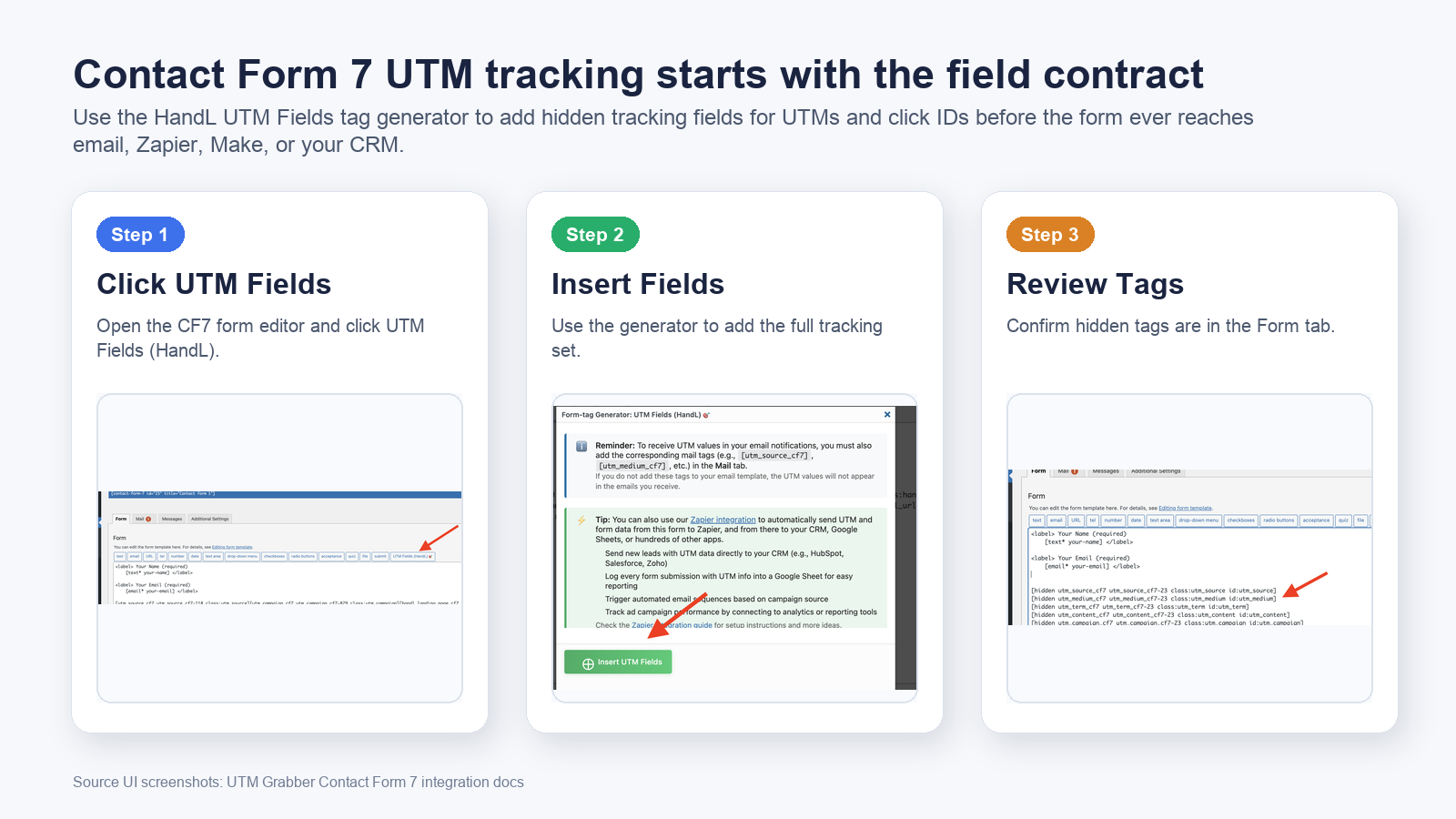
In the Contact Form 7 form editor:
- Edit the form you want to track.
- Click UTM Fields (HandL).
- Click Insert UTM Fields.
- Save the form.
- Add the matching mail tags in the Mail tab if you want UTM data in the email body.
The generator inserts hidden fields for the core attribution parameters, including:
[hidden utm_source_cf7 utm_source_cf7-{formid} class:utm_source id:utm_source]
[hidden utm_medium_cf7 utm_medium_cf7-{formid} class:utm_medium id:utm_medium]
[hidden utm_term_cf7 utm_term_cf7-{formid} class:utm_term id:utm_term]
[hidden utm_content_cf7 utm_content_cf7-{formid} class:utm_content id:utm_content]
[hidden utm_campaign_cf7 utm_campaign_cf7-{formid} class:utm_campaign id:utm_campaign]
[hidden gclid_cf7 gclid_cf7-{formid} class:gclid id:gclid]
This is much safer than copying old snippets across forms because the class and field-name contract stays consistent. If your team still uses a legacy Contact Form 7 UTM tracking snippet, treat it as an older implementation path and verify every field name, class, ID, and mail tag manually.
The field schema to start with
For most paid-media and lead-attribution workflows, start with these Contact Form 7 hidden fields.
| Contact Form 7 field | Parameter | Why it matters |
|---|---|---|
utm_source_cf7 | utm_source | Source such as google, meta, linkedin, newsletter, partner, or referral. |
utm_medium_cf7 | utm_medium | Channel type such as cpc, paid_social, email, organic, affiliate, or referral. |
utm_campaign_cf7 | utm_campaign | Campaign name or campaign ID used for reporting. |
utm_term_cf7 | utm_term | Keyword, query, audience, or targeting signal when available. |
utm_content_cf7 | utm_content | Creative, placement, ad variant, button, or CTA version. |
gclid_cf7 | gclid | Google Ads click ID used for offline conversion and lead-quality feedback. |
| Additional click IDs | gbraid, wbraid, fbclid, fbc, fbp | Helpful for iOS traffic, Meta CAPI, attribution matching, and paid-platform diagnostics when collected appropriately. |
| Journey fields | landing page, referrer, first touch, last touch | Helps explain where the session started and what path created the conversion. |
Do not create ten naming conventions for the same idea. utm_campaign, campaign, Campaign Name, utmCampaign, and utm_campaign_cf7 may all look understandable to a human, but automation systems treat them as different fields.
The best Contact Form 7 UTM tracking setups use one field schema from form to email to CRM to reporting.
Contact Form 7 mail tags are a separate step
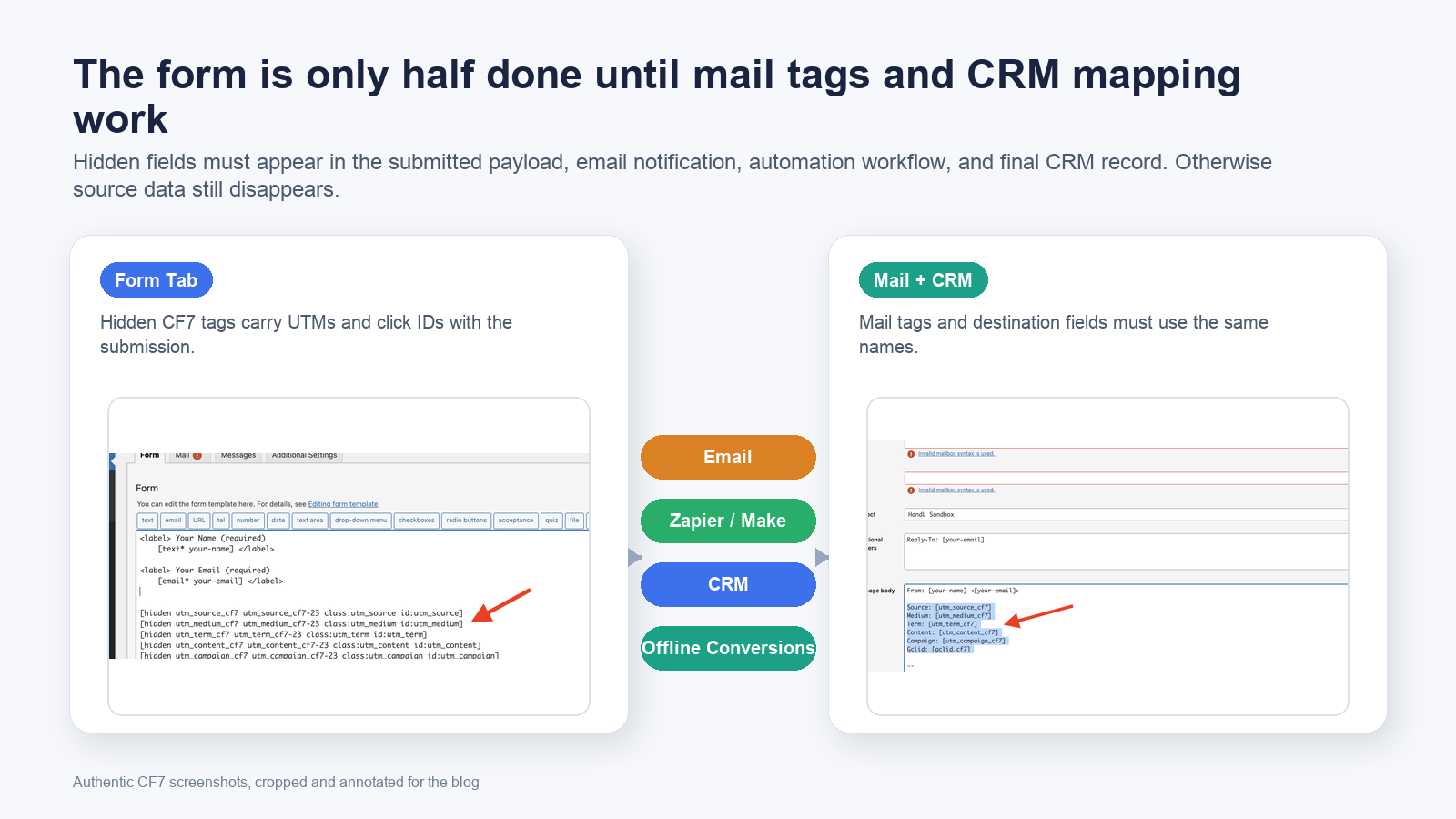
Contact Form 7 uses form tags inside the form template and mail tags inside the Mail tab. Adding a hidden field to the form does not automatically mean the value appears in your email notification.
If you want attribution data in the email body, add the matching mail tags:
Source: [utm_source_cf7]
Medium: [utm_medium_cf7]
Term: [utm_term_cf7]
Content: [utm_content_cf7]
Campaign: [utm_campaign_cf7]
Gclid: [gclid_cf7]
This is one of the most common Contact Form 7 tracking mistakes: the hidden fields exist, but the Mail tab never references them. The lead email arrives without UTM data, and the team assumes the tracking plugin failed.
The CRM handoff is where the money is
Email notifications are useful for QA, but they are not the final destination for attribution. The real value comes when the same data reaches the systems where your team makes decisions:
- HubSpot, Salesforce, Zoho, Pipedrive, GoHighLevel, or another CRM.
- Zapier or Make scenarios that enrich and route leads.
- Google Sheets or a data warehouse used by RevOps.
- Email marketing platforms such as Mailchimp, ActiveCampaign, or Klaviyo.
- Google Ads offline conversions or enhanced conversions workflows.
- Meta CAPI or offline conversion pipelines when your use case and consent posture support it.
If the Contact Form 7 email includes utm_campaign but the CRM field is still blank, attribution is still broken. The submitted payload must be mapped into destination fields that actually exist.
Think of the CRM mapping as a contract:
| Payload value | Destination field example | QA question |
|---|---|---|
utm_source_cf7 | Lead Source Original | Did the value arrive on the final lead/contact record? |
utm_medium_cf7 | Lead Medium Original | Does the CRM accept the exact value, or does automation overwrite it? |
utm_campaign_cf7 | Campaign Name Original | Is the field mapped for every form and every automation path? |
gclid_cf7 | Google Click ID | Is it available for offline conversion upload? |
| landing page | First Landing Page | Does it preserve the first page or overwrite on every visit? |
The form can be configured perfectly and still fail at the CRM layer. Always check the final record, not only the Contact Form 7 editor.
Zapier and Make need explicit field mapping
Many teams connect Contact Form 7 to Zapier or Make and assume every field will be preserved. That assumption creates messy attribution.
For a durable automation setup:
- Submit a test lead with a full tagged URL.
- Refresh the Zapier or Make sample payload.
- Confirm every UTM and click ID field appears in the trigger data.
- Map each value into a named destination field.
- Re-test after publishing the live form.
- Confirm the final CRM record contains the same values.
Do not only look at a successful automation run. A Zap can run successfully while silently ignoring unmapped UTM fields.
Caching, consent, and script timing can make Contact Form 7 UTM tracking look inconsistent
Contact Form 7 usually submits on the client side, but the attribution values still depend on browser timing and storage. If caching or optimization changes when scripts run, hidden fields can be empty at the moment of submit.
Check these conditions before blaming the form:
- Page cache, CDN cache, and host-level cache are active for logged-out visitors.
- JavaScript minification, combination, defer, delay, or "optimize assets" settings do not delay tracking too long.
- Consent management platforms, cookie banners, and GTM Consent Mode do not block required first-party attribution storage before the form is submitted.
- Cookies or local storage are persistent enough for the expected buying journey.
- Query strings are not stripped from landing URLs by redirects, security tools, or cache rules.
- The same form is not embedded inside an iframe that cannot receive parent-page UTM values.
- Cross-domain steps preserve UTMs before the visitor reaches the Contact Form 7 page.
If real visitors see a cached, delayed, consent-gated version of the page, your logged-in WordPress test is not enough.
What to test when UTM parameters are not passing to Contact Form 7
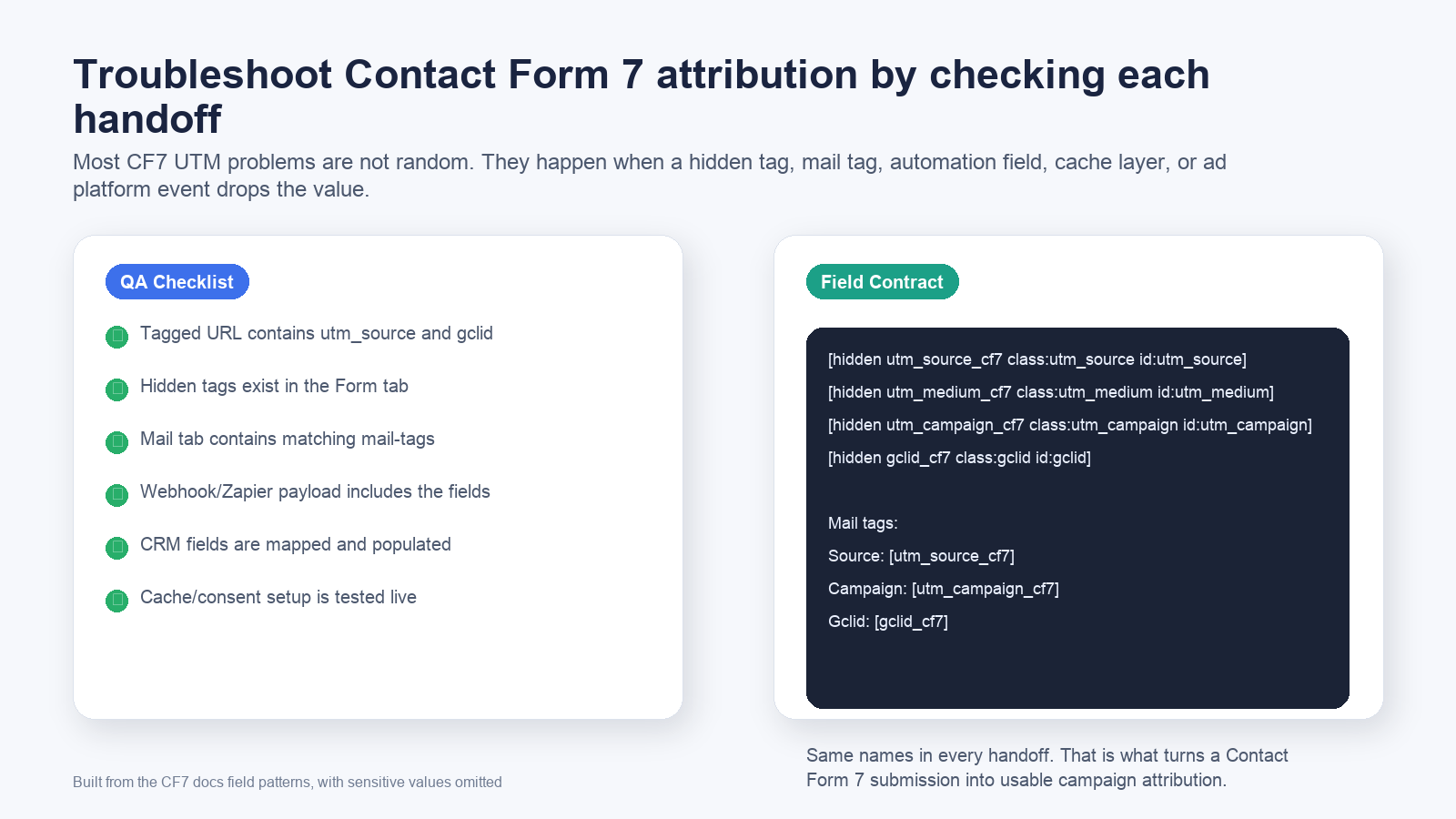
Use this live-page QA sequence before declaring the implementation finished:
- Open an incognito window while logged out of WordPress.
- Visit the live page with a test URL:
?utm_source=google&utm_medium=cpc&utm_campaign=cf7_test&utm_content=ad_a&utm_term=test_keyword&gclid=test-gclid
- Submit the Contact Form 7 form.
- Confirm the email includes every mail tag value.
- Confirm Zapier, Make, webhook, or CRM receives the same fields.
- Confirm the final lead/contact record has the mapped values.
- Navigate to another page, return, and submit again to test persistence.
- Repeat after consent choices, page cache, CDN cache, and optimization plugins are active.
Common Contact Form 7 UTM tracking mistakes
Mistake 1: Hidden fields exist, but mail tags are missing
Contact Form 7 will not automatically print every hidden field in your notification. If the Mail tab does not include [utm_source_cf7], [utm_medium_cf7], [utm_campaign_cf7], and the other tags, the email will not show those values.
Mistake 2: The form field names do not match the CRM fields
The form can send utm_campaign_cf7 while the CRM automation expects utm_campaign. That mismatch is enough to lose campaign data. Normalize the naming once, then map deliberately.
Mistake 3: Only UTMs are collected, but click IDs are ignored
UTMs explain campaign taxonomy. Click IDs can support ad-platform feedback loops. If you run Google Ads, collect gclid, gbraid, and wbraid where available. If you run Meta Ads, think about fbclid, fbc, fbp, and event-level data in the context of your consent and privacy requirements.
Mistake 4: Testing only inside WordPress preview
Logged-in admin sessions often bypass cache and behave differently from public traffic. Always test the live page as a real visitor.
Mistake 5: Assuming a successful Zap means attribution succeeded
Automation success means the task ran. It does not mean every field was mapped. Open the destination CRM record and verify the actual values.
Mistake 6: Letting cache or consent tools change the submit timing
If the form submits before attribution values populate, your fields will be blank. This can happen with delayed JavaScript, aggressive optimization, cookie banners, CMPs, and GTM rules.
Mistake 7: Reusing one Contact Form 7 form across multiple pages without page context
If the same form shortcode appears on many landing pages, capture landing page, referrer, first touch, and current page context. Otherwise every form can look identical inside the CRM.
What good looks like
A healthy Contact Form 7 UTM tracking setup has these traits:
- The UTM Fields generator is used for the core hidden fields.
- The Mail tab includes matching mail tags when email notifications need attribution.
- The payload includes
utm_source,utm_medium,utm_campaign,utm_term,utm_content, andgclid. - Google Ads and Meta Ads click identifiers are captured where appropriate.
- Zapier, Make, webhook, or native CRM integrations map every attribution field.
- Cache, consent, and optimization tools are included in QA.
- The final CRM lead/contact record contains the same values that appeared in the test URL.
The goal is not to make Contact Form 7 store more fields. The goal is to make campaign data survive long enough to improve reporting, routing, sales follow-up, and ad optimization.
Related references:
What broken Contact Form 7 attribution costs
- Google Ads and Meta Ads receive weaker lead-quality signals.
- Sales sees "unknown source" and cannot prioritize follow-up by campaign intent.
- Agencies waste time reconciling GA4, ad platform data, form emails, and CRM records.
- Winning campaigns look average because revenue is detached from the click that created it.
- Budget shifts are made from incomplete data instead of actual pipeline attribution.
The damage usually appears after the lead is created, when your CRM and ad platforms have incomplete feedback.
The practical implementation standard
- Use the native UTM Fields generator instead of hand-copying fragile snippets.
- Capture UTMs, click IDs, landing page, and referrer where useful.
- Add matching Contact Form 7 mail tags when email notifications need attribution.
- Map every field into Zapier, Make, CRM, email platform, or offline conversion workflow.
- QA the final CRM record from a live tagged URL.
Once this works on one high-volume form, turn it into the standard for every Contact Form 7 lead form.
Why teams keep losing UTM data in Contact Form 7
How UTM Grabber helps
UTM Grabber gives WordPress teams a practical way to capture and preserve Contact Form 7 attribution data without rebuilding every form from scratch.
- Native Contact Form 7 UTM field generator.
- First-party UTM and click ID capture for WordPress attribution.
- Hidden field support for Contact Form 7 forms.
- Cleaner handoff into email notifications, Zapier, Make, CRMs, Google Ads offline conversions, and Meta workflows.
- A repeatable QA pattern for agencies, RevOps, and PPC teams.
Who should care about Contact Form 7 UTM tracking
- WordPress sites using Contact Form 7 for lead generation.
- Agencies responsible for client attribution and reporting.
- PPC teams sending Google Ads or Meta Ads traffic to WordPress forms.
- RevOps teams trying to fix unknown lead source in the CRM.
- Founders who need to know which campaigns actually create pipeline.
If campaign data affects budget, routing, lead scoring, sales follow-up, or offline conversion feedback, this is not optional instrumentation.
What real users are saying
Bring your highest-volume Contact Form 7 form and we will help you find the break.
Sources checked:
- UTM Grabber Contact Form 7 Integration Docs
- UTM Grabber Contact Form 7 UTM Tracking
- UTM Grabber Contact Form 7 Native Integration
- UTM Grabber Contact Form 7 Zapier Tutorial
- UTM Grabber Contact Form 7 to Facebook Conversion API
- Contact Form 7 Tag Syntax
- Contact Form 7 Hidden Field
- Contact Form 7 Setting Up Mail
- Contact Form 7 FAQ: Adding Form Fields to Email