
How to Track UTM Parameters in GoHighLevel: Fix Lead Source, Iframes, and CRM Attribution
GoHighLevel can be a strong CRM and funnel platform. But GoHighLevel UTM tracking gets messy fast when the real funnel is not only a GHL funnel.
A very common setup looks like this:
- The ad sends traffic to a WordPress, Webflow, Wix, Shopify, or custom landing page.
- The landing page embeds a GoHighLevel form, survey, calendar, order form, or booking flow.
- The visitor arrives with
utm_source,utm_medium,utm_campaign,utm_content,utm_term,gclid,gbraid,wbraid,fbclid,msclkid, or another click ID. - The lead submits the form.
- The contact appears inside GHL.
- The source is Direct, Referral, Third-Party, Other, or just blank.
That is the moment everyone starts asking the expensive question:
Which campaign actually created this lead, appointment, opportunity, or customer?
This guide explains how to track UTM parameters in GoHighLevel, why lead source gets lost, how GHL native attribution works, why iframe embeds need special handling, and how to keep first-touch and latest-touch data usable inside contact records, opportunities, workflows, dashboards, Zapier, Make, Google Ads offline conversions, and Meta CAPI.
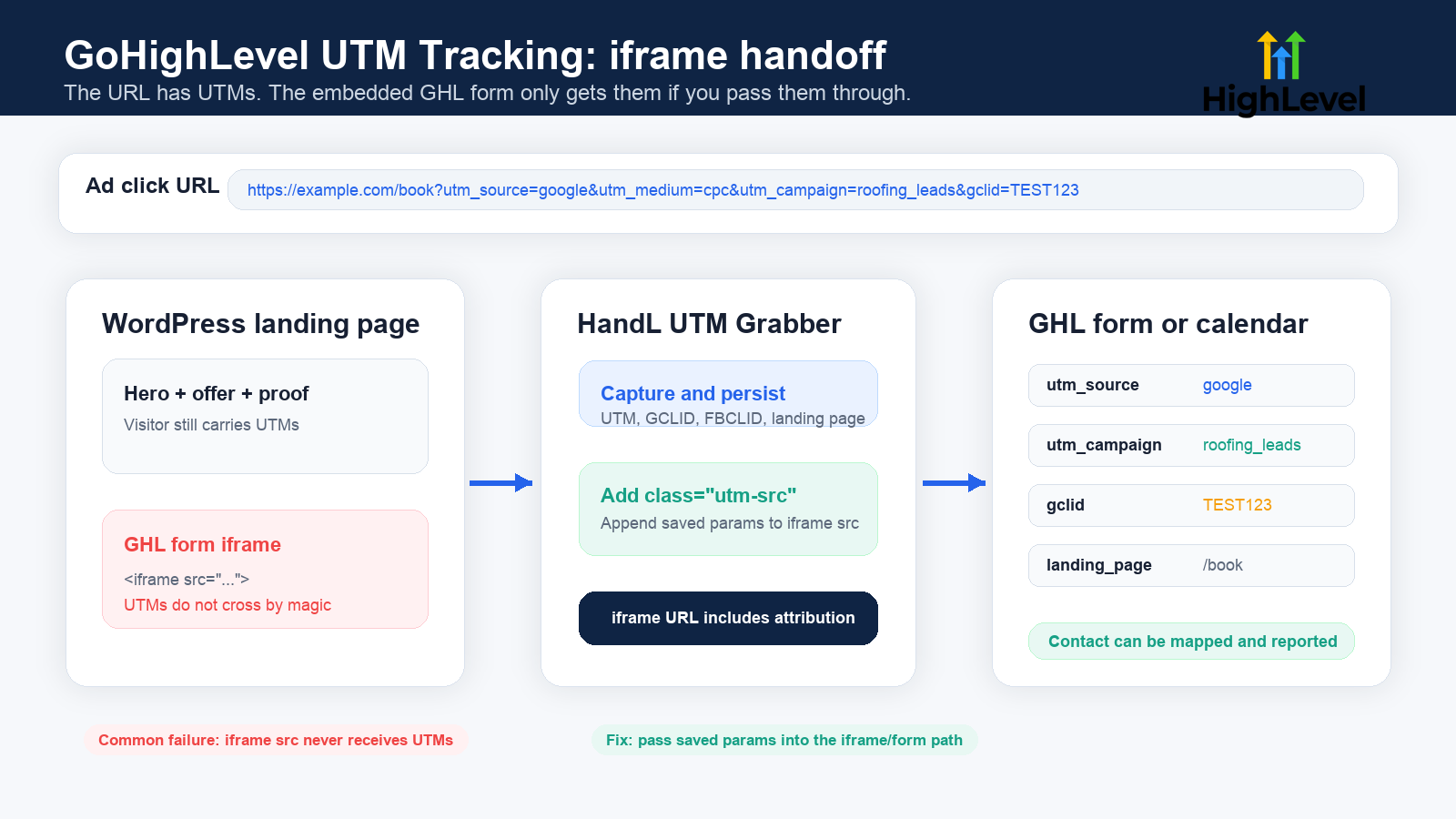
If you searched for GoHighLevel UTM tracking
- You want to know which Google Ads, Meta Ads, TikTok Ads, LinkedIn Ads, emails, affiliates, partners, or SEO pages create GHL leads.
utm_sourceis in the landing page URL, but the GoHighLevel contact record has no UTM fields.- The GHL attribution panel shows something, but your workflows, notifications, exports, dashboards, or client reports cannot use it cleanly.
- A WordPress page embeds a GHL form in an iframe, but the iframe does not receive the parent page UTM parameters.
- Google Ads sends
gclid,gbraid, orwbraid, but your GHL contact or opportunity cannot be matched back to the click. - Meta Ads sends
fbclid, but the source becomes Referral, Other, or Direct. - GHL first attribution and latest attribution do not match the numbers in GA4, Google Ads, Meta Ads, or the CRM pipeline.
- A workflow, Zapier step, Make scenario, or API integration creates the contact, and GHL reports the source as Third-Party.
Most GHL attribution problems are not reporting problems. They are handoff problems.
GoHighLevel UTM tracking is really contact-level attribution
UTM tracking is not just a GA4 exercise.
For GHL users, the practical goal is this:
Every contact and opportunity should carry the campaign context that created it.
That includes the obvious UTM fields:
utm_sourceutm_mediumutm_campaignutm_contentutm_term
It also includes click IDs and page context:
gclidgbraidwbraidfbclidmsclkid- landing page
- referrer
- first-touch source
- latest-touch source
If that data only lives in the browser URL, it is fragile. If it only lives in GA4, sales cannot use it. If it only lives in GHL's native attribution panel, it may not be available where your workflows, exports, client dashboards, or ads feedback loops need it.
The clean setup is:
- Capture the parameters when the visitor lands.
- Persist them while the visitor moves through the page or funnel.
- Pass them into the GHL form, survey, calendar, chat, or order form.
- Store them on the GHL contact as custom fields when you need workflow/reporting access.
- Keep first-touch fields protected from overwrite.
- Update latest-touch fields when a later source should be recorded.
- Map the same values into opportunities, notifications, webhooks, Zapier, Make, and ad platform feedback when needed.
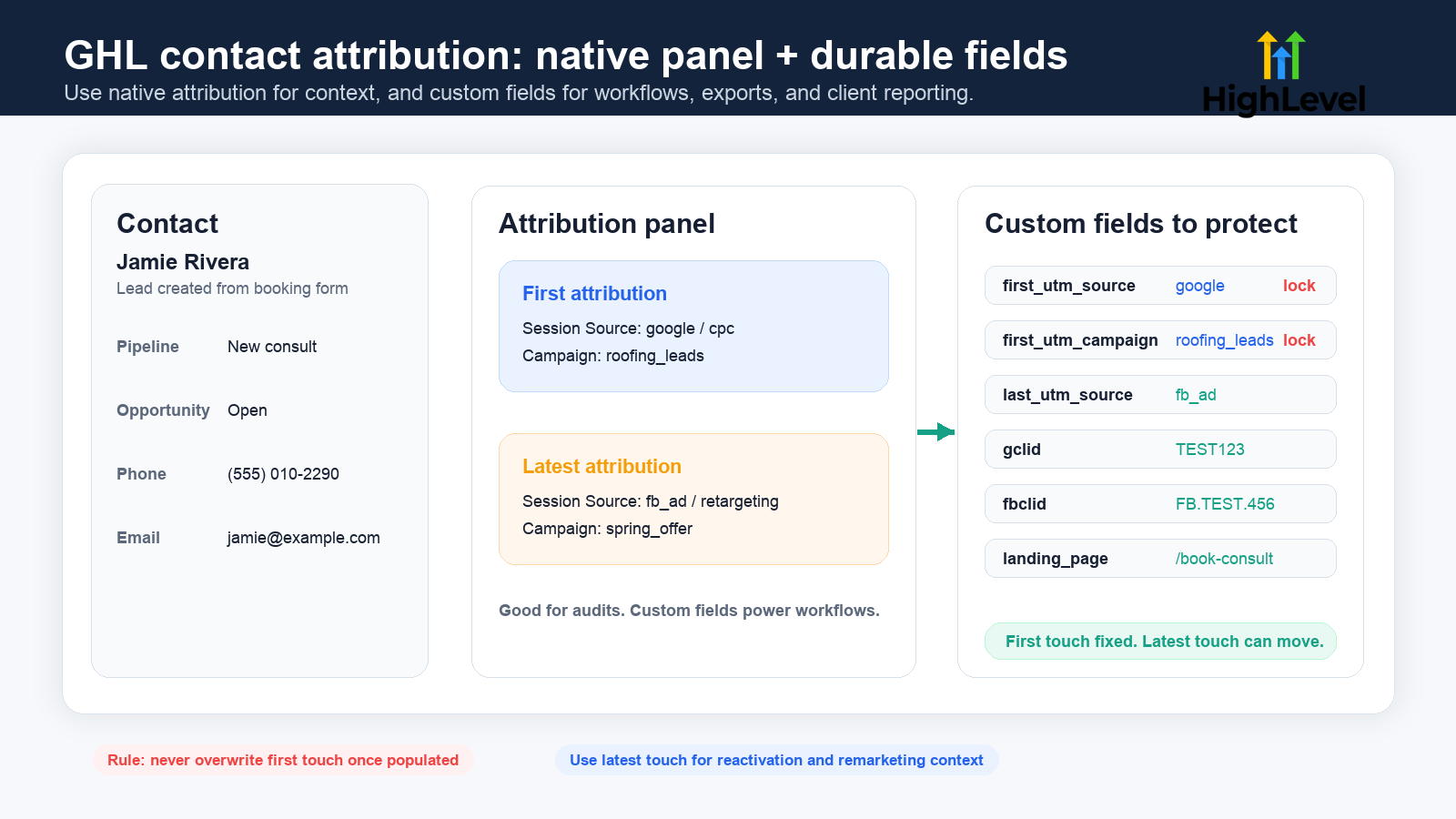
What HighLevel captures natively
HighLevel has native attribution concepts. That matters because you should not build your GHL tracking strategy as if the platform has no idea what a source is.
HighLevel's attribution documentation says attribution can be recorded when a contact performs certain actions in the same session:
- Form or survey submission
- Calendar booking submission
- Chat widget submission after contact info is submitted
- One-step or two-step order form submission
It also says non-HighLevel events do not capture attribution data, including UTM parameter data. This distinction is important.
If the conversion action is a native GHL form, survey, calendar, chat widget, or order form, GHL has a path for attribution. If the lead is created by another tool, by Zapier, by Make, by an API job, or by a non-GHL form, the native attribution system may not classify the source the way you expect.
That is why teams see Third-Party, CRM UI, Other, or Direct even when their ad URLs were tagged correctly.
Native attribution is useful, but it is not the whole system
GHL native attribution can help you audit a contact, but it may not solve every operational use case.
For example, your team might need to:
- Trigger a workflow when
utm_source = google - Route leads by campaign
- Send a Slack notification that includes the campaign
- Push UTM fields into a Google Sheet
- Export lead source by client or sub-account
- Use Smart Lists or dashboard widgets
- Send offline conversions back to Google Ads
- Send qualified lead events to Meta CAPI
- Preserve first-touch data when the same contact submits again
For those use cases, you often want durable custom fields on the contact record in addition to native attribution.
A practical GHL field schema looks like this:
| Field | Purpose |
|---|---|
first_utm_source | Original source that created the contact |
first_utm_medium | Original channel or medium |
first_utm_campaign | Original campaign |
first_utm_content | Original ad, creative, placement, or content |
first_utm_term | Original keyword or audience detail |
last_utm_source | Most recent source before the latest conversion |
last_utm_medium | Most recent medium |
last_utm_campaign | Most recent campaign |
gclid | Google Ads click ID |
gbraid / wbraid | Google click IDs used in newer privacy and app/browser paths |
fbclid | Meta click ID |
msclkid | Microsoft Ads click ID |
landing_page | Page where the tracked session started |
referrer | Previous page/domain when available |
First-touch fields should be written once and protected. Latest-touch fields can update.
That single rule prevents a retargeting click, email click, or internal CRM action from overwriting the original acquisition source.
Why GoHighLevel lead source gets lost
Most GHL attribution failures fall into one of these buckets.
1. The landing page is not actually a GHL page
If the visitor lands on a native GHL website or funnel page and submits a native GHL conversion event in the same session, native attribution has a clearer path.
But many real funnels are hybrid:
- WordPress landing page with GHL form embed
- Elementor page with GHL calendar embed
- Webflow page with GHL iframe
- Wix page with GHL form
- Shopify page with GHL popup
- A custom site that posts data into GHL later
In that case, the parent page and the embedded form are not the same tracking environment.
The parent page may have the UTM parameters. The embedded GHL iframe may not.
2. The form is inside an iframe
An iframe is a page inside another page. It has its own URL, its own document, and often its own tracking context.
If the user lands here:
https://example.com/book?utm_source=google&utm_medium=cpc&utm_campaign=roofing_leads
but the iframe source is only:
<iframe src="https://api.leadconnectorhq.com/widget/form/FORM_ID"></iframe>
the form iframe may never see utm_source, utm_medium, or utm_campaign.
With HandL UTM Grabber, the fix is to add the utm-src class to the iframe so captured parameters can be appended to the iframe URL:
<iframe
  src="https://api.leadconnectorhq.com/widget/form/FORM_ID"
  class="utm-src"
  frameborder="0"
  width="100%"
  height="700"
  scrolling="no">
</iframe>
That makes the GHL form receive the same marketing context the visitor brought to the parent page.
3. The contact is created by Zapier, Make, API, or another form
HighLevel's attribution source rules include a Third-Party source for leads generated from tools like Zap. That is not a bug. It is the platform categorizing the contact creation path.
If the lead is created outside a native HighLevel event, do not assume GHL's native attribution will reconstruct the campaign source later.
Instead, send the attribution values as explicit fields:
- UTM fields
- click IDs
- landing page
- referrer
- form name
- funnel step
- source platform
Then use workflow rules and reporting fields intentionally.
4. The workflow runs before attribution fields are populated
This happens more often than teams admit.
The form submits. GHL creates or updates the contact. A workflow immediately sends an email, creates an opportunity, posts to Slack, sends a webhook, or pushes the lead to another CRM.
If the UTM fields are written after that action, the downstream payload is already missing attribution.
The practical rule:
Normalize and write attribution fields before routing, notifications, opportunity creation, webhooks, Zapier, Make, or reporting actions.
5. First-touch gets overwritten by every later submission
GHL contacts can return.
A person might first click a Google Ad, then come back from email, then click a retargeting ad, then book a call, then submit a form again from a direct visit.
If every form submission writes over the same utm_source field, your original acquisition source disappears.
Use two groups of fields:
- First-touch fields: write only if empty.
- Latest-touch fields: update on every tracked conversion.
6. UTM naming does not match GHL reporting expectations
HighLevel's ad reporting docs are specific about certain source values. For example, HighLevel documents utm_source=adwords for Google Ads reporting and utm_source=fb_ad for Facebook Ads reporting. Its attribution source documentation also notes that gclid, wbraid, gbraid, and msclkid can classify paid search traffic.
If your ads use inconsistent values like Google, google ads, google-cpc, facebook, FB, and meta, your own reports may still make sense to a human, but platform-level attribution and dashboard grouping can drift.
You do not need to blindly copy every naming convention for every use case. But you do need a consistent schema and a QA test that proves GHL, GA4, Google Ads, Meta Ads, and your CRM reports agree enough to make decisions.
7. Consent, cookies, redirects, and cross-domain steps interfere
UTM tracking depends on timing.
Attribution can break when:
- A cookie banner blocks tracking until after the form loads.
- A redirect drops the query string.
- The visitor moves from one domain to another without parameter persistence.
- A page cache serves stale JavaScript or stale embedded form markup.
- A mobile in-app browser strips or alters referrer behavior.
- The lead submits before your tracking script populates fields.
This is why a one-page test is not enough. You need to test the real path from ad click to final GHL record.
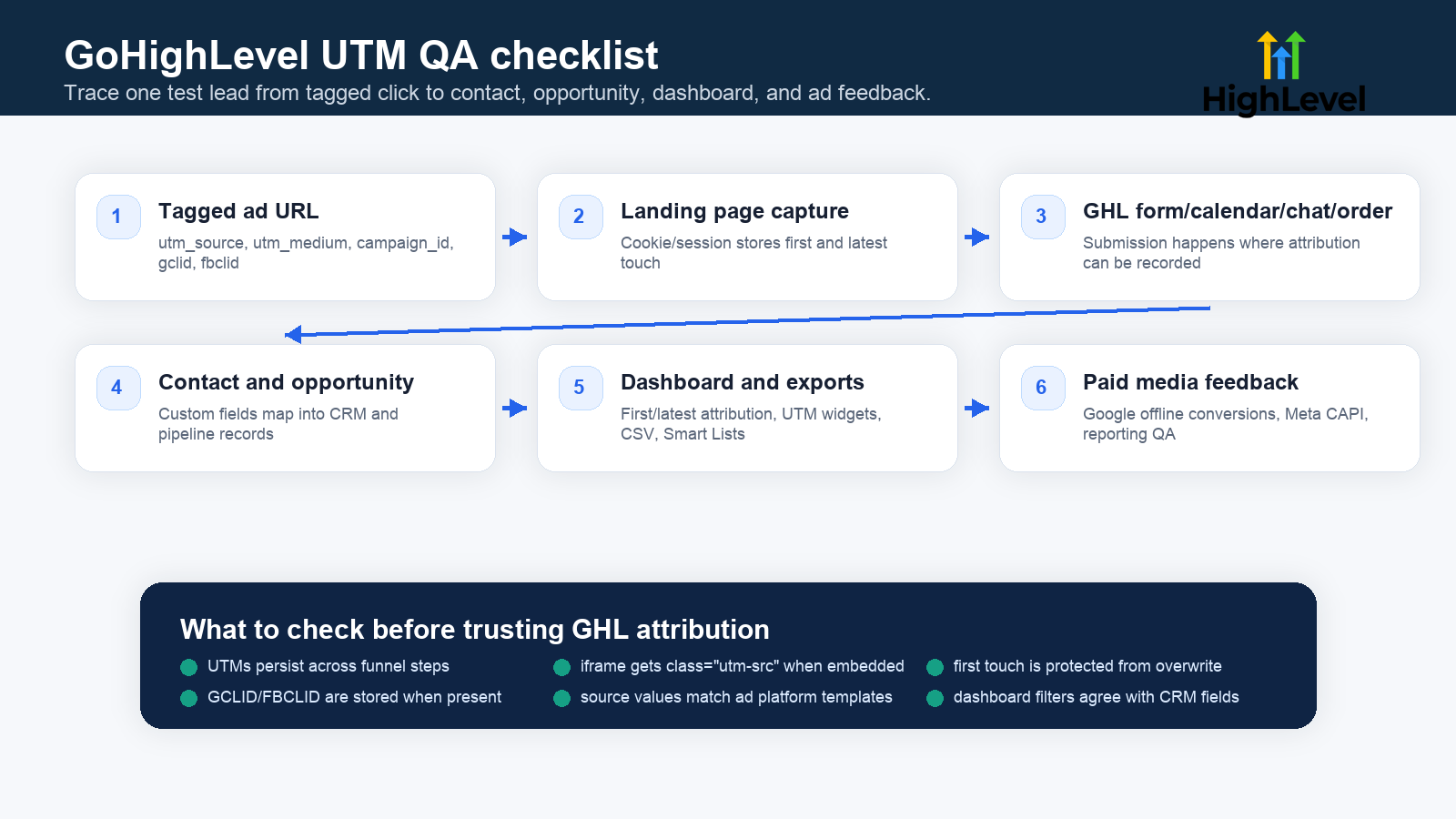
The best implementation pattern for WordPress + GoHighLevel
If your site is WordPress and your form or calendar lives in GHL, use this pattern.
Step 1: Tag the traffic source
Every paid or partner link should include consistent parameters:
https://example.com/book
  ?utm_source=google
  &utm_medium=cpc
  &utm_campaign=roofing_leads
  &utm_content=ad_01
  &utm_term=emergency_roof_repair
For Google Ads, preserve the click IDs:
gclidgbraidwbraid
For Meta Ads, preserve:
fbclid_fbc_fbpwhere applicable for server-side events
For Microsoft Ads, preserve:
msclkid
Step 2: Capture and persist on the parent page
The parent landing page should capture the parameters as soon as the visitor arrives.
That capture should survive:
- page reloads
- multi-step pages
- delayed form loading
- embedded widgets
- thank-you page redirects
- cache layers
- consent timing where legally allowed
This is where HandL UTM Grabber is useful: it stores attribution values on the WordPress side so the page can pass them to forms, buttons, iframes, CRMs, and reporting systems.
Step 3: Pass UTMs into the GHL iframe
If you use a GHL iframe embed, add:
class="utm-src"
to the iframe element.
This lets the captured UTM and click ID values travel into the iframe src instead of staying trapped on the parent page.
Step 4: Create GHL custom fields for reporting
Create custom fields in GHL for the values you need to use in workflows, filters, exports, dashboards, or client reporting.
At minimum:
first_utm_sourcefirst_utm_mediumfirst_utm_campaignlast_utm_sourcelast_utm_mediumlast_utm_campaigngclidfbclidlanding_pagereferrer
If you run serious paid media, also add:
utm_contentutm_termcampaign_idad_group_idad_idmsclkidgbraidwbraid
Step 5: Map fields into the form or workflow
Do not stop at "the form submitted."
Check the actual contact record:
- Are the fields populated?
- Are values attached to the right contact?
- Are values visible to workflows?
- Are values included in opportunity creation?
- Are values available in notifications?
- Are values included in webhooks?
- Are values available in Zapier or Make?
Step 6: Protect first-touch values
Use conditional logic:
If first_utm_source is empty:
  write captured utm_source
Else:
  keep existing first_utm_source

Always:
  update last_utm_source
Repeat the same logic for campaign, medium, click IDs, landing page, and referrer as needed.
Native GHL attribution vs custom UTM fields
You do not have to choose only one.
Use both, but use them for different jobs.
| System | Best for | Watch out for |
|---|---|---|
| GHL native attribution | Contact-level audit, first/latest attribution context, GHL dashboards | May depend on native GHL events and session behavior |
| Custom UTM fields | Workflows, exports, notifications, Zapier, Make, client reporting, offline conversions | Must be created, mapped, protected, and QA'd |
| GA4 | Web analytics, traffic exploration, page-level behavior | Sales team may not see lead-level attribution |
| Google Ads / Meta Ads | Platform optimization and conversion feedback | Needs clean click IDs and conversion mapping |
The best setup makes these systems agree on the important questions:
- Which campaign created the lead?
- Which campaign created the booked call?
- Which campaign created the opportunity?
- Which campaign created revenue?
- Which campaign should receive more budget?
How to QA GoHighLevel UTM tracking
Use a real test lead. Do not only inspect code.
- Open an incognito window.
- Visit a test URL with UTMs and a fake click ID.
- Example:
https://example.com/book?utm_source=google&utm_medium=cpc&utm_campaign=ghl_test&gclid=TEST-GCLID-123
- Complete the real GHL form, calendar, survey, chat, or order flow.
- Open the GHL contact record.
- Check native attribution.
- Check custom UTM fields.
- Check the opportunity record if one is created.
- Check workflow actions, tags, notifications, and webhooks.
- Check Zapier, Make, Google Sheets, HubSpot, Salesforce, or any downstream system.
- Repeat with the same email and a second source to verify first-touch protection.
- Repeat on mobile, Safari, Chrome, and an in-app browser if Meta or TikTok traffic matters.
What good looks like:
first_utm_sourcestays fixed after the first conversion.last_utm_sourceupdates after a later tracked conversion.gclid,gbraid,wbraid,fbclid, ormsclkidare stored when present.- The GHL attribution panel and custom fields are explainable.
- The opportunity has enough source context for pipeline reporting.
- Webhooks and automation payloads include the same attribution values.
- Dashboards do not over-count Direct, Other, Third-Party, or Referral because of missing campaign data.
GoHighLevel embedded forms on external websites
HighLevel has an External Tracking feature that can detect and capture some external website form submissions. Its docs describe support for DOM-based forms and attribution tracking, including UTM parameters, page URLs, and session data.
That is useful, but do not confuse every external form path with every iframe path.
The practical distinction:
- If a form is rendered directly in the page DOM, a tracking script may be able to inspect and capture fields.
- If a form is inside an iframe, the parent page and iframe have a boundary.
- If the lead is created later by Zapier, Make, or API, GHL may classify it differently from a native GHL submission.
So for embedded GHL forms on WordPress, the safest pattern is still:
Capture on the parent page, append to the iframe, map into GHL fields, then verify the contact.
GHL dashboards and reporting
HighLevel dashboards can use attribution and UTM parameters in custom widgets. HighLevel also documents traffic source analytics for sites, including channel/source analysis and the idea that UTMs and click IDs help classify traffic.
That is helpful for reporting, but the dashboard is only as good as the data entering the contact and opportunity system.
If too many leads are showing as Direct, Other, Referral, or Third-Party, do not start by redesigning the dashboard.
Start here:
- Did the final URL include the right UTM values?
- Did redirects preserve the query string?
- Did the form submit on the same tracked path?
- Was the GHL form embedded in an iframe?
- Did the iframe receive the parameters?
- Were custom fields present and mapped?
- Did a workflow overwrite first-touch values?
- Did Zapier or Make create the contact without attribution context?
- Did ad platform naming match GHL's expected reporting templates?
GHL and paid ads: Google, Meta, Microsoft, and offline conversions
If you use GHL for paid media lead management, store click IDs even when you also store UTMs.
UTMs tell humans what campaign brought the visitor.
Click IDs help platforms match conversions back to ad clicks.
For Google Ads:
- preserve
gclid - preserve
gbraid - preserve
wbraid - keep campaign/ad/ad group IDs when available
- map qualified leads or booked appointments into offline conversion workflows when appropriate
For Meta Ads:
- preserve
fbclid - preserve
_fbcand_fbpwhere applicable - send clean event names and event IDs if using Meta CAPI
- do not let "Lead" mean ten different things across forms, calendars, and pipelines
For Microsoft Ads:
- preserve
msclkid - map qualified events back when your reporting workflow supports it
GHL is often the operational source of truth for lead quality. That means GHL attribution fields can influence ad optimization, not just reporting.
Common GoHighLevel UTM tracking mistakes
Mistake: Only looking at GA4
GA4 can tell you web traffic source. It does not guarantee your GHL contact, opportunity, workflow, or sales team can use the same source.
Mistake: Trusting the URL alone
Seeing UTMs in the browser URL only proves the landing page received them. It does not prove the GHL form, contact, workflow, or dashboard received them.
Mistake: Embedding a GHL form iframe without passing parameters
The parent page and iframe are not the same thing. If you do not pass parameters into the iframe source, the embedded form can be blind to the original URL.
Mistake: Mapping everything to one source field
One source field gets overwritten. Use first-touch and latest-touch.
Mistake: Letting workflows run before attribution is written
If the webhook fires too early, the CRM, sheet, or client notification gets bad data even if the contact field updates one second later.
Mistake: Ignoring consent and cache
Cookie banners, CMPs, GTM Consent Mode, WordPress cache, page builders, and delayed scripts can all change whether attribution fields populate before submission.
Mistake: Not testing repeat submissions
The first submission might look perfect. The second submission might destroy original source data.
The simplest reliable GHL attribution standard
For each major funnel, you should be able to trace one test lead through this path:
Tagged ad click
  -> landing page capture
  -> GHL form/calendar/chat/order submission
  -> contact custom fields
  -> first/latest attribution
  -> opportunity
  -> workflow/webhook/Zapier/Make
  -> dashboard/export
  -> ad platform feedback
If one step is missing, that is where the leak lives.
Related references
- GCLID Missing in Your CRM? How to Fix Google Ads Click ID, UTMs, and Offline Conversions
- The Complete Tracking Failure Audit: 8 Common Problems That Break Attribution
- WPForms UTM Tracking: Hidden Fields, Smart Tags, CRM
- Elementor UTM Tracking: Hidden Fields, Webhooks, CRM Attribution
- Contact Form 7 UTM Tracking: Hidden Fields, Mail Tags, CRM
Sources checked:
- UTM Tracking in GoHighLevel with HandL UTM Grabber
- Appending UTMs to the Iframe src with HandL UTM Grabber
- UTM Grabber GoHighLevel Landing Page
- HighLevel Understanding Attribution Traffic Sources
- HighLevel URL Parameters in Websites and Funnels
- HighLevel External Form Tracking
- HighLevel Enhanced Form Tracking and Custom Field Capture
- HighLevel Facebook Ad Reporting Setup
- HighLevel Google Ad Reporting Setup
- HighLevel Traffic Source Analytics for Sites
- HighLevel Attribution and UTM Parameters in Custom Widgets
What broken GHL attribution costs
- Agencies cannot prove which campaigns created leads, appointments, opportunities, or won deals.
- Sales teams cannot route or prioritize leads by campaign intent.
- Paid media teams over-credit Direct, Referral, or Other.
- Google Ads and Meta Ads do not receive clean qualified-lead feedback.
- Client reporting becomes a manual reconciliation project.
- Retargeting, nurture, and reactivation campaigns overwrite original acquisition source.
A lead with no source is not just a reporting gap. It is a budget decision made with missing evidence.
The practical GoHighLevel standard
- Every campaign URL is tagged consistently.
- WordPress/external pages capture and persist UTM and click IDs.
- GHL iframe embeds receive appended parameters through
utm-srcwhen needed. - Native GHL attribution is checked, but not treated as the only source of truth.
- Custom first-touch and latest-touch fields exist on the contact.
- First-touch values are protected from overwrite.
- Workflows, opportunities, webhooks, Zapier, Make, and dashboards receive the same attribution values.
- Click IDs are preserved for Google Ads, Meta Ads, Microsoft Ads, and offline conversion workflows.
Once this works for one high-value funnel, repeat the same QA for every form, calendar, survey, chat widget, order form, and paid landing page.
Why teams keep losing GHL source data
How UTM Grabber helps with GoHighLevel
UTM Grabber gives WordPress and external-site funnels a cleaner way to keep campaign data attached when the final lead record lives in GHL.
- Capture UTM parameters and click IDs on the landing page.
- Persist first-touch and latest-touch values.
- Append UTMs into embedded GHL iframe URLs with
utm-src. - Support cleaner handoff into GHL custom fields, workflows, webhooks, Zapier, Make, and reporting.
- Preserve Google Ads, Meta Ads, Microsoft Ads, landing page, and referrer context for better attribution QA.
Who should care about GHL UTM tracking
- Agencies building GoHighLevel funnels for local service, healthcare, legal, coaching, home services, and SaaS clients.
- Paid media teams sending Google Ads, Meta Ads, TikTok Ads, LinkedIn Ads, or Microsoft Ads traffic into GHL.
- WordPress sites using embedded GHL forms, surveys, calendars, or order forms.
- RevOps teams using GHL contact fields, opportunities, workflows, dashboards, Zapier, Make, or webhooks.
- Founders trying to understand which channels create qualified leads, not just visits.
If GHL is where you judge lead quality, booked calls, pipeline, or client campaign performance, attribution belongs in the implementation QA process.
What real users are saying
Bring one tagged GHL funnel or embedded form flow and we will help you find where attribution disappears.