
WPForms UTM Tracking: Hidden Fields, Smart Tags, GCLID, and CRM Attribution
WPForms makes it easy to build WordPress lead forms. But it does not automatically solve the question your marketing and sales teams care about most: where did this lead actually come from?
That is where WPForms UTM tracking breaks for many teams. A visitor lands with utm_source, utm_medium, utm_campaign, utm_content, utm_term, gclid, gbraid, wbraid, fbclid, or other click identifiers in the URL. The visitor submits the form. The entry arrives. The email notification works. But the CRM still says lead source = unknown.
The problem is rarely "WPForms does not work." The problem is usually the handoff: capture the campaign data, store it, populate WPForms hidden fields with Smart Tags, add the right CSS class for client-side capture, preserve first-touch values when needed, and map the final payload into HubSpot, Salesforce, Zoho, Pipedrive, GoHighLevel, Zapier, Make, or your reporting database.
For WPForms, the clean implementation pattern is: Hidden Field + HandL UTM Smart Tag + matching CSS class + CRM field mapping + live QA.
If this is what you are trying to fix
- You search how to track UTM parameters in WPForms because leads enter the CRM with no source.
- WPForms entries show the form submission, but UTM fields are empty.
- The URL contains
utm_campaign, but the WPForms hidden field does not populate. - Google Ads sends
gclid,gbraid, orwbraid, but the click ID never reaches your offline conversion workflow. - Meta Ads sends
fbclid, but you cannot connect that context to lead quality, Meta CAPI, or downstream reporting. - The WPForms email notification includes source data, but Salesforce, HubSpot, Zapier, Make, or another CRM does not.
- First-touch attribution fields are missing from WPForms Smart Tags.
- Caching, consent management, GTM Consent Mode, delayed JavaScript, or optimization plugins make results inconsistent between admin preview and real visitors.
These are implementation problems. They can be tested, reproduced, and fixed with a clear WPForms attribution schema.
How WPForms UTM tracking should work
Start with the attribution chain, not the form field
A reliable WPForms UTM setup has seven parts:
- Capture the first landing URL, UTM parameters, click IDs, referrer, and landing page.
- Persist the values in first-party storage so they survive page changes, reloads, and delayed submissions.
- Create WPForms Hidden Fields for the attribution values you need.
- Populate those fields with HandL UTM Grabber Smart Tags.
- Add the matching CSS class, such as
utm_campaign, so client-side tracking can fill the field when caching is active. - Map every field into the destination system: entries, notifications, Zapier, Make, CRM, data warehouse, Google Ads offline conversions, or Meta workflows.
- QA the live public page while logged out, with cache, consent, and optimization tools active.
Most broken WPForms implementations only check step 3. Someone adds a Hidden Field, sees it in the form builder, and assumes tracking is done. But a Hidden Field is only a container. It does not help unless it receives the right value before submission and survives the downstream handoff.
WPForms UTM tracking is not finished until the final CRM record contains the same values that appeared in the landing page URL.
The recommended WPForms method: Hidden Field + HandL Smart Tag
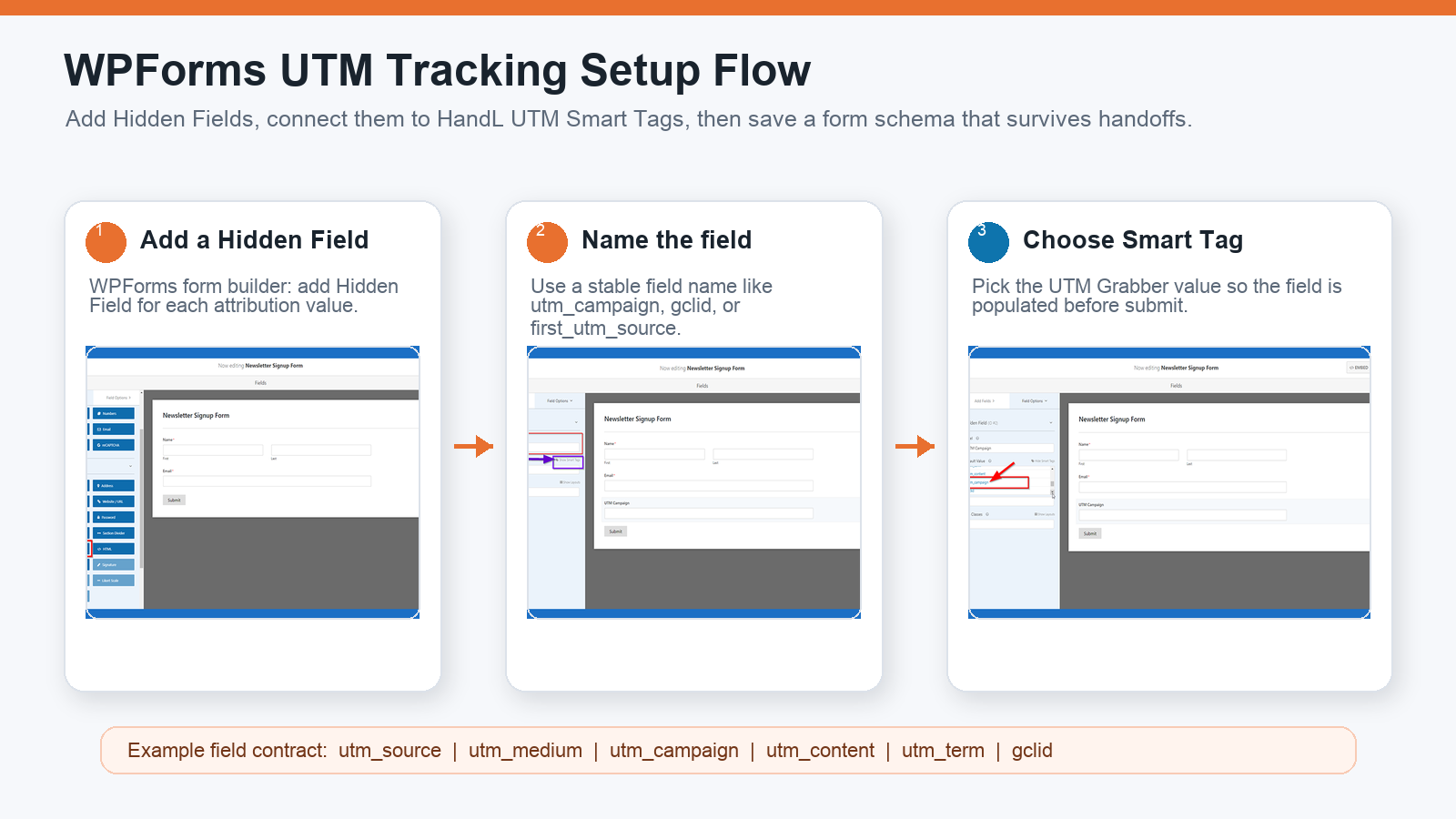
The UTM Grabber WPForms docs show the practical setup:
- Open WPForms in WordPress and create or edit a form.
- Add a Hidden Field for the attribution value.
- Name the field clearly, such as
UTM Campaign,GCLID, orFirst UTM Source. - Click Show Smart Tags in the field settings.
- Select the HandL UTM Grabber value from the Smart Tag list.
- Add the matching CSS class when needed, for example
utm_campaign. - Save the form.
- Submit a tagged test URL and verify the populated values under WPForms Entries.
The important part is consistency. If one form uses utm_campaign, another uses campaign_name, and another uses Campaign, your CRM mapping will eventually drop something.
Why the CSS class matters for client-side tracking
The WPForms docs call out a detail that is easy to miss: when you add a parameter like utm_campaign, add the class variable as utm_campaign too.
That class helps UTM Grabber identify and populate the field on the client side. This matters when your WordPress host, page cache, CDN, or optimization plugin serves cached HTML.
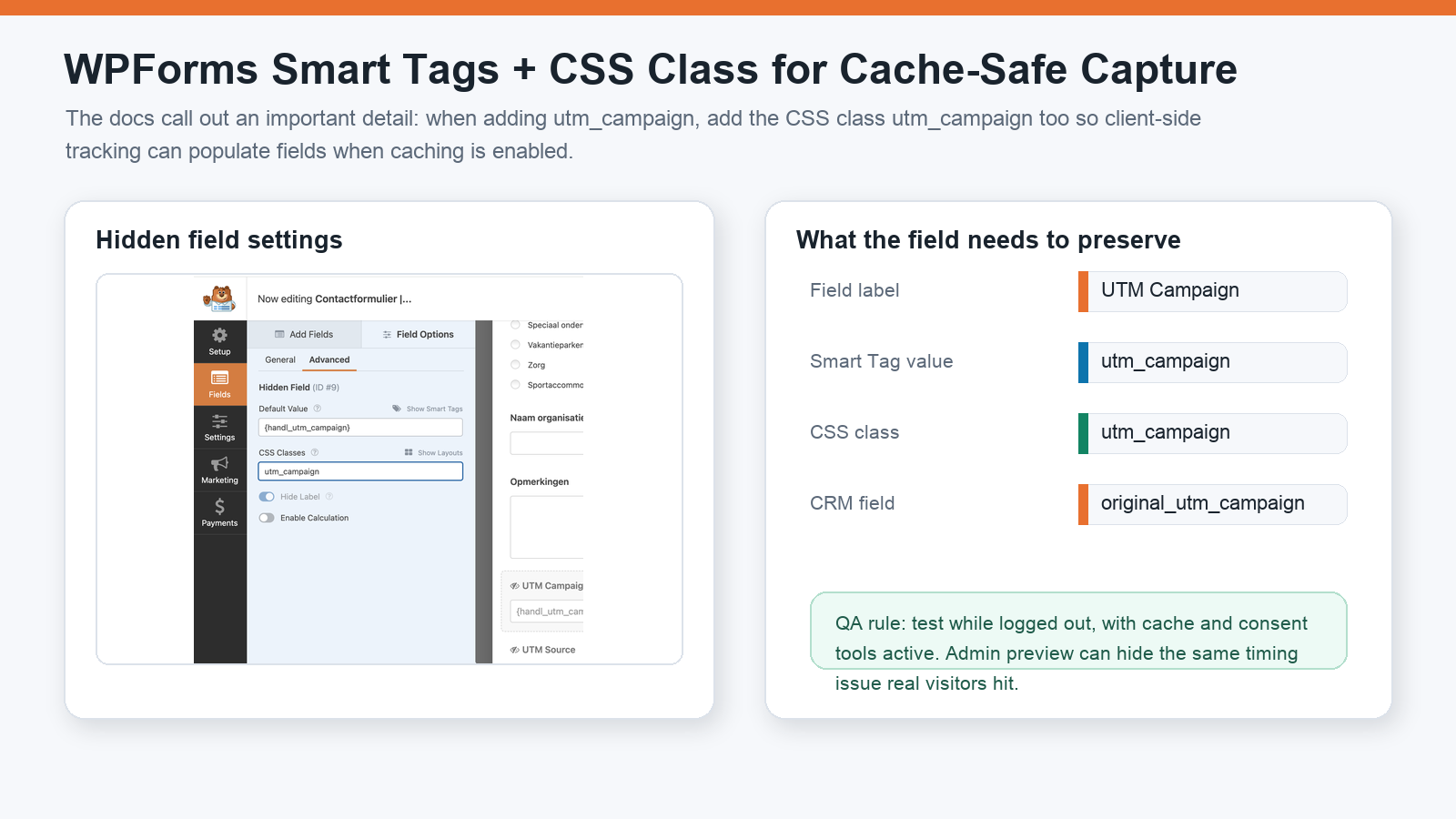
Use this mental model:
| WPForms setting | Example | Why it matters |
|---|---|---|
| Field label | UTM Campaign | Human-readable name in the builder and entries. |
| Smart Tag/default value | HandL UTM campaign Smart Tag | Pulls the stored attribution value into the field. |
| CSS class | utm_campaign | Lets client-side capture populate the field when caching is enabled. |
| CRM field | original_utm_campaign or utm_campaign | Controls where the data lands after submission. |
If your WPForms hidden field exists but stays blank, check the Smart Tag and the CSS class before changing your reporting dashboard.
What parameters should WPForms capture?
Start with the parameters your ad, SEO, sales, and reporting workflows actually use.
| Field | Capture this when available | Used for |
|---|---|---|
utm_source | Source such as google, meta, linkedin, newsletter, partner, referral. | Channel and platform reporting. |
utm_medium | Medium such as cpc, paid_social, email, organic, affiliate. | Paid vs organic vs email grouping. |
utm_campaign | Campaign name or campaign ID. | Campaign-level ROI and lead quality. |
utm_term | Keyword, audience, query, or targeting signal. | Search and audience diagnostics. |
utm_content | Creative, ad, placement, button, or CTA. | Creative and variation testing. |
gclid | Google Ads click ID. | Offline conversion uploads and lead-quality feedback. |
gbraid / wbraid | Google Ads iOS-related click identifiers. | Google Ads conversion feedback in privacy-constrained traffic. |
fbclid, fbc, fbp | Meta click and browser identifiers where available and appropriate. | Meta attribution context, CAPI matching, and diagnostics. |
| landing page | First page of the session. | Funnel and landing page reporting. |
| referrer | Previous site or source when UTMs are missing. | Organic, referral, and dark traffic cleanup. |
| first-touch fields | first_utm_source, first_utm_campaign, etc. | Original source reporting and sales context. |
Do not collect a field only because it is available. Collect it because someone will use it for budget allocation, sales routing, lead scoring, offline conversion uploads, or source-to-revenue reporting.
First-touch vs last-touch in WPForms
The UTM Grabber WPForms docs include a separate first-attribution workflow. This matters because different teams ask different questions:
- Sales often asks: What originally brought this lead to us?
- Paid media often asks: What final click or campaign created the conversion?
- RevOps often needs both.
If first-attribution parameters are not showing in WPForms Smart Tags, the docs recommend adding the first-attribution parameters as custom parameters so they appear in the Smart Tag list. Then you can use them like other parameters.
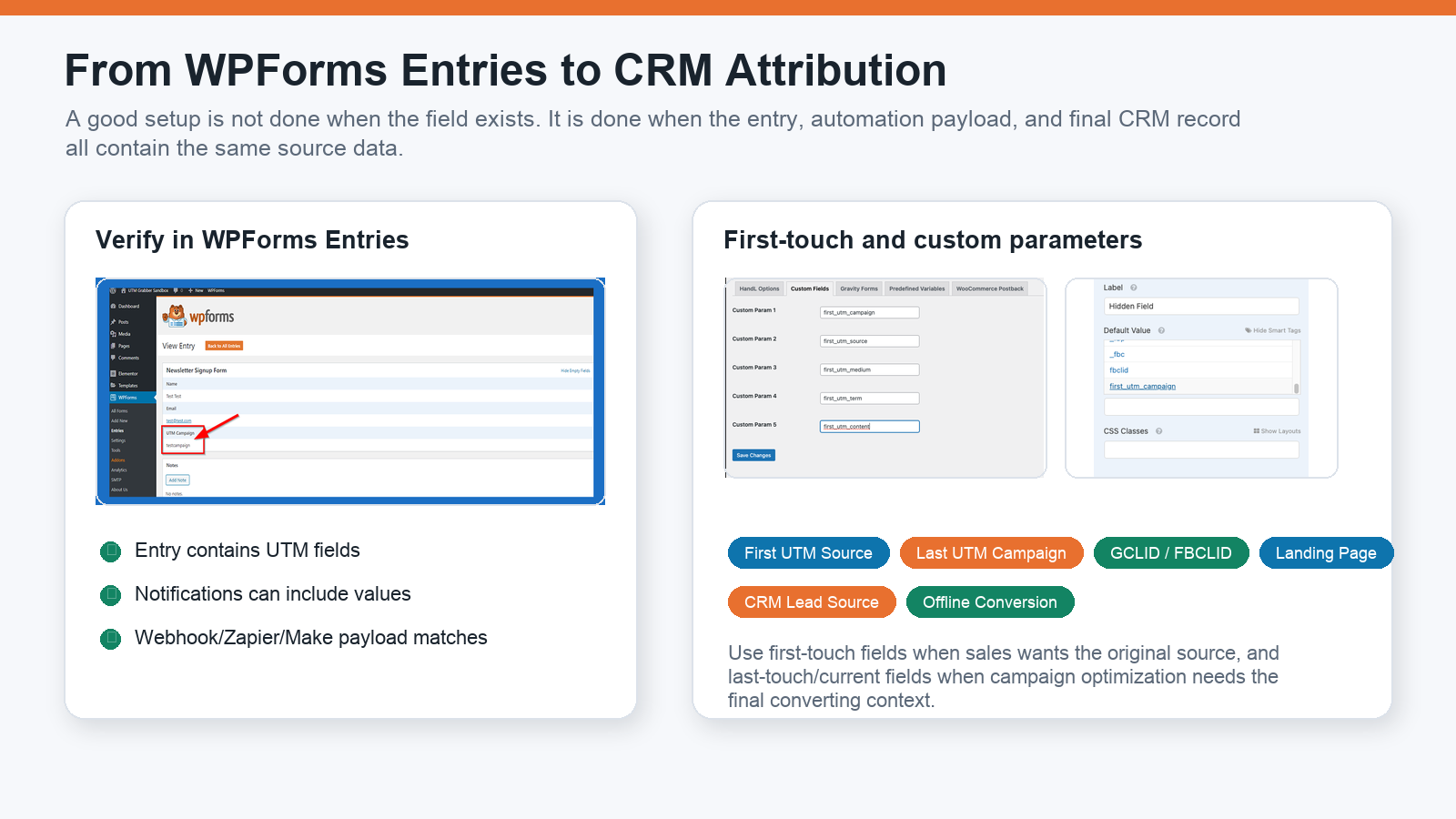
A practical field contract might include:
utm_source
utm_medium
utm_campaign
utm_content
utm_term
gclid
fbclid
landing_page
referrer
first_utm_source
first_utm_medium
first_utm_campaign
The key is to decide what each field means. utm_campaign should not sometimes mean first-touch campaign and sometimes mean last-touch campaign. If you need both, name them separately.
WPForms Entries are your first QA checkpoint
After you publish the form, submit a real test from a tagged URL and open the WPForms entry.
Use a test URL like:
?utm_source=google&utm_medium=cpc&utm_campaign=wpforms_test&utm_content=ad_a&utm_term=test_keyword&gclid=test-gclid
Then verify:
- The WPForms entry contains the hidden fields.
- Each field has the expected value.
- The email notification contains the same values if you added them there.
- Zapier, Make, webhook, or CRM receives the same values.
- The final CRM lead/contact record stores them in permanent fields.
If the entry is correct but the CRM is blank, the problem is downstream mapping. If the entry is blank, the problem is field setup, Smart Tags, CSS class, timing, cache, consent, or URL persistence.
Zapier, Make, and CRM mapping must be explicit
Many WPForms UTM tracking setups fail after the form submits. The field exists. The value exists. The automation runs. But nobody mapped the value into the destination field.
For each destination, confirm the full path:
| Destination | What to check |
|---|---|
| WPForms Entries | Hidden fields are present and populated. |
| Email notifications | The message body includes the attribution fields you want humans to see. |
| Zapier | The sample payload includes UTM and click ID fields, and each is mapped into a destination field. |
| Make | The module sees the fields and passes them through later steps without renaming or dropping them. |
| HubSpot / Salesforce / Zoho / Pipedrive | Fields exist, are mapped, and are not overwritten by automation. |
| Google Ads offline conversions | gclid, gbraid, or wbraid is captured and tied to the correct lead/conversion event. |
| Meta workflows | Meta click/browser context is collected only where appropriate for your consent and privacy posture. |
Automation success is not the same as attribution success. A Zap can be green while the campaign field is ignored.
Caching and consent can change the WPForms result
If you only test while logged into WordPress, you may miss the exact failure real visitors see.
Test with the same conditions as a real visitor:
- Logged out of WordPress.
- Incognito/private browser.
- Page cache active.
- CDN cache active.
- JavaScript defer/delay/minify settings active.
- Consent banner and CMP behavior active.
- GTM Consent Mode rules active.
- Real redirect chain from ad click to landing page to form page.
The class-based client-side fill is especially important when server-rendered values are not reliable because caching is serving the same HTML to many visitors.
If your cache serves one blank hidden field to everyone, the browser still needs a reliable way to populate the right value before submit.
Common WPForms UTM tracking mistakes
Mistake 1: Adding the Hidden Field but not the Smart Tag
The Hidden Field is only the place where data can go. It still needs the HandL UTM Smart Tag or another reliable value source.
Mistake 2: Forgetting the CSS class
For UTM fields like utm_campaign, the docs recommend adding the matching class variable. That is especially helpful when caching is enabled.
Mistake 3: Using different field names across forms
utm_campaign, campaign, Campaign Name, and original_campaign can all make sense to humans. They do not mean the same thing to automation. Standardize the schema.
Mistake 4: Testing only the email notification
Email is useful, but the CRM is where attribution needs to live. Always check the final contact, lead, opportunity, or deal record.
Mistake 5: Ignoring first-touch fields
If a buyer visits from Google today and converts from branded search next week, last-touch data alone can hide the original source. Use first-touch fields when the sales and RevOps workflow needs original-source context.
Mistake 6: Only collecting UTMs
UTMs are useful campaign labels, but ad-platform feedback loops often need click IDs. If you run Google Ads, capture gclid, gbraid, and wbraid where available. If you run Meta Ads, understand how fbclid, fbc, and fbp fit your consent and CAPI workflow.
Mistake 7: Letting redirects strip parameters
If the ad URL redirects through another URL, landing page, subdomain, scheduler, or checkout before WPForms loads, the query string can disappear. Preserve UTMs across important steps.
Mistake 8: Assuming admin preview equals production
Admin preview can bypass cache, load scripts differently, and hide consent behavior. QA the public URL.
What good looks like
A healthy WPForms UTM tracking setup has these traits:
- Every important WPForms lead form uses the same attribution field schema.
- Hidden Fields use the correct HandL UTM Grabber Smart Tags.
- UTM fields include matching CSS classes such as
utm_campaignwhere needed. - WPForms Entries show UTM values, click IDs, referrer, landing page, and first-touch fields where useful.
- Notifications, Zapier, Make, CRM, and offline conversion workflows receive the same values.
- Cache, consent, and optimization settings are part of the test plan.
- Marketing can connect campaign spend to qualified leads and sales outcomes.
Related references:
What broken WPForms attribution costs
- Google Ads and Meta Ads receive weaker conversion feedback.
- Sales cannot prioritize leads by campaign, keyword, or source intent.
- Agencies spend hours reconciling WPForms entries, GA4, ad platforms, and CRM reports.
- Winning campaigns look weak because pipeline is detached from the original click.
- Budget shifts happen from partial attribution instead of actual lead quality.
The cost shows up later, when marketing and sales try to make decisions from incomplete lead-source data.
The practical WPForms implementation standard
- Use WPForms Hidden Fields for attribution values.
- Populate values with HandL UTM Grabber Smart Tags.
- Add matching CSS classes for cache-safe client-side capture.
- Include UTMs, click IDs, landing page, referrer, and first-touch fields where useful.
- Verify WPForms Entries and the final CRM record from a live tagged URL.
Once this works on one high-volume form, make it the standard for every WPForms lead form.
Why teams keep losing UTM data in WPForms
How UTM Grabber helps
UTM Grabber gives WordPress teams a practical way to capture and preserve WPForms attribution data without rebuilding every form from scratch.
- HandL Smart Tags for WPForms hidden fields.
- First-party UTM and click ID capture for WordPress attribution.
- Support for first-touch and last-touch attribution fields.
- Client-side field population patterns for cached WordPress pages.
- Cleaner handoff into WPForms Entries, notifications, Zapier, Make, CRMs, Google Ads offline conversions, and Meta workflows.
Who should care about WPForms UTM tracking
- WordPress teams using WPForms for lead generation.
- Agencies responsible for client attribution and reporting.
- PPC teams sending Google Ads or Meta Ads traffic into WPForms.
- RevOps teams trying to fix unknown lead source in the CRM.
- Founders who need to know which forms and campaigns actually create pipeline.
If campaign data affects budget, routing, lead scoring, sales follow-up, or offline conversion feedback, this is not optional instrumentation.
What real users are saying
Bring your highest-volume WPForms lead form and we will help you find the break.
Sources checked: