
WS Form UTM Tracking: Hidden Fields, Classes, CRM Attribution
WS Form is powerful enough to build serious WordPress lead forms. But that power does not automatically mean every lead reaches your CRM with clean campaign attribution.
The usual failure looks simple from the outside: a visitor lands with utm_source, utm_medium, utm_campaign, utm_content, utm_term, gclid, gbraid, wbraid, fbclid, msclkid, or another tracking parameter in the URL. The WS Form submission works. The email notification arrives. But HubSpot, Salesforce, Zoho, Pipedrive, GoHighLevel, a webhook, Zapier, Make, or the offline conversion upload still says lead source = unknown.
In WS Form, the fix is not only "add a hidden field." The reliable pattern is: hidden text fields + exact field class variables + HandL UTM persistence + submission QA + CRM mapping.
That exact-class piece matters. WS Form can store submitted hidden fields, and WS Form has its own tracking variables, but HandL UTM Grabber needs the field class naming convention to know which stored attribution value belongs in which hidden field.
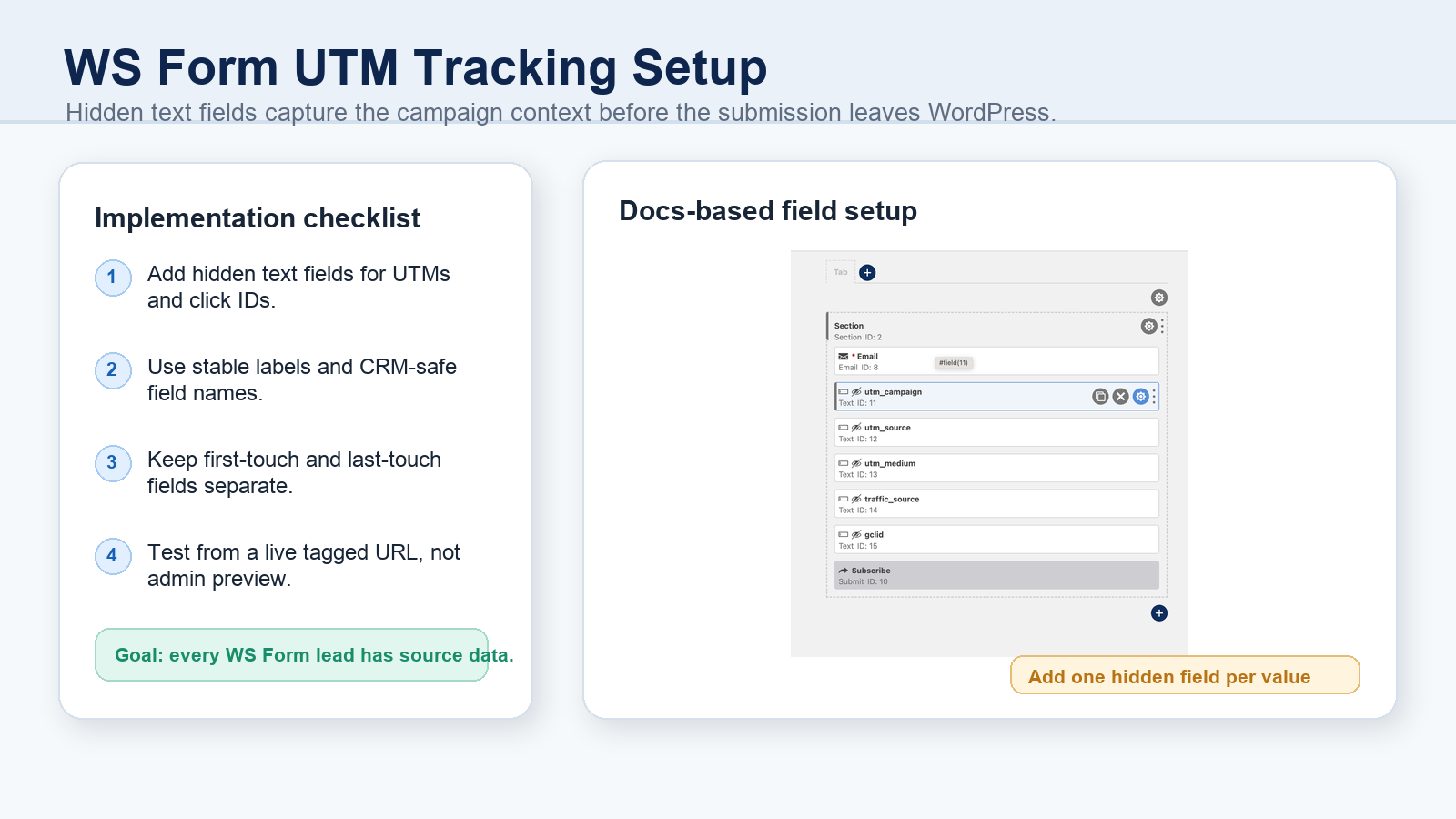
If this is what you are trying to fix
- You search WS Form UTM tracking because submitted leads are missing campaign source.
utm_sourceis visible in the landing page URL, but the WS Form submission field is blank.- You added hidden fields, but you did not add the right field class variable.
- You mapped values to a CRM, but every form uses a different field name.
- Google Ads sends
gclid,gbraid, orwbraid, but your offline conversion process cannot find the click ID. - Meta Ads sends
fbclid, but the lead record does not preserve the data needed for downstream attribution. - WS Form tracking variables work in one place, but not in another, because some are client-side and some are server-side only.
- Consent, cache, delayed scripts, redirects, or multi-page navigation cause UTMs to disappear before the form is submitted.
These are usually implementation problems, not analytics mysteries. You can reproduce them with a tagged URL and fix the weak link.
How WS Form UTM tracking should work
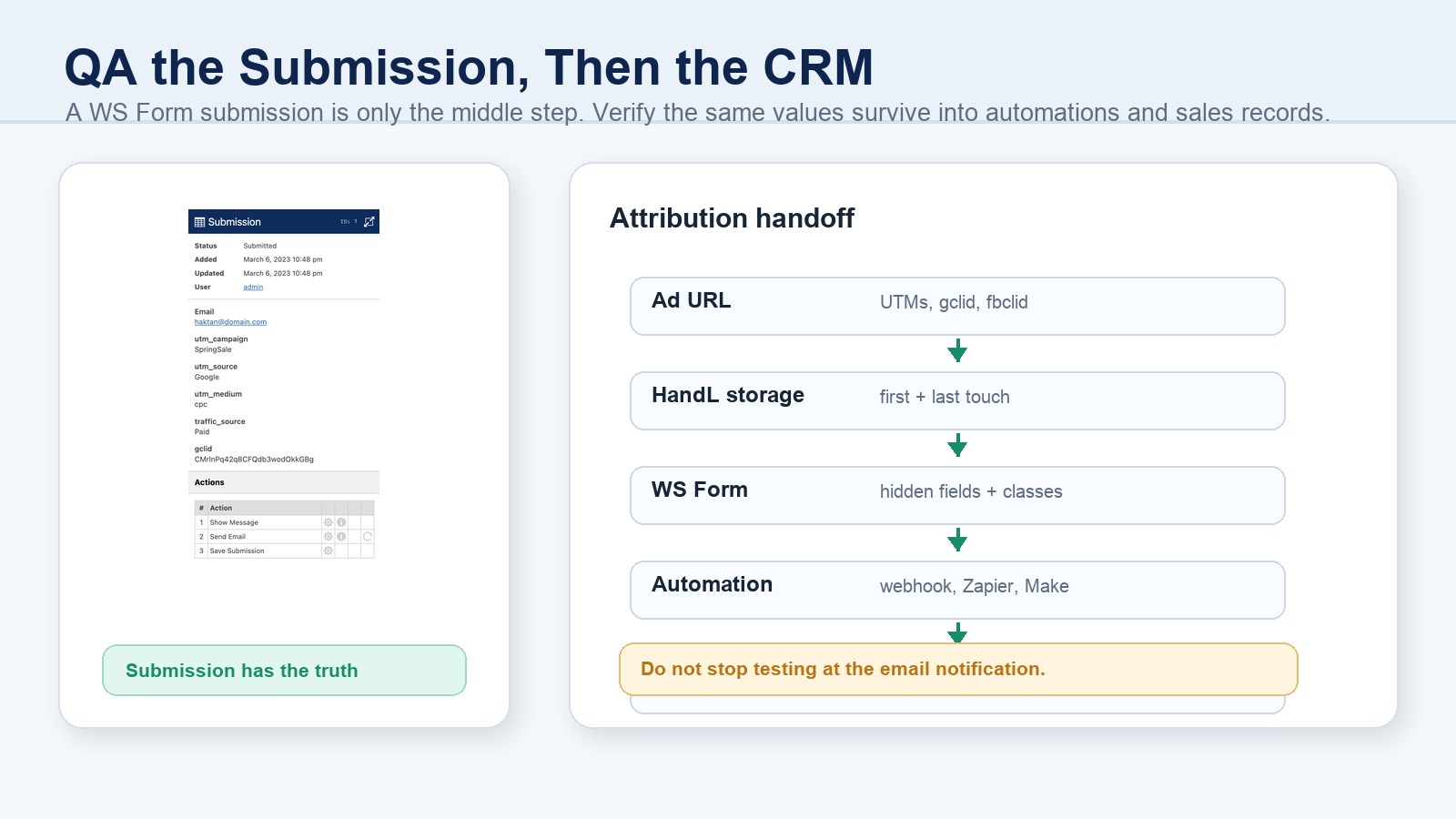
Think of WS Form attribution as a handoff, not a single field.
- The ad platform or referring source sends URL parameters.
- HandL UTM Grabber captures and stores those parameters in the browser.
- WS Form contains hidden text fields for the values you want to keep.
- Each WS Form hidden field has the correct class variable so HandL can populate it.
- The submission stores the values.
- Your webhook, Zapier, Make, email action, or CRM integration maps the same values into the final lead record.
When that chain is clean, the business result is simple: sales and marketing can see which campaigns produced the lead, which source produced the opportunity, and which ads should receive more budget.
Why WS Form is slightly different from other form builders
For many form builders, the standard instruction is: add a hidden field and select the UTM value.
WS Form needs a slightly more precise approach. In the HandL UTM Grabber docs, the setup pattern is:
- Add the values you want to track as hidden text fields.
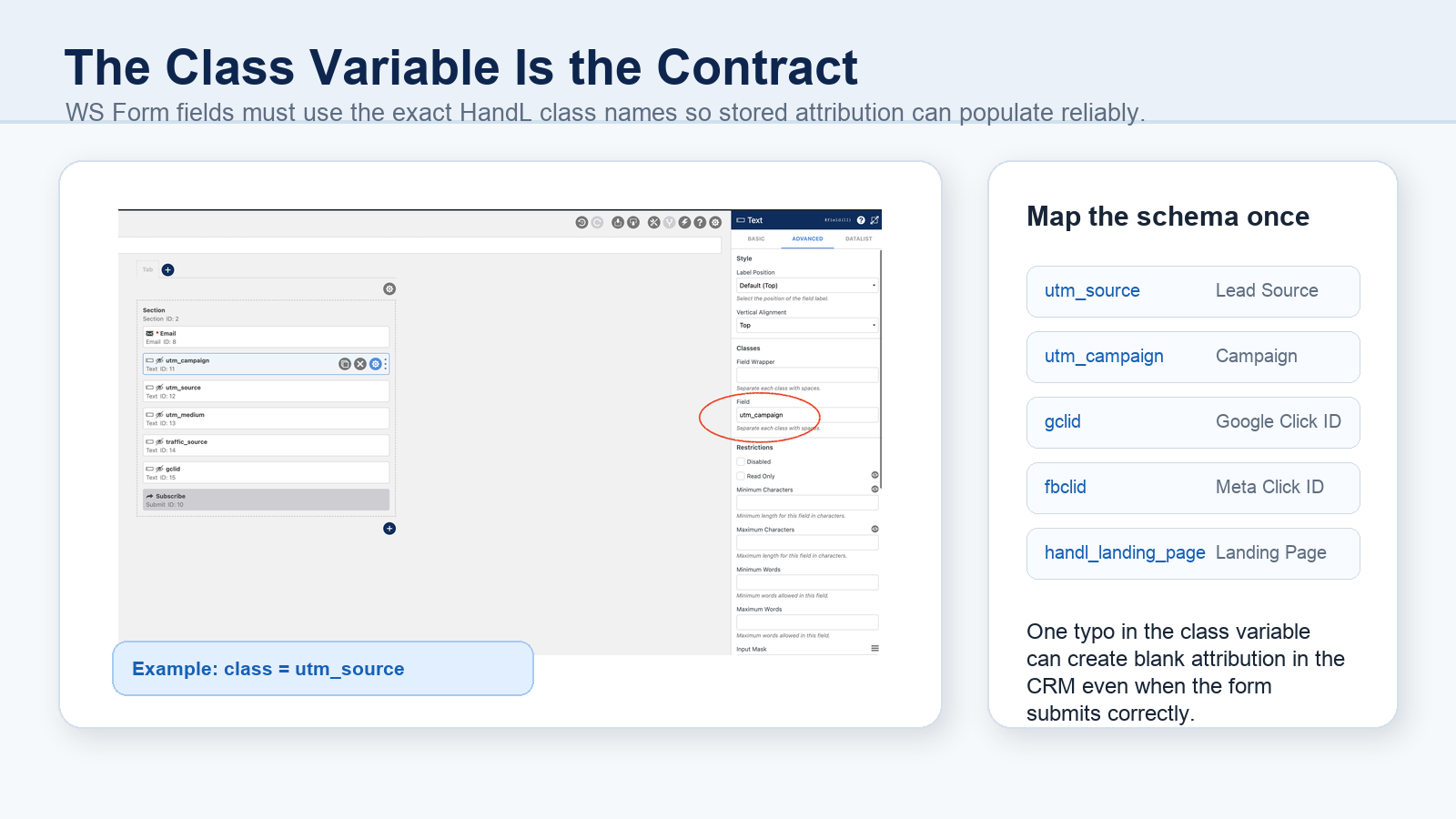
- Add a field class variable to each field.
- Make sure the class matches the HandL naming convention exactly.
- Submit a live test and inspect the stored submission.
That means the class variable becomes the contract between HandL and WS Form. If the field is supposed to capture utm_source, the class needs to match that value. If the field is supposed to capture gclid, it needs the gclid class. A label like "Campaign Source" may look correct in the form builder, but the class is what determines whether the tracking value is populated.
The recommended WS Form setup
Start with one high-value lead form. Do not try to fix every form at once.
Add hidden text fields for the core attribution values:
utm_sourceutm_mediumutm_campaignutm_termutm_contentgclidgbraidwbraidfbclidmsclkidtraffic_sourcehandl_original_refhandl_landing_pagehandl_url
Then add the matching class variable to each field.
The practical rule is this: use the same field schema everywhere. If one WS Form calls the field utm_source, another calls it source, and your CRM field is named lead_source_original, your reporting will drift. The form might be working, but the CRM mapping will still fail.
Use WS Form hidden fields for values that must travel
WS Form's own hidden field documentation explains that hidden fields can store data that users do not see or modify during submission. That is exactly why hidden fields are useful for attribution.
But hidden fields are not magic storage. They need a value source.
For WS Form UTM tracking, that source can be:
- HandL UTM Grabber stored values, populated through field class variables.
- WS Form variables, where appropriate.
- Query string values such as
#query_var("gclid"), when the value is still present on the form page. - Server-side tracking variables used in actions or custom mapping.
The difference matters because users rarely convert on the exact same URL where the ad click happened. They browse, come back, open a pricing page, click to another form, or submit after the original query string is gone. That is where persistent HandL capture becomes more reliable than only reading the current URL.
Native WS Form tracking variables are useful, but know their limits
WS Form has a native tracking feature that can store information such as referrer, full URL, query string, user agent, operating system, IP-related data, and UTM parameters.
That is valuable, but it is not the same as a deliberate first-touch and last-touch marketing attribution system.
There are three important details:
- WS Form says tracking attributes are disabled by default for privacy/GDPR reasons.
- Some WS Form tracking variables are only available after submission, so they are server-side/action values rather than client-side field values.
- Native tracking variables describe the current form context unless you build a durable persistence strategy around them.
Use WS Form native tracking where it helps, but do not treat it as a replacement for storing campaign context across page views and sessions.
First-touch and last-touch should not overwrite each other
Many teams accidentally collapse attribution into one field called utm_source.
That makes reporting easier for a week and harder forever.
For paid media, SEO, AEO, partner traffic, newsletters, and AI referrals, you usually want both:
- First-touch fields: the original campaign or source that brought the visitor into the journey.
- Last-touch fields: the latest campaign or source before the form submission.
HandL UTM Grabber supports this pattern through stored first-touch and last-touch values. WS Form hidden fields give you a place to send those values with the submission. The CRM gives you a place to report on them.
Keep these fields separate:
first_utm_sourcefirst_utm_mediumfirst_utm_campaignutm_sourceutm_mediumutm_campaignhandl_original_refhandl_landing_pagehandl_refhandl_url
When a customer takes multiple visits to convert, this is the difference between "Google Ads created the lead" and "Google Ads assisted, organic search converted, and the original landing page was the pricing page."
What about GCLID, FBCLID, GBRAID, WBRAID, and MSCLKID?
UTM parameters explain your campaign taxonomy. Click IDs help connect the conversion back to ad platforms and downstream optimization workflows.
For Google Ads and Microsoft Ads, capture:
gclidgbraidwbraidmsclkid
For Meta Ads, capture:
fbclidfbcfbp, where your consent and implementation strategy supports it
WS Form has an official tutorial showing how to store gclid with a hidden field and #query_var("gclid") when the query parameter exists on the form page. That is useful for the immediate page-load case.
But for real funnels, you should also test what happens after:
- the user clicks from the landing page to another page,
- a redirect removes the query string,
- a consent banner delays scripts,
- cache serves an older page,
- the visitor returns later,
- the form is embedded or loaded after the tracking script.
If the click ID matters for offline conversions, do not only check the URL. Check the final CRM record.
The CRM mapping is where attribution often breaks
The WS Form submission can be perfect and the CRM can still be wrong.
That usually happens because the integration layer renames, ignores, or overwrites the fields:
- WS Form submission field:
utm_campaign - Zapier field:
Campaign - CRM property:
latest_campaign - Offline conversion file column:
Google Click ID
None of these names are bad by themselves. The problem is inconsistency.
Create a field map before you build the automation:
| Attribution value | WS Form field/class | Automation field | CRM field | Used for |
|---|---|---|---|---|
| Source | utm_source | utm_source | utm_source | lead source reporting |
| Campaign | utm_campaign | utm_campaign | utm_campaign | campaign ROI |
| Google Click ID | gclid | gclid | gclid | Google offline conversions |
| Meta Click ID | fbclid | fbclid | fbclid | paid social attribution |
| Landing Page | handl_landing_page | handl_landing_page | first_landing_page | first-touch analysis |
Then make every WS Form follow that same contract.
Cache, consent, and timing can make WS Form look broken
If a WS Form hidden field is blank, do not assume the field itself is the problem.
The tracking value can disappear earlier in the chain:
- The ad platform tracking template is not adding UTMs.
- A redirect strips
utm_source,gclid, orfbclid. - A caching layer serves a page before client-side tracking runs.
- A consent management platform blocks storage until consent is granted.
- GTM Consent Mode, CMP rules, or privacy tools change when scripts fire.
- The form loads before the attribution script populates the value.
- A multi-domain funnel loses first-party cookies.
- The CRM integration maps the wrong field.
For WS Form, the timing point is important because you may have native WS Form variables, HandL UTM values, hidden fields, and integration mappings all involved in the same submission.
How to QA WS Form UTM tracking
Use a controlled test URL:
https://example.com/contact/?utm_source=google&utm_medium=cpc&utm_campaign=ws_form_test&utm_content=ad_a&utm_term=crm_tracking&gclid=test-gclid-123&fbclid=test-fbclid-456
Then run this QA checklist:
- Open the live public page in a fresh browser profile.
- Accept or reject consent based on the scenario you want to test.
- Submit the form with a clearly fake test email.
- Open the WS Form submission record and inspect every hidden field.
- Confirm first-touch and last-touch values are separated.
- Confirm
gclid,gbraid,wbraid,fbclid, andmsclkidare present where expected. - Confirm webhook, Zapier, Make, or CRM automation receives the same values.
- Confirm the final CRM record stores the values in the right properties.
- Repeat after navigating from the landing page to another page before submitting.
- Repeat after cache and optimization plugins are active.
If the WS Form submission has the values but the CRM does not, the break is downstream. If the WS Form submission is blank, the break is field setup, class variable naming, script timing, consent, cache, or persistence.
Common WS Form UTM tracking mistakes
Mistake 1: Adding a hidden field but not adding the class variable
The field exists, but HandL does not know what value belongs there. Add the exact class for the value you want to capture.
Mistake 2: Using a label as if it were the mapping key
The label is useful for humans. The class and field mapping are what matter for automation.
Mistake 3: Relying only on current-page query strings
#query_var("gclid") is useful when the query parameter is on the form page. It is not enough when users navigate before converting.
Mistake 4: Enabling WS Form tracking variables without a consent plan
WS Form tracking attributes are privacy-sensitive. Make your consent, CMP, and privacy notice part of the implementation, not an afterthought.
Mistake 5: Testing in admin preview only
Admin preview can load scripts, cache, and consent differently than the real public page. Test the public URL.
Mistake 6: Not logging the raw payload
For serious funnels, keep a short-term debug log of the submitted attribution payload. When a CRM field is blank, you need to know whether the value failed in the browser, WS Form, automation, or CRM.
Mistake 7: Mixing first-touch and last-touch in one field
If the same field is overwritten on every visit, you lose the original source. That makes long-cycle lead attribution weaker.
What good looks like
A healthy WS Form UTM tracking setup has these traits:
- Every important WS Form uses the same attribution field schema.
- Hidden text fields exist for UTMs, click IDs, referrer, landing page, and traffic source.
- Each hidden field has the correct HandL class variable.
- WS Form submissions contain the expected values from a live tagged URL.
- CRM records receive the same values.
- Google Ads offline conversion and Meta reporting workflows can access click IDs where appropriate.
- Consent and privacy rules are documented.
- Cache, redirects, and multi-page navigation are included in QA.
Related references:
- WPForms UTM Tracking: Hidden Fields, Smart Tags, CRM
- Ninja Forms UTM Tracking: Hidden Fields, Zapier, CRM
- Contact Form 7 UTM Tracking: Hidden Fields, Mail Tags, CRM
- Elementor UTM Tracking: Hidden Fields, Native Parameters, Webhooks, and CRM Attribution
- The Complete Tracking Failure Audit
What broken WS Form attribution costs
- Paid media teams pause campaigns that actually created pipeline.
- Sales cannot prioritize leads by source, keyword, or campaign intent.
- Agencies spend hours reconciling WS Form submissions, GA4, ad platforms, and CRM reports.
- Google Ads and Meta Ads receive weaker conversion feedback.
- Founders lose trust in reporting because every dashboard tells a different story.
The cost is not just missing UTM data. The cost is making campaign decisions from incomplete lead records.
The practical WS Form implementation standard
- Use hidden text fields for attribution values.
- Use exact HandL class variables on each hidden field.
- Capture UTMs, click IDs, landing page, referrer, and traffic source.
- Separate first-touch and last-touch fields.
- Map every value into webhook, Zapier, Make, CRM, and offline conversion workflows.
- Verify the final CRM record from a live tagged URL.
Once the pattern works on one high-volume form, clone the field schema into every important WS Form.
Why teams keep losing UTM data in WS Form
How UTM Grabber helps
UTM Grabber gives WordPress teams a practical way to capture and preserve campaign attribution before WS Form submits the lead.
- Persistent first-party capture for UTMs and click IDs.
- First-touch and last-touch attribution fields.
- HandL class-based population for WS Form hidden fields.
- Support for Google Ads, Meta Ads, Microsoft Ads, organic, referral, direct, and custom parameters.
- Cleaner handoff into WS Form submissions, webhooks, Zapier, Make, CRMs, and offline conversion workflows.
Who should care about WS Form UTM tracking
- WordPress teams using WS Form for lead generation.
- PPC teams sending Google Ads, Meta Ads, or Microsoft Ads traffic into WS Form.
- Agencies responsible for client attribution and CRM reporting.
- RevOps teams fixing unknown lead source in HubSpot, Salesforce, Zoho, Pipedrive, or GoHighLevel.
- Founders who need to know which campaigns create qualified leads.
If WS Form submissions influence budget, sales routing, lead scoring, or offline conversion feedback, this belongs in your QA process.
What real users are saying
Bring your highest-volume WS Form lead form and we will help you find the break.
Sources checked: