
The Complete Tracking Failure Audit: 8 Common Problems That Break Attribution
After more than 15 years working inside tracking, attribution, paid media, forms, CRMs, and revenue operations, one pattern keeps showing up: tracking usually does not fail because of one dramatic bug.
It fails because one small handoff breaks between the ad click, landing page, consent banner, cookie, form, cache layer, iframe, CRM integration, or reporting system.
That is why a campaign can look fine in Meta or Google Ads while the CRM says unknown source. Or a lead can submit a form with a valid gclid, fbclid, or UTM in the URL, but the sales team still sees a blank lead-source field. Or the ad platform can get conversions, but the business cannot explain which campaign, keyword, creative, form, offer, or funnel step created pipeline.
This is the comprehensive tracking failure audit we wish every marketing team ran before blaming the algorithm, changing bids, rebuilding landing pages, or buying another dashboard.
If this feels painfully familiar
- Paid campaigns are spending, but UTM parameters are missing from form submissions.
- Meta, Google Ads, GA4, and the CRM all show different lead counts.
- The form is submitted correctly, but hidden fields are empty.
- A third-party form works visually, but the iframe never receives attribution data.
- A checkout, booking, or application flow crosses domains and cookies do not follow.
- A cookie banner, CMP, or GTM Consent Mode setup causes privacy-related attribution data loss.
- Cookies look set in one visit, but they are not persistent across reloads, sessions, or domains.
- Caching, redirects, or plugins strip the query string before tracking can read it.
- Tracking fires too early, too late, or on the wrong event because of a race condition.
- Leads enter the CRM, but field mapping, automation, or lifecycle logic is wrong.
The scary part is not that tracking breaks. The scary part is how normal broken tracking can look from the outside.
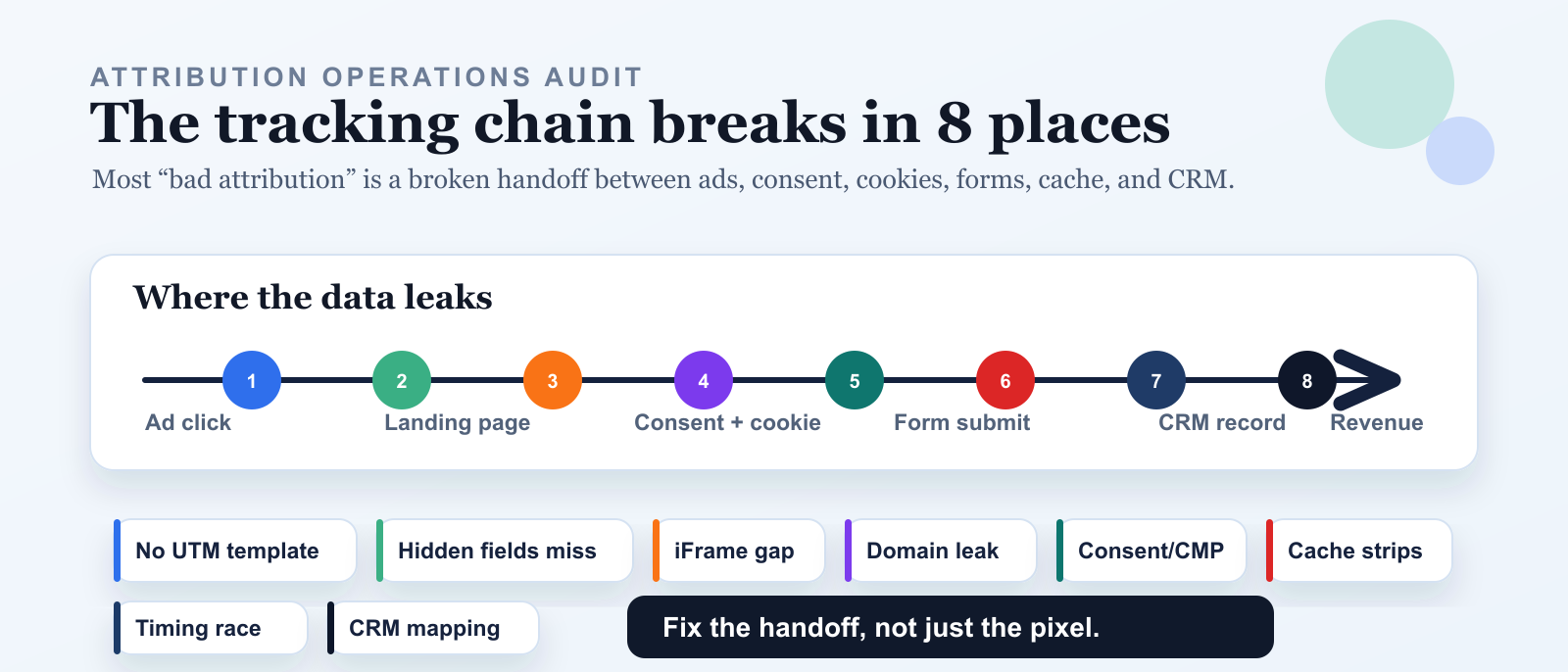
The eight most common tracking problems we see in real operations
Start with the tracking chain, not the tool
Most teams audit tracking by opening a tag manager preview, clicking a form, and checking whether a pixel fired.
That is not enough.
A pixel firing only proves that a pixel fired. It does not prove that the right campaign data reached the landing page, that the CMP allowed storage, that cookies persisted, that the script saved first-touch attribution, that hidden fields were included in the form payload, that iframe data crossed safely, that cache rules preserved query parameters, or that the CRM mapped the fields correctly.
The real tracking chain looks like this:
- Ad platform URL setup
- Landing page capture
- Consent management and cookie persistence
- Hidden field population
- Form submission payload
- Cross-domain, iframe, cache, or timing handoff
- CRM field mapping and automation
- Reporting and revenue attribution
If any link breaks, the final report becomes a guess.
1. Tracking templates are not set up in the ad platform
This is the simplest tracking problem and still one of the most expensive.
If Meta Ads, Google Ads, Microsoft Ads, LinkedIn, email, affiliates, or partner links do not add UTMs or click identifiers to the landing URL, your website has very little to capture. No UTM means no campaign context. No campaign context means weak attribution.
Google Ads supports tracking templates and final URL suffixes for adding tracking parameters to landing page URLs. Google Analytics also uses UTM parameters such as utm_source, utm_medium, utm_campaign, utm_term, and utm_content to identify campaign traffic.
For Google Ads, a practical starting point is:
utm_source=google&utm_medium=cpc&utm_campaign={campaignid}&utm_term={keyword}&utm_content={creative}
Keep Google Ads auto-tagging enabled when appropriate so gclid, gbraid, or wbraid can also be preserved.
For Meta Ads, a practical starting point is:
utm_source={{site_source_name}}&utm_medium=paid_social&utm_campaign={{campaign.name}}&utm_content={{ad.name}}&utm_term={{adset.name}}&campaign_id={{campaign.id}}&adset_id={{adset.id}}&ad_id={{ad.id}}
The exact naming convention can vary, but the principle does not: every paid click should arrive with enough structured data to identify platform, campaign, audience, creative, placement, and click context.
Symptoms
- Paid traffic appears as direct, referral, paid social, or unassigned without campaign detail.
- CRM leads have a source like
facebookbut no campaign, ad set, or ad. - Google Ads or Meta reports conversions, but the CRM cannot tie leads back to campaign structure.
- GA4 acquisition reports look cleaner than the CRM because the form never captured the URL data.
What to test
Do not test from Ads Manager preview alone. Click a real published ad when possible, or use the platform's preview tools carefully. Then inspect the landing URL.
You should see:
utm_sourceutm_mediumutm_campaignutm_contentutm_term- platform IDs such as
campaign_id,adset_id, orad_id - click IDs such as
gclid,fbclid,msclkid,gbraid, orwbraidwhere applicable
Fix
Create a standard tracking template per platform. Apply it at the account or campaign level where possible, then override only when a specific funnel needs different naming.
Also document your naming rules. A tracking template is not just a URL string. It is a contract between paid media, analytics, forms, CRM, and reporting.
2. Hidden fields exist in theory, but not inside the form submission
This is the classic "we installed UTM tracking but the CRM is blank" problem.
The URL has UTMs. The JavaScript detects them. Maybe the values even appear somewhere in the browser. But the actual form submission does not include those values.
That can happen when:
- The hidden fields were never added to the form.
- The fields exist in the DOM, but not inside the actual
<form>element. - The field names do not match the CRM or form provider property names.
- The form is rebuilt dynamically after the tracking script runs.
- The field is marked hidden incorrectly or overwritten by form prefill behavior.
- The form provider strips unknown fields.
- The developer tests the page visually but never checks the network payload.
HubSpot's hidden field documentation is a useful reminder: a hidden field can pass a value into a property without the visitor filling it out, but the implementation still depends on the field being configured correctly.
Symptoms
- The landing URL contains UTMs, but the submitted lead does not.
- Some forms capture UTMs and others do not.
- A form clone or A/B test loses attribution because the hidden fields were not copied.
- The CRM receives
utm_sourcebut notutm_campaign,utm_content, or click IDs. - First-touch fields are overwritten by a later direct visit.
What to test
Open developer tools and inspect the actual request payload when the form submits.
Do not stop at:
- "The hidden input is visible in the HTML."
- "The browser console has the right value."
- "The form provider says hidden fields are supported."
You need to verify the payload sent to the form endpoint includes the exact field names and values.
Fix
Add hidden fields for both first-touch and latest-touch context:
| Field group | Recommended fields |
|---|---|
| UTM fields | utm_source, utm_medium, utm_campaign, utm_term, utm_content, utm_id |
| Click IDs | gclid, gbraid, wbraid, fbclid, msclkid, ttclid, li_fat_id |
| Page context | landing_page, conversion_page, referrer, page_title |
| Time context | first_touch_timestamp, last_touch_timestamp, conversion_timestamp |
| Attribution model | first_touch_source, latest_touch_source, original_referrer, latest_referrer |
| Consent and cookie context | consent_state, analytics_storage, ad_storage, cmp_choice, cookie_persistence_check |
Then run a test submission with unique values like:
utm_source=test_source_20260526
utm_campaign=test_campaign_hidden_fields
utm_content=test_ad_payload_check
If those exact values do not appear in the CRM record, the tracking is not done.
3. The lead form is inside a third-party iframe
Iframes are one of the biggest reasons tracking looks fine on the parent page but fails inside the form.
The parent page may have the UTMs. UTM Grabber or another attribution script may capture them. GA4 may see the session. But the actual form lives inside a different document, often on a different domain.
Because of the browser's same-origin rules, JavaScript on the parent page cannot freely read or write data inside a cross-origin iframe. MDN documents that cross-origin windows have limited access to each other and recommends window.postMessage() for communication between documents from different origins.
In plain English: the parent page knowing the attribution data does not mean the iframe form knows it too.
Common iframe failures
- The iframe
srcdoes not include the query string. - The parent page captures UTMs, but the iframe loads before capture completes.
- The iframe provider does not accept custom hidden fields.
- The iframe provider accepts fields, but the parent page never passes them.
- A cross-origin policy prevents direct DOM access.
- The iframe form posts to the vendor, and the vendor sends only standard contact fields to the CRM.
What to test
Inspect the iframe src.
If the parent page is:
https://example.com/demo/?utm_source=meta&utm_campaign=summer_offer
but the iframe is:
https://forms.vendor.com/embed/12345
then the form vendor may never see the UTM parameters.
The iframe often needs to receive something like:
https://forms.vendor.com/embed/12345?utm_source=meta&utm_campaign=summer_offer
or the parent and child frames need a secure postMessage() bridge that passes approved attribution fields after both frames are ready.
Fix
Choose one of these implementation patterns:
- Pass UTMs into the iframe URL when the provider supports query-string prefill.
- Use a secure
postMessage()integration with a specifictargetOrigin, not a wildcard. - Install the tracking script inside the iframe itself if you control the iframe source.
- Replace the iframe with an embedded form that runs in the parent page.
- Use a server-side form endpoint that receives the parent-page attribution data directly.
The worst pattern is the most common one: a third-party iframe that visually works, but has no attribution contract with the parent page.
4. Different domains across the funnel leak cookies and source history
Cross-domain funnels are normal now:
- main site on
example.com - landing page on
go.example.com - booking flow on
scheduler.com - checkout on
shop.example-store.com - application form on
secure-provider.com - thank-you page back on
example.com
Every domain change creates a tracking risk.
Cookies are scoped by domain. Browser storage is scoped by origin. GA4 cross-domain measurement exists because, without it, a user who moves between different root domains can be identified as separate users and sessions.
So when a funnel crosses domains without a plan, attribution can split into fragments:
- first domain knows the ad click
- second domain knows the form submission
- third domain knows the payment
- CRM sees the lead
- reporting cannot connect the story
Symptoms
- The same person appears as multiple users or sessions.
- Conversions appear under referral sources like
checkout.example.com,scheduler.com, or the payment provider. - First-touch source is present on the landing page but missing at checkout or booking.
- Thank-you page conversion tags fire, but the form or order record has no source detail.
What to test
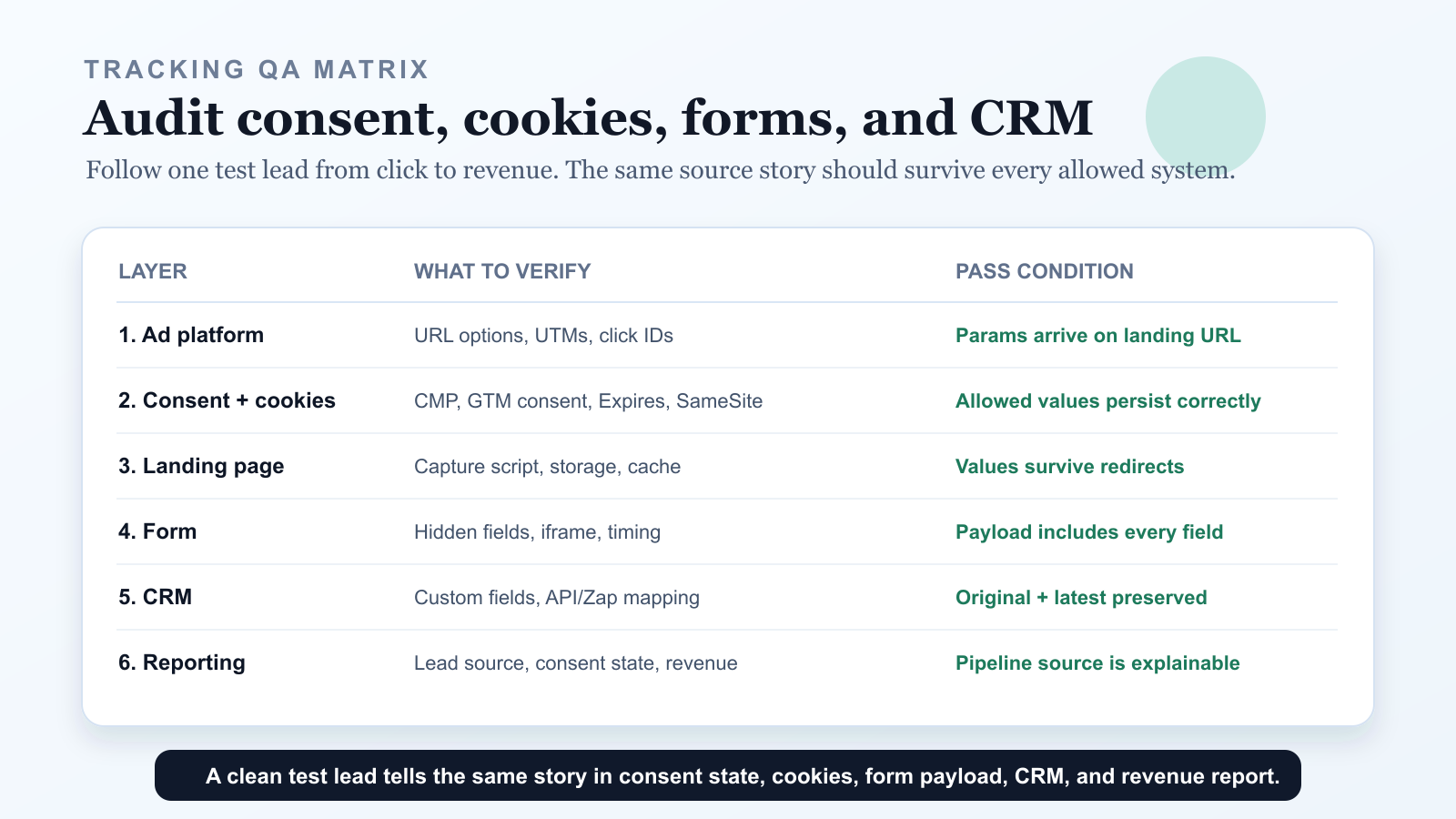
Follow one test lead across the full funnel.
At each step, record:
- current domain
- full URL and query string
- first-party cookies
- local storage values
- form payload
- CRM record
- analytics source and medium
If the source story disappears at a specific domain transition, you found the leak.
Fix
Use the right combination of:
- GA4 cross-domain measurement for analytics continuity.
- Query-string forwarding for UTMs and click IDs when moving between domains.
- First-party storage on every domain you control.
- Server-side attribution records keyed by a lead ID, session ID, or form submission ID.
- CRM fields for original source, latest source, landing page, referrer, and click IDs.
The key is to preserve attribution at the business-object level, not only inside browser cookies. A lead, booking, order, or application should carry its own source context.
5. Consent management, privacy settings, and cookie persistence erase source data
This is the tracking problem more teams are seeing now:
- "UTMs are missing after the cookie banner."
- "GTM Consent Mode is blocking GA4 or Google Ads conversions."
- "Our first-party cookies are not persisting."
- "The CMP says consent is granted, but the tags still act denied."
- "Lead source is unknown when the visitor rejects analytics cookies."
- "Cookiebot, OneTrust, CookieYes, iubenda, or our custom CMP changed attribution."
Those are all versions of the same operational problem: privacy controls changed what can be stored, when it can be stored, and which tags can read it.
Consent management is not just a legal banner. It is now part of the attribution pipeline. A Consent Management Platform, or CMP, can decide whether analytics cookies, advertising cookies, local storage, session storage, Google tags, Meta Pixel, LinkedIn Insight Tag, Microsoft UET, TikTok Pixel, server-side tagging, or custom JavaScript are allowed to run.
Google Consent Mode and Consent Mode v2 add another layer. Google documents consent types such as ad_storage, analytics_storage, ad_user_data, and ad_personalization. Google Tag Manager also has a Consent Initialization trigger and consent settings so tags can respect the user's consent state before other triggers fire.
This is good and necessary for privacy. But if it is implemented incorrectly, privacy-safe measurement turns into attribution data loss.
The customer-search version of this problem
People usually do not search for "CMP attribution architecture." They search for symptoms:
- why are my UTMs missing
- why is GA4 source medium wrong
- why is Google Ads conversion tracking not working after cookie consent
- GTM consent mode not firing tags
- Consent Mode v2 setup problem
- cookie banner blocking analytics
- cookies not persistent after refresh
- first-party cookie not saved
- Safari ITP deleting attribution cookies
- lead source unknown in CRM
- GCLID not captured in hidden field
- FBCLID not saved after consent
- UTM parameters not passing to form
The article should be framed around those real questions because that is how marketers, founders, agencies, and RevOps teams experience the issue.
Common consent and cookie failures
- The CMP loads after GTM, so tags read the wrong default consent state.
- Consent defaults are never set, so tags behave inconsistently.
- Consent updates happen after the page transition, so the next page still sees denied storage.
- The user clicks "Accept", but the choice is not persisted in a first-party cookie or local storage.
- Attribution cookies are created as session cookies because no
ExpiresorMax-Ageis set. - Cookies are set on the wrong
DomainorPath, so another funnel page cannot read them. SameSite,Secure, or browser privacy behavior prevents cookies from being sent in the expected context.- A third-party script, tag template, or CMP category blocks the UTM capture script.
- Google tags respect Consent Mode, but custom attribution tags do not have consent rules configured.
- A strict GDPR, ePrivacy, CCPA, CPRA, or internal privacy configuration blocks analytics before the first-touch source is saved.
MDN's cookie documentation matters here: cookies without Expires or Max-Age are session cookies, while persistent cookies need an expiration date or maximum age. MDN also documents SameSite and Secure behavior, which can change when cookies are sent across same-site and cross-site contexts.
In practical terms: do not assume a cookie is persistent just because you saw it once in DevTools.
What to test
Open the browser's developer tools and check the cookie and storage layer directly.
For Chrome, look in:
- Application > Cookies
- Application > Local storage
- Application > Session storage
- Network > the landing page request >
Set-Cookie - GTM Preview > Consent state
- Tag Assistant > Consent and tag firing diagnostics
For each attribution cookie or storage value, check:
| What to inspect | Why it matters |
|---|---|
| Cookie name | Confirms the expected attribution cookie exists |
| Domain | Determines which hostnames can read it |
| Path | Determines which paths can receive it |
| Expires / Max-Age | Confirms whether the cookie is persistent or session-only |
| SameSite | Affects same-site and cross-site request behavior |
| Secure | Required for some cross-site cookie behavior and HTTPS-only delivery |
| HttpOnly | If enabled, JavaScript cannot read the cookie |
| Consent category | Shows whether analytics, ads, or functional storage is allowed |
| GTM consent state | Confirms ad_storage, analytics_storage, ad_user_data, and ad_personalization |
Then test the real customer journey:
- Land with
utm_source,utm_campaign,gclid, andfbclid. - Before accepting consent, check whether anything is stored.
- Accept consent and check whether the CMP updates the consent state.
- Refresh the page and confirm the consent choice persists.
- Close and reopen the browser and confirm the attribution cookie still exists.
- Move to the form page, iframe, checkout, or booking page.
- Submit the form and inspect whether hidden fields contain the expected source values.
- Check whether the CRM receives the same values.
Fix
Treat consent as a first-class tracking dependency:
- Set consent defaults before measurement tags run.
- Use GTM's Consent Initialization trigger for CMP or consent default tags.
- Persist the visitor's consent choice in first-party storage.
- Confirm the attribution cookie has the right
Domain,Path,ExpiresorMax-Age,SameSite, andSecureattributes. - Make sure custom attribution scripts have a clear privacy category: necessary, functional, analytics, or advertising.
- Capture privacy-safe attribution data only when your policy and consent model allow it.
- Use server-side tagging or backend attribution records only with the right consent, disclosure, and data-minimization rules.
- Store consent state beside lead source so the CRM can explain whether missing data is a tracking bug or a privacy choice.
6. Caching strips or freezes attribution data
Caching is good for speed. Bad caching rules are terrible for attribution.
We have seen tracking break because:
- a CDN ignores query strings for HTML pages
- a WordPress cache plugin serves a cached page state
- a redirect strips
utm_,gclid,fbclid, ormsclkid - a canonicalization rule removes all parameters
- a landing page builder rewrites URLs
- a reverse proxy forwards only selected query strings
- an edge function normalizes URLs before the capture script runs
CloudFront's cache policy documentation is relevant here because query strings can be part of the cache key and part of what gets forwarded to origin, depending on configuration. If the infrastructure layer is not configured with attribution in mind, marketing parameters can disappear before your form has any chance to capture them.
Symptoms
- UTMs appear on the first request but disappear after a redirect.
- The final landing page URL has no query string.
- Paid traffic sometimes has attribution and sometimes does not.
- Attribution works in staging but fails behind production CDN or cache rules.
- The form captures stale values from a previous cached state.
What to test
Run a header and redirect-chain check:
curl -sS -I -L 'https://example.com/page/?utm_source=test&utm_campaign=cache_check&gclid=test123'
Then check the final browser URL and the form payload.
You are looking for two things:
- Did the query string survive redirects?
- Did the tracking script read it before any rewrite, cache, or hydration behavior changed the page?
Fix
Do not blindly disable caching. Instead:
- Preserve marketing parameters through redirects.
- Do not strip known attribution parameters from landing URLs before capture.
- Avoid caching personalized hidden-field values in static HTML.
- Exclude form pages or form fragments from aggressive cache rules when needed.
- Configure CDN cache and origin request policies intentionally.
- Capture attribution on the earliest page load and store it first-party.
The goal is fast pages with reliable attribution, not speed at the cost of source data.
7. Race conditions make tracking fire too early or too late
Race conditions are subtle because they are not always reproducible.
The same setup can work on your laptop and fail for a real user on a slow mobile connection, a busy page, a delayed consent banner, an async form provider, or a single-page application route change.
Google Tag Manager's form submission trigger documentation calls out timing explicitly: the "Wait for Tags" option can delay form submission until dependent tags fire or a timeout is reached. Google's data layer documentation also explains that messages are processed in order and that values pushed later are not guaranteed to be available for the next event unless you structure the event properly.
That is the heart of a tracking race condition: the conversion event and the attribution values do not arrive in the same moment.
Common timing failures
- Tracking script runs before the form exists.
- Form provider renders after the hidden-field hydration script finishes.
- User submits before the attribution script loads.
- Consent manager delays tags, but the form still submits.
- SPA route changes update the visible page but not the attribution state.
- A click trigger fires before validation, so failed submissions are counted as leads.
- A thank-you message appears without a full page load, and the conversion tag never fires.
- A tag fires on submit, but hidden fields are filled only after submit begins.
What to test
Test the same form under different conditions:
- normal desktop
- mobile viewport
- throttled network
- Safari
- Chrome incognito
- ad blocker on and off
- consent accepted and denied
- returning visitor with old cookies
- direct return after first paid visit
Then watch the sequence:
- URL parameters arrive.
- Attribution is stored.
- Form renders.
- Hidden fields hydrate.
- User submits.
- Network payload includes values.
- CRM receives values.
- Conversion tags fire once.
Fix
The reliable pattern is:
- Capture UTMs and click IDs as early as possible.
- Persist first-touch and latest-touch values in first-party storage.
- Hydrate hidden fields after the form is actually available.
- Rehydrate when dynamic forms render, routes change, or modals open.
- Use provider-specific form events when available.
- Fire conversion events on successful submission, thank-you state, or server confirmation.
- Avoid counting button clicks as completed leads unless there is no better event.
Do not assume "page loaded" means "form is ready." In modern funnels, those are often different moments.
8. The form-to-CRM connection is not mapped correctly
This is where a lot of tracking projects quietly die.
The ad URL is correct. The landing page captures values. The hidden fields submit. The form tool stores the data. Then the CRM integration drops it.
Zapier describes field mapping as connecting two fields so data flows from one step into another. That sounds simple, but real CRM workflows add plenty of failure points:
- The CRM fields do not exist.
- The form fields exist, but they are not mapped.
- The fields are mapped to the wrong object, like Contact instead of Lead.
- A Zap or automation uses static text instead of dynamic form values.
- Field types are wrong, so values are truncated, rejected, or normalized badly.
- Picklists reject unexpected UTM values.
- A duplicate lead merge overwrites original source.
- Lifecycle automation replaces first-touch attribution with last-touch source.
- Sales manually edits source fields.
- The integration sends only standard contact fields and ignores hidden fields.
Symptoms
- The form provider submission has UTMs, but the CRM record does not.
- CRM has latest source but not original source.
- All leads show the same campaign because a static value was mapped.
- New leads work, but duplicate contacts lose attribution.
- Pipeline reports are grouped under "Web", "Paid", "Other", or "Unknown".
- Sales cannot see campaign, keyword, ad, or landing page context.
What to test
Run a test lead with unique values and follow it across every system:
| System | What should be visible |
|---|---|
| Landing URL | test UTMs and click IDs |
| Browser storage | first-touch and latest-touch values |
| Form payload | hidden fields with exact test values |
| Form provider record | submitted attribution fields |
| Integration log | mapped fields and payload |
| CRM lead or contact | original and latest attribution fields |
| Opportunity or deal | campaign context copied or associated |
| Revenue report | source survives after qualification and close |
If the data exists in one system and disappears in the next, the integration mapping is the break.
Fix
Create explicit CRM fields for attribution. At minimum:
- Original source
- Original medium
- Original campaign
- Original landing page
- Original referrer
- Latest source
- Latest medium
- Latest campaign
- Latest landing page
- Latest referrer
- Click IDs
- Form page
- Conversion timestamp
Then map every form, Zap, webhook, API integration, and native connector to those fields. Protect original source fields from being overwritten unless you intentionally want them updated.
Sources checked:
- Google Ads Help: Learn about final URLs and tracking templates
- Google Ads Help: Add a Final URL suffix
- Google Analytics Help: Collect campaign data with custom URLs
- Google Analytics Help: Set up cross-domain measurement
- Google Analytics Help: About consent mode
- Google Analytics Help: Tag Manager consent mode support
- Google for Developers: Consent mode overview
- Google for Developers: Set up consent mode on websites
- MDN: Same-origin policy
- MDN: Window postMessage
- MDN: Set-Cookie header
- Google Tag Manager Help: Form submission trigger
- Google for Developers: The data layer
- AWS CloudFront: Parameters in cache key and forwarded to origin
- HubSpot Knowledge Base: Hidden form fields
- Zapier Help: Send data between steps by mapping fields
The hidden cost of broken tracking
- You cut a campaign that actually produced pipeline because the CRM called it unknown.
- You scale a campaign that only looked good because another channel created the lead first.
- You optimize Meta or Google Ads toward shallow events because offline quality never makes it back.
- You blame the landing page when the real problem is hidden fields or iframe data transfer.
- You blame the ad platform when the real issue is CMP timing, Consent Mode, or cookie persistence.
- You confuse legitimate privacy choice data loss with a broken implementation because consent state is not stored in the CRM.
- You blame sales when marketing never passed source context into the CRM.
- You invest in dashboards before the underlying data pipeline is trustworthy.
- You lose the ability to compare campaign, keyword, creative, audience, offer, and revenue honestly.
Bad tracking does not just make reports messy. It changes decisions.
What a reliable tracking setup looks like
- Every paid platform uses a documented tracking template or URL parameter standard.
- UTMs and click IDs are captured on the first landing page.
- First-touch and latest-touch values are stored separately.
- Consent state, CMP category, and cookie persistence are tested before campaign launch.
- Every form has the required hidden fields, including cloned forms and A/B test variants.
- Third-party iframes receive attribution through query parameters,
postMessage(), or a controlled server-side handoff. - Cross-domain journeys preserve source context through cookies, linkers, URL forwarding, or backend records.
- Cache and redirect rules are tested against real marketing parameters.
- GTM Consent Mode, Consent Mode v2, GDPR, CCPA/CPRA, ePrivacy, and TCF behavior are documented in plain language for marketing and RevOps.
- Conversion events fire on successful submission, not only button clicks.
- CRM fields are mapped, protected, and visible to sales and reporting.
- Test leads are run before campaigns launch, not after revenue reports look wrong.
The goal is not a prettier report. The goal is a lead record that keeps its source story all the way to revenue.
Why adding another pixel usually does not fix this
Where UTM Grabber fits
UTM Grabber is built for the practical middle of attribution: preserving campaign, referrer, landing page, and click context before forms and CRMs lose it.
- Capture UTMs, click IDs, referrers, landing pages, and source history before the visitor submits.
- Populate hidden fields across common WordPress, WooCommerce, and form-builder workflows.
- Preserve first-touch and latest-touch attribution instead of overwriting everything with the last visit.
- Help diagnose whether the issue is the URL, consent state, cookie persistence, form, iframe, domain transition, cache layer, or CRM handoff.
- Pass cleaner data into CRM, lead notifications, orders, bookings, and downstream revenue analysis.
Who should run this audit
- Paid media teams running Meta Ads, Google Ads, Microsoft Ads, LinkedIn Ads, or TikTok Ads.
- Agencies responsible for proving lead quality and campaign ROI.
- B2B teams with long funnels, booked demos, qualification stages, and sales pipelines.
- Ecommerce and WooCommerce teams that need to connect campaigns to orders.
- Privacy, analytics, and RevOps teams dealing with CMP, GTM Consent Mode, cookie persistence, GDPR, CCPA, and cookieless attribution questions.
- Healthcare, legal, finance, education, and local-service teams where one lead can be high value.
- RevOps teams trying to clean up CRM source fields after years of inconsistent implementation.
- Founders who want to know which campaigns actually create customers.
If marketing decisions depend on source data, tracking has to be treated as infrastructure, not decoration.
What real users are saying
Preserve UTMs, click IDs, referrers, landing pages, consent state, cookie context, and form attribution before another lead enters the CRM as unknown.