
Ninja Forms UTM Tracking: Hidden Fields, HandL Values, Zapier, and CRM Attribution
Ninja Forms can capture a lead. The harder part is making sure the lead still carries the campaign context that created it.
That is where many Ninja Forms UTM tracking setups break. A visitor lands with utm_source, utm_medium, utm_campaign, utm_content, utm_term, gclid, gbraid, wbraid, fbclid, or other click identifiers in the URL. The form submits. The notification fires. Zapier or Make runs. But the CRM still says lead source = unknown.
The problem is usually not that Ninja Forms is broken. The problem is the attribution handoff: capture the original click data, store it, populate Ninja Forms Hidden fields, select the right HandL UTM Grabber value, send the payload to Zapier or Make, and map the final values into the CRM.
For Ninja Forms, the clean implementation pattern is: Hidden field + HandL UTM Grabber value + consistent field naming + automation mapping + live QA.
If this is what you are trying to fix
- You search how to track UTM parameters in Ninja Forms because leads enter the CRM with no source.
- The landing page URL has UTMs, but Ninja Forms Hidden fields are empty.
- The form notification works, but HubSpot, Salesforce, Zoho, Pipedrive, GoHighLevel, Zapier, or Make does not receive the same UTM values.
- Google Ads sends
gclid,gbraid, orwbraid, but the click ID never reaches your offline conversion workflow. - Meta Ads sends
fbclid, but you cannot connect the lead to campaign quality, Meta CAPI, or downstream reporting. - You used a Ninja Forms query string merge tag, but the visitor converted after navigating to another page and the parameter disappeared.
- Caching, consent management, GTM Consent Mode, deferred JavaScript, or optimization plugins make the Hidden field populate inconsistently.
- Different Ninja Forms use different names for the same field, so CRM mapping keeps drifting.
These are implementation problems, not random analytics noise. They can be reproduced and fixed.
How Ninja Forms UTM tracking should work
Start with the full attribution chain
A reliable Ninja Forms UTM setup has seven parts:
- Capture the first landing URL, UTM parameters, click IDs, referrer, and landing page.
- Persist those values in first-party storage so they survive reloads, navigation, and delayed form submissions.
- Create Ninja Forms Hidden fields for the attribution values you need.
- Populate each Hidden field with the right HandL UTM Grabber value.
- Submit the fields with the Ninja Forms entry and notification payload.
- Map every field into Zapier, Make, CRM, email platform, offline conversion upload, or reporting workflow.
- QA the live public page while logged out, with cache, consent, and optimization tools active.
Most broken implementations only check step 3. Someone adds a Hidden field, sees it in the form builder, and assumes tracking is solved. But a Hidden field is only a container. It has to receive the right value before submission and keep the same name through every downstream system.
Ninja Forms UTM tracking is not done until the final CRM record contains the same source data that appeared on the visitor's landing URL.
The recommended Ninja Forms setup
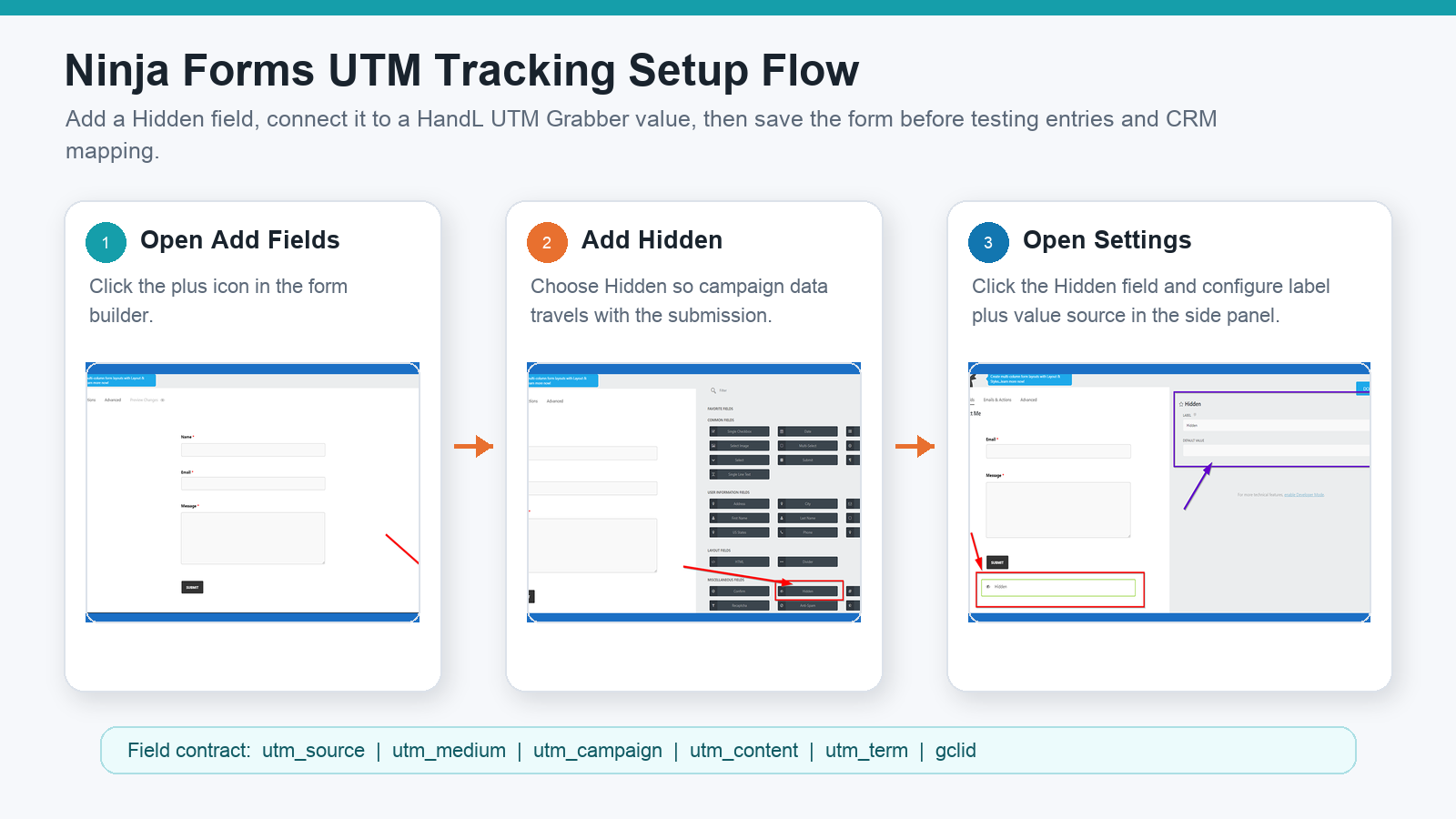
The UTM Grabber Ninja Forms docs show the practical setup:
- Open Ninja Forms in WordPress.
- Edit the form you want to track.
- Click the + button to add a field.
- Add a Hidden field.
- Click the Hidden field to open its settings panel.
- Name the field clearly, such as
UTM Campaign,GCLID, orFirst UTM Source. - Click the value/merge icon beside the field value.
- Select HandL UTM Grabber.
- Choose the value you want, such as UTM source, UTM campaign, landing page, or click ID.
- Click Done and save/publish the form.
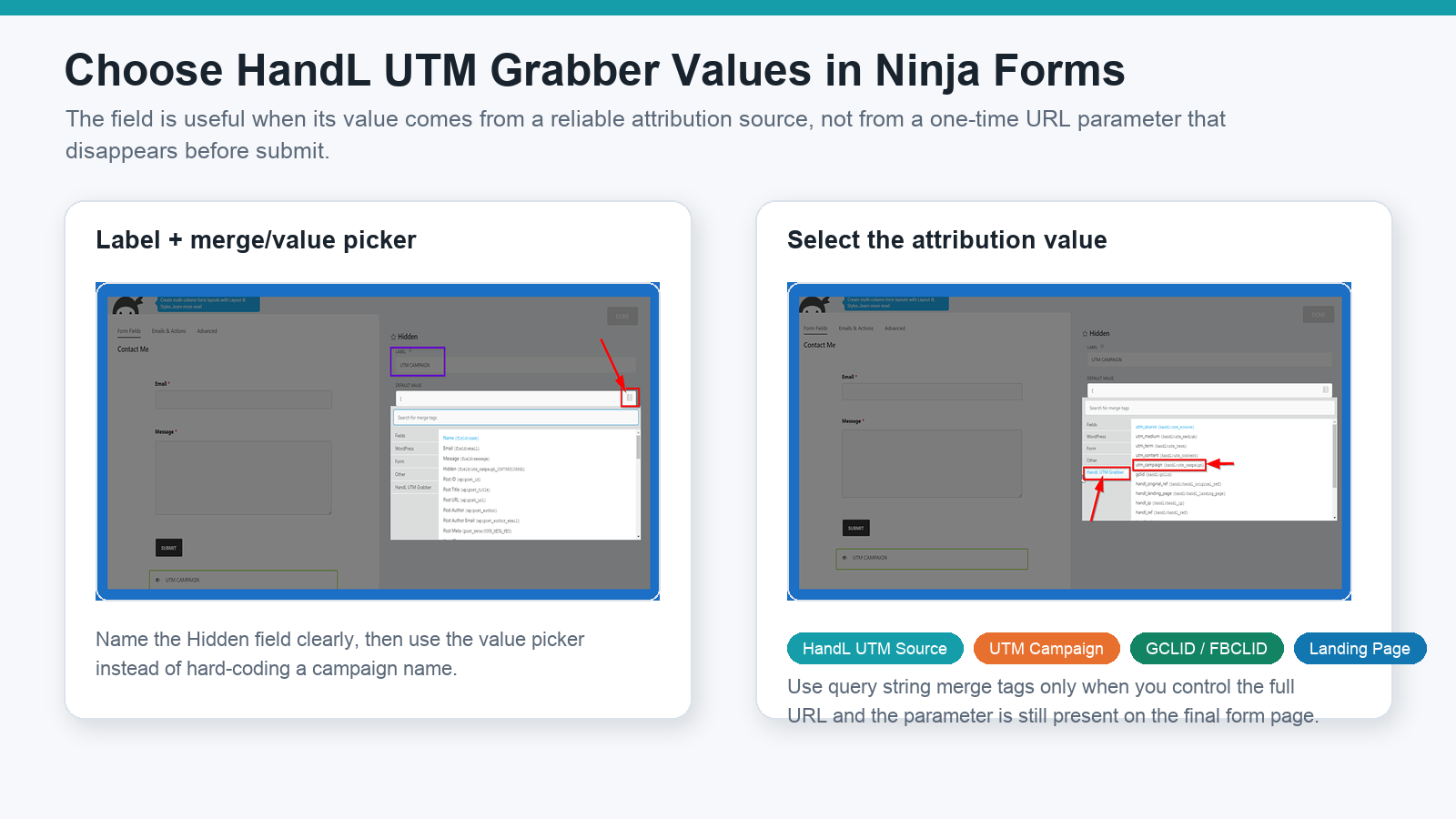
The important part is not just adding the Hidden field. It is choosing a reliable attribution value and using a stable field naming contract.
If one form calls the field utm_campaign, another calls it Campaign, and another sends Campaign Name, your CRM mapping will eventually drop or overwrite something.
Query strings are useful, but not enough for durable attribution
Ninja Forms has query string support through merge tags like:
{querystring:source}
That can work when the parameter is still present on the final form page. For example, if the visitor lands directly on:
https://example.com/contact/?source=facebook
Then a Ninja Forms field can receive facebook from the source key.
But paid-media attribution is usually messier:
- The visitor lands on one page and submits on another.
- The visitor returns later without the original query string.
- A redirect strips UTMs.
- A consent banner delays tracking.
- A cache layer serves the same blank HTML to many visitors.
- The funnel sends users across subdomains or third-party steps.
That is why relying only on query strings can create missing attribution. UTM Grabber's job is to capture and preserve campaign data so Ninja Forms can populate Hidden fields even when the original query string is no longer sitting in the browser address bar.
What fields should Ninja Forms capture?
Start with the parameters that your reporting, sales, and ad-platform feedback loops actually use.
| Field | Capture this when available | Used for |
|---|---|---|
utm_source | Source such as google, meta, linkedin, newsletter, partner, referral. | Channel and platform reporting. |
utm_medium | Medium such as cpc, paid_social, email, organic, affiliate. | Paid vs organic vs email grouping. |
utm_campaign | Campaign name or campaign ID. | Campaign-level ROI and lead quality. |
utm_term | Keyword, query, audience, or targeting signal. | Search and audience diagnostics. |
utm_content | Creative, placement, ad, button, or CTA variation. | Creative and A/B test reporting. |
gclid | Google Ads click ID. | Offline conversion upload and lead-quality feedback. |
gbraid / wbraid | Google Ads iOS-related click identifiers. | Google Ads conversion feedback in privacy-constrained traffic. |
fbclid, fbc, fbp | Meta click and browser identifiers where available and appropriate. | Meta attribution context, CAPI matching, and diagnostics. |
| landing page | First page of the session. | Funnel and landing page analysis. |
| referrer | Previous site or source when UTMs are missing. | Organic, referral, and dark traffic cleanup. |
| first-touch fields | first_utm_source, first_utm_campaign, etc. | Original source reporting and sales context. |
Do not collect every possible value only because it exists. Collect the fields that will drive budget allocation, lead routing, lead scoring, offline conversion uploads, and source-to-revenue reporting.
First-touch vs last-touch in Ninja Forms
Different teams ask different questions:
- Sales asks: What originally brought this lead to us?
- Paid media asks: Which final campaign created the conversion?
- RevOps asks: Can we keep both without corrupting the CRM?
That means you may want both first-touch and last-touch/current fields.
A practical Ninja Forms field contract might include:
utm_source
utm_medium
utm_campaign
utm_content
utm_term
gclid
fbclid
landing_page
referrer
first_utm_source
first_utm_medium
first_utm_campaign
The key is to decide what each field means. utm_campaign should not sometimes mean original campaign and sometimes mean final campaign. If you need both, name them separately.
Zapier, Make, and CRM mapping are where many Ninja Forms setups fail
The UTM Grabber docs include a Ninja Forms to Zapier integration path because the value usually needs to leave WordPress and reach business systems.
That handoff is where attribution often breaks.
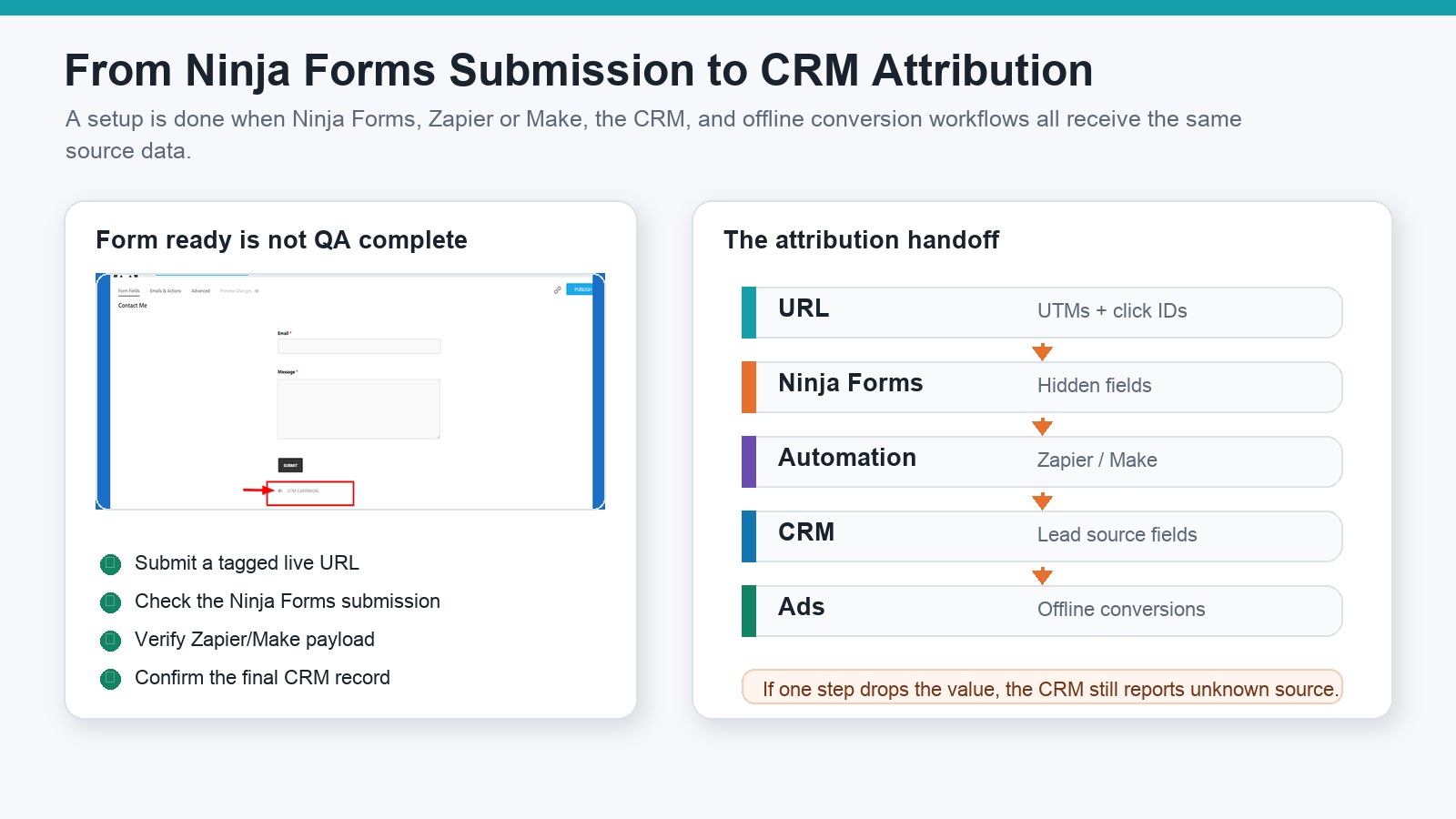
For each destination, verify the full path:
| Destination | What to check |
|---|---|
| Ninja Forms submission | Hidden fields are present and populated. |
| Email notification | The message includes attribution fields if humans need to see them. |
| Zapier | The trigger sample contains UTM and click ID fields, and each is mapped into the destination. |
| Make | The scenario sees the fields and passes them through later modules without renaming or dropping them. |
| HubSpot / Salesforce / Zoho / Pipedrive | Fields exist, are mapped, and are not overwritten by workflow rules. |
| Google Ads offline conversions | gclid, gbraid, or wbraid is captured and tied to the correct lead/conversion event. |
| Meta workflows | Meta click/browser context is collected only where appropriate for your consent and privacy posture. |
Automation success is not attribution success. A Zap can run successfully while ignoring utm_campaign.
Cache, consent, and timing can change the result
If you only test while logged into WordPress, you may miss the exact failure real visitors see.
Test with the same conditions as a real visitor:
- Logged out of WordPress.
- Incognito/private browser.
- Page cache active.
- CDN cache active.
- JavaScript defer/delay/minify settings active.
- Consent banner and CMP behavior active.
- GTM Consent Mode rules active.
- Real redirect chain from ad click to landing page to form page.
If the form submits before the attribution values are populated, your Hidden fields will be blank. If the CRM mapping expects a different field name, your Ninja Forms submission can be correct while the CRM remains empty.
QA the live Ninja Forms page like a payload
Use a test URL like:
?utm_source=google&utm_medium=cpc&utm_campaign=ninja_forms_test&utm_content=ad_a&utm_term=test_keyword&gclid=test-gclid
Then check the full chain:
- Submit the live public form while logged out.
- Confirm the Ninja Forms submission contains the Hidden field values.
- Confirm the email notification includes the values if needed.
- Confirm Zapier, Make, or webhook receives the same values.
- Confirm the final CRM lead/contact record stores the values.
- Navigate between pages and submit again to test persistence.
- Repeat after cache, consent, and optimization tools are active.
If the Ninja Forms submission is correct but the CRM is blank, the problem is downstream mapping. If the Ninja Forms submission is blank, the problem is field setup, value selection, timing, cache, consent, or URL persistence.
Common Ninja Forms UTM tracking mistakes
Mistake 1: Adding the Hidden field but not assigning the HandL value
The Hidden field has to receive data from somewhere. Select the HandL UTM Grabber value instead of leaving the default value empty.
Mistake 2: Depending only on query strings
Query strings are useful when the parameter is still present on the form page. They are not enough when users browse multiple pages, return later, or pass through redirects.
Mistake 3: Using inconsistent field names
utm_campaign, campaign, Campaign Name, and original_campaign are not the same field to Zapier, Make, or a CRM. Standardize the schema.
Mistake 4: Testing only the email notification
Email is useful for QA, but the CRM is where attribution needs to live. Always check the final record.
Mistake 5: Ignoring click IDs
UTMs explain campaign taxonomy. Click IDs can support ad-platform feedback. If you run Google Ads, capture gclid, gbraid, and wbraid where available. If you run Meta Ads, understand how fbclid, fbc, and fbp fit your consent and CAPI workflow.
Mistake 6: Letting redirects strip attribution
If the ad URL redirects through another URL, subdomain, scheduler, or checkout before Ninja Forms loads, campaign data can disappear before the form sees it.
Mistake 7: Assuming admin preview equals production
Admin preview can bypass cache, load scripts differently, and hide consent behavior. QA the public URL.
What good looks like
A healthy Ninja Forms UTM tracking setup has these traits:
- Every important Ninja Forms lead form uses the same attribution field schema.
- Hidden fields are connected to HandL UTM Grabber values.
- Submissions include UTMs, click IDs, referrer, landing page, and first-touch fields where useful.
- Email notifications, Zapier, Make, CRM, and offline conversion workflows receive the same values.
- Cache, consent, and optimization tools are part of the test plan.
- Marketing can connect campaign spend to qualified leads and sales outcomes.
Related references:
What broken Ninja Forms attribution costs
- Google Ads and Meta Ads receive weaker conversion feedback.
- Sales cannot prioritize leads by campaign, keyword, or source intent.
- Agencies spend hours reconciling Ninja Forms submissions, GA4, ad platforms, and CRM reports.
- Winning campaigns look weak because pipeline is detached from the original click.
- Budget shifts happen from partial attribution instead of actual lead quality.
The cost shows up later, when marketing and sales try to make decisions from incomplete source data.
The practical Ninja Forms implementation standard
- Use Ninja Forms Hidden fields for attribution values.
- Populate each field with the right HandL UTM Grabber value.
- Capture UTMs, click IDs, landing page, referrer, and first-touch fields where useful.
- Map every field into Zapier, Make, CRM, email platform, or offline conversion workflow.
- Verify the final CRM record from a live tagged URL.
Once this works on one high-volume form, make it the standard for every Ninja Forms lead form.
Why teams keep losing UTM data in Ninja Forms
How UTM Grabber helps
UTM Grabber gives WordPress teams a practical way to capture and preserve Ninja Forms attribution data without rebuilding every form from scratch.
- HandL UTM Grabber values for Ninja Forms Hidden fields.
- First-party UTM and click ID capture for WordPress attribution.
- Support for first-touch and last-touch attribution fields.
- Cleaner handoff into Ninja Forms submissions, notifications, Zapier, Make, CRMs, Google Ads offline conversions, and Meta workflows.
- A repeatable QA pattern for agencies, RevOps, and PPC teams.
Who should care about Ninja Forms UTM tracking
- WordPress teams using Ninja Forms for lead generation.
- Agencies responsible for client attribution and reporting.
- PPC teams sending Google Ads or Meta Ads traffic into Ninja Forms.
- RevOps teams trying to fix unknown lead source in the CRM.
- Founders who need to know which forms and campaigns actually create pipeline.
If campaign data affects budget, routing, lead scoring, sales follow-up, or offline conversion feedback, this is not optional instrumentation.
What real users are saying
Bring your highest-volume Ninja Forms lead form and we will help you find the break.
Sources checked: