
Vibe Code UTM Tracking and Attribution for My Site
Yes, you can absolutely vibe code UTM tracking and attribution for your site.
AI coding tools make it easier than ever to ask for a script that reads utm_source, utm_medium, utm_campaign, gclid, fbclid, or msclkid from the URL, stores those values in the browser, and pushes them into hidden form fields.
For a simple demo, that is not hard anymore.
The better question is:
Is it worth maintaining your own attribution system when ad spend, CRM reporting, lead quality, offline conversions, and revenue attribution depend on it?
Because UTM tracking looks like a small JavaScript task until the real world shows up: Safari tracking prevention, cookieless browsers, aggressive caching, embedded forms, iframe forms, Consent Mode, Google click IDs, Meta click IDs, cross-domain funnels, CRM field mapping, server-side events, bot traffic, and sales teams asking why the lead source is still blank.
That is the difference between a vibe-coded prototype and a battle-tested attribution layer.
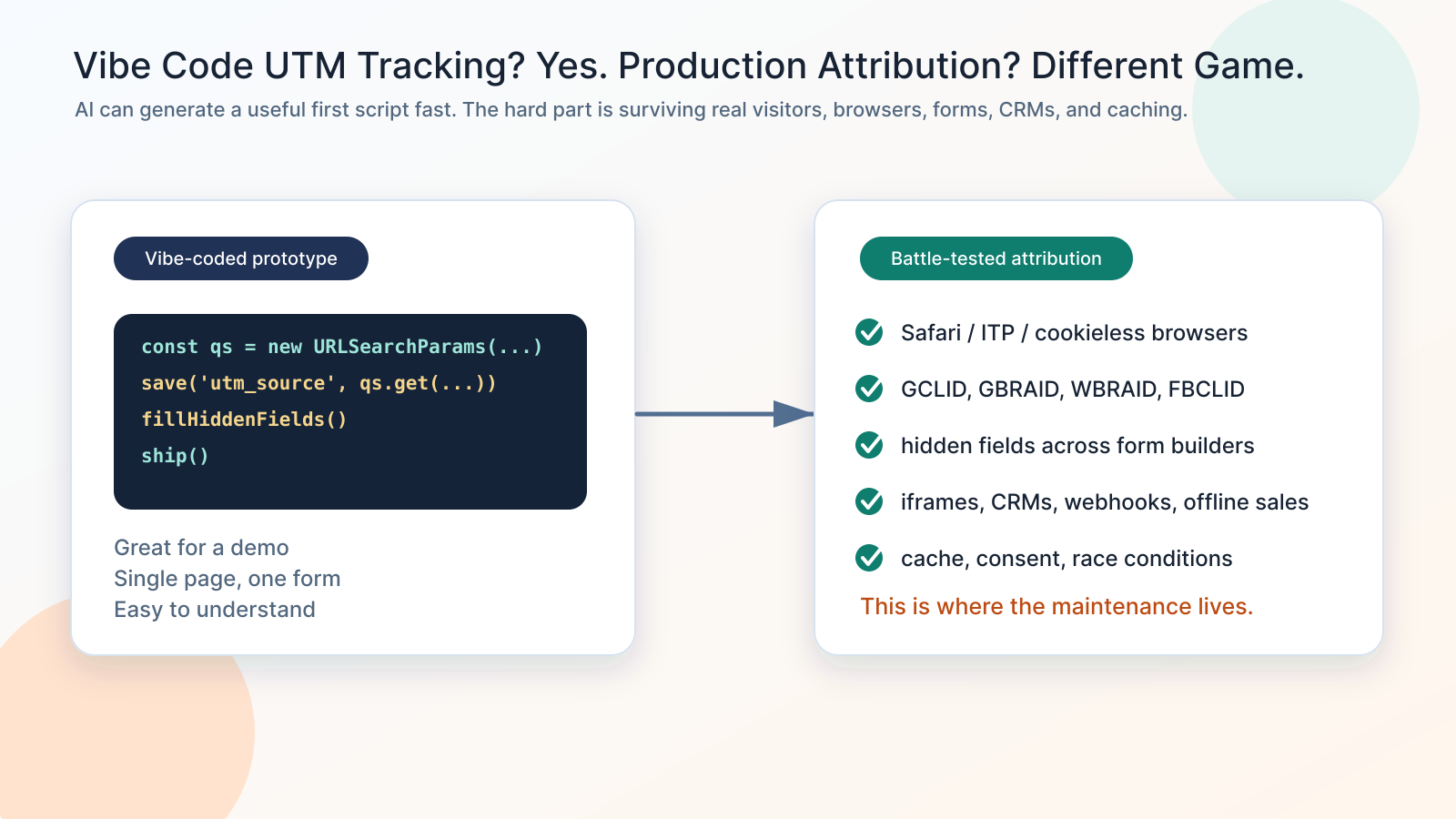
If you are thinking about vibe coding UTM tracking
- You want to capture UTM parameters and send them into your form, CRM, or order record.
- You asked ChatGPT, Claude, Cursor, or another AI tool to create a UTM tracking script.
- The script works on your landing page, but you are not sure what happens after the visitor clicks to another page.
- Hidden fields work in one form builder, but fail in Elementor, Contact Form 7, WPForms, HubSpot, GoHighLevel, Salesforce, or an iframe embed.
- Google Ads sends GCLID, GBRAID, or WBRAID, but the values disappear before the lead gets to the CRM.
- Meta sends fbclid, but your server-side CAPI event does not have the same journey context.
- You have caching, consent, or privacy tools that change when scripts run.
- You can build the script, but you do not want to own every browser, form, CRM, and ad-platform edge case forever.
The danger is not that AI cannot write the first version. The danger is thinking the first version is the system.
The honest answer: simple UTM tracking is vibe-codeable
What AI can build quickly
A basic UTM tracker is a perfect AI coding task.
You can describe the behavior in plain English:
“Read UTM parameters from the URL, store them in localStorage or cookies, and fill hidden fields before a form submits.”
An AI tool can usually generate something like:
In pseudo-code, the first version usually does four things:
- Read query parameters from the landing page URL.
- Store selected fields such as
utm_source,utm_campaign, andgclidin browser storage. - Find matching hidden form fields.
- Populate those fields before the form submits.
That is useful.
For a single-page campaign, one form, one browser test, and one CRM destination, this may be enough to prove the concept.
A vibe-coded UTM tracker can help with:
- Reading URL parameters with
URLSearchParams. - Saving first-touch or latest-touch values in
localStorageor cookies. - Filling hidden fields by field name.
- Appending UTMs to internal links.
- Passing attribution into a webhook payload.
- Logging values in the browser console for debugging.
- Creating a quick internal proof of concept.
So the argument is not “AI cannot do this.”
The argument is that production attribution is bigger than the first script.
What makes production UTM tracking hard
Google's own UTM documentation explains the basic idea: add campaign parameters to URLs so Analytics can identify the campaign that referred the traffic. Google Ads auto-tagging adds GCLID to destination URLs so Google Ads and Analytics can connect ad clicks to later behavior.
That is the clean version.
The messy version is what happens after the click.
A real attribution system needs to answer questions like:
- Did the visitor land with UTMs, GCLID, GBRAID, WBRAID, FBCLID, MSCLKID, or a referrer?
- Should this be first touch, latest touch, or both?
- Where should the data live: cookie, localStorage, sessionStorage, server session, CRM, or order meta?
- What happens when Safari limits tracking storage?
- What happens when the form loads after the tracking script?
- What happens when a cache serves a page without the original query string?
- What happens when a form is inside a third-party iframe?
- What happens when the funnel crosses domains or subdomains?
- What happens when Consent Mode or a CMP blocks scripts until opt-in?
- What happens when the lead is created in the CRM two minutes later, but the ad click happened three days ago?
- What happens when the sales team updates the opportunity to qualified, closed won, refunded, or no-show?
That is where a vibe-coded snippet becomes a maintained product.
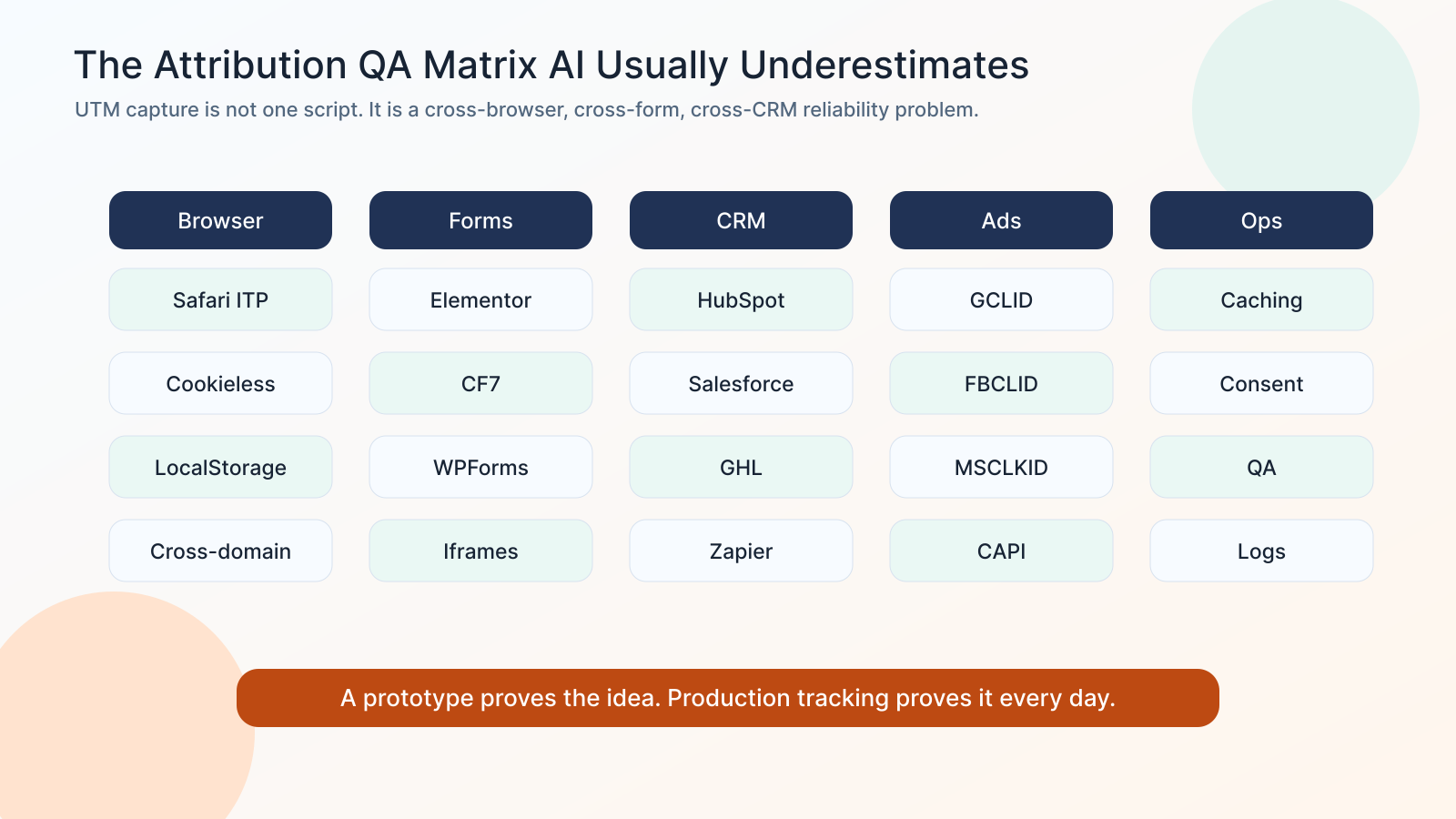
The browser problem: storage is not neutral anymore
A lot of DIY UTM scripts use localStorage because it is simple. MDN describes localStorage as storage saved across browser sessions for the document origin. That sounds perfect for attribution.
But browsers are no longer passive storage containers.
WebKit's Tracking Prevention documentation describes Safari's long-running work to reduce cross-site tracking. WebKit's ITP changes also targeted link decoration and script-writable website data in certain contexts.
In practical terms, this means:
- Browser behavior changes.
- Cookie and storage lifetime can be limited.
- Link decoration can be treated as tracking behavior.
- Private browsing and privacy tools can clear or partition data.
- Third-party embeds and iframes behave differently than first-party pages.
- A script that works in Chrome today may not preserve the same attribution window in Safari.
A vibe-coded tracker may capture the value. The production question is whether it captures it reliably enough for your attribution window.
The form problem: hidden fields are not one thing
“Fill the hidden field” sounds simple until you deal with real form builders.
Elementor, Contact Form 7, WPForms, Formidable Forms, Ninja Forms, WS Form, Forminator, HubSpot, GoHighLevel, Salesforce Web-to-Lead, and custom React forms all have different timing, markup, field naming, validation, rendering, and submission behavior.
The hidden field can fail because:
- The field name does not match the script selector.
- The form renders after the script runs.
- The form rerenders and clears values.
- The field exists in the builder but is not included in the final submission.
- The field is inside an iframe.
- The field is mapped in the form, but not mapped into the CRM.
- The webhook sends the field, but Zapier or Make drops it.
- The CRM accepts the field on Lead but does not map it to Contact, Account, Opportunity, or Deal.
A working hidden field on one page does not prove attribution works across the funnel.
The caching problem: the server may never see the query string
Aggressive caching is good for performance.
It is also one of the classic ways UTM tracking breaks.
If a WordPress host, plugin cache, CDN, edge cache, or page optimization layer serves a cached page without honoring query-string behavior, server-side code may not see the original UTMs. This is why relying only on PHP request values can fail on modern cached WordPress stacks.
A client-side tracker can help because it runs in the browser after the page is served.
But even client-side tracking has timing problems:
- The form may submit before the script populates fields.
- GTM may load late.
- Consent banners may delay scripts.
- Optimization plugins may defer, minify, combine, or reorder scripts.
- The landing page may be cached differently than the form page.
- Single-page apps may change routes without page reloads.
This is why UTM tracking needs QA across the exact site stack, not only a code snippet.
The ad-platform problem: UTMs are only part of attribution
UTMs help explain campaign source, medium, campaign, term, and content.
But paid media attribution often depends on click IDs too:
- GCLID for Google Ads auto-tagging.
- GBRAID and WBRAID for some Google Ads iOS and privacy-safe attribution paths.
- FBCLID and Meta's
fbcvalue for Meta click attribution. - MSCLKID for Microsoft Ads.
- Other platform IDs for TikTok, LinkedIn, Reddit, and affiliate networks.
A vibe-coded script that only stores utm_source and utm_campaign may look successful while silently losing the identifiers that offline conversions, enhanced conversions, CAPI matching, and CRM revenue attribution need.
The actual requirement is not “save UTMs.”
It is “preserve every useful attribution identifier from click to conversion to CRM outcome.”
The CRM problem: capture is not the same as reporting
Attribution becomes useful when it reaches the business record.
For lead generation, that means the data must survive:
- Landing page.
- Form page.
- Hidden field population.
- Form submission.
- Email notification.
- Webhook.
- CRM lead creation.
- Lead-to-contact conversion.
- Opportunity or deal creation.
- Sales stage updates.
- Offline conversion upload.
A DIY script may get the value into the browser. That is step one.
The harder work is making sure the same value reaches HubSpot, Salesforce, GoHighLevel, Marketo, ActiveCampaign, Zapier, Make, Google Sheets, WooCommerce, or a custom CRM in a way your team can report on.
No data in the CRM means no attribution, even if the browser script worked perfectly.
The hidden cost of vibe-coded attribution
The first version is cheap. The second year is where the cost shows up.
You have to maintain:
- Browser privacy changes.
- New ad platform click IDs.
- New form-builder updates.
- CRM field mapping changes.
- Consent and CMP behavior.
- Caching and CDN changes.
- Cross-domain funnel changes.
- Server-side and client-side event consistency.
- Debug logs and QA tools.
- Support requests when a lead source goes blank.
That maintenance cost is easy to underestimate because the first script feels small.
But attribution is not a one-time feature. It is a living contract between your ads, site, forms, browser storage, CRM, analytics, and sales process.
If your team has the engineering time and appetite, building it can be worthwhile.
If your team wants reliable lead-source data while focusing on campaigns and revenue, buying a battle-tested layer is usually cheaper than rediscovering every edge case yourself.
When vibe coding your own UTM tracker makes sense
Vibe coding can be a good choice when:
- You need a quick prototype or internal proof of concept.
- You have one landing page and one form.
- You are not spending much on paid media yet.
- You only need latest-touch UTMs for light reporting.
- You have an engineer who will own QA and maintenance.
- You are comfortable losing some attribution in edge cases.
- You understand that the script must be tested across browsers, devices, forms, and CRM records.
In other words: vibe code it when the cost of being wrong is low.
That is a perfectly reasonable stage for many businesses.
When DIY UTM tracking becomes risky
Why UTM Grabber is different from a quick script
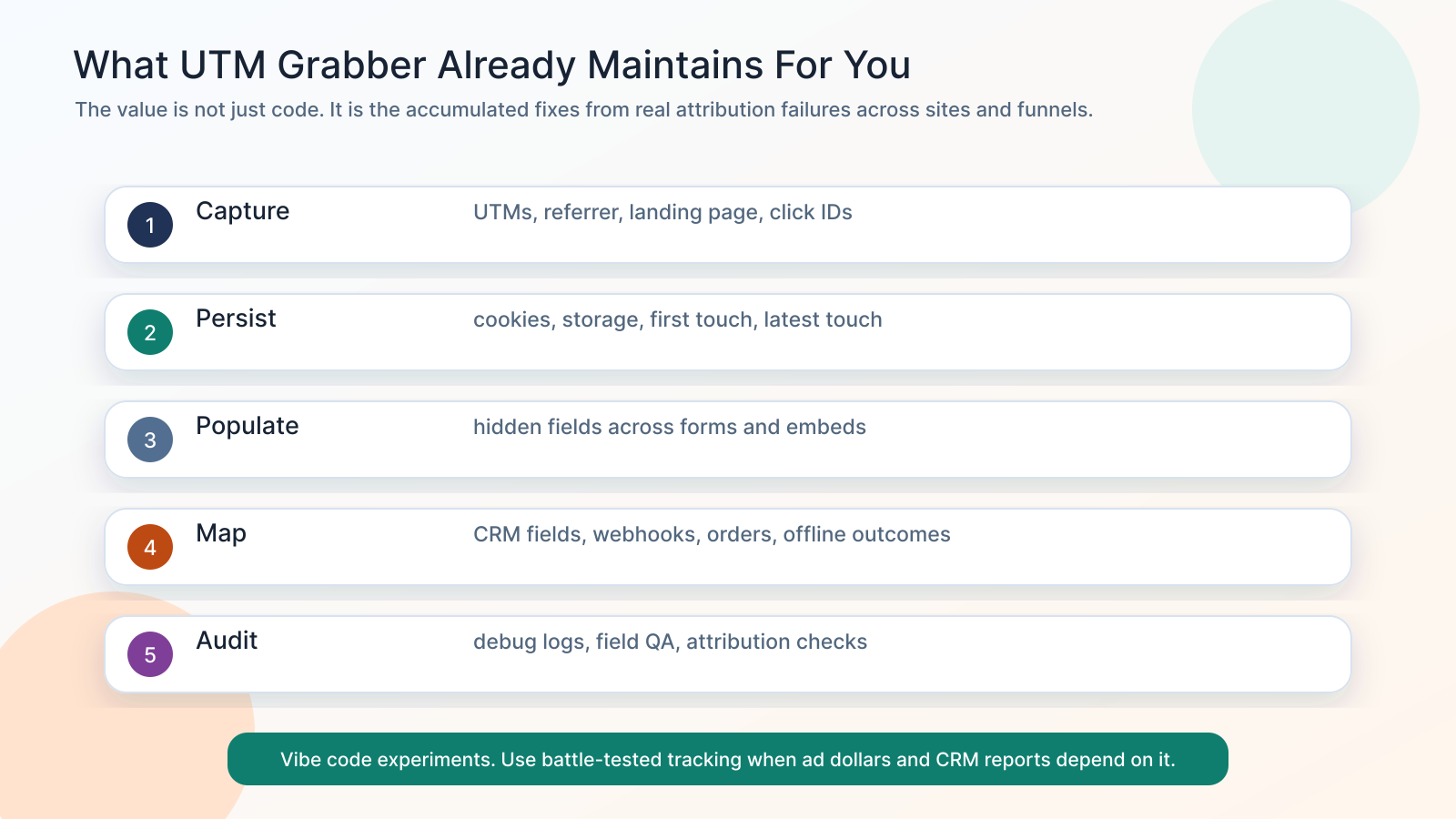
UTM Grabber is not just UTM capture code. It is 15 years of attribution edge cases packaged into a maintained tracking layer.
- Captures UTMs, referrer, landing page, click IDs, first touch, and latest touch.
- Populates hidden fields across many WordPress forms, CRMs, ecommerce flows, and integrations.
- Handles real-world timing issues like delayed forms, cached pages, and script execution order.
- Preserves Google, Meta, Microsoft, and other click IDs for CRM and offline conversion workflows.
- Supports the practical work marketers actually need: lead source tracking, form attribution, CRM mapping, WooCommerce orders, and ad-platform feedback loops.
- Helps reduce the support burden of “why is this field blank?” across browsers, devices, form builders, and campaigns.
A practical build-vs-buy decision framework
Choose vibe coding when you want learning and speed
Build your own if your primary goal is to understand the mechanics.
You will learn how query parameters work, how browser storage behaves, how form fields are populated, and how CRM mapping breaks. That knowledge is valuable.
A good vibe-coded prototype should include:
- A list of parameters to capture.
- First-touch and latest-touch rules.
- Storage method and expiration policy.
- Hidden field selector strategy.
- Form submission QA.
- CRM field mapping.
- Browser test matrix.
- A debug mode.
- A suppression rule for staging, internal traffic, and bots.
If that list sounds fun, build it.
Choose UTM Grabber when you want reliability and support
Use UTM Grabber when you want the attribution problem handled so you can focus on campaigns, offers, landing pages, and sales outcomes.
This is especially true if:
- You use WordPress.
- You have multiple forms or CRMs.
- You run paid traffic.
- You need source data in the CRM.
- You need click IDs preserved.
- You have caching or consent complexity.
- You want first-touch and latest-touch data.
- You need attribution to survive across real customer journeys.
A vibe-coded script can be a good starting point.
UTM Grabber is for the point where “mostly works” is no longer good enough.
The best compromise: vibe code around the edges, not the core
A smart middle ground is to use UTM Grabber for the core attribution layer, then vibe code custom reporting, dashboards, QA utilities, alerts, or CRM cleanup tools around it.
That lets AI help where it shines:
- Building internal dashboards.
- Comparing CRM fields to ad platform reports.
- Finding blank attribution fields.
- Generating UTM naming checkers.
- Creating QA scripts.
- Summarizing lead-source anomalies.
- Exporting campaign performance views.
Do not spend your AI leverage rebuilding the part that has to survive every browser and form builder change.
Use AI to extend the system, not to inherit every attribution edge case from scratch.
Quick checklist before you vibe code UTM tracking
Before you decide to build your own, answer these:
- Which parameters do you need: UTMs, GCLID, GBRAID, WBRAID, FBCLID, MSCLKID, referrer, landing page?
- Do you need first touch, latest touch, or both?
- How long should attribution persist?
- What happens in Safari and privacy-focused browsers?
- Does your cache preserve or strip query strings?
- Which form builders need hidden fields populated?
- Are any forms embedded in iframes?
- Which CRM fields must be mapped?
- What happens after lead-to-contact or lead-to-opportunity conversion?
- Do you need WooCommerce order attribution?
- Do you need Google Offline Conversions, Enhanced Conversions, Meta CAPI, or lifecycle events?
- How will you detect blank or stale attribution fields?
- Who owns the tracking when it breaks?
If you have crisp answers, DIY may be reasonable.
If those questions open up a second project, that is the product hiding inside the snippet.
Related references
- The Complete Tracking Failure Audit
- WP Engine Caching and UTM Tracking
- How to Track UTM Parameters in HubSpot Forms
- How to Track UTM Parameters in Salesforce
- Stape Meta CAPI Gateway: Why It Is Not Enough for Multi-Step Funnels
Sources checked:
- Simon Willison on vibe coding and the original Karpathy phrasing
- Google Analytics URL builder and UTM campaign parameter documentation
- Google Ads auto-tagging and GCLID documentation
- MDN localStorage documentation
- WebKit Tracking Prevention documentation
- WebKit Intelligent Tracking Prevention 2.3
- UTM Grabber documentation
Vibe code the experiments. Use UTM Grabber when attribution data has to survive browsers, caching, forms, CRMs, and real ad spend.