
Stape Meta CAPI Gateway: Why Pixel Mirroring Is Not Enough for Multi-Step Funnels
Stape, server-side GTM, and Meta Conversions API Gateway can absolutely improve Meta tracking. They can help recover browser-side signal loss, route events through a server endpoint, improve event coverage, and make Pixel + CAPI deduplication easier to manage.
But here is the part many advertisers miss:
A mirrored Pixel event is not the same thing as a complete conversion story.
If your funnel has multiple steps, multiple domains, a quiz, a booking tool, a checkout, a CRM handoff, a sales call, or an offline close, the final conversion touch may not contain the data Meta needs to optimize ads properly. The event might fire. Deduplication might look fine. Events Manager might show a server event. But the payload can still be too thin, too late, or missing the journey context that proves which visitor became a qualified lead, booked appointment, purchase, or high-LTV customer.
That is where the real power shifts from Pixel mirroring to journey memory.
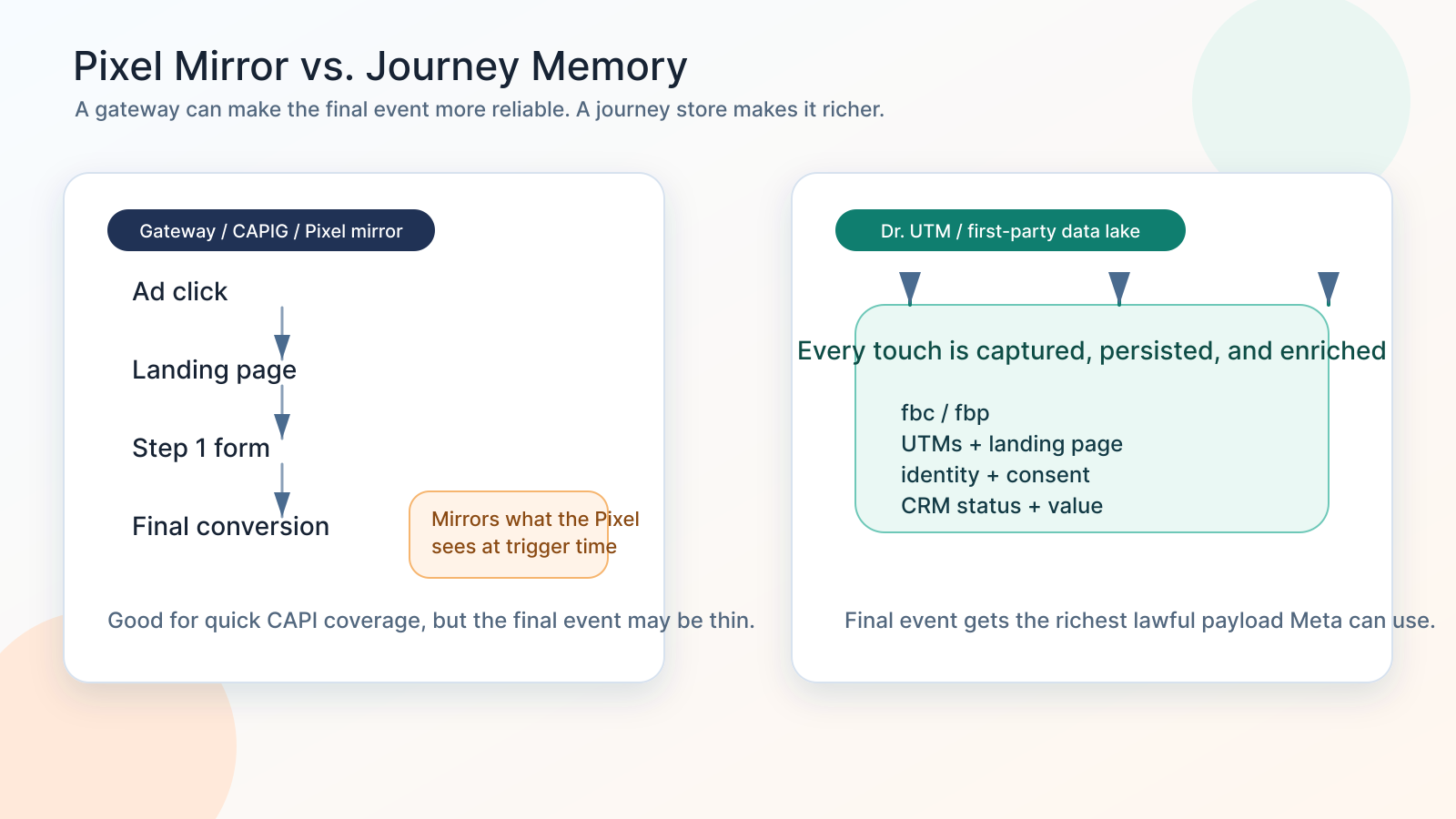
A platform like Dr. UTM is built around that idea: capture the journey early, persist it in a first-party data layer, enrich it as the user moves through the funnel, and send the richest lawful payload at the moment the conversion event fires.
If your Meta CAPI is connected but performance still feels wrong
- You installed Stape Meta CAPI Gateway, Meta Conversions API Gateway, or server-side GTM, but CPA is still rising.
- Events Manager shows server events, but Event Match Quality, event coverage, or deduplication is inconsistent by event.
- Your final Lead or Purchase event fires, but it does not contain first-touch source, click IDs, landing page, quiz answers, lead quality, CRM status, or order context.
- A partner integration sends basic standard events, but your actual funnel uses custom steps, custom carts, bookings, phone calls, or offline sales.
- The browser Pixel is treated as the source of truth even though the browser never sees everything the CRM, backend, or sales team knows.
- Your Meta algorithm is optimizing for raw leads instead of qualified leads, showed appointments, closed revenue, or high-value customers.
- You need to know whether to use CAPI Gateway, Stape-hosted server GTM, direct Meta CAPI, or a data lake in between.
The trap is assuming connected means complete. Meta can receive an event and still not receive the full story your funnel already knows.
The main idea: coverage is not intelligence
What Stape Meta CAPI Gateway and Meta CAPIG are good at
Gateway-style implementations solve a real problem. Stape describes its Meta Conversions API Gateway as a low-lift way to implement Facebook or Meta CAPI with no manual tagging, especially when the advertiser wants Meta CAPI only and does not need a broader server-side tracking architecture.
Stape's own documentation and webinar materials also make the architecture clear: the gateway depends on Meta Pixel events. When the Pixel detects an event, the gateway can send a server-side version of that event through Conversions API. Deduplication is handled automatically for that gateway path.
That is useful when the goal is:
- Faster Meta CAPI coverage without a custom backend project.
- Lower maintenance for a simple Pixel-based web funnel.
- A first-party server endpoint for Meta events.
- Automatic deduplication inside the gateway path.
- A quick implementation for advertisers without tracking engineers.
So this is not an anti-Stape argument. It is an architecture argument.
Gateway-style CAPI is often a good first step. It is not always the final data strategy.
The limitation: a mirror can only reflect what it sees
A Pixel mirror can only send what the Pixel event knows at the time it fires.
That sounds obvious, but it is the exact reason multi-step funnels lose signal.
Think about a lead generation funnel:
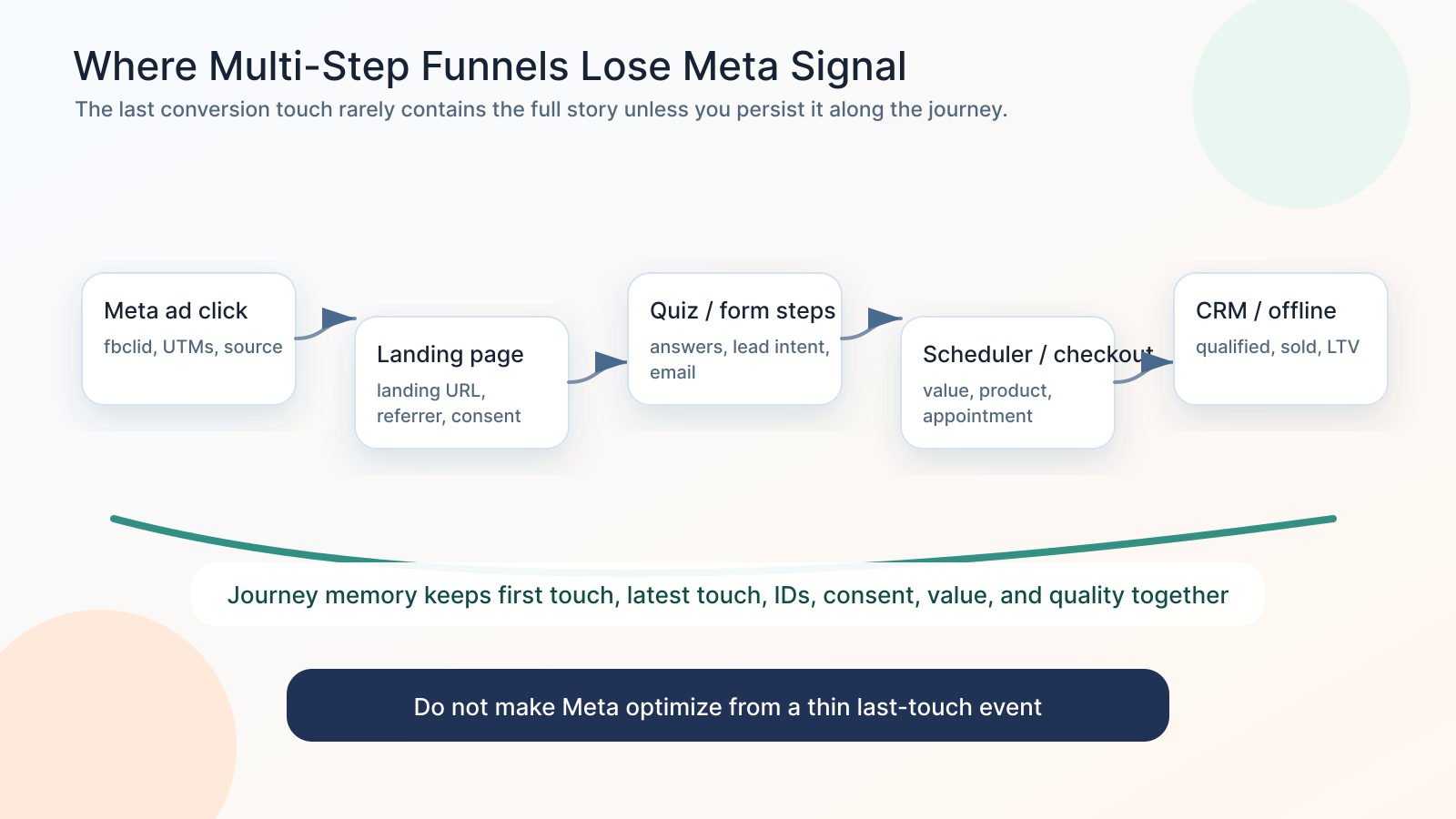
- A user clicks a Meta ad and lands with fbclid, UTMs, and landing page context.
- They browse two pages, then start a quiz.
- They enter email on step three.
- They book a call in an embedded scheduler.
- A sales rep qualifies the lead in the CRM two days later.
- The deal closes offline after a phone call.
If your only server-side path mirrors the Pixel event at the booking confirmation page, Meta may receive a clean server event, but the event can still be missing the richer truth:
- The original fbc value from the first ad click.
- The original fbp browser identifier.
- First-touch and latest-touch UTM fields.
- Landing page and referrer.
- Email, phone, name, city, state, ZIP, and country in the correct normalized format.
- Consent state at capture and conversion time.
- Quiz answers or qualification fields.
- CRM lead ID or external ID.
- Appointment status, pipeline stage, revenue, or expected value.
- Product IDs, SKU variants, content IDs, or subscription context.
That is the difference between “Meta received an event” and “Meta received an event it can optimize from.”
Why multi-step funnels are harder than a basic checkout
A simple ecommerce store has a more direct path: product page, add to cart, checkout, purchase. Even there, custom carts and app-based checkout can create tracking gaps.
A multi-step lead or high-ticket funnel is harder because the valuable conversion is often not the first form submit.
The real optimization target may be:
- Qualified lead.
- Booked appointment.
- Showed appointment.
- Approved application.
- Sales qualified opportunity.
- Closed won deal.
- Funded loan.
- Delivered treatment plan.
- Subscription renewal.
- High-LTV customer segment.
The browser Pixel usually does not own those states. Your CRM, booking system, call center, backend, or data warehouse owns them.
So if you rely only on a Pixel-mirror path, the final event may answer, “Did a page fire a Pixel event?”
It may not answer, “Was this the kind of customer Meta should find more of?”
The Meta CAPI deduplication piece still matters
Meta's Conversions API deduplication documentation centers on the relationship between browser and server events. For the recommended method, the browser Pixel event ID needs to match the server-side CAPI event ID, and the event name needs to match too. Meta also documents fbp and external ID based deduplication options when those identifiers are passed consistently.
This is why the event identity contract is non-negotiable:
| Requirement | What can go wrong |
|---|---|
| Same event name | Browser sends Lead while server sends CompleteRegistration or a custom name. |
| Same event ID | Pixel generates one ID while server generates another. Meta sees two events. |
| Same user context | Server event lacks fbp, fbc, IP, user agent, or hashed customer data. |
| Reasonable timing | Events arrive too late or out of sequence, making debugging harder. |
| One source per event path | Multiple plugins, gateway paths, and server tags send the same event. |
But deduplication is only one layer.
A perfectly deduplicated event can still be a weak optimization signal if the payload is missing the customer and journey data.
Event Match Quality is about user data, not just server-side delivery
Meta's customer information parameter documentation lists the identifiers advertisers can send with events, including hashed contact fields like email and phone, plus non-hashed fields like client IP address, client user agent, fbc, and fbp. Meta also notes that the browser can automatically include some information, while server events often require you to manually configure those fields.
That matters because a server-to-server event is not magically rich.
If the server event comes from a gateway that only mirrors a thin browser event, the server route may be stronger than the browser route, but the payload still may not include the full customer context.
Server-side tracking is transport. Data quality is payload.
A strong Meta CAPI event should try to include, where lawful and consented:
- event_name and event_id that align with the browser event.
- event_time, action_source, and event_source_url.
- client_ip_address and client_user_agent from the real visitor, not your server.
- fbp and fbc captured and persisted from the browser journey.
- Hashed email, phone, first name, last name, city, state, ZIP, and country when available.
- external_id that maps to your user, lead, contact, booking, or order.
- Value, currency, content IDs, product data, lead status, or funnel-specific custom data.
- Consent state and policy controls appropriate for your business and region.
Where Stape, server-side GTM, or Meta CAPI is still justified
The right answer is not “gateway bad, custom good.” The right answer is: use the simplest architecture that can preserve the signal your business actually needs.
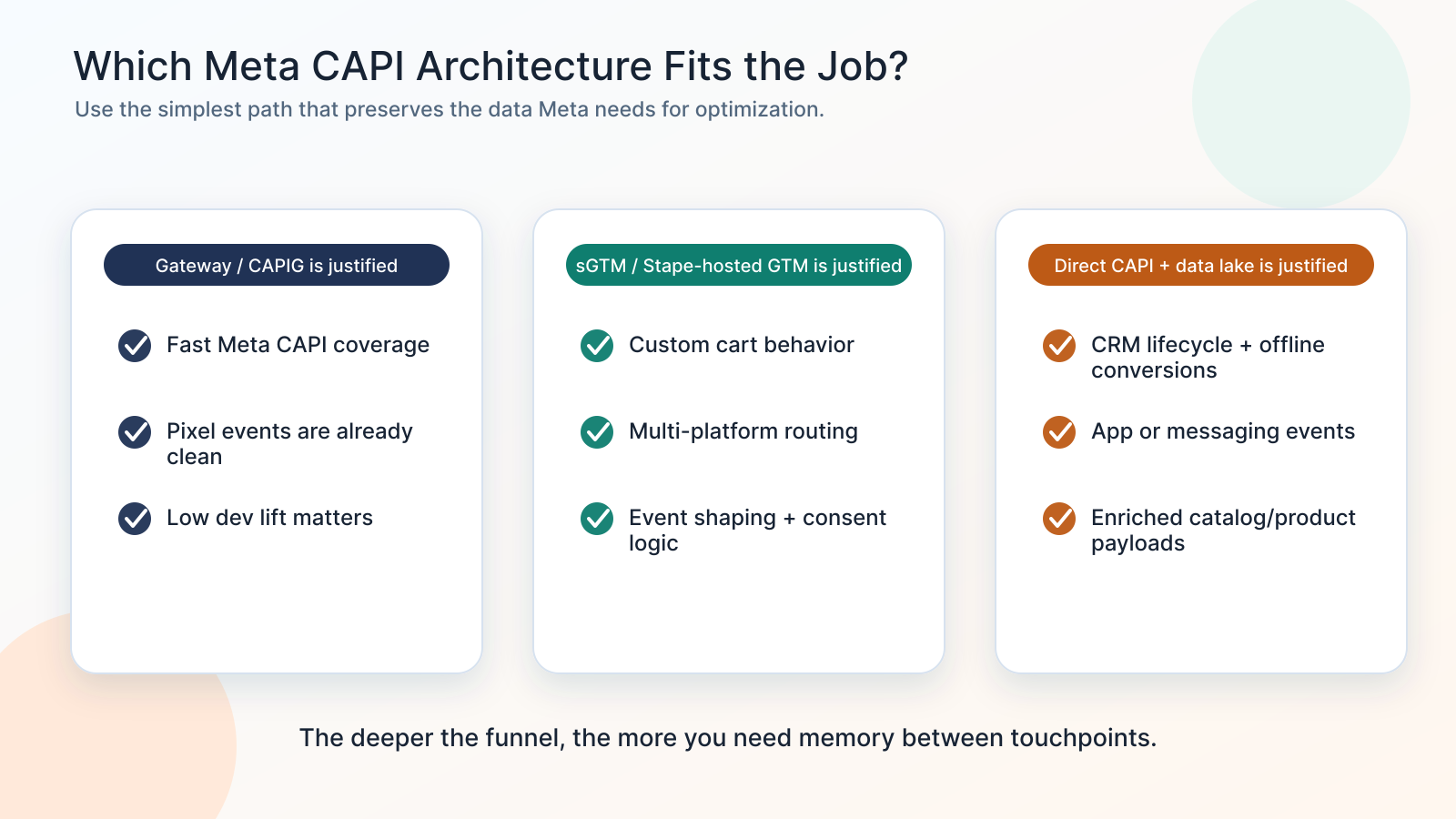
Here are the situations where a Stape-style implementation, server-side GTM, or direct Meta CAPI setup is strongly justified.
1. Custom events outside the partner integration
Partner integrations are usually designed around common standard events: PageView, ViewContent, AddToCart, InitiateCheckout, Lead, Purchase.
But many serious funnels have business-specific events:
- QuizCompleted.
- ApplicationStarted.
- ApplicationApproved.
- CallBooked.
- CallShowed.
- QuoteGenerated.
- TrialActivated.
- LeadQualified.
- DealWon.
If the partner integration does not know those events exist, it cannot send them accurately.
This is where server-side GTM or direct CAPI can be justified. You can define the exact business event, map it to a Meta standard event when appropriate, send a custom event when needed, and include the data that makes the event useful.
2. Custom cart and add-to-cart behavior
AddToCart looks simple until the cart is not simple.
Modern carts often include:
- AJAX add-to-cart.
- Mini-cart interactions.
- Bundles and kits.
- Upsells and order bumps.
- Subscription toggles.
- Variant selectors.
- Financing or appointment-first flows.
- Headless checkout.
- Multiple domains or subdomains.
A partner plugin may fire AddToCart, but it may not include the right content IDs, quantity, value, currency, SKU, product group, or subscription context.
A custom CAPI or server-side GTM layer lets you shape the event around the actual cart behavior instead of hoping the default plugin sees it.
3. Lead lifecycle or CRM events
For lead generation, the first form submit is often a noisy event.
Meta does not need more low-quality leads. It needs feedback about which leads became real opportunities.
This is where CRM events matter:
- Lead received.
- Lead contacted.
- Qualified lead.
- Appointment booked.
- Appointment showed.
- Proposal sent.
- Closed won.
- Closed lost.
- Revenue collected.
A Pixel mirror cannot see those states unless they are pushed back into the tracking architecture. A data lake or first-party attribution store can connect the original visitor journey to later CRM outcomes and send the right lifecycle events back to Meta through CAPI.
This is one of the biggest gaps in multi-step funnel tracking: the conversion that teaches Meta the most often happens after the website session is over.
4. Offline conversions
Offline conversions are not optional for businesses where revenue happens away from the website.
Examples include:
- Phone sales.
- In-person appointments.
- Medical or dental treatment plans.
- Auto sales.
- Real estate leads.
- Franchise inquiries.
- B2B deals.
- Loan approvals.
- Insurance applications.
The website may generate the lead, but the real value is created later in a CRM, call center, POS, or backend system.
For these businesses, direct CAPI and offline event pipelines are justified because the browser cannot send what it never sees.
The key is to carry the original attribution identifiers forward: fbc, fbp, UTMs, landing page, click IDs, external ID, lead ID, and consent context. Then, when the offline outcome occurs, you send Meta a richer event tied back to the original journey.
5. App or messaging events
Some conversions happen in places where the website Pixel is not the right source of truth:
- Mobile apps.
- WhatsApp conversations.
- Messenger flows.
- SMS-based sales processes.
- Call tracking platforms.
- Chat widgets.
- Booking tools.
Gateway-style web tracking can help with web events, but app and messaging workflows usually need their own event source. That may mean app events, webhook-based CAPI events, CRM-triggered events, or a broader event-routing system.
6. Enriched catalog or product events where partner payloads are too thin
Meta's algorithm can use product and catalog context when the event payload is clean.
Default partner payloads can become too thin when you have:
- Complex catalogs.
- Product variants.
- Bundles.
- Custom product IDs.
- Marketplace-style inventory.
- Lead forms tied to products or services.
- High-ticket products with delayed purchase cycles.
- Subscription or recurring revenue logic.
If the partner integration sends a Purchase without the right content IDs, value, currency, quantity, category, or product group, the event can be technically valid but strategically weak.
A richer server-side payload can help Meta understand which products, customers, and conversion values matter.
The hidden cost of a thin Meta CAPI payload
A thin payload creates a quiet performance tax.
You may see events in Events Manager. You may see a green check. You may even see deduplication working. But Meta may still be learning from weak examples.
That can show up as:
- Higher CPA because the algorithm cannot identify enough matched converters.
- Lower lead quality because campaigns optimize for form fills instead of qualified outcomes.
- Poor retargeting because audiences are built from incomplete identity data.
- Bad creative decisions because reporting overweights the wrong conversion paths.
- Broken offline optimization because sales outcomes are never sent back.
- Fragile debugging because event IDs, fbc, fbp, and CRM IDs are not logged together.
The expensive mistake is paying for traffic while starving the algorithm of the data your business already collected.
What a stronger Meta CAPI architecture looks like
A mature Meta CAPI setup does not only forward events. It remembers the journey.
It should:
- Capture fbclid, fbc, fbp, UTMs, referrer, landing page, and device context on the first visit.
- Persist that data through multi-step forms, iframes, booking tools, carts, and cross-domain paths.
- Store a stable external_id that can connect browser activity, form submission, CRM contact, booking, order, and offline close.
- Enrich the final event with lawful customer information, value, product data, lifecycle status, and consent state.
- Send matching browser and server events with the same event name and event ID when dedupe is needed.
- Send CRM and offline lifecycle events when the real business outcome happens after the session.
- Monitor Event Match Quality, event coverage, deduplication, data freshness, and sampled activities by priority event.
The best version of this architecture is boring in the right way: every important event has a known source, known IDs, known payload, known consent state, and known destination.
Why adding more tags does not fix this
Where Dr. UTM fits
Dr. UTM acts as the journey memory between the ad click and the final conversion event.
- Capture first-party attribution data before it disappears.
- Persist UTMs, click IDs, fbc, fbp, landing page, referrer, form fields, and CRM IDs across the funnel.
- Enrich Meta CAPI events when the visitor becomes a lead, booking, purchase, qualified opportunity, or offline sale.
- Help Meta optimize toward the outcomes that actually create revenue, not just the page event the Pixel happened to see.
- Connect web forms, CRM stages, offline conversions, custom events, and product data into a cleaner CAPI payload strategy.
Learn more at drutm.com.
Who should care about this
This matters most if you run:
- Multi-step lead funnels.
- High-ticket sales funnels.
- Appointment, booking, or consultation funnels.
- Ecommerce stores with custom carts or product logic.
- Shopify, WooCommerce, or headless checkout flows with custom behavior.
- GoHighLevel, HubSpot, Salesforce, or other CRM-driven sales processes.
- Offline conversion programs for calls, appointments, show rates, sales, or revenue.
- Meta campaigns where CPA, ROAS, EMQ, or lead quality changed after a tracking update.
If your conversion happens in one clean browser session, a gateway may be enough. If your revenue happens across a journey, you need memory.
A practical decision framework
Choose CAPI Gateway when speed matters and the Pixel event is already complete
Use Meta CAPI Gateway or Stape Meta CAPI Gateway when:
- You mainly need Meta CAPI for standard web Pixel events.
- You do not have custom backend events, CRM lifecycle events, or offline outcomes.
- Your Pixel events already contain enough event and user data.
- You want lower maintenance and faster implementation.
- You understand that the gateway is not your full attribution warehouse.
Choose server-side GTM when you need control over event shaping
Use Stape-hosted server GTM or another server-side GTM setup when:
- You need to route events to multiple platforms.
- You need to filter, transform, or enrich events before they reach Meta.
- You have custom cart behavior or custom conversion events.
- You need stronger consent routing and debugging controls.
- You have a technical team or tracking partner that can maintain the setup.
Choose direct CAPI plus a data lake when the funnel creates data over time
Use direct CAPI with a first-party journey store when:
- The most valuable event happens in the CRM or offline.
- You need to connect first touch, latest touch, identity, and value.
- You want Meta to optimize for qualified leads, appointments, sales, or LTV.
- You need stable IDs across browser, form, CRM, booking, purchase, and offline close.
- Partner or gateway payloads are too thin for your business logic.
The best architecture may combine layers carefully
A mature setup may use more than one layer, but each layer needs a clear job.
For example:
- Gateway for basic web event recovery.
- Server-side GTM for controlled event routing and transformation.
- Data lake for journey persistence and CRM/offline enrichment.
- Direct CAPI for lifecycle events that the Pixel never sees.
The rule is simple:
Do not send duplicate versions of the same event unless the browser and server events share the same deduplication contract. Do not send thin events when your business already knows richer data.
Related references
- How to Improve Meta Event Match Quality (EMQ)
- Meta Ads Event ID, Deduplication, and EMQ Problems After April 2026
- The Complete Tracking Failure Audit
- HIPAA Conversion Tracking: Meta CAPI, Google Ads, and PHI
Sources checked:
- Stape Meta Conversions API Gateway page
- Stape CAPIG common errors and FAQ
- Stape comparison of server-side GTM and gateways
- Stape and Meta webinar notes on CAPIG vs server-side GTM
- Meta documentation on deduplicating Pixel and Conversions API events
- Meta customer information parameter documentation
- Dr. UTM
The goal is not just more server events. The goal is better events: clean IDs, richer payloads, CRM feedback, and journey memory Meta can actually learn from.