
WP Engine Caching and UTM Tracking: Why Client-Side Capture Is the Safe Fix
If your WordPress site is hosted on WP Engine and your UTM parameters, gclid, fbclid, hidden fields, lead source, or CRM attribution keep disappearing, the problem is usually not your ads.
It is the layer where you are trying to capture the data.
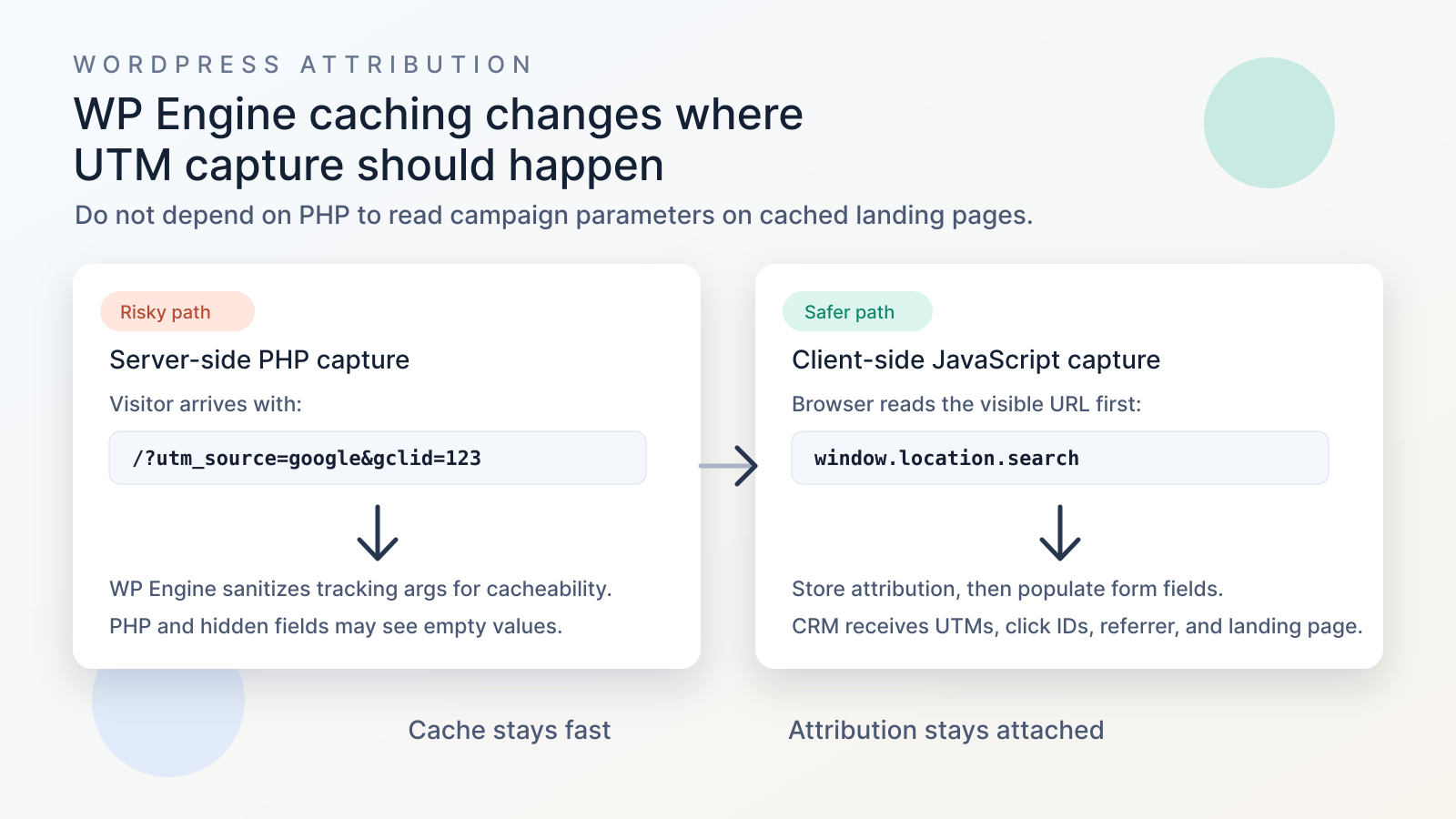
WP Engine is built to keep pages fast by serving cached HTML whenever possible. That is good for performance. But it also means server-side UTM tracking in PHP can be unreliable, especially when forms, phone number swaps, personalization, or hidden fields depend on $_GET["utm_source"] during page render.
For WP Engine sites, the most reliable default is simple: capture attribution in the browser, store it client-side, and populate your form fields before submission.
If this is what you are seeing
- UTMs are visible in the browser URL, but form hidden fields are empty.
utm_source,utm_medium,utm_campaign, orgclidappear in GA4, but do not reach the CRM.- Tracking works while you are logged into WordPress, but fails in incognito or logged-out tests.
- PHP code using
$_GET["utm_source"]returns blank on WP Engine. - A landing page redirect drops
gclid,utm_, or other query parameters. - WP Engine support recommends a cache exclusion, but you are worried about speed and scalability.
- Your plugin uses
admin-ajax.phpor server-side cookie renewal and WP Engine warns about too many uncached requests.
These are classic symptoms of a cache-safe site with a tracking implementation that depends too much on PHP.
What WP Engine is doing, and why it matters
WP Engine is optimizing for cacheability
WP Engine's platform uses heavy caching so WordPress does not need to rebuild every public page with PHP for every visitor. Their own docs explain that uncached requests use more server resources, can pressure PHP workers, and can contribute to 502 or 504 errors when too much traffic bypasses cache.
That matters because marketing URLs create a huge number of unique URL combinations:
?utm_source=google&utm_medium=cpc&utm_campaign=brand?utm_source=facebook&utm_medium=paid_social&utm_campaign=remarketing?gclid=...?fbclid=...?utm_content=ad_a?utm_term=tracking+software
If every unique tracking URL forced a fresh PHP render, campaign traffic could turn one landing page into thousands of uncached variants.
WP Engine's answer is to preserve performance by sanitizing tracking parameters before the page is generated by PHP. Their docs specifically discuss utm_ and gclid variables, explain that the server sanitizes those parameters for cacheability, and recommend JavaScript for actions based on those variables in most cases.
The important difference: analytics JavaScript vs PHP capture
This is where many teams get confused.
GA4, Meta Pixel, Microsoft Clarity, LinkedIn Insight Tag, and other browser scripts can often still read the visible URL because they run in the visitor's browser.
But a server-side WordPress implementation is different. If your PHP template, shortcode, form plugin, or theme logic tries to read:
$_GET["utm_source"]
$_GET["gclid"]
$_GET["utm_campaign"]
it may be reading a request that WP Engine already sanitized for cacheability.
That is why you can see this strange split:
| Tool or system | Can it still see UTMs? | Why |
|---|---|---|
| GA4 browser tag | Often yes | It reads the URL in the browser. |
| Meta Pixel | Often yes | It runs client-side after the page loads. |
| PHP hidden field logic | Often no | PHP may receive a sanitized request. |
| Server-side phone swap | Often no | PHP personalization conflicts with cache. |
| CRM form submission | Only if fields are populated | The CRM receives what the form submits. |
If your CRM is missing UTMs, do not stop at "GA4 has the campaign." Analytics seeing the URL is not the same as your form, lead record, opportunity, or offline conversion system receiving attribution.
Why customer complaints keep showing the same pattern
Public reports and support threads usually fall into a few buckets:
- A developer expects
$_GETto contain UTM values, but WP Engine cache behavior strips or sanitizes the values before PHP. - A site works when logged in, then fails logged out because logged-in WordPress users often bypass cache.
- UTM parameters are lost during redirects, especially when a landing page URL is missing the trailing slash before the query string.
- A plugin author tells the customer to ask WP Engine support to allow a tracking cookie or query argument.
- A team asks for broad cache exclusions, then realizes that high-volume paid campaigns can make too many requests uncached.
This is why the fix should not be "turn off caching everywhere." That fights the hosting platform.
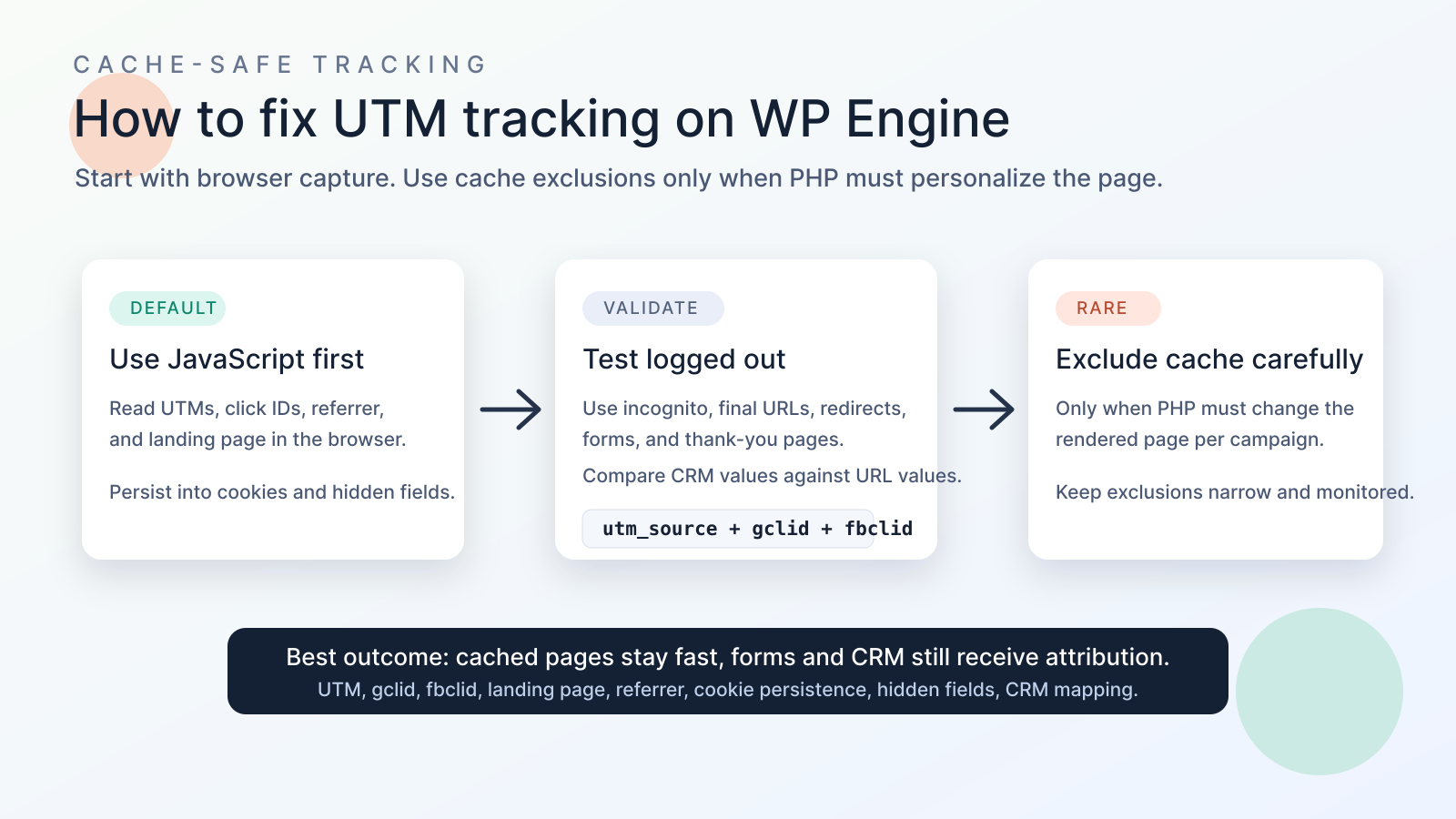
The fix is to let WP Engine do what WP Engine is good at, while attribution capture runs where the visitor-specific data actually exists: in the browser.
What client-side UTM tracking does differently
Client-side tracking reads the URL after the cached page is delivered:
const params = new URLSearchParams(window.location.search);
const utmSource = params.get("utm_source");
const gclid = params.get("gclid");
const fbclid = params.get("fbclid");
Then it stores the values in first-party storage and writes them into form fields before the lead submits.
That flow avoids the central WP Engine caching conflict:
- WP Engine serves the cached landing page quickly.
- Browser JavaScript reads the actual URL.
- The tracker stores UTMs, click IDs, landing page, referrer, and first-touch data.
- Hidden fields are populated after the form loads.
- The CRM receives attribution with the lead.
- Offline conversion imports, Meta CAPI, Google enhanced conversions, and reporting can use the CRM record later.
The WP Engine trailing slash problem
WP Engine also documents a common Google Ads issue: if the landing page URL is missing the trailing slash before gclid, WordPress may redirect the URL to the canonical trailing-slash version and the click ID can be lost.
Use this pattern:
https://example.com/landing-page/?gclid=...
Not this:
https://example.com/landing-page?gclid=...
This matters for Google Ads auto-tagging, Google offline conversions, enhanced conversions, and any CRM workflow that expects gclid to survive from click to form submission.
When cache exclusions make sense
Sometimes you really do need server-side behavior. For example:
- A page must render different legal copy per campaign.
- A backend system must change pricing, routing, or availability before the page is delivered.
- A low-traffic campaign page uses PHP personalization and the performance tradeoff is acceptable.
In that case, WP Engine can support cache exclusions for paths, query arguments, or cookies. But their docs are clear that broad exclusions can hurt performance, caching cannot be fully disabled for the whole site or homepage, and WP Engine may remove exclusions that negatively affect server performance.
Use cache exclusions as a precise exception, not the foundation of your attribution strategy.
Good requests to support are specific:
- Environment name
- Exact affected URL
- Exact variable such as
utm_source,utm_campaign,gclid, or a custom parameter - Replication steps
- Approximate percentage of traffic using the variable
- Whether the issue happens only logged out
- Whether the page redirects before loading
Bad requests are broad:
- "Exclude all UTM traffic from cache forever."
- "Disable cache on the homepage."
- "Bypass cache for every visitor with any marketing parameter."
Those requests can create the exact traffic problem WP Engine caching is designed to prevent.
The right architecture for WP Engine UTM tracking
For most WordPress marketing sites on WP Engine, this is the clean setup:
| Layer | Responsibility | What to avoid |
|---|---|---|
| Ad platform | Add UTMs, gclid, gbraid, wbraid, fbclid, msclkid, and campaign IDs. | Sending traffic to redirecting URLs or missing trailing slashes. |
| Browser tracker | Capture URL parameters, landing page, referrer, first touch, last touch, and click IDs. | Waiting until after the form submits. |
| First-party storage | Persist attribution across pages and sessions based on consent rules. | Relying only on server-side PHP sessions. |
| Forms | Populate hidden fields on load and again before submit. | Server-rendering hidden values into cached HTML. |
| CRM | Store source, medium, campaign, term, content, landing page, referrer, click ID, and consent state. | Mapping all fields into one generic "lead source" field. |
| Conversion APIs | Send clean downstream conversions from CRM or backend events. | Sending offline conversions without original click IDs. |
Test this the way real visitors experience it
Do not test this while logged into WordPress only. Logged-in tests are often misleading because they can bypass cache.
Run a real test:
- Open an incognito window.
- Use the final ad URL, including trailing slash.
- Add
?utm_source=test&utm_medium=cpc&utm_campaign=wpengine-cache-test&gclid=test123&fbclid=test456. - Watch the Network tab for 301 or 302 redirects.
- Confirm the final URL still has parameters, or confirm your tracker captured them before redirect.
- Submit a test form.
- Check the form entry, email notification, webhook, CRM record, and automation payload.
- Confirm fields are not empty and not copied from a previous cached visitor.
For deeper debugging, compare:
- Logged in vs logged out
- Incognito vs normal browser
- URL with trailing slash vs without trailing slash
- First page vs second page of the funnel
- Form page vs thank-you page
- WP Engine page cache vs Edge Full Page Cache
- CRM field values vs browser URL values
The pass/fail test is not whether the URL looked right. The pass/fail test is whether the CRM record contains the right attribution.
Sources checked:
- WP Engine: Cache and utm/gclid Variables
- WP Engine: Server and Browser Cache
- WP Engine: Cookies and PHP Sessions
- WP Engine: PHP Workers and Request Prioritization
- WP Engine: Trailing Slash for Google AdWords
- Viget: Why UTM Parameters Do Not Work on WP Engine
- WordPress.org support thread: UTM Event tracker does not track
- Stack Overflow: Having utm_ in the URL string breaks the GET variable in WordPress
- Silicon Dales: UTM parameter stripping issues with WP Engine caching
What this costs when you ignore it
- Google Ads leads enter the CRM without
gclid, making offline conversion imports weaker. - Meta Ads leads lose
fbclid, first touch, landing page, and campaign context. - Sales teams see "direct" or "unknown" instead of the real source.
- Forms pass blank hidden fields because cached HTML was rendered before the visitor arrived.
- A/B tests and landing page tests look inconclusive because source data is incomplete.
- Agencies optimize campaigns based on analytics data that does not match CRM reality.
- Cache exclusions get added too broadly and create avoidable performance risk.
A fast landing page with empty attribution is still a broken revenue system.
What a cache-safe WP Engine tracking setup looks like
- Final URLs include the trailing slash before query parameters.
- UTMs and click IDs are captured by client-side JavaScript as early as possible.
- Attribution values are stored in first-party cookies or browser storage according to consent rules.
- Hidden fields are populated after form render and again right before submission.
- Multi-step forms, iframes, calendars, quizzes, and embedded forms receive the same attribution values.
- CRM fields are mapped separately for source, medium, campaign, term, content, landing page, referrer,
gclid,fbclid,msclkid,gbraid, andwbraid. - Logged-out and incognito tests match the real CRM payload.
- Cache exclusions are used only for narrow, proven server-side needs.
The goal is not to defeat WP Engine caching. The goal is to make attribution work with it.
Why the usual fixes fail on WP Engine
How UTM Grabber helps on WP Engine
UTM Grabber is built for the client-side capture pattern WP Engine sites need.
UTM Grabber captures campaign data in the browser and passes it into your forms and CRM, so your cached WordPress pages can stay fast while your lead records stay useful.
- Capture UTMs,
gclid,fbclid,msclkid,gbraid,wbraid, landing page, and referrer. - Populate hidden fields in popular WordPress form builders and third-party embedded forms.
- Preserve attribution across multi-page funnels and redirects where possible.
- Push clean lead source data into CRM fields, webhooks, automations, and reporting.
- Reduce dependence on PHP-based
$_GETcapture that conflicts with WP Engine caching.
This guide is for
- Marketing teams searching for WP Engine UTM tracking not working.
- WordPress developers debugging UTM parameters stripped by WP Engine.
- Agencies fixing hidden fields empty on cached WordPress pages.
- Paid media teams losing
gclid,fbclid, or lead source data in the CRM. - Site owners who want cache speed without sacrificing attribution.
The best WP Engine tracking setup does not fight cache. It captures attribution where cache cannot erase it: in the visitor's browser before the form is submitted.
We can review your WP Engine cache behavior, UTM capture, form hidden fields, cookie persistence, and CRM field mapping.