
How to Track UTM Parameters in LatePoint Bookings
LatePoint is built for fast appointment booking. That is exactly why attribution can get slippery.
A visitor clicks a Google Ads campaign, a Meta ad, a newsletter link, or a partner referral. They land on your WordPress site with utm_source, utm_medium, utm_campaign, gclid, fbclid, or another click identifier in the URL. Then they open a LatePoint booking form, move through several booking steps, maybe pay, maybe land on a thank-you page, and finally the appointment is created.
The booking worked. But the marketing question is still open:
Which campaign actually created that appointment?
This guide explains how LatePoint UTM tracking should work with HandL UTM Grabber, what gets captured automatically, how to QA the booking record, and where attribution usually breaks when the data leaves LatePoint for Zapier, Make, HubSpot, Salesforce, GoHighLevel, Google Sheets, Google Ads offline conversions, or Meta CAPI.
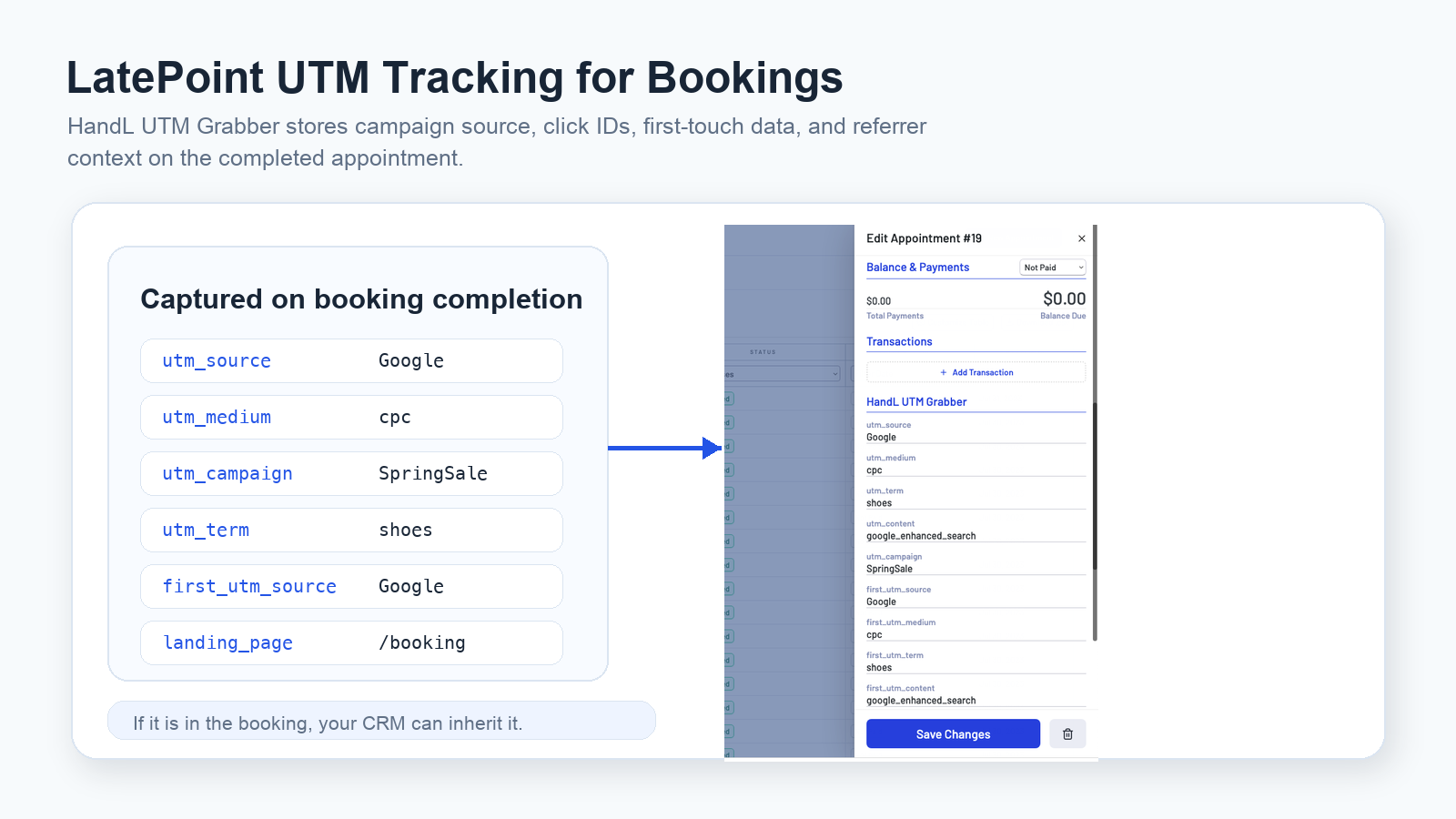
If you searched for LatePoint UTM tracking
- You want to know which ads, emails, partners, or SEO pages create booked appointments.
utm_sourceis visible on the landing page, but not in the final LatePoint booking.- Google Ads sends
gclid,gbraid, orwbraid, but your CRM cannot find the click ID. - Meta Ads sends
fbclid, but the booking record does not keep the attribution trail. - LatePoint bookings arrive in your CRM, but every lead source says direct, unknown, or website.
- Zapier, Make, or a webhook sends the booking, but skips the UTM fields.
- You use a booking button, modal, direct booking form, redirect, or payment step and are not sure where the UTM data disappears.
The fix is usually not another GA4 report. The fix is making sure the booking itself carries campaign context.
The simple version
LatePoint UTM tracking should be booking-level attribution
For appointment businesses, the conversion is not only a page view. It is the completed booking.
That means campaign data should be attached to the LatePoint appointment record, not only to the landing page session or GA4 visit.
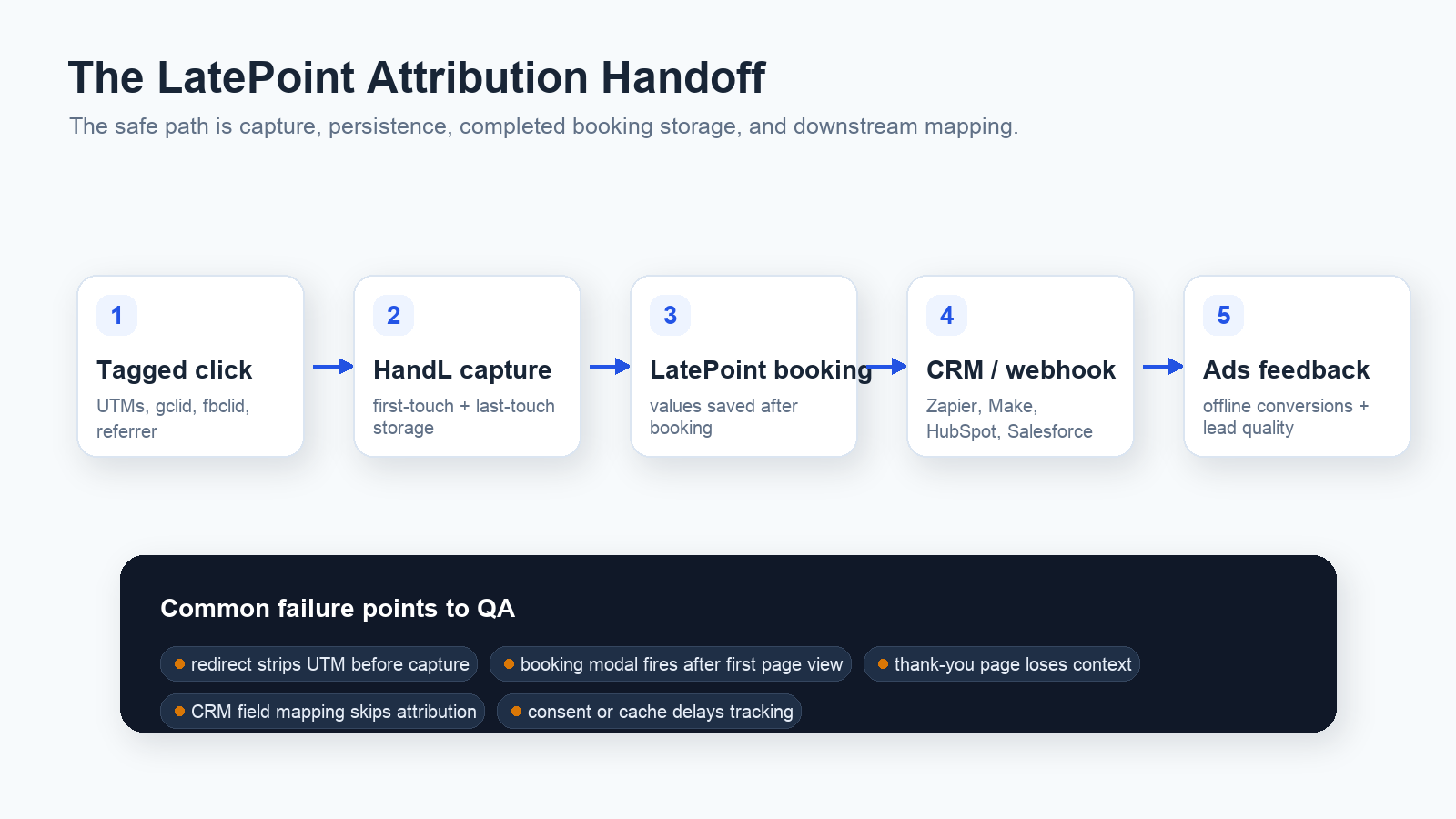
The practical flow looks like this:
- A visitor lands with tagged campaign data.
- HandL UTM Grabber captures UTMs, click IDs, referrer, landing page, and first-touch data.
- The visitor completes a LatePoint booking.
- The completed booking stores the attribution values.
- Your CRM, webhook, Zapier, Make, or reporting workflow receives those same values.
The UTM Grabber LatePoint documentation says the integration is native. In other words, you do not need to manually add a normal form hidden field the way you often do with classic WordPress form builders. Once the booking is completed, HandL can capture the parameters into the LatePoint booking context.
That is a big difference.
With Contact Form 7, Elementor Forms, WPForms, Ninja Forms, or WS Form, the normal setup is hidden fields plus mapping. With LatePoint, the more important question is:
Did the booking complete, and did the captured values make it into the booking and downstream systems?
What should be captured
Start with the fields that answer business questions.
Core UTM fields:
utm_sourceutm_mediumutm_campaignutm_termutm_content
Paid media click IDs:
gclidgbraidwbraidfbclidmsclkid
Attribution context:
- first-touch UTM source, medium, campaign, term, and content
- last-touch UTM source, medium, campaign, term, and content
- landing page
- current page
- original referrer
- traffic source
- device/browser context where appropriate
For a local service business, clinic, agency, consultant, coach, salon, medspa, tutor, repair shop, or any appointment-based funnel, these fields are not "nice to have." They explain which channels create real bookings, not just clicks.
Why LatePoint bookings lose attribution
LatePoint can render booking flows in several ways. Official docs show a direct booking form shortcode, booking buttons that open a modal, block-based inserts, shortcode attributes, and workflow/webhook automation.
All of those are useful. They also create places where tracking can drift.
Common failure points:
- The visitor lands with UTMs, but tracking scripts load after the booking interaction starts.
- The booking form opens in a modal and the team only tests the landing page, not the completed appointment.
- A redirect or thank-you page happens after booking and the team assumes the thank-you page owns the attribution.
- A cache layer or optimization plugin delays, combines, blocks, or strips tracking scripts.
- Consent management blocks tracking until after the visitor has already started the booking flow.
- The CRM receives the booking through Zapier, Make, or a webhook, but the UTM fields are not mapped.
- The CRM property names do not match the booking payload names.
- The team relies on LatePoint
source_idto identify the form placement, but expects it to replace full campaign tracking.
source_id can help identify the specific LatePoint booking form or button source. It is not a replacement for utm_source, utm_medium, utm_campaign, click IDs, first-touch attribution, or CRM field mapping.
LatePoint booking form, button, and source_id
LatePoint supports direct booking forms and booking buttons. The direct form shortcode is useful when the appointment flow lives directly on the page. The booking button is useful when the user clicks a CTA and opens the booking flow.
For example, LatePoint documents the direct booking form shortcode:
[latepoint_book_form]
And the booking button shortcode:
[latepoint_book_button]
LatePoint also documents attributes for controlling form behavior, including preselected services, agents, locations, dates, and a source_id attribute that can be found on the booking edit form in admin.
Use source_id for placement-level reporting:
- homepage booking button
- service page booking form
- paid landing page booking CTA
- sidebar booking widget
- agent-specific booking link
Use HandL UTM Grabber for campaign-level reporting:
- Google Ads campaign and keyword
- Meta campaign/ad/adset context passed through UTMs
- email campaign source
- partner referral source
- affiliate parameter
- organic or AI search landing page
- original referrer and first-touch source
Those two layers answer different questions. source_id tells you where the booking form lived. UTMs and click IDs tell you which marketing path brought the person there.
Webhooks and CRM mapping are the second half
LatePoint webhooks can send booking or customer data to outside systems. LatePoint's webhook docs describe using HTTP Request actions through automation workflows and using services such as Zapier to receive booking data and push it into a CRM, Google Sheets, mailing list, or other system.
That is where many teams lose attribution.
The LatePoint booking may have the UTM values, but the CRM record still says unknown source because the webhook mapping only sends:
- name
- phone
- appointment date
- service
- agent
- payment amount
That is not enough for performance marketing.
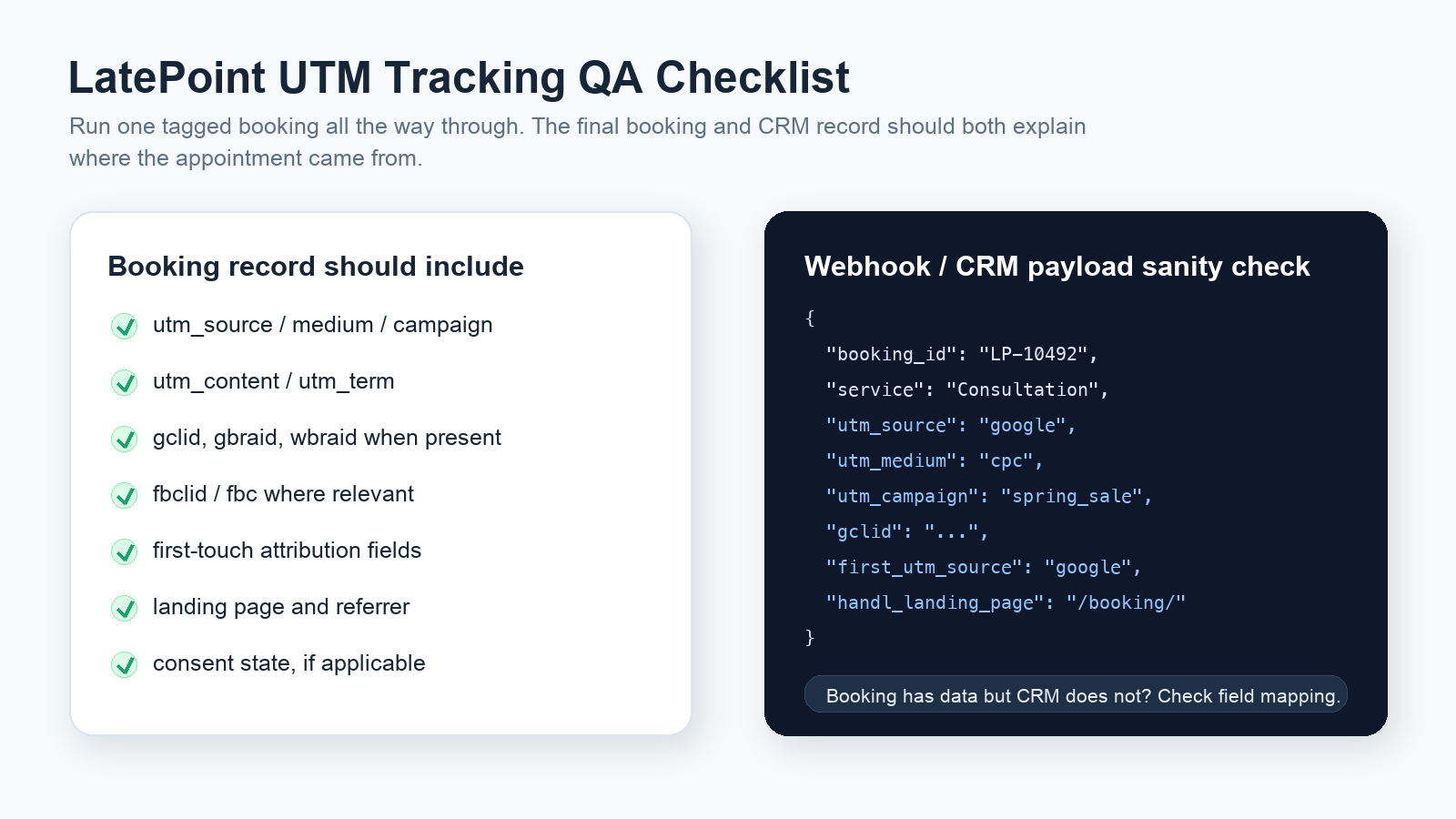
If you send LatePoint bookings to HubSpot, Salesforce, Zoho, Pipedrive, GoHighLevel, Google Sheets, Zapier, Make, or a custom webhook endpoint, map the attribution fields too:
utm_sourceutm_mediumutm_campaignutm_termutm_contentfirst_utm_sourcefirst_utm_mediumfirst_utm_campaigngclidgbraidwbraidfbclidmsclkid- landing page
- referrer
- traffic source
The QA process: test one real booking end to end
Do not test this only with a page view. Test the completed booking.
Use a tagged test URL like:
https://example.com/book/?utm_source=google&utm_medium=cpc&utm_campaign=spring_sale&utm_content=search_ad&utm_term=consultation&gclid=test-gclid-123
Then complete the same flow a customer would complete:
- Land on the tagged URL.
- Open the LatePoint booking form or booking button.
- Choose service, agent, location, date, and time.
- Complete required customer fields.
- Complete payment if the flow requires it.
- Confirm the booking.
- Open the LatePoint booking record in WordPress admin.
- Confirm the HandL UTM Grabber fields exist.
- Check the webhook, Zapier, Make, or CRM record.
- Confirm the same attribution values arrived downstream.
The pass/fail rule is simple:
The final booking record and the final CRM record should both explain where the appointment came from.
Do not rely only on the thank-you page
LatePoint supports redirecting to a custom thank-you page after the booking is completed by adding custom JavaScript in the Tracking Field under Settings > General.
Thank-you pages are useful for:
- GA4 conversion events
- Google Ads conversion tags
- Meta Pixel events
- confirmation messaging
- next-step instructions
But the thank-you page should not be your only source of truth.
Why?
- The booking may be created before the redirect happens.
- The redirect URL may not contain the original UTMs.
- The user may close the modal before a delayed tag fires.
- Payment flows can create extra navigation.
- Browser privacy, ad blockers, consent banners, or script timing can block the thank-you event.
Use the thank-you page as a conversion signal. Use the LatePoint booking record as the attribution record.
First-touch and last-touch matter for appointment funnels
Appointment funnels are rarely one-click journeys.
Someone might first find you through SEO, come back through a Meta remarketing ad, click a Google Ads brand search, then book three days later from a service page.
If you only save the last utm_source, you will over-credit the last click. If you only save the first source, you may miss the campaign that finally converted the appointment.
For LatePoint bookings, store both:
- first-touch UTM source, medium, campaign, term, and content
- last-touch UTM source, medium, campaign, term, and content
- first landing page
- current booking page
- original referrer
This lets you answer better questions:
- Which campaigns introduce new appointment leads?
- Which campaigns close them?
- Which service pages convert paid traffic?
- Which booking buttons or forms perform best?
- Which leads should be uploaded back to Google Ads or Meta after qualification?
Google Ads, Meta Ads, and offline conversion feedback
LatePoint bookings often become revenue later.
The booking itself may be a consultation, appointment request, discovery call, class registration, or service booking. The valuable event might happen after the appointment is approved, attended, paid, qualified, or sold.
That makes click ID capture important.
For Google Ads, preserve:
gclidgbraidwbraid- booking ID
- customer email or phone where appropriate
- booking timestamp
- lead qualification or revenue status
For Meta Ads, preserve:
fbclidfbcfbp- booking ID or event ID
- email, phone, IP, user agent, and other lawful matching parameters where appropriate
- final booking or sales status
This gives you a cleaner path for offline conversion uploads, enhanced conversions for leads, Meta CAPI, lead quality reporting, and appointment-to-revenue analysis.
Privacy, consent, and appointment data
Appointment data can be sensitive depending on the business.
A haircut booking, tutoring appointment, photo session, or home service visit is one thing. Medical, therapy, dental, wellness, legal, financial, or other regulated appointment types need stricter data handling.
For UTM and click ID tracking, keep these rules in mind:
- Do not put sensitive service details into UTM values.
- Do not send protected or regulated information to ad platforms.
- Keep campaign names business-safe.
- Store only what you need for attribution and reporting.
- Respect consent choices when your jurisdiction or setup requires it.
- Document what is captured and where it is sent.
Good campaign naming:
utm_campaign=brand_search_consultation
utm_content=service_page_cta
Risky campaign naming:
utm_campaign=anxiety_therapy_patient_intake
utm_content=hipaa_condition_specific_offer
Campaign taxonomy is not just an SEO or PPC issue. It is part of privacy-safe attribution.
Common LatePoint UTM tracking mistakes
The most common mistakes are operational:
- Testing only a page view instead of a completed booking.
- Assuming GA4 attribution equals booking-level attribution.
- Using a booking button modal and never checking the final appointment record.
- Not mapping UTM fields into CRM properties.
- Letting Zapier or Make create a contact without campaign fields.
- Sending
source_idbut not UTM/click ID fields. - Treating first-touch and last-touch as the same field.
- Forgetting
gclid,gbraid,wbraid,fbclid, andmsclkid. - Not testing consent, cache, and mobile browsers.
- Changing booking redirects without retesting tracking.
What a good LatePoint attribution setup looks like
A strong setup is boring in the best way:
- Every campaign URL is tagged consistently.
- HandL UTM Grabber captures UTMs and click IDs on landing.
- LatePoint booking records show the captured attribution after completion.
- First-touch and last-touch values are stored separately.
- The booking's
source_idis used for form placement, not as a UTM replacement. - Webhooks, Zapier, Make, and CRM mappings include attribution fields.
- Google Ads and Meta Ads click IDs survive the booking flow.
- Thank-you page tags are treated as additional signals, not the only source of truth.
- Consent and privacy behavior is tested.
- One test booking can be traced from ad click to booking to CRM to reporting.
A practical implementation checklist
Use this checklist before you trust the data:
- Create one tagged test URL.
- Complete the actual LatePoint booking flow.
- Check the LatePoint appointment record for UTM fields.
- Confirm
utm_source,utm_medium, andutm_campaignare populated. - Confirm first-touch fields are not overwritten by last-touch fields.
- Confirm
gclid,gbraid,wbraid,fbclid, ormsclkidare stored when present. - Confirm the booking source, service, agent, and location still make sense.
- Trigger the webhook or automation.
- Check the CRM/contact/deal/lead record.
- Confirm CRM field names match your reporting schema.
- Test direct form, booking button, modal, mobile, and paid landing page flows.
- Retest after cache, consent, theme, booking form, or redirect changes.
Related references
- Contact Form 7 UTM Tracking: Hidden Fields, Mail Tags, CRM
- WPForms UTM Tracking: Hidden Fields, Smart Tags, CRM
- Ninja Forms UTM Tracking: Hidden Fields, Zapier, CRM
- WS Form UTM Tracking: Hidden Fields, Classes, CRM
- The Complete Tracking Failure Audit
Sources checked:
- UTM Tracking in LatePoint with HandL UTM Grabber
- LatePoint Booking UTM Tracking Integration
- UTM Grabber LatePoint Landing Page
- LatePoint Shortcodes Documentation
- LatePoint Add Booking Form Directly on a Page
- LatePoint Webhooks Documentation
- LatePoint Custom Thank-You Page Redirect
- LatePoint Booking Form Editor
- LatePoint WordPress Plugin Directory Page
What broken LatePoint attribution costs
- Paid media teams cannot see which campaigns create real booked appointments.
- Sales or front desk teams cannot prioritize leads by source, campaign, or intent.
- Google Ads and Meta Ads do not receive clean feedback for qualified appointments.
- Agencies waste time reconciling LatePoint, GA4, CRM, and ad platform reports.
- Operators over-credit direct traffic because campaign data disappeared before the CRM.
A booked appointment without attribution is not just a reporting gap. It is a budget decision made with missing evidence.
The practical LatePoint standard
- Capture campaign values before the booking starts.
- Store attribution on the completed LatePoint booking.
- Keep first-touch and last-touch values separate.
- Map attribution into the CRM, not only into analytics.
- Preserve click IDs for Google Ads, Meta Ads, Microsoft Ads, and offline conversion workflows.
- Treat redirects, payments, consent, cache, and mobile browsers as part of QA.
Once this works on one high-value booking flow, repeat the same QA for every booking form, booking button, service page, and paid landing page.
Why teams keep losing LatePoint campaign data
How UTM Grabber helps with LatePoint
UTM Grabber gives WordPress appointment funnels a way to keep campaign data attached to the actual booking.
- Native LatePoint attribution capture when bookings are completed.
- First-touch and last-touch UTM tracking.
- Click ID capture for Google Ads, Meta Ads, Microsoft Ads, and partner campaigns.
- Landing page, referrer, and traffic source context.
- Cleaner handoff from LatePoint bookings into CRM, webhook, Zapier, Make, and reporting workflows.
Who should care about LatePoint UTM tracking
- WordPress businesses using LatePoint for appointments, consultations, classes, demos, or service bookings.
- Agencies running paid media into LatePoint booking pages.
- Local service businesses trying to prove which campaigns create booked jobs.
- Clinics, wellness brands, coaches, consultants, and appointment-based funnels with privacy-aware tracking needs.
- RevOps teams sending LatePoint bookings into CRMs, webhooks, Zapier, Make, or Google Sheets.
If LatePoint bookings influence marketing spend, sales routing, offline conversions, or revenue reporting, this belongs in your QA process.
What real users are saying
Bring one tagged booking flow and we will help you find where attribution disappears.