
AI Bot Traffic Is Breaking Conversion Tracking: How to Stop Bots From Training Meta and Google Ads
AI crawlers used to feel like an SEO or hosting problem.
Now they are becoming a conversion tracking problem.
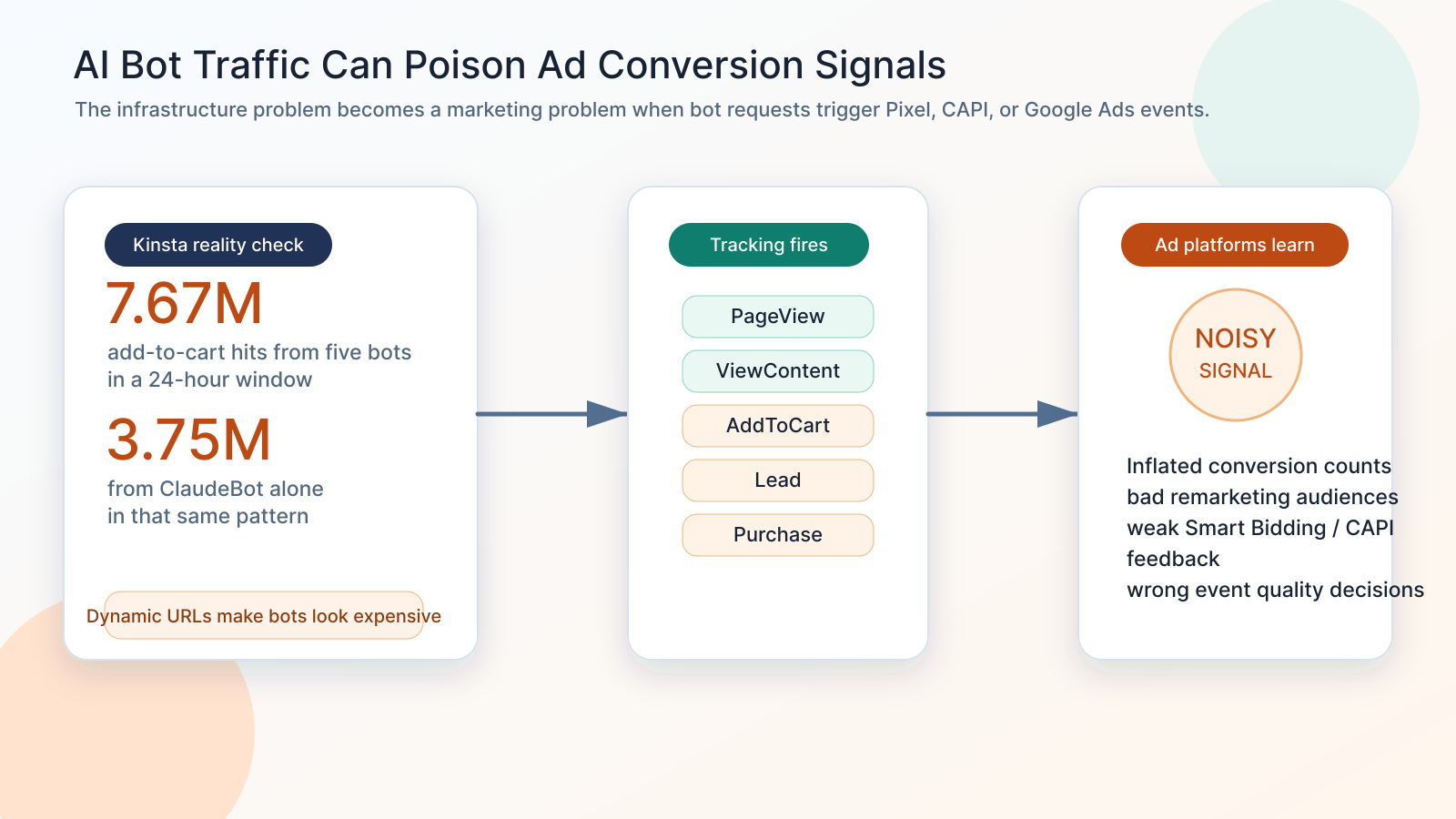
Kinsta's recent bot traffic research made the issue impossible to ignore. Their infrastructure data showed 7.67 million add-to-cart hits from five bots in a 24-hour window, with ClaudeBot alone responsible for 3.75 million of those hits in that pattern. Kinsta's new Bot Protection page also frames the new reality clearly: a large share of site traffic is no longer human, and site owners need controls for what gets through.
That matters for marketers because many websites treat page views, product views, add-to-cart actions, form submissions, thank-you pages, and checkout activity as conversion signals.
If AI bots, crawlers, uptime tools, preview bots, or broken automated loops trigger those same events, the damage is not just server load. It can become bad data flowing into Meta Pixel, Meta Conversions API, Google Ads conversion tracking, GA4, remarketing audiences, Smart Bidding, Performance Max, and CRM attribution.
The scary version is simple:
Your ad platforms may start learning from automated behavior instead of real buyer behavior.
Not every bot request becomes a conversion event. Many crawlers do not run JavaScript, many will not match to a real ad user, and ad platforms have invalid traffic systems. But if your tracking fires too early, uses URL-based custom conversions, sends server-side events from raw HTTP requests, or treats add-to-cart and thank-you page hits as truth, bot traffic can poison the signal before Meta or Google ever sees it.
If your conversion tracking suddenly looks fake
- WooCommerce AddToCart events spike, but revenue does not move.
- Meta Events Manager shows more activity, but CPA gets worse and remarketing audiences feel lower quality.
- Google Ads conversions or micro-conversions rise while CRM-qualified leads stay flat.
- Server logs show crawlers hitting product, cart, checkout, search, filter, calendar, or thank-you URLs repeatedly.
- Your CAPI setup has strong coverage, but it forwards every backend event without a bot filter.
- Your Google Ads Smart Bidding strategy is optimizing from noisy conversions instead of verified revenue or qualified leads.
- Your analytics reports show inflated sessions, strange engagement, unusual geographies, odd user agents, or conversion events with no matching business outcome.
The first question is no longer just whether the event fired. It is whether a real person did the thing you are measuring.
The new risk: bot traffic is not only a traffic problem
Why the Kinsta bot protection news matters for marketers
Kinsta's Bot Protection launch is about infrastructure control: preset protection levels, Cloudflare bot scores, verified bot exclusions, traffic analytics, bulk controls, allowlists, and the ability to block AI crawlers directly inside MyKinsta.
That is useful on its own. It can reduce server strain, protect dynamic endpoints, and clean up hosting-side traffic analytics.
But marketers should read the same news through a different lens.
If a crawler can hammer add-to-cart URLs millions of times, and your tracking stack treats add-to-cart URLs as conversion triggers, then bot traffic becomes conversion data pollution.
This is especially dangerous for sites where tracking is tied to:
- URL visits such as thank-you pages, checkout pages, cart pages, or booking confirmation pages.
- WooCommerce query parameters such as
?add-to-cart=. - JavaScript events that fire on page load instead of human action.
- Server-side CAPI events triggered by backend routes.
- GTM triggers based on URL patterns instead of validated user behavior.
- CRM automations that accept bot-submitted forms as leads.
- Micro-conversions used as primary goals in Google Ads or Meta campaigns.
Kinsta's report is an infrastructure story. For advertisers, it is also a measurement story.
AI crawlers are growing, but behavior matters more than volume
Cloudflare's crawler research shows how quickly the crawler landscape is changing. GPTBot, Meta-ExternalAgent, ClaudeBot, ChatGPT-User, PerplexityBot, and other AI-related crawlers are now part of the traffic mix alongside Googlebot and Bingbot.
Akamai's 2025 fraud and abuse research also reported a 300% increase in AI-powered bot traffic and called out business impacts such as higher expenses, site performance degradation, and polluted metrics.
The volume is real. But the more important issue is behavior.
Kinsta's report describes crawlers getting stuck in query-string loops, treating slight URL variations as new pages, and repeatedly hitting dynamic endpoints. That is where WordPress and WooCommerce sites are especially exposed because cart, checkout, search, filter, wishlist, AJAX, and calendar routes usually bypass cache and trigger real server work.
For marketing teams, those same routes often map to important events.
That is the dangerous overlap.
How bot traffic becomes a Meta or Google Ads signal
There are four common paths.
1. Browser pixel events fire from bot-like sessions
Some automated traffic uses headless browsers or rendering systems that can execute JavaScript. If your Meta Pixel, Google tag, GA4 tag, TikTok pixel, LinkedIn Insight Tag, or custom event script fires on page load, that session may create PageView, ViewContent, AddToCart, Lead, or custom events.
This does not mean every crawler becomes a matched ad user. It means your measurement layer may still record non-human behavior and, in some cases, send it to ad platforms.
2. URL-based custom conversions are too easy to fool
Meta's Pixel documentation explains that conversions can be tracked through standard events, custom events, and custom conversions based on website URLs. URL rules are convenient, but they are fragile.
If a bot reaches a URL that matches your conversion rule, the rule cannot always know whether the visitor is a real customer, a crawler, an internal QA tool, a social preview bot, or a broken automation loop.
This is why thank-you page and checkout URL tracking should be treated as a starting point, not the final source of truth.
3. Server-side tracking forwards raw backend activity
Server-side tracking is powerful, but it can amplify bad data when it blindly forwards requests.
If your backend sends Meta CAPI or Google Ads events whenever a route is requested, a bot does not need to execute JavaScript. It only needs to hit the endpoint.
This matters for:
- WooCommerce add-to-cart routes.
- Checkout and cart endpoints.
- Search and filter URLs.
- Booking or calendar pages.
- Form endpoints.
- Download or lead magnet URLs.
- Webhook-driven events.
- Custom CAPI or server-side GTM containers.
Server-side tracking should not mean “send every server event.” It should mean “send every validated business event.”
4. Fake leads and carts become optimization examples
The highest-risk case is when bot traffic creates fake business objects:
- Fake cart sessions.
- Fake leads.
- Fake newsletter signups.
- Fake demo requests.
- Fake account creations.
- Fake quote requests.
- Fake abandoned carts.
If those events go into Meta, Google Ads, or your CRM as real conversions, your campaigns can optimize toward the wrong behavior. Your reports may show more conversion volume while the sales team gets worse lead quality.
This is how a tracking problem turns into a targeting problem.
The hidden cost: your algorithm learns the wrong lesson
Ad platforms optimize from feedback.
Meta's Pixel documentation says tracked conversions can be used for analysis, custom audiences, ad optimization, and Advantage+ catalog campaigns. Google says Smart Bidding uses Google AI to optimize for conversions or conversion value in each auction, and Google Ads conversion tracking helps define valuable customer actions.
That means conversion quality matters.
If low-quality automated events are allowed into the feedback loop, the platform may see more “success” from traffic patterns that do not represent buyers.
The cost shows up as:
- Inflated conversion counts that do not match orders, leads, bookings, or revenue.
- Retargeting audiences filled with non-buying sessions.
- AddToCart audiences polluted by crawler activity.
- Smart Bidding and Performance Max learning from micro-conversions that have no business value.
- Meta campaigns optimizing toward low-quality event patterns.
- CRM reports blaming the wrong source, campaign, keyword, or creative.
- Teams spending time “fixing ads” when the real issue is event integrity.
Complete tracking is not enough anymore. You need clean tracking.
What to fix first
Step 1: Audit every event that can fire without a human action
Start with your most dangerous events:
| Event | Why bots can pollute it | Safer rule |
|---|---|---|
| PageView | Every crawler request can look like a visit in logs. | Keep for analytics, but separate bot traffic where possible. |
| ViewContent | Product pages are crawler magnets. | Do not use as a primary optimization event unless quality is proven. |
| AddToCart | Kinsta's report shows cart URLs can be hammered by bots. | Require a real session, cart nonce, valid product, and human-like behavior. |
| Lead | Bots can submit forms or hit thank-you pages. | Validate form submission, email quality, consent, and CRM acceptance. |
| Purchase | Confirmation URLs can be revisited, previewed, or crawled if exposed. | Use backend order creation, transaction ID, and payment/order status. |
| Custom conversion | URL rules can fire without business validation. | Move high-value goals to event-based or CRM-validated triggers. |
Then compare platform event counts against business truth:
- Meta Events Manager vs real orders or leads.
- Google Ads conversions vs CRM-qualified conversions.
- GA4 ecommerce events vs backend orders.
- AddToCart events vs actual cart sessions.
- Lead events vs CRM contacts accepted after validation.
- CAPI logs vs server logs by user agent and IP range.
If the ad platform sees more “success” than the business sees, start investigating bot-triggered events.
Step 2: Use edge bot protection, but do not stop there
Kinsta Bot Protection is the right kind of first layer because it works before the request becomes a WordPress workload. It can challenge suspicious traffic, use Cloudflare bot scoring, preserve verified search engine bots, show traffic classification, and block AI crawlers when appropriate.
That helps with performance and analytics.
But bot protection at the edge does not automatically make your tracking policy correct.
You still need to decide:
- Which bots may crawl public content for SEO or AI visibility?
- Which bots should never reach cart, checkout, search, form, or booking endpoints?
- Which traffic should be allowed to view content but suppressed from marketing events?
- Which server-side events require a real session, valid consent, transaction ID, or CRM status?
- Which conversions are allowed to train Meta and Google Ads bidding?
Step 3: Separate crawl policy from conversion policy
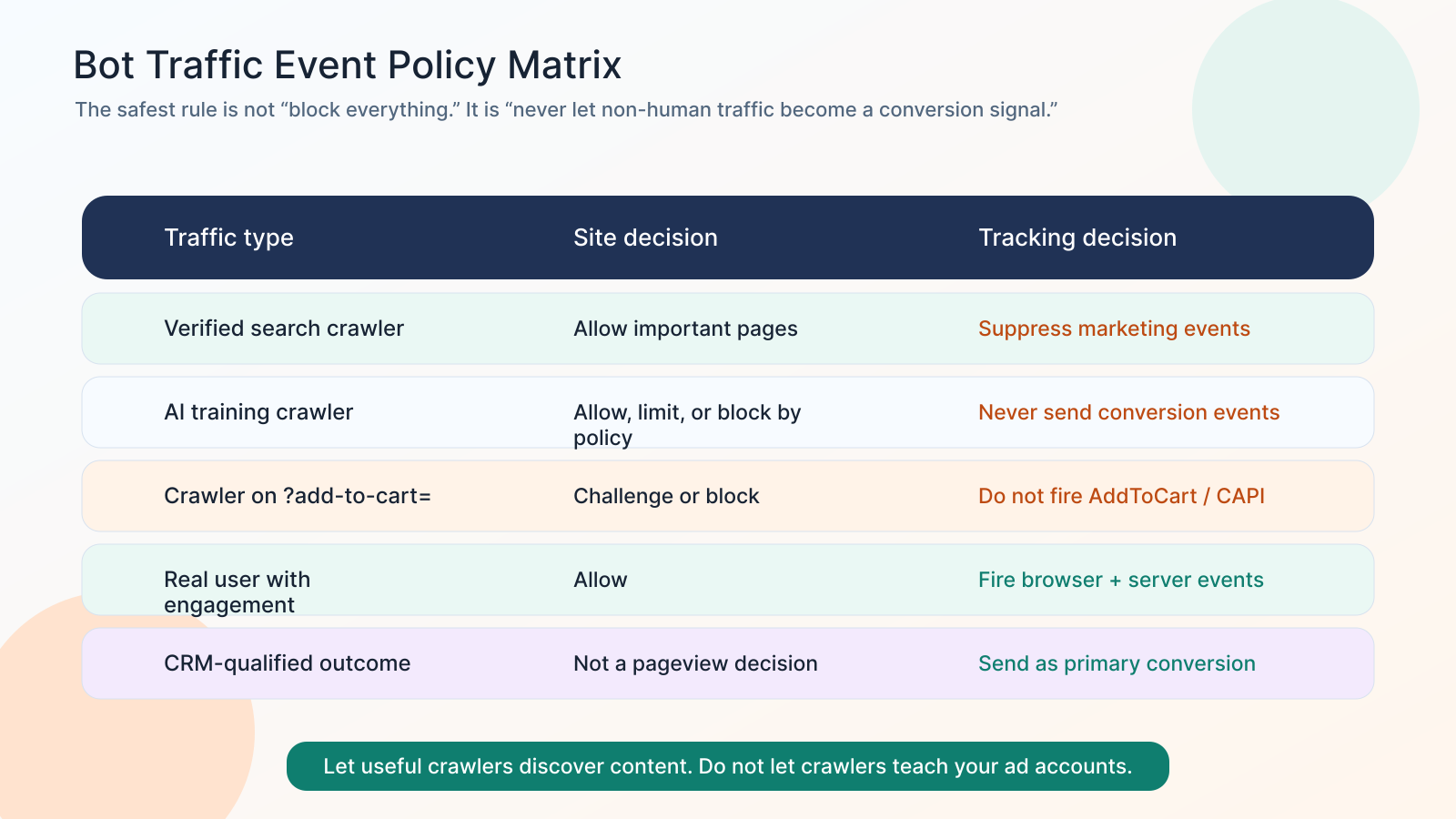
Do not turn this into “block every bot.”
That is too blunt.
Some bots matter for discoverability. Googlebot, Bingbot, social preview bots, AI search crawlers, partner integrations, uptime monitors, and internal tools may all have legitimate reasons to touch some parts of the site.
The better rule is:
Let useful crawlers discover content. Do not let crawlers trigger conversion events.
That means you may allow a verified crawler to access product pages, blog posts, and documentation, while blocking or challenging the same category of traffic from:
?add-to-cart=URLs.- Cart and checkout pages.
- Thank-you pages.
- Search result loops.
- Filter and faceted navigation loops.
- Booking calendars.
- Form endpoints.
- AJAX actions.
- API routes that create sessions or state.
Step 4: Add a tracking gate before pixels and CAPI
A tracking gate is a simple idea:
Before an event is sent to an ad platform, prove it should be sent.
For browser-side tracking, this can include:
- Consent state.
- Bot or challenge outcome from the server.
- Internal IP and QA environment exclusion.
- User-agent filtering for known crawlers.
- Session age or engagement threshold for low-value events.
- Click-based triggers instead of page-load triggers when appropriate.
- Refusing to fire conversion tags on URLs that should never be crawled.
For server-side tracking, this can include:
- Edge bot score or WAF classification.
- Verified crawler detection.
- Datacenter, proxy, or suspicious ASN checks.
- Session and cookie presence.
- Valid cart nonce, order ID, lead ID, or transaction ID.
- Rate limits by IP, session, user agent, product, and endpoint.
- CRM validation before sending primary Lead events.
- Payment or order-status validation before sending Purchase.
For Meta CAPI specifically, Meta's server event parameters include fields such as event time, user data, event source URL, event ID, and action source. The event can be technically valid and still be strategically bad if the action source was not a real customer action.
That is why bot filtering needs to happen before the event leaves your system.
Step 5: Move optimization away from weak micro-conversions
If bots are hitting product pages, cart URLs, search pages, or forms, do not make those weak events your primary optimization goal.
Use a hierarchy:
- PageView and ViewContent for diagnostics, not primary bidding.
- AddToCart only after human-session validation.
- Lead only after form validation and CRM acceptance.
- Qualified Lead after CRM status update.
- Purchase after backend order creation and payment/order status.
- Offline Conversion after real sales outcome.
- Revenue or value-based conversion when you can trust the value.
The closer the event is to revenue truth, the harder it is for crawler noise to pollute.
Step 6: Log the fields you need to debug bot pollution
You cannot fix what you cannot join together.
For every important event, log:
- event name.
- event ID.
- event source URL.
- user agent.
- IP address or anonymized IP intelligence output.
- bot score or WAF decision.
- session ID.
- fbp and fbc if present.
- gclid, gbraid, wbraid, fbclid, and UTMs.
- consent state.
- order ID, lead ID, cart ID, booking ID, or CRM contact ID.
- whether the event was sent, suppressed, or downgraded.
- reason code for suppression.
This lets you answer the real question:
Did a human action create this conversion, or did a bot route accidentally create an event?
What clean bot-aware tracking looks like
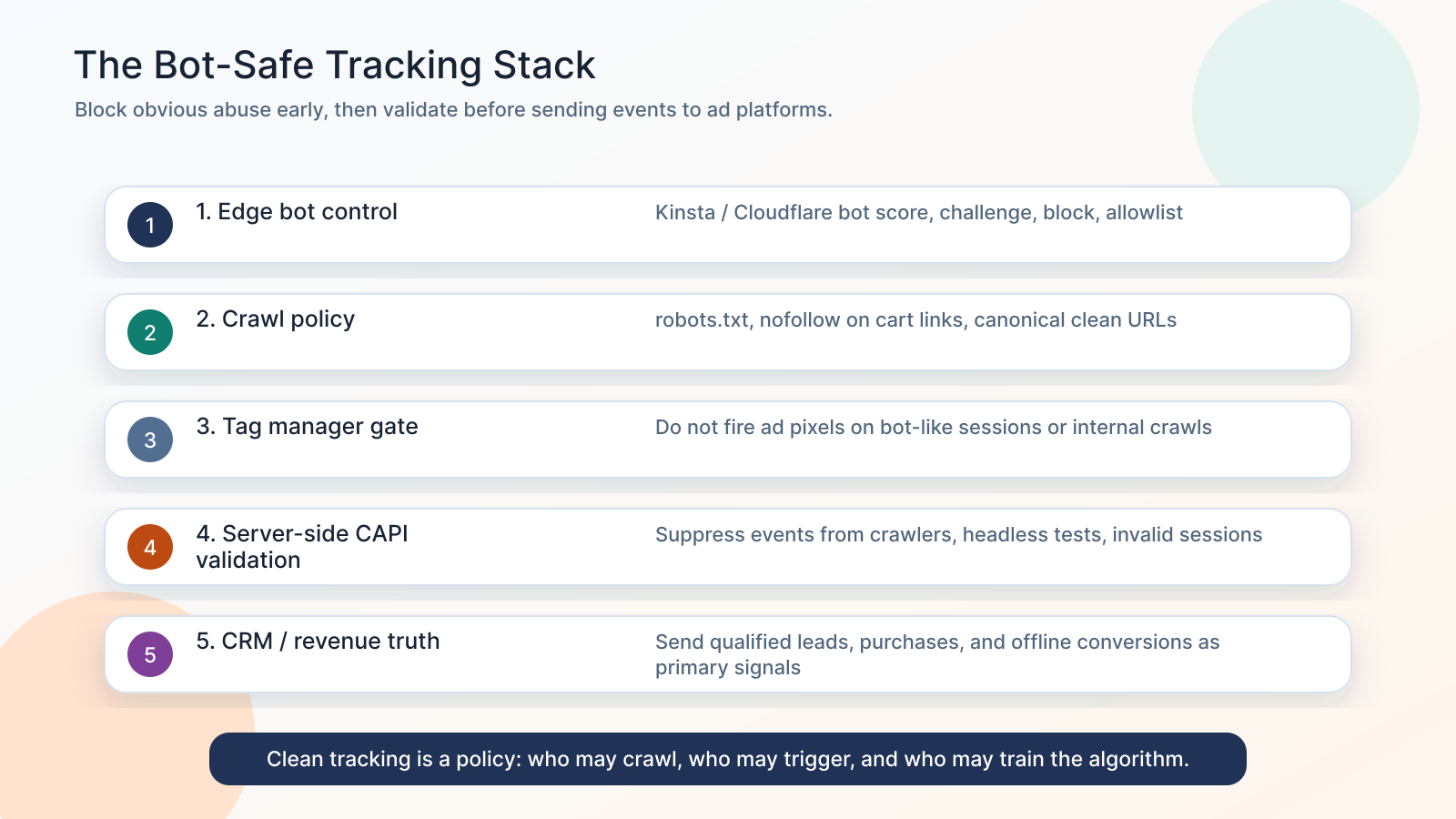
A strong setup has five layers:
- Edge control: Kinsta Bot Protection, Cloudflare, WAF, or equivalent bot controls classify traffic before WordPress, WooCommerce, or your app does expensive work.
- Crawl control: robots.txt, nofollow on action URLs, canonical URLs, faceted navigation rules, and explicit allow/block policies reduce crawler loops.
- Tag control: GTM, pixels, and client scripts do not fire conversion events on bot-like sessions, internal traffic, staging URLs, or crawler-only paths.
- Server control: CAPI, Enhanced Conversions, offline conversions, and server-side GTM only send validated business events.
- Business control: CRM-qualified outcomes, real orders, appointment status, and revenue events become the primary optimization signals.
The goal is not to hide from AI crawlers. The goal is to stop non-human traffic from becoming training data for your paid media accounts.
Why more CAPI can make the problem worse
Where UTM Grabber fits
UTM Grabber helps preserve attribution for real leads and customers. Pair that with bot-aware event rules so the data you keep is worth sending.
- Capture UTMs, click IDs, landing page, referrer, and first-party attribution before they disappear.
- Pass attribution into forms, CRM fields, orders, and offline conversion workflows.
- Keep lead-source data connected to the CRM outcome so you can optimize for qualified leads and revenue, not noisy page events.
- Use attribution fields together with bot score, session validation, consent state, and CRM acceptance to decide which events should train ad platforms.
- Audit mismatches between Meta, Google Ads, GA4, WooCommerce, and CRM records when bot traffic or AI crawlers distort reporting.
Who should audit this now
This matters most if you run:
- WooCommerce stores with visible add-to-cart URLs or dynamic product filters.
- WordPress sites with heavy search, booking, calendar, or AJAX endpoints.
- Meta campaigns optimizing for AddToCart, Lead, CompleteRegistration, Purchase, or custom events.
- Google Ads campaigns using Smart Bidding, Performance Max, Maximize Conversions, Target CPA, or Target ROAS.
- Server-side GTM, Meta CAPI, Google Enhanced Conversions, or offline conversion imports.
- Lead generation funnels where CRM quality does not match ad-platform conversion volume.
- High-ticket funnels where one fake lead can distort small-volume optimization.
- Sites seeing sudden traffic spikes, server load, inflated analytics, or strange event patterns.
A quick bot-safe tracking checklist
Use this as the minimum audit:
- Are cart, checkout, search, filter, booking, and thank-you URLs crawlable?
- Do any marketing events fire purely from a URL visit?
- Can
?add-to-cart=trigger AddToCart without a validated human session? - Does server-side CAPI check bot score, user agent, session, consent, and event source URL?
- Are known crawlers suppressed from Meta, Google Ads, TikTok, LinkedIn, and GA4 conversion events?
- Are internal QA, uptime monitoring, staging, and preview tools excluded?
- Are primary conversions based on backend truth, CRM status, order ID, payment status, or offline revenue?
- Do you log event IDs and suppression reasons for debugging?
- Do you compare ad-platform conversions to CRM and backend reality every week?
- Are micro-conversions marked secondary when they are vulnerable to bot traffic?
Related references
- The Complete Tracking Failure Audit
- Stape Meta CAPI Gateway: Why It Is Not Enough for Multi-Step Funnels
- How to Improve Meta Event Match Quality (EMQ)
- WooCommerce UTM Tracking: Orders, Revenue, GCLID, and Meta CAPI
- AI Search Tracking for SEO, AEO, and the LLM Era
Sources checked:
- Kinsta Bot Protection
- Kinsta AI & Bot Traffic Reality Check
- Kinsta on bot traffic and dynamic WordPress endpoints
- Kinsta on WooCommerce bot traffic
- Cloudflare crawler research
- Cloudflare crawl-to-click gap research
- Akamai 2025 fraud and abuse research
- Google Ads Smart Bidding help
- Google Ads invalid traffic help
- Google Ads conversion tracking overview
- Meta Pixel conversion tracking documentation
- Meta Conversions API server event parameters
Bot protection keeps the site stable. Bot-aware tracking keeps your ad accounts learning from real customers.