
WooCommerce UTM Tracking: Orders, Revenue, GCLID, and Meta CAPI
Your WooCommerce store has orders. Google Ads, Meta Ads, GA4, and your CRM all have reports. But the hard question is still painful:
Which campaign actually created the revenue?
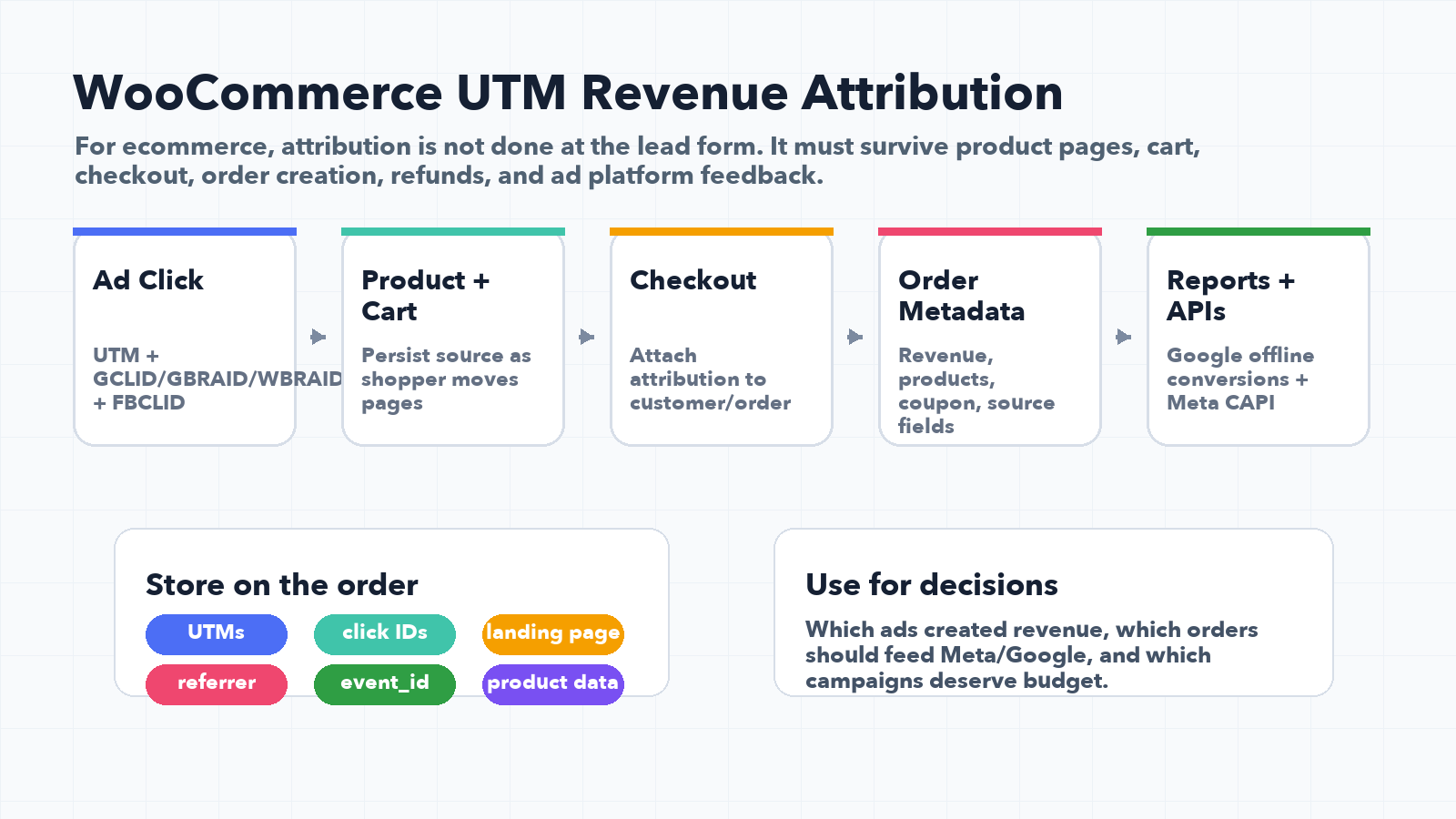
If you searched for WooCommerce UTM tracking, you probably need to fix one of these
- WooCommerce orders show revenue, but no source, medium, or campaign.
- Google Ads shows conversions, but the order export cannot prove which campaign paid off.
- Meta Purchase events fire, but dedupe, EMQ, or event matching is weak.
- GCLID, GBRAID, WBRAID, FBCLID, FBP, or FBC never make it to the order record.
- Your finance report and ad platform report disagree, so budget decisions become guesswork.
The answer is not just GA4. The order itself needs clean campaign, click ID, and customer context.
The short answer
WooCommerce UTM tracking means storing attribution data on the order, not only in analytics.
At minimum, every paid or organic order should preserve:
utm_source,utm_medium,utm_campaign,utm_term,utm_contentgclid,gbraid,wbraid,fbclid,msclkid- Landing page, referrer, and checkout URL
- First touch and latest touch values
- Order ID, value, currency, product IDs, and email when allowed
- A stable
event_idif you send browser and server-side events
If the WooCommerce order does not store the campaign and click ID data, revenue attribution will always be partial.
Why WooCommerce UTM tracking is different from normal form tracking
A lead form needs to explain where a contact came from. A WooCommerce checkout needs to explain where money came from.
That means the tracking has to survive:
- Product page browsing
- Cart creation
- Checkout page navigation
- Payment provider redirects
- Thank-you page events
- Returning customers
- Consent behavior
- Browser privacy limits
By the time the order is complete, the original URL may no longer include the original campaign values. So the capture has to happen before checkout, and the values must be attached to the order when purchase happens.
What to store on each WooCommerce order
Think of the WooCommerce order as the source of truth for revenue attribution.
| Data type | Fields to store | Why it matters |
|---|---|---|
| Campaign context | utm_source, utm_medium, utm_campaign, utm_term, utm_content | Shows which campaign and creative influenced the purchase. |
| Google identifiers | gclid, gbraid, wbraid | Supports Google Ads offline conversion imports and attribution feedback. |
| Meta identifiers | fbclid, fbc, fbp | Supports Meta CAPI matching and event quality. |
| Order facts | Order ID, value, currency, product IDs, quantity | Required for clean purchase and revenue reporting. |
| Journey context | First touch, latest touch, landing page, referrer | Helps separate introduction, return visit, and conversion source. |
| Event identity | event_id | Helps deduplicate browser Pixel and server-side purchase events. |
Why GA4 alone is not enough
GA4 is helpful for session and ecommerce reporting, but many business decisions happen outside GA4:
- Ad platform optimization
- CRM lifecycle reporting
- Finance revenue exports
- Customer support and refund analysis
- Email segmentation
- LTV and repeat purchase analysis
If the source data is stored only in GA4, your WooCommerce order table still cannot answer the attribution question on its own.
Revenue attribution gets much stronger when the order record, analytics record, CRM record, and ad platform conversion all carry the same identifiers.
Google Ads: why GCLID, GBRAID, and WBRAID matter
Google Ads offline conversion workflows depend on tying a conversion back to an ad interaction. Google documentation recommends capturing Google click IDs and storing them with leads or conversion records where possible.
For WooCommerce, that means capturing:
gclidfor standard Google Ads click attributiongbraidandwbraidfor privacy-aware app and web paths- Order value and currency
- Conversion time
- Email or other enhanced conversion data when eligible and compliant
Do not wait until the thank-you page to think about this. The click ID has to be captured when the visitor arrives, then attached to the order when payment completes.
Meta CAPI: why event_id, fbp, fbc, and user data matter
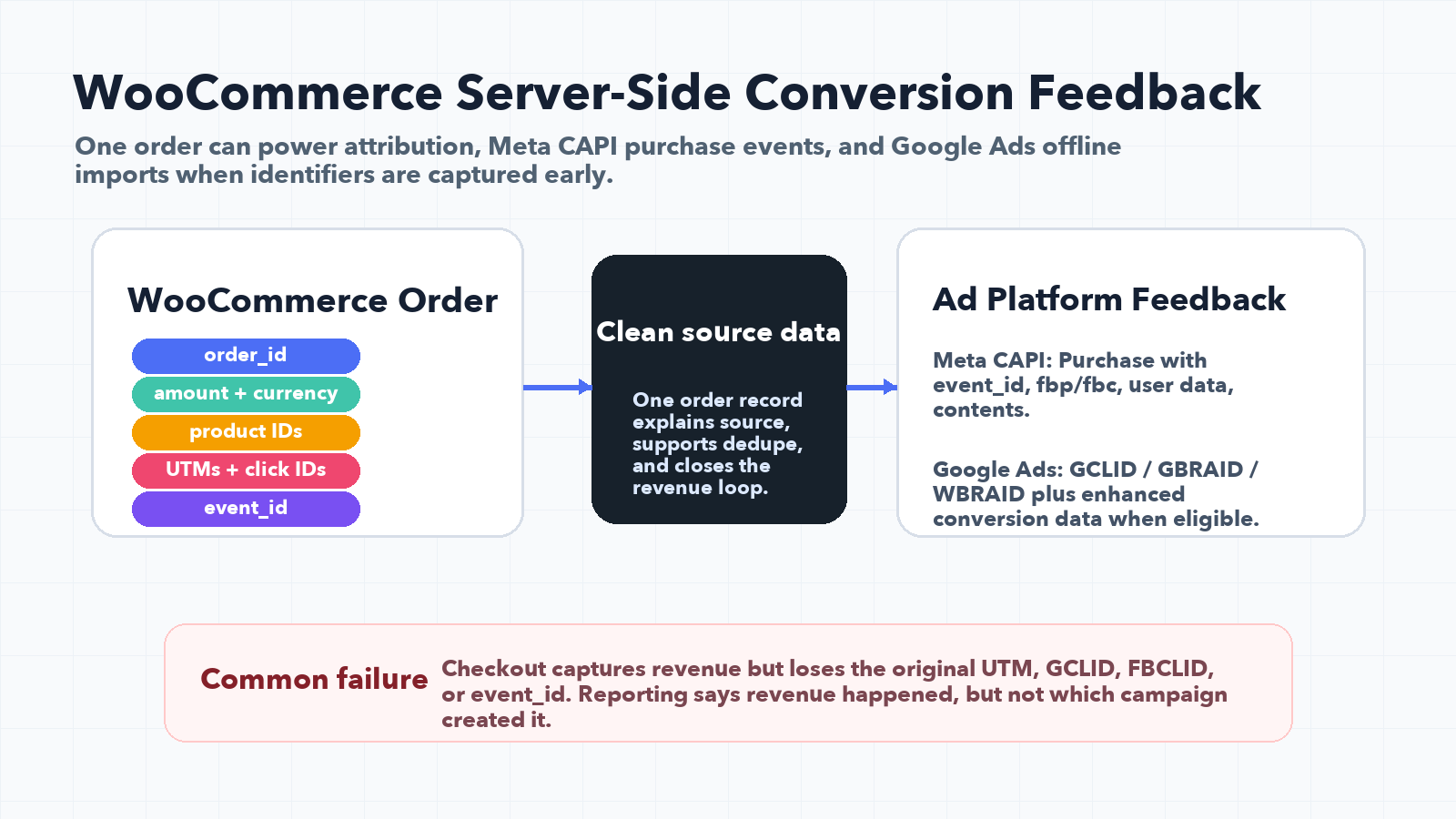
For Meta, WooCommerce purchase tracking often uses both browser Pixel and Conversions API. Meta's deduplication guidance centers on matching the same event name and event ID between browser and server events.
For a WooCommerce Purchase event, keep the structure simple and consistent:
- Browser event:
Purchasewith a stableeventID - Server event:
Purchasewith the sameevent_id - User identifiers: email, phone, IP address, user agent,
fbp,fbcwhen available and permitted - Commerce data: value, currency, content IDs, contents, quantity
The browser and server events should describe the same purchase, not two slightly different purchases.
First touch vs latest touch for WooCommerce revenue
Last click is tempting because it is easy, but it can punish the campaign that originally created the customer.
For example:
- Someone clicks a Meta prospecting ad.
- They leave without buying.
- They return from branded Google search.
- They complete a WooCommerce order.
If you only store latest touch, Google gets all the credit. If you store first touch and latest touch, you can see both the discovery campaign and the conversion path.
For ecommerce, store:
- First touch source and campaign
- Latest touch source and campaign
- Order source fields
- Full touch history if your team needs deeper analysis
This is especially useful when you compare SEO, AEO, Google Ads, Meta Ads, email, influencers, affiliates, and AI search referrals.
Common WooCommerce UTM tracking problems
Problem 1: The checkout captures revenue but loses the landing source
This happens when UTMs are read only from the current URL. The checkout URL often has no UTM parameters left.
Fix it by capturing campaign values on arrival, storing them first-party, and attaching them to the order at checkout.
Problem 2: Order metadata exists, but exports and dashboards ignore it
If the values are buried in order meta but never exported, sales and finance teams will not use them.
Map the values into reports, CRM records, customer properties, and any spreadsheet or BI export.
Problem 3: Meta Purchase events are duplicated or unmatched
If the browser event and server event use different event IDs, dedupe fails. If user data is missing, matching quality suffers.
Use the same event_id for browser and server purchase events, and send the user data you are allowed to collect.
Problem 4: Google Ads cannot import the purchase cleanly
If the order does not store gclid, gbraid, or wbraid, Google Ads may not be able to connect that offline conversion back to the ad interaction.
Capture these IDs early and store them with the order.
Problem 5: Consent and privacy rules change what can be sent
You need to respect consent, platform policies, and legal requirements. Build your system so it can store allowed attribution fields, suppress restricted fields, and document what was sent where.
Tracking architecture should improve measurement without pretending privacy rules do not exist.
QA checklist for WooCommerce UTM tracking
Use this before trusting the numbers:
- Open a product URL with
?utm_source=google&utm_medium=cpc&utm_campaign=woo_test&gclid=test123. - Add a product to cart and complete a test order.
- Confirm the WooCommerce order stores source, medium, campaign, landing page, and click ID.
- Repeat the test after navigating from product page to cart to checkout.
- Repeat with a returning visitor session.
- Verify GA4 receives ecommerce data with source context where appropriate.
- Verify Meta browser and server Purchase events use the same
event_id. - Verify Google Ads offline conversion fields are available before trying to import.
- Confirm exports, CRM records, and dashboards include the attribution fields.
How UTM Grabber fits into WooCommerce attribution
UTM Grabber is built to catch campaign values before they disappear and make those values available when the order happens.
Use UTM Grabber to connect WooCommerce orders back to ads
Capture UTMs, click IDs, first-touch values, latest-touch values, and page context so the WooCommerce order can explain the revenue.
- Store first touch and latest touch campaign data.
- Capture Google, Meta, and Microsoft click IDs.
- Attach attribution fields to WooCommerce orders.
- Support Google Ads offline conversion and Meta CAPI workflows.
- Give marketing, finance, and CRM teams the same source of truth.
Sources checked:
- UTM Grabber: send UTMs from WooCommerce to Google Analytics
- UTM Grabber: WooCommerce to Facebook offline conversion
- Google Ads API documentation: manage offline conversions
- Google Ads Help: import conversions from clicks
- Meta Conversions API documentation: deduplicate Pixel and server events
Capture source, campaign, click ID, and order revenue data before attribution disappears.