
How to Improve Meta Event Match Quality (EMQ): Coverage, Dedupe, and CAPI Fixes
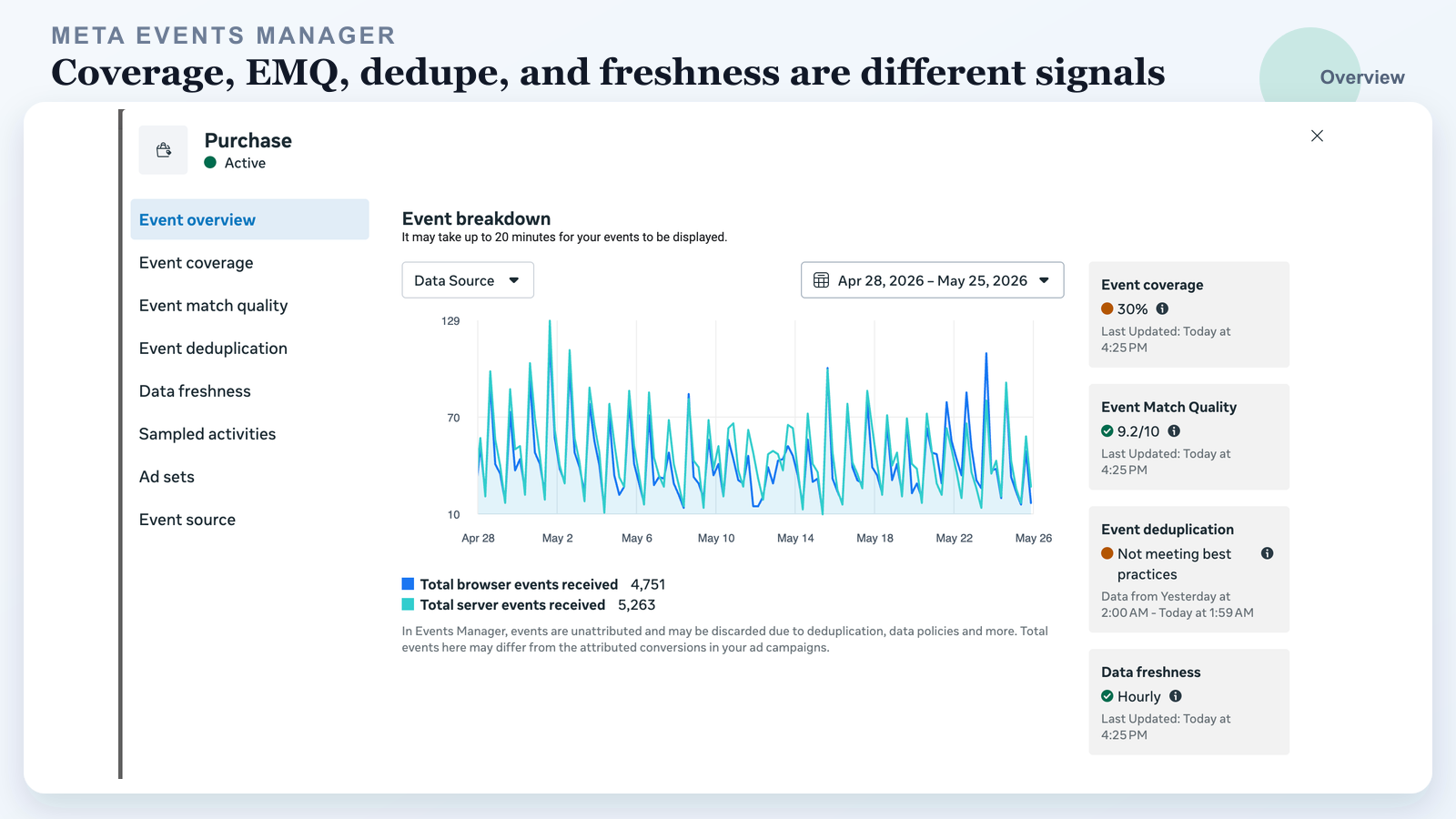
Meta Events Manager can look healthy and broken at the same time.
You can have Event Match Quality above 9/10 while event coverage is weak. You can send plenty of customer parameters while browser and server events still fail to deduplicate. You can pass the Test Events tool and still lose production events because the real checkout, form, iframe, cache layer, consent manager, or CRM handoff behaves differently.
This guide explains how to improve Meta Event Match Quality, what a good EMQ score does and does not prove, and what to fix first across CAPI coverage, event_id deduplication, fbp/fbc, user data, data freshness, and sampled activities.
If you searched for how to improve Meta Event Match Quality
- You want to improve Meta Event Match Quality, but you are not sure whether the real problem is EMQ, CAPI coverage, or deduplication.
- Meta shows high EMQ, but Purchase, Lead, or InitiateCheckout performance still got worse.
- Event coverage is low, even though your server-side tracking or Meta CAPI integration is installed.
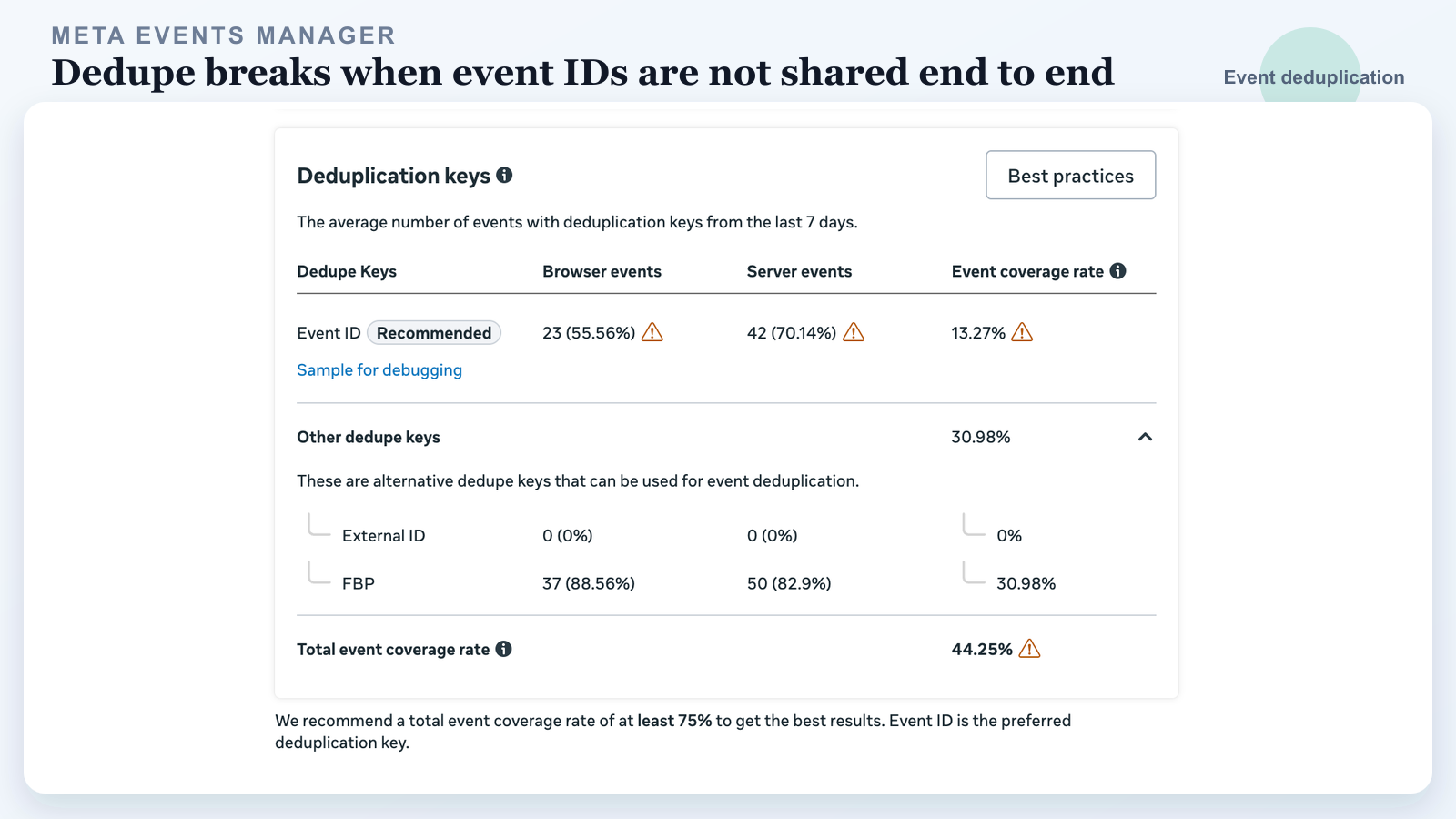
- Event deduplication says not meeting best practices or shows low Event ID overlap.
- Meta gives you a sample event_id for debugging, but your logs do not store the value anywhere.
- Browser and server events are both firing, but the numbers do not line up.
- Your team keeps adding parameters, but the real issue is a broken event_id contract.
The mistake is treating all green checks as proof that the conversion signal is reliable. They are diagnostics, not a full audit.
First, separate the four signals
What to fix first when your Meta EMQ score is low
Most advertisers do not search for a definition because they are curious. They search because CPA went up, attribution looks wrong, or Events Manager says the account is not meeting best practices. Meta groups several diagnostics together in Events Manager because they all affect signal quality, but they answer different questions.
| Signal | What it means | What it does not mean | Fix first |
|---|---|---|---|
| Event coverage | The share of browser Pixel events also covered by Conversions API server events. | It does not prove the browser and server events are deduplicating. | Make sure every important browser conversion has a matching server event. |
| Event deduplication | Whether Meta can tell that a browser event and server event describe the same user action. | It does not prove the event has enough customer data for matching. | Use one canonical event_id on both browser and server. |
| Event Match Quality (EMQ) | How effective the customer information parameters may be at matching the event to a Meta account. | It does not prove CAPI coverage or dedupe is correct. | Send lawful, normalized user_data on the server event. |
| Data freshness | How quickly the event is sent after the action occurred. | It does not prove the event name, payload, or dedupe keys are correct. | Send conversion events as close to real time as possible. |
| Sampled activities | Real examples Meta shows so you can inspect URLs, payloads, connection method, and diagnostics. | It does not show every production event. | Use samples to locate the exact source, URL, payload, and missing field. |
Do not chase EMQ first if coverage or dedupe is broken. The fastest way to improve Meta Event Match Quality in a meaningful way is to fix the full signal path: browser event, server event, dedupe key, customer parameters, and timing. A server event with great customer parameters still creates bad optimization data if it cannot be paired with the browser event it is supposed to represent.
1. Event coverage: is CAPI covering your browser events?
Coverage is the practical health check for your Meta Conversions API integration. In plain English, it asks:
When the browser Pixel sees an important event, does Meta also receive the matching server event?
For a serious Pixel + CAPI setup, your key conversion events should not be browser-only. If Purchase has 1,000 browser events and only 300 comparable server events, you do not have strong CAPI coverage for Purchase. You have partial server-side tracking.
Low coverage usually points to one of these problems:
- The server event fires only for some form paths, payment paths, products, or domains.
- The browser uses
Purchase, but the server sendspurchase,Lead, or a custom event name. - The server event is filtered by consent, backend validation, CRM status, bot rules, or queue failures.
- A third-party form, checkout, or iframe receives the lead, but the parent site never passes the needed identifiers.
- Cross-domain funnels lose cookies, click IDs, UTMs,
fbp,fbc, or the first-party session. - Caching strips query parameters or changes the landing page URL before tracking reads it.
- The server sends late, sends batched events too slowly, or drops invalid batches.
Coverage is the first question: did the server event show up for the same business action?
2. Event deduplication: can Meta pair browser and server?
If browser Pixel and CAPI both send the same Purchase, Meta needs a way to count it once. That is deduplication.
The cleanest pattern is:
// Browser Pixel
fbq("track", "Purchase", {
  value: 199.00,
  currency: "USD"
}, {
  eventID: "order_9182"
});
{
  "event_name": "Purchase",
  "event_id": "order_9182",
  "event_time": 1779825600,
  "action_source": "website",
  "event_source_url": "https://example.com/thank-you"
}
The same user action should generate one event ID, then reuse it everywhere.
Do not generate a UUID in the browser and a different UUID on the server. Do not let an empty event ID become normal. Do not let a privacy or platform fallback value replace your first-party event ID when you already have a real order ID, lead ID, appointment ID, or generated conversion ID.
Meta can use other keys such as fbp or external_id in some dedupe scenarios, but that path is more fragile. The browser event timing matters, the keys need to be consistent, and race conditions can create double counting. Event ID is the preferred dedupe key because it describes the event instance, not just the user or browser.
3. EMQ: can Meta match the event to a person, and how do you improve it?
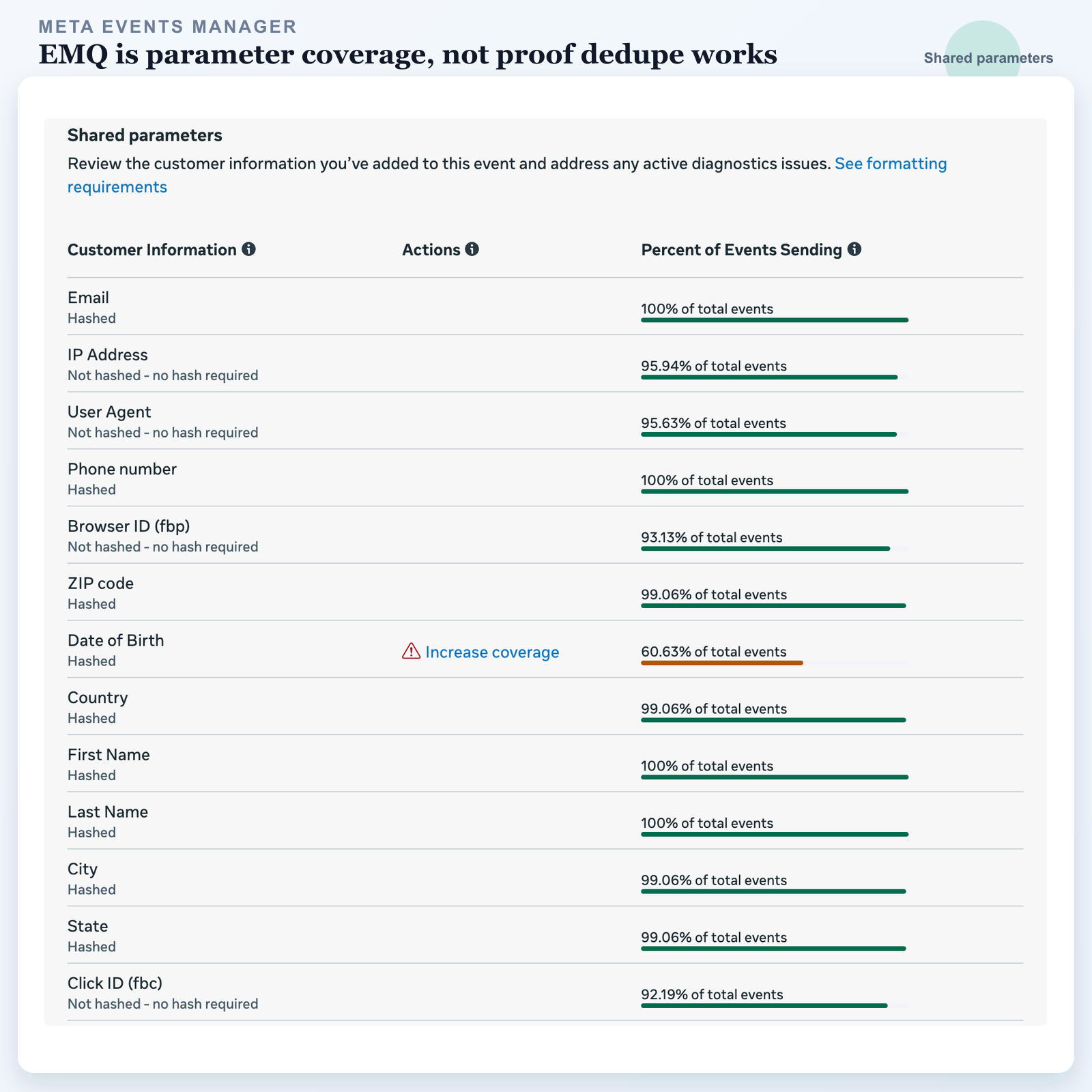
Event Match Quality is about matching, not deduplication.
Meta scores how useful your customer information parameters may be for matching a server event to a Meta account. Strong EMQ usually means you are sending more complete and better formatted user_data. If your score is low, this is the section most people are really looking for: send more accurate first-party identifiers, normalize and hash the fields Meta expects hashed, preserve fbp and fbc, and include IP address plus user agent when lawful and available.
Useful customer information parameters can include:
client_ip_addressclient_user_agentfbpfbc- hashed
em - hashed
ph - hashed
fn,ln,ct,st,zp, andcountry - hashed or stable
external_id, where appropriate lead_idor other platform-safe IDs where applicable
Some fields must be hashed. Some must not be hashed. IP address, user agent, fbp, and fbc are not hashed in the same way as email or phone. This is why formatting matters.
But here is the key point:
A high EMQ does not mean dedupe works.
You can send email, phone, IP address, user agent, fbp, fbc, name, city, state, and ZIP on the server event, then still fail dedupe because the browser event used eventID = lead_123 while the server event used event_id = crm_987.
4. Data freshness: did the signal arrive while it still matters?
Data freshness is latency. It asks how long it takes between the real conversion action and the server event arriving at Meta.
Freshness problems are common when CAPI is wired through delayed CRM automation, nightly jobs, slow queues, Zapier-style retries, or offline imports that were never intended to optimize live campaigns.
For optimization events such as Purchase, Lead, CompleteRegistration, Schedule, or SubmitApplication, you want the server event close to real time. If you can send it immediately, send it immediately. If you need a queue, keep it tight and monitor failed jobs.
A delayed conversion is still useful for reporting, but it is weaker as a live bidding signal.
5. Sampled activities: where the actual breakage shows up
Sampled activities are underrated. They let you inspect real examples of what Meta received.
Use sampled activities to answer:
- Did the event fire on the intended URL?
- Did the event name match the action?
- Did browser and server use the same Pixel or dataset?
- Did
event_idexist on both sides? - Was
event_idempty, duplicated, changed, or replaced? - Was
event_source_urlcorrect? - Did
client_ip_addressandclient_user_agentexist on CAPI events? - Did the payload include
fbpandfbcwhen the browser had them? - Did the event arrive from the expected plugin, server container, CRM, or custom endpoint?
If Meta gives you a sample event_id for debugging, treat it like a production incident clue. Search that value in your logs. If you cannot find it, your logging is not good enough for CAPI debugging.
At minimum, log these fields for important conversions:
- event name
- canonical conversion ID, such as order ID or lead ID
- browser
eventID - server
event_id fbpfbc- event source URL
- timestamp at browser fire
- timestamp at server send
- CAPI response status
- CRM or form submission ID
- consent state, when applicable
If you cannot trace one conversion from click to browser event to server event to CRM record, you are guessing.
Sources checked:
What these metrics cost when you read them wrong
- High EMQ with low coverage means Meta may match the server events it receives, but too many browser events are still not covered by CAPI.
- Coverage without dedupe means Meta receives both sides, but cannot reliably identify one business action.
- Dedupe without strong user data means Meta can count the event once, but may still struggle to match it to the right person.
- Freshness without correct payloads means bad data arrives quickly.
- Sampled activity ignored means you miss the exact URL, payload, or trigger where the breakage happens.
Bad Meta diagnostics do not just make reports messy. They train the ad system on the wrong picture of your funnel.
What a clean Meta CAPI setup looks like
- Every important conversion has a browser event and a server event where that is allowed and appropriate.
- Browser and server share the same event name, same pixel or dataset, and same event_id.
event_idis generated once per conversion and stored with the order, lead, appointment, or form record.fbp,fbc, UTMs, click IDs, landing page, referrer, and consent state are captured early and passed through the funnel.- Server events include lawful, normalized customer information parameters such as IP address, user agent, hashed email, hashed phone, name, location,
fbp, andfbc. - Events are sent close to real time, with retries and dead-letter logging for failed CAPI calls.
- Sampled activities and CAPI logs can be matched back to a CRM or order record.
- The event map stays simple: one real conversion action, one canonical event, one source of truth.
Do this before changing bids, budgets, or campaign structure. Measurement is the floor under the media plan.
Why adding more tracking often makes it worse
How UTM Grabber fits into this
UTM Grabber helps you keep the original click and session data attached to the lead, so CAPI and CRM debugging does not turn into archaeology.
Meta diagnostics are easier to fix when every lead record contains the acquisition data that created it.
- Capture UTMs,
fbclid, click IDs, landing page, referrer, and browser/session identifiers. - Push those values into hidden fields, CRMs, forms, webhooks, and backend flows.
- Preserve attribution through multi-page funnels, forms, iframes, and CRM handoffs.
- Make it easier to map a Meta sample event back to the real lead or customer record.
This matters most for
- Paid media teams managing Meta Ads CPA, ROAS, or lead quality.
- Ecommerce brands running Pixel plus Meta Conversions API.
- Lead generation funnels using forms, iframes, calendars, quizzes, or third-party landing pages.
- Agencies responsible for Meta CAPI event coverage, deduplication, EMQ, and CRM attribution.
- Operators who need to explain why Meta performance changed before touching campaign structure.
Most accounts do not need more random events. They need fewer, cleaner events that can be traced from click to form to CRM to ad platform.
We can review your UTM capture, hidden fields, CAPI event IDs, dedupe keys, and CRM handoff.