
See What Your Ad Spend Turned Into, From Click to Revenue
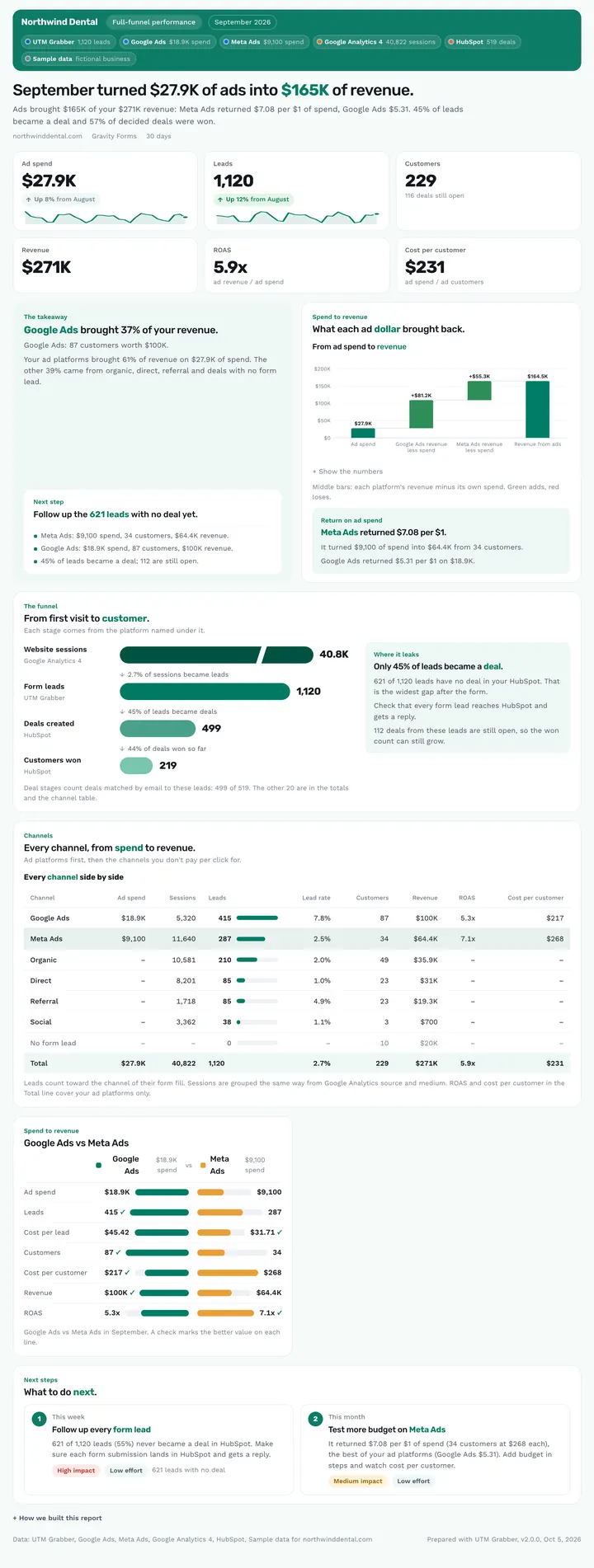
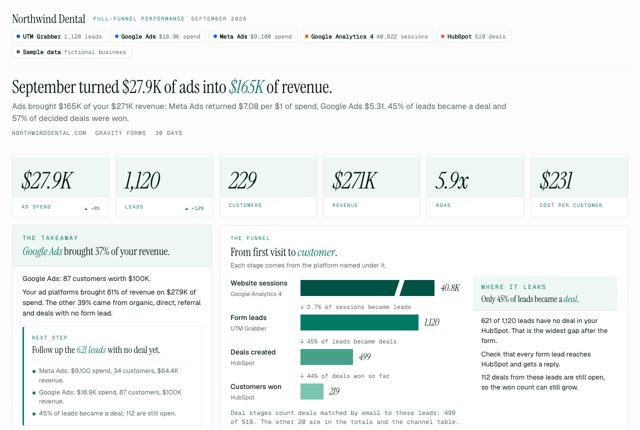
Full-funnel performance is the flagship cross-platform monthly. It puts ad spend, website sessions, form leads, deals, customers and revenue on one page, channel by channel, with ROAS and cost per customer. It answers “what did our marketing turn into this month, and where does the funnel leak?”
Published · Updated
/funnelLeads joined with ads, analytics and CRMNew in v2.0Joins ads, analytics and CRM
What did my marketing spend turn into this month?
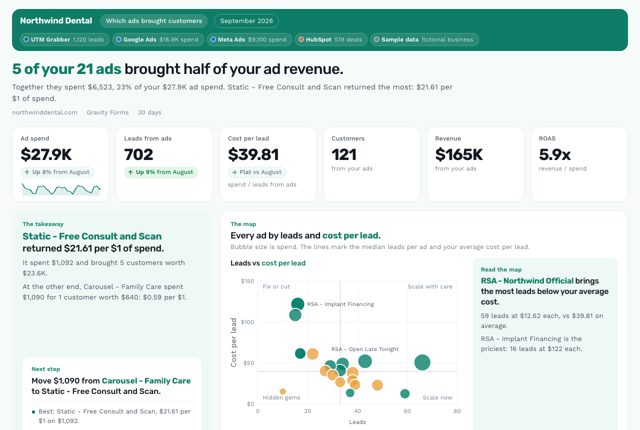
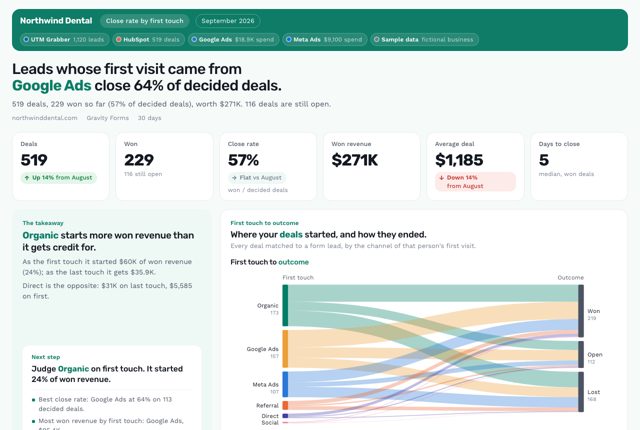
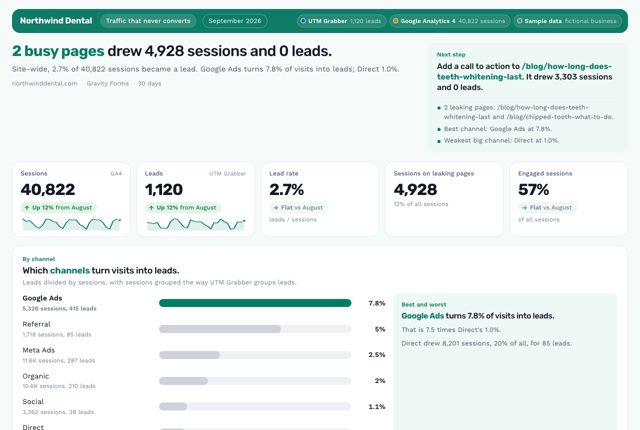
It depends on how much data you connect. To see ad spend, website visits, leads, deals, customers and revenue on one page, channel by channel, Full-funnel performance is the report to run. Type /funnel to get it. To rank single ads by real revenue, use Which ads brought customers. To see which first touch closes deals, Close rate by first touch fits better. To find busy pages with no leads, pick Traffic that never converts.
What it is: Full-funnel performance is a cross-platform monthly from the free UTM Grabber Reports skill for owners and marketing leads that follows visits to leads to customers to revenue in one view.
What this report answers
Built for: Owners and marketing leads who answer for the whole marketing budget.
What's in the report
Why You Can Trust What It Tells You
Works with what you connect
Every source except UTM Grabber is optional, and a missing source drops its stage with a note saying Connect X to add Y.
Totals that tie out to your CRM
Deals match leads by email, and deals with no form lead get their own row, so totals tie out to your CRM.
Fair read on young deals
When this period has 10+ points more open deals than the last, the report holds back changes in customers and revenue.
Ask your AI
Type the shortcut, or ask in your own words. Your AI pulls your leads through your UTM Grabber connection and builds the report.
You ask: /funnelWhat did our ad spend turn into this month?
Used UTM Grabber, Google Ads, Meta Ads, Google Analytics 4 and HubSpot

check_site_health· UTM Grabberlist_forms· UTM Grabberget_entries· UTM Grabber· 1,120 leadsget_campaign_spend· Google Ads· $18.9K spendget_campaign_spend· Meta Ads· $9,100 spendrun_report· Google Analytics 4· 40,822 sessionsget_deals· HubSpot· 519 deals
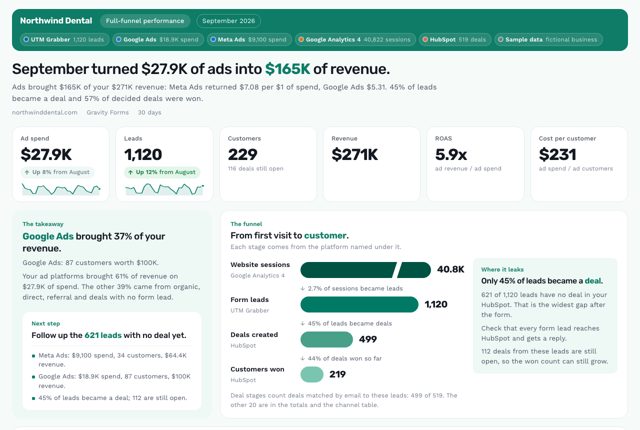
Claude answers: September turned $27.9K of ads into $165K of revenue. Ads brought $165K of your $271K revenue: Meta Ads returned $7.08 per $1 of spend, Google Ads $5.31.
/funnel- “What did our ad spend turn into this month?”
- “Show me the full funnel from ad spend to revenue.”
- “Where is our funnel leaking?”
What it uses
UTM GrabberRequiredYour leads, with their UTMs and click IDsReport designs need Claude, Codex or Cursor.
 Full-funnel performance
Which plan do you need?
This report works on every plan, starting with the free plugin.
On Free and Starter your AI reads only your last 30 days, so a 30-day report leaves out the change against the period before. Starter+ and Premium add it.
| Plan | What your AI reads |
|---|---|
| Free pluginThis report | Your last 30 days, with a fair-use allowance |
| Starter | Your last 30 days, with first touch and more click IDs |
| Starter+ or Premium | Your full history, unmetered |
See it in 4 looks
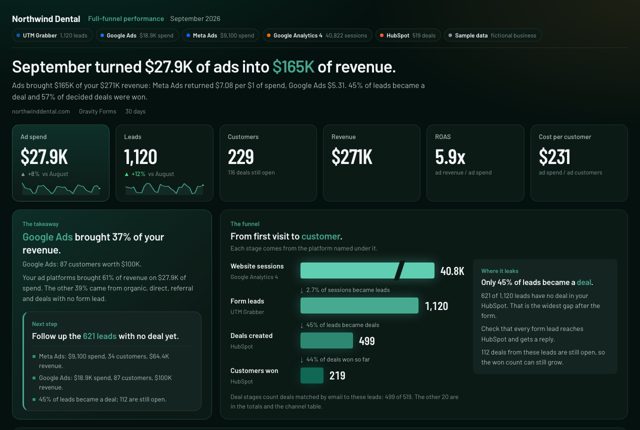
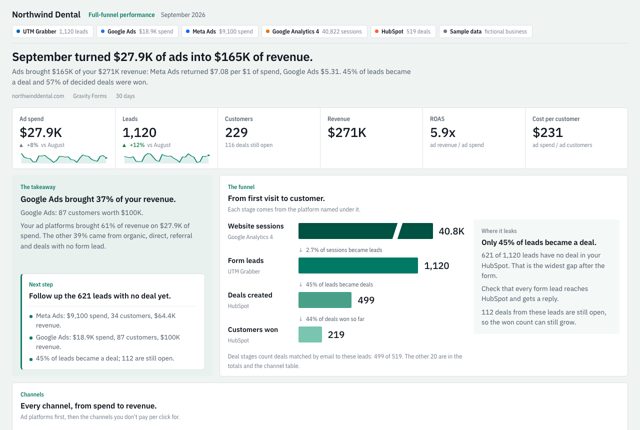
Same numbers, same story, 4 designs. View the sample full screen, or download it as a PDF or editable PowerPoint slides.
Questions about this report
Do I need every platform connected?
No. Only UTM Grabber is required. Each extra source adds a stage: ad accounts add spend and ROAS, Google Analytics adds sessions, and a CRM or WooCommerce adds customers and revenue.
Where do the Google Ads and CRM connectors come from?
From each platform or a third party, not from UTM Grabber. You add them to the same AI chat, and the skill joins their numbers with your UTM Grabber leads.
How is ROAS calculated?
Revenue from customers who came through an ad platform, divided by that platform's spend. The table's Total line shows paid ROAS and labels it that way.
Related reports
Want Us to Build This for You?
Get reports like this one with your logo and colors, set up for you. With the Support Package, we connect the AI Connector (MCP) to your data and hand you your own AI report builder, tuned to your business, for weekly, monthly and annual reports.
Works on free and paid plans, and with your agency. Cancel anytime, no contracts.
$199/yr$349
Launch price · Real Value: $1,700
- Expert SetupOur resident expert team installs UTM Grabber and wires every form, with a live test.
- Diagnostics & FixesCaching, cookie and GDPR leaks found and fixed, then audited again all year.
- Custom Reporting + MCPWe connect the AI Connector (MCP) to your data and hand you your own AI report builder.
- Ongoing SupportNew funnels and forms wired all year, with priority answers.
Get This Report on
Your Own Leads.
Connect UTM Grabber to Claude, ChatGPT, Codex or Cursor with the AI Connector (MCP), add the free Reports skill, then type /funnel. Or just describe what you need.
Every plan can connect. The report designs need an AI app that supports skills: Claude, Codex or Cursor.
This sample is real output from the UTM Grabber Reports skill v2.0, built on sample data for Northwind Dental, a fictional dental practice. Once you set it up, every report uses your own brand colors and logo. Google Ads, Meta, Google Analytics and CRM connectors come from each platform or a third party, not from UTM Grabber. You add them to the same AI chat.