
How to Track OpenAI Ads Conversions: Measurement Pixel, Conversions API, UTMs, and ChatGPT Attribution
OpenAI Ads tracking is the next attribution problem marketers need to prepare for.
The important news is not just that OpenAI has a JavaScript Measurement Pixel. It is that OpenAI now has official Ads measurement documentation for ChatGPT Ads, including a browser pixel, a server-side Conversions API, supported conversion events, event_id deduplication, and an OpenAI click/reference identifier called oppref.
That matters because customer discovery is changing.
For years, the default path was:
Google or Bing search -> ad or organic result -> landing page -> form or checkout -> CRM.
Now more buyers are starting with ChatGPT, Claude, Perplexity, Gemini, AI Overviews, and other answer engines. They do not always behave like traditional keyword searchers. They ask a question, compare options, get an answer, click a suggested site or ad, and expect the site to understand the context immediately.
If your team wants to win in the AI search, AEO, GEO, LLMO, and OpenAI Ads era, the tracking stack has to be ready before the traffic spike arrives.
The practical goal is simple:
Capture OpenAI / ChatGPT traffic context, preserve UTMs and oppref, send clean browser and server conversion events, dedupe with the same event_id, and store the attribution story in the CRM.
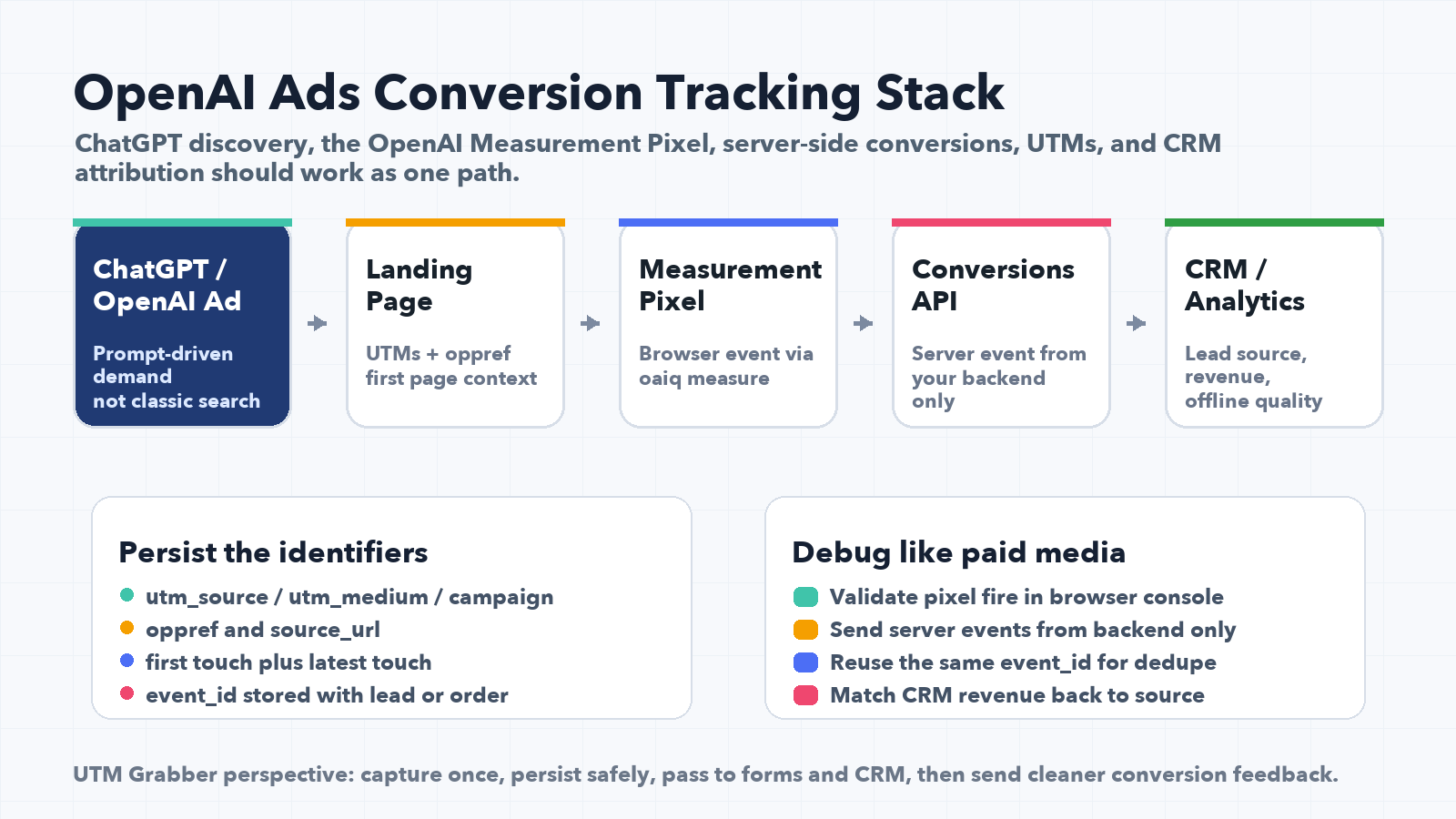
If OpenAI Ads conversion tracking is not ready
- You will see ChatGPT or OpenAI traffic, but you will not know which visit became a lead, trial, booking, subscription, or order.
- Your landing page may receive
opprefor UTM parameters, but the form and CRM will lose them before submission. - Your OpenAI Measurement Pixel may fire in the browser, but the server-side conversion will use a different
event_id, causing deduplication problems. - Your backend may send server events without the original landing page, source URL, or OpenAI reference context.
- Your reports may group AI-assisted visits into Direct, Referral, Other, or Unknown.
- Your sales team may qualify a high-intent ChatGPT lead, but marketing will not know that AI search or OpenAI Ads created the opportunity.
- Your AI SEO, AEO, GEO, and LLMO efforts may create traffic that your CRM cannot prove.
The brands that instrument OpenAI Ads and AI search early will learn while competitors are still arguing about why Direct and Referral traffic changed.
OpenAI Ads tracking is not just another pixel
Most marketers will first treat OpenAI Ads tracking like another paid media tag.
That is understandable, but incomplete.
OpenAI's official Ads overview says ChatGPT Ads help customers discover relevant products and services, and its measurement docs include both a conversion pixel and a Conversions API. In other words, OpenAI is not only thinking about impressions and clicks. It is creating the measurement layer needed for conversion optimization and advertiser feedback.
That is the same kind of pattern marketers already know from Meta CAPI, Google Ads Enhanced Conversions, Google Offline Conversions, TikTok Events API, and LinkedIn Conversions API.
But the channel context is different.
Traditional search starts with an explicit keyword. AI search starts with a prompt, a conversation, a recommendation, or a synthesized answer. The user may arrive more educated, more skeptical, or further down the decision path. If you only look at GA4 sessions or last-click source/medium, you may miss the real movement.
This is why OpenAI Ads conversion tracking should live in the same strategic bucket as AI search tracking, answer engine optimization, generative engine optimization, and CRM attribution.
You are not just measuring an ad click. You are measuring a new discovery path.
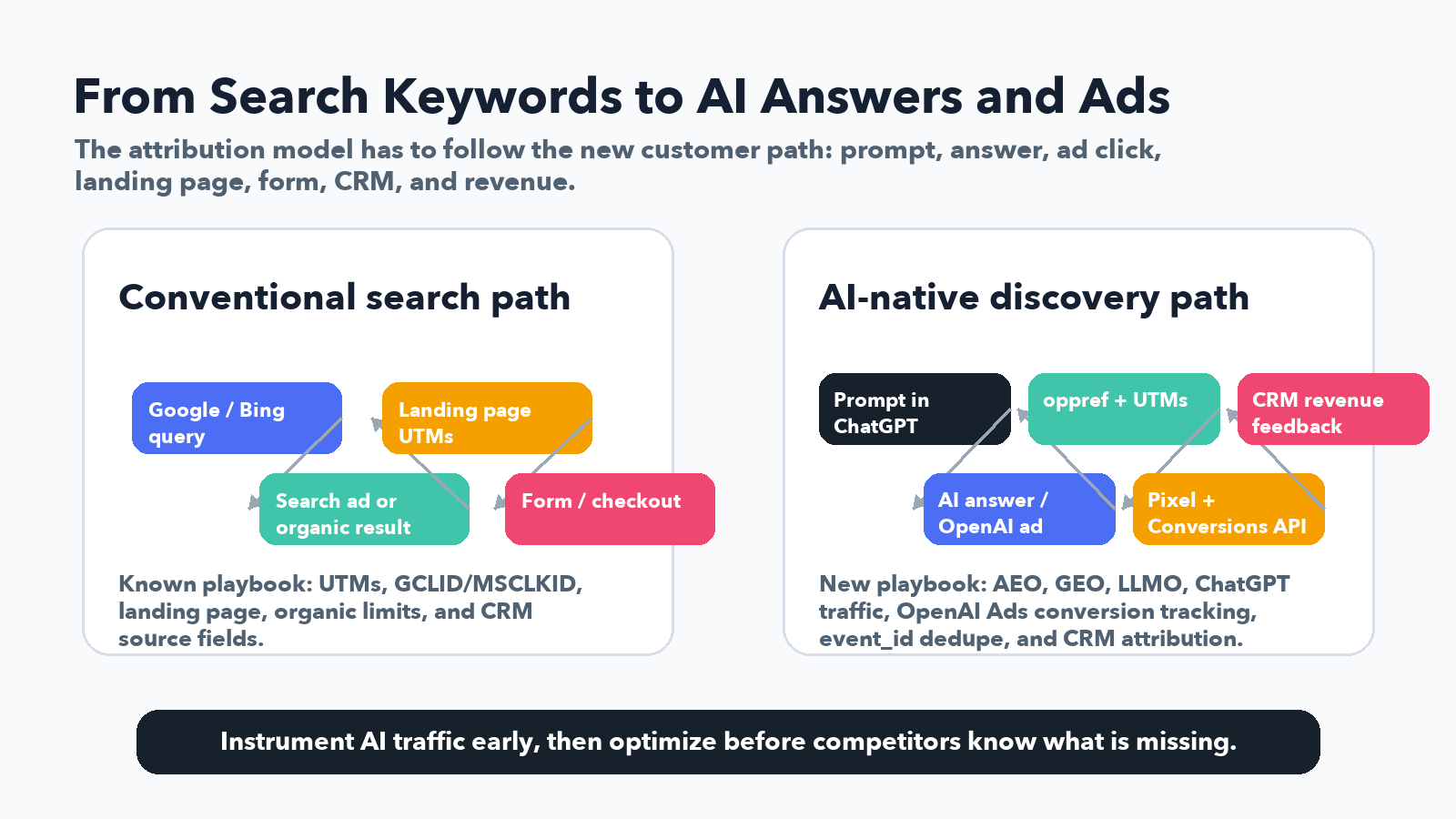
What OpenAI officially documents today
OpenAI's Ads documentation currently gives marketers and developers four important building blocks.
| OpenAI Ads component | What it is | Why marketers should care |
|---|---|---|
| Ads overview | OpenAI's hub for ChatGPT Ads, measurement, and advertiser APIs | Confirms that ads, conversion measurement, and performance monitoring belong together. |
| JavaScript Measurement Pixel | Browser-side conversion tracking using oaiq("measure", ...) | Lets you send conversion events from the page, similar to other ad pixels. |
| Conversions API | Server-to-server conversion events sent from your backend | Gives a more reliable path for leads, purchases, subscriptions, and offline-style events. |
| Supported events | Standard event names and data shapes | Helps you avoid messy custom event naming before you understand the taxonomy. |
The main tracking lesson is this:
Use the OpenAI Measurement Pixel in the browser, use the OpenAI Conversions API from the server, and connect both with a stable event_id when they describe the same conversion.
That one sentence will save a lot of debugging later.
The OpenAI Measurement Pixel: what it does
The JavaScript Measurement Pixel is the browser-side part of OpenAI Ads conversion tracking.
At a high level, the page loads OpenAI's pixel SDK, initializes it with a Pixel ID, and sends events using a pattern like:
const eventId = `lead_${crypto.randomUUID()}`;

window.oaiq("measure", "lead_created", {
  type: "customer_action"
}, {
  event_id: eventId
});
For pure browser-only events, OpenAI says the SDK can generate an event ID when you omit one. But for serious conversion tracking, you usually need more discipline.
If the same conversion is also going to be sent from your backend through the Conversions API, generate your own event_id and reuse it on both sides.
The pixel also handles several useful transport details automatically. According to OpenAI's docs, the pixel can capture oppref from the landing page URL, store it in a first-party __oppref cookie, add source_url, timestamp events, and batch closely grouped measure calls.
That matters because oppref is the OpenAI-provided reference value you do not want to lose between the landing page and the eventual conversion.
Treat oppref like an important click/context identifier. Preserve it. Pass it forward. Store it with the lead or order when possible.
The OpenAI Conversions API: what it changes
The OpenAI Conversions API is the server-side part of the stack.
OpenAI describes it as server-to-server conversion events, and its docs say it is more reliable than the pixel alone. Events are sent from your server to an endpoint that includes your Pixel ID, with authorization handled by a Conversions API key.
That gives you a better path for events that are confirmed on the backend:
- qualified lead created
- appointment scheduled
- checkout started
- order created
- subscription created
- trial started
- registration completed
- offline or CRM-qualified conversion
A server-side OpenAI conversion event includes metadata plus a data object. The important fields to design around are:
| Field | Why it matters |
|---|---|
id | Your unique event identifier on the Conversions API side. It is used with event type for deduplication. |
type | The supported event name, such as lead_created, order_created, or subscription_created. |
timestamp_ms | Event time in milliseconds. OpenAI documents freshness rules, so do not send stale events casually. |
custom_event_name | Required when type is custom. Keep it stable and use the same value on browser and server. |
oppref | OpenAI-provided reference identifier. The API does not capture it for you, so capture and pass it when available. |
source_url | Required when action_source is web. Store the landing page and conversion page cleanly. |
action_source | Context such as web, mobile_app, offline, physical_store, phone_call, email, or other. |
user | Optional user fields that can improve attribution accuracy, subject to policy, consent, and data minimization. |
opt_out | Lets you opt an event out of future user-level personalization. |
data | The event data shape that must match the event type. |
A backend event for a lead might look conceptually like this:
{
  "id": "lead_8f9f7c2a",
  "type": "lead_created",
  "timestamp_ms": 1773892800000,
  "oppref": "saved_openai_reference",
  "source_url": "https://example.com/demo",
  "action_source": "web",
  "data": {
    "type": "customer_action"
  }
}
The exact implementation belongs in your backend, not in page JavaScript.
OpenAI's pixel troubleshooting guidance is very clear on this point: use the pixel in the browser, and do not call the server Conversions API directly from page code.
That is not only cleaner. It protects your API key and keeps your conversion logic closer to the real source of truth.
event_id deduplication is the part you cannot fake
This is where many teams will get OpenAI Ads tracking wrong.
If the browser pixel fires lead_created, and your server also sends lead_created, those may represent the same business event. You do not want the platform to count one lead twice.
OpenAI documents the dedupe pattern:
- Pixel event uses
event_id. - Conversions API event uses
id. - Both should use the same value when they represent the same conversion.
- Both should be sent with the same Pixel ID.
- For custom events, use the same
custom_event_nameon both sides.
The practical implementation pattern is:
- Generate one conversion ID before the form or checkout is submitted.
- Send that ID with the browser pixel event as
event_id. - Submit that same ID with the form, checkout, or backend transaction.
- Save it in the CRM, order table, or lead table.
- Send the server event with the same value as
id. - Log the value so debugging is possible.
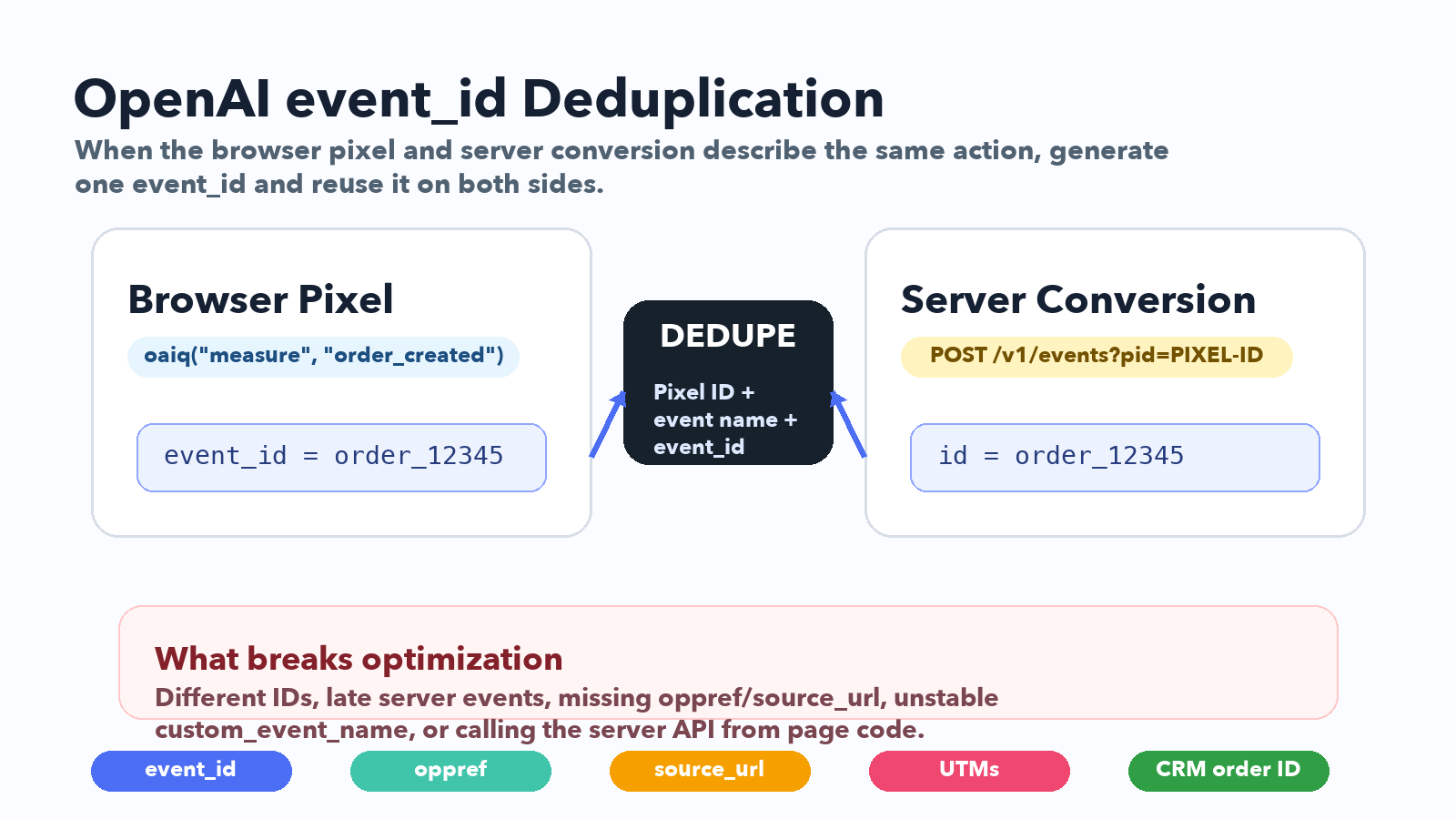
If you cannot find the event_id later, you cannot debug the dedupe later.
That is why the event_id should not only live in the browser console. Put it somewhere your team can inspect: a hidden form field, CRM field, lead note, order metadata, server log, or event audit table.
The event names marketers should map first
OpenAI's Supported Events documentation includes a standard event taxonomy. Do not start by inventing 30 custom events. Start with the standard events that match your funnel.
| OpenAI event | Data type | Good use case |
|---|---|---|
page_viewed | contents | Important page load, such as pricing, demo, or a campaign landing page. |
contents_viewed | contents | Product, article, listing, plan, or content item viewed after page load. |
items_added | contents | Item added to cart, quote, bundle, or selected package. |
checkout_started | contents | Checkout, booking checkout, or payment flow starts. |
order_created | contents | Purchase completed. |
lead_created | customer_action | Lead form submitted or contact requested. |
registration_completed | customer_action | Account, webinar, event, or gated content registration completed. |
appointment_scheduled | customer_action | Demo, consultation, sales call, booking, or appointment scheduled. |
subscription_created | plan_enrollment | Paid subscription starts. |
trial_started | plan_enrollment | Free trial starts. |
custom | custom | Only when the standard taxonomy does not fit. |
For most UTM Grabber customers, the first OpenAI conversion tracking map should be this:
| Funnel type | Primary OpenAI event | What to store in CRM |
|---|---|---|
| Lead generation | lead_created | UTMs, oppref, landing page, referrer, event_id, form name, CRM lead ID. |
| Demo booking | appointment_scheduled | UTMs, oppref, booking page, appointment type, event_id, sales owner. |
| SaaS trial | trial_started | UTMs, oppref, plan, event_id, trial account ID, email hash strategy if allowed. |
| Subscription | subscription_created | UTMs, oppref, plan ID, amount, currency, event_id, customer ID. |
| Ecommerce | order_created | UTMs, oppref, order ID, amount, currency, contents, event_id. |
OpenAI's event data docs also note a key formatting rule: monetary values should be integers in the currency's lowest denomination. In practice, that means $129.99 becomes 12999 with currency: "USD".
UTM tracking still matters in the OpenAI Ads era
Some teams will hear "OpenAI pixel" and assume UTMs are less important.
That is backwards.
UTMs become more important when new channels appear, because your CRM, sales reports, and BI tools still need portable campaign fields.
Your OpenAI Ads tracking plan should include both OpenAI-specific identifiers and normal marketing attribution fields.
At minimum, capture and persist:
utm_sourceutm_mediumutm_campaignutm_contentutm_termoppref- first landing page
- last landing page
- first referrer
- last referrer
- conversion page
event_id- form name or checkout step
- CRM lead ID, contact ID, opportunity ID, order ID, or customer ID
For campaign naming, leave room for values like:
utm_source=openai
utm_source=chatgpt
utm_medium=paid_ai
utm_medium=ai_ads
utm_campaign=chatgpt_ads_demo
utm_content=answer_card_variant_a
Do not hard-code your reporting around only google, facebook, linkedin, bing, and newsletter.
The AI traffic layer will not always fit old channel boxes.
How OpenAI Ads connects to SEO, AEO, GEO, and LLMO
This post is about conversion tracking, but the bigger strategy is AI visibility.
The same company may now care about all of these at once:
| Term | What it means in plain English |
|---|---|
| SEO | Ranking in traditional search results. |
| AEO | Being selected as a clear answer by answer engines. |
| GEO | Optimizing content for generative search and AI answer systems. |
| LLMO | Making your brand, product, and content understandable to large language models. |
| AI search tracking | Measuring visits, leads, pipeline, and revenue from ChatGPT, Claude, Perplexity, Gemini, AI Overviews, and related systems. |
| OpenAI Ads tracking | Measuring paid ChatGPT / OpenAI ad interactions with the pixel, Conversions API, UTMs, and CRM attribution. |
The mistake is separating these too much.
A user may discover you through an AI answer, compare you through traditional search, return through a retargeting ad, and finally convert through a branded campaign. Or they may click an OpenAI ad from ChatGPT and immediately book a demo.
Your website and CRM need to capture that path early.
The best time to start tracking AI search and OpenAI Ads traffic is before leadership asks why AI-generated demand is not showing up in pipeline reports.
For a deeper AI search tracking strategy, see our guide on AI Search Tracking for SEO, AEO, and the LLM Era.
The field design I would create before launch
Before spending heavily on OpenAI Ads, create the fields you will need to analyze performance.
For a lead-gen or SaaS funnel, I would start with this schema.
| Field | Purpose |
|---|---|
| First UTM Source | Original acquisition source. |
| First UTM Medium | Original acquisition medium. |
| First UTM Campaign | Original campaign. |
| Latest UTM Source | Most recent tracked source before conversion. |
| Latest UTM Medium | Most recent tracked medium before conversion. |
| Latest UTM Campaign | Most recent tracked campaign before conversion. |
| OpenAI oppref | OpenAI-provided reference identifier when available. |
| OpenAI Event ID | The dedupe ID shared by browser and server events. |
| First Landing Page | Page where the visitor first entered. |
| Conversion Page | Page where the lead, booking, subscription, or order happened. |
| First Referrer | Original referrer or source domain. |
| Latest Referrer | Latest referrer or source domain. |
| AI Source | Normalized bucket such as ChatGPT, Claude, Perplexity, Gemini, AI Overview, OpenAI Ads, or unknown AI referral. |
| CRM Object ID | Lead, contact, opportunity, order, subscription, or customer ID. |
This is not only for reporting. It helps you send better server conversions later.
If the CRM knows the lead became qualified, booked a call, purchased, or expanded, your server can send cleaner conversion feedback than a browser pixel alone.
Consent, privacy, and data minimization
OpenAI conversion tracking should be implemented with the same discipline you use for Meta CAPI, Google Ads Enhanced Conversions, and offline conversion imports.
That means:
- Respect your consent management platform and regional privacy requirements.
- Do not fire marketing tags before consent when your legal basis requires consent.
- Avoid sending sensitive information unless your legal, privacy, and platform policy review says it is allowed.
- Use only documented fields.
- Do not invent user fields because another ad platform supports them.
- Keep API keys on the server.
- Do not call the Conversions API from browser JavaScript.
- Keep an
opt_outpath if your implementation needs to exclude events from future user-level personalization.
OpenAI's Conversions API includes optional user fields that can improve attribution accuracy. That does not mean you should send every piece of customer data you can collect.
The right rule is: send the minimum high-quality data needed for measurement, with consent, in the documented format, from the correct environment.
For healthcare, finance, legal, or other sensitive categories, add a formal policy review before sending conversion payloads. Do not copy Meta or Google payload logic into OpenAI without reviewing the OpenAI schema and your own obligations.
The QA checklist for OpenAI conversion tracking
Use this checklist before calling an OpenAI Ads launch ready.
Browser pixel QA
- Pixel ID is installed on the right domain.
- Pixel loads after the correct consent state.
oaiq("init", ...)runs once.oaiq("measure", ...)fires on the intended page or action.debug: trueis used while testing, then removed or controlled for production.event_idis generated by your code when the same event will be sent server-side.opprefis present when the landing URL includes it.- The first-party
__opprefcookie is not blocked by your own implementation.
Server Conversions API QA
- API key is stored server-side only.
- Events are sent from backend logic, not browser code.
idmatches the pixelevent_idfor deduped events.typeuses a supported event name when possible.custom_event_nameis stable when usingcustom.timestamp_msis fresh and accurate.source_urlis present for web events.opprefis captured and passed when available.- Payloads are tested with validation before production when supported by your workflow.
- Failed batches are logged, because OpenAI documents batch behavior where one failing event can fail the full batch.
CRM and attribution QA
- Hidden fields capture UTMs,
oppref, landing page, referrer, andevent_id. - The form submission includes those hidden fields in the actual payload.
- CRM field mapping is complete.
- Lead conversion or opportunity creation does not lose the OpenAI attribution fields.
- Sales qualification events can be connected back to the original
event_idor CRM object ID. - Reporting separates OpenAI Ads, ChatGPT organic/referral, AI search, and generic referral traffic.
How UTM Grabber fits into this
UTM Grabber is not trying to replace OpenAI's Measurement Pixel or Conversions API.
It helps with the part that usually breaks around them: capturing attribution values from the landing page, persisting them across the visitor journey, populating forms, and sending clean source data into the CRM.
That matters because OpenAI Ads tracking will still fail if:
- the visitor lands with useful parameters but submits a form three pages later,
- the form hidden fields are missing,
- the CRM field names do not match,
- a booking widget or iframe loses the parent page data,
- a cache layer serves stale server-rendered values,
- the browser pixel and server conversion use different IDs,
- the sales team cannot see the source fields after the lead is created.
For broader attribution failure patterns, see The Complete Tracking Failure Audit. For CRM field design, see How to Track UTM Parameters in Salesforce.
Prepare your site for OpenAI Ads, ChatGPT traffic, and AI search attribution
The real advantage is not installing one more tag. It is preserving the conversion context all the way into the CRM.
- Capture UTMs, click IDs, referrers, landing pages, and AI traffic indicators before the form submit.
- Persist first-touch and latest-touch values across pages, sessions, and funnel steps.
- Populate hidden fields for WordPress forms, booking flows, and CRM handoffs.
- Store
event_idand OpenAI reference context where your team can debug it later. - Build a cleaner foundation for OpenAI Ads conversion tracking, AI search tracking, AEO reporting, GEO strategy, and LLM traffic attribution.
The bottom line
OpenAI Ads measurement is early, but the direction is obvious.
AI-native discovery is moving from a content and SEO conversation into a paid media, conversion API, and CRM attribution conversation.
The companies that prepare now will have a measurement advantage later. They will know which ChatGPT traffic converts, which OpenAI Ads campaigns create pipeline, which AI search pages deserve investment, and which conversion events should feed optimization.
The companies that wait will see more traffic labeled as Direct, Referral, Other, or Unknown.
Do the boring tracking work early. Capture the identifiers. Keep events simple. Reuse the same event_id. Send server conversions from the backend. Store the attribution story in the CRM.
That is how you turn OpenAI Ads and AI search from a mystery channel into a measurable growth channel.
Sources checked
Reviewed on May 29, 2026.
- OpenAI Ads overview
- OpenAI JavaScript Measurement Pixel
- OpenAI Conversions API
- OpenAI Supported Events
UTM Grabber helps preserve source, campaign, click ID, landing page, referrer, and CRM attribution data across your forms and funnels.