
Meta Ads Overspend at Night? Use Tracking Data to Prove It
If Meta Ads suddenly spends a huge amount late at night, the worst thing you can do is argue from screenshots alone.
You need to answer the questions a Meta rep, finance team, or client will immediately ask:
Was there real traffic? Was it Meta-tagged traffic? Did it convert? Was it bot traffic? Was it from the target country? Which ads carried the spend? Did purchases, revenue, leads, or backend activity rise with the spend?
In one anonymized high-spend audit, we investigated a late-night Meta delivery spike on June 23, 2026. The suspicious window was 10PM to midnight MST.
The first-pass evidence showed approximately $23.2K in Meta spend, 6,307 tracked events, and only 6 purchases during that two-hour window. The 11PM MST hour alone showed about $18.9K in spend and 0 purchases.
The important part is not just the numbers. The important part is how fast the evidence came together.
Because the site had a real first-party tracking system, the investigation could move from “something feels wrong” to a refund-ready Meta overspend evidence packet in roughly 30 minutes using Amazon Athena, local analysis, charts, and Codex-assisted workflow automation.
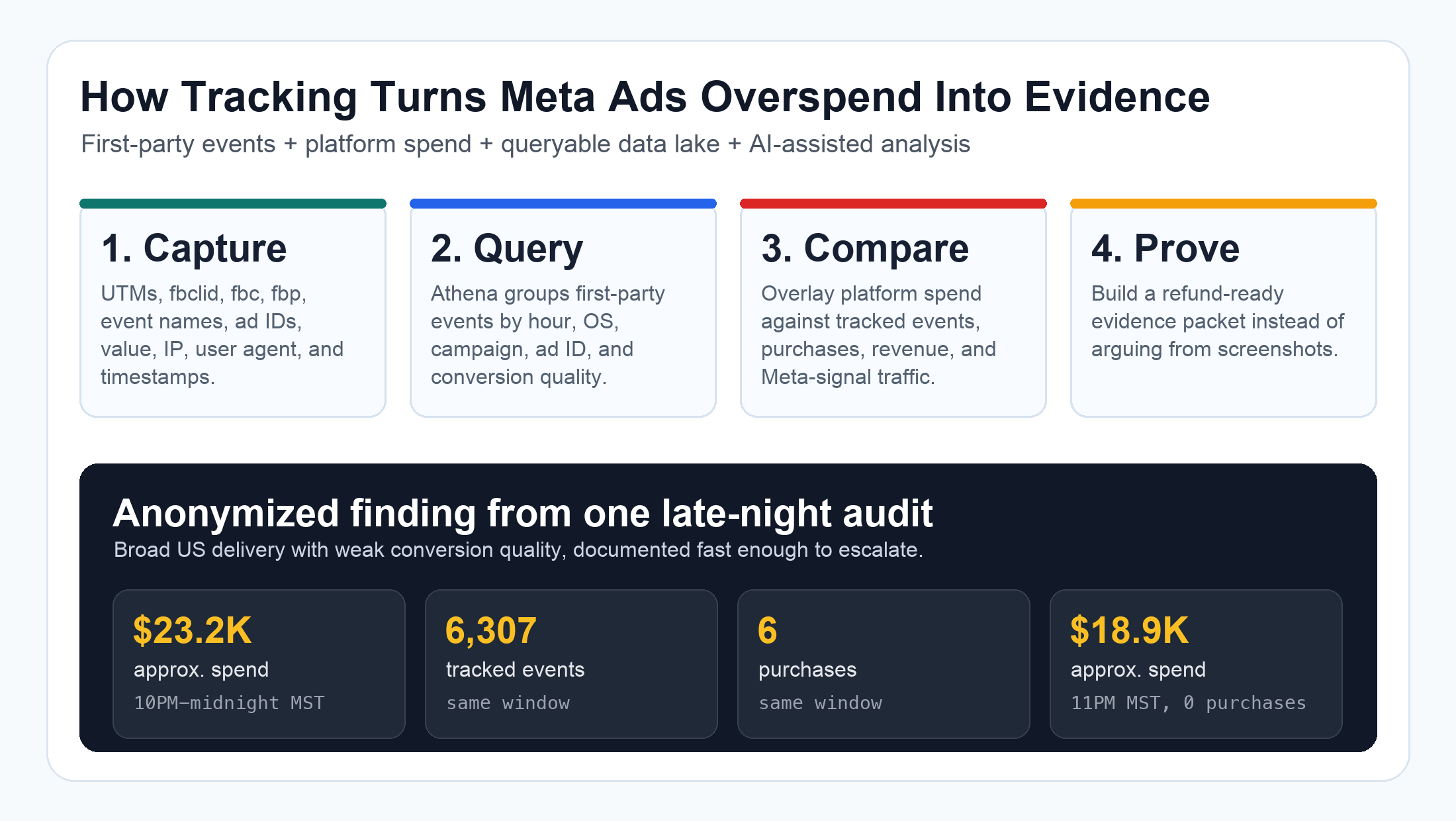
When Facebook Ads spends too much and the traffic does not back it up
- Your Meta Ads account spends a large amount in a short late-night window.
- Ads Manager shows spend, but backend purchases, leads, booked calls, or CRM opportunities do not rise with it.
- The team suspects bot traffic, invalid traffic, poor delivery, or a pacing issue, but cannot prove it.
- Screenshots show the spend spike, but they do not show who came to the site, what they did, or whether they were target-market users.
- The ad platform report is aggregated, delayed, or not aligned to the timezone used by the website tracking system.
- The client asks for a refund or credit review, but the account manager needs evidence by hour, ad ID, geography, device, IP, and conversion outcome.
The question is not only whether Meta spent the money. The question is whether the business received proportional traffic and conversions for that spend.
Why Meta overspend investigations fail without first-party tracking
Meta Ads budget behavior is only the beginning
Meta's budget documentation describes daily budgets as average daily spend over a week, and Meta may spend more on some days and less on others. That matters because not every daily overspend is automatically a platform failure.
But that does not end the investigation.
If a campaign spends heavily during a strange hour, and the business does not receive proportional purchases, leads, or revenue, you still need to inspect delivery quality, traffic quality, and conversion quality.
That requires data Meta does not fully own:
| Question | Why Meta alone may not answer it | What first-party tracking adds |
|---|---|---|
| Did traffic reach the site? | Ads Manager can report clicks or landing page views, but the site may see something different. | Server/browser events with exact timestamps. |
| Was the traffic Meta-attributable? | Platform attribution can lag or aggregate. | fbclid, _fbc, _fbp, UTMs, referrer, and ad IDs. |
| Did visitors behave like buyers? | Spend and clicks do not prove business value. | Purchases, lead events, order value, CRM status, and backend truth. |
| Was it bot-like traffic? | Invalid traffic systems are opaque from the advertiser side. | IP concentration, user agents, OS split, hosting/proxy flags, and request patterns. |
| Which ads or ad sets were involved? | UI screenshots are hard to reconcile. | ad_id, adset_id, utm_content, utm_campaign, and event counts by hour. |
| Can we ask for a refund review? | A support ticket without evidence is weak. | A concise packet: suspect window, spend, events, conversions, geo, and affected ads. |
This is why UTM tracking, Facebook Ads UTM tracking, click ID capture, and server-side event logs are not just reporting conveniences. They become your audit trail when something expensive happens.
If your tracking only lives in GA4 summaries or last-click CRM fields, you may not be able to reconstruct the incident.
What the anonymized audit found
The first question: was this just bot traffic?
The initial suspicion was simple: maybe a bot or crawler generated traffic after 10PM and caused Meta to spend into junk behavior.
That was worth testing, but the data did not support a simplistic “foreign bot dump” story.
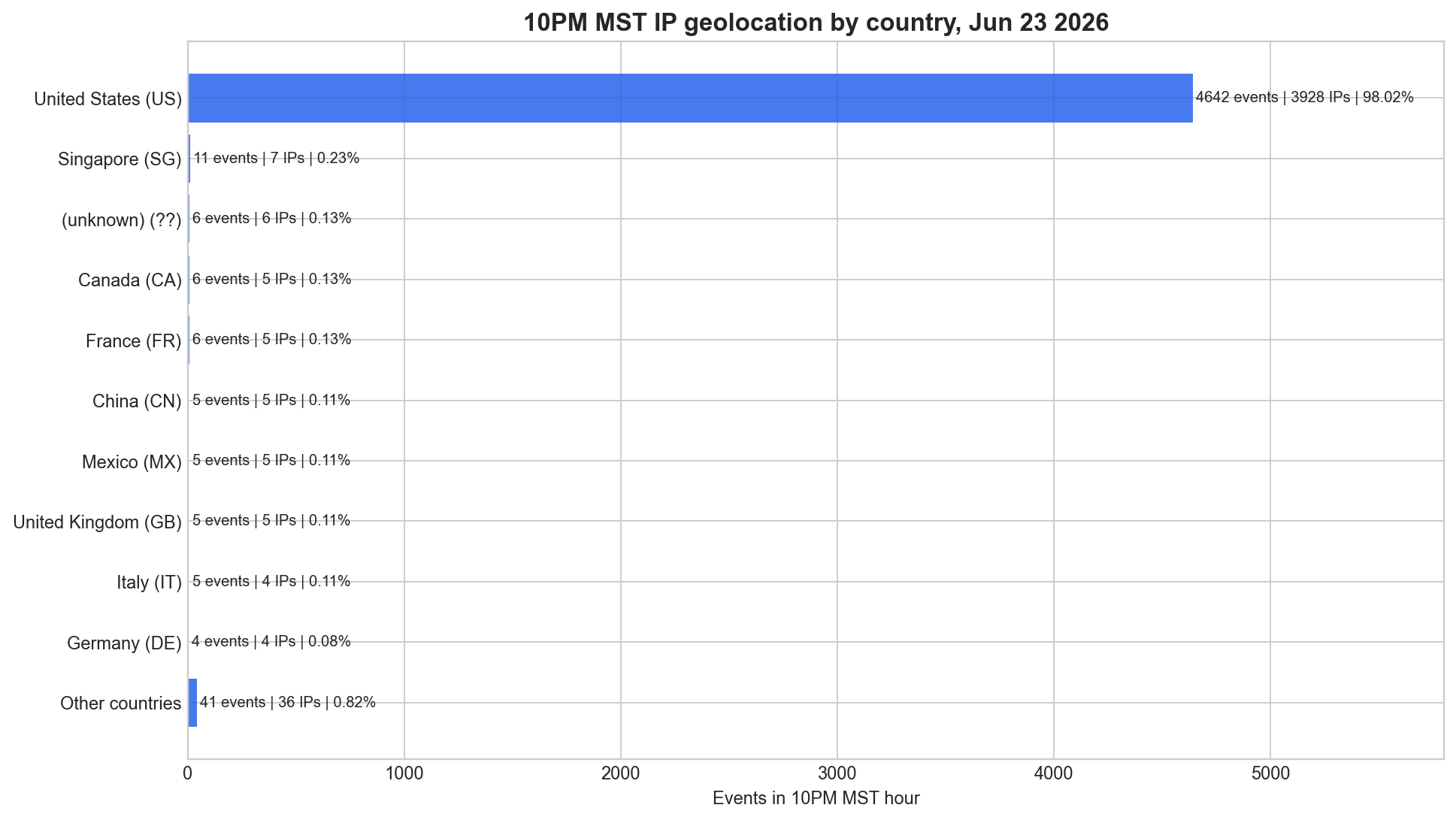
For the 10PM MST peak hour, the audit found:
| 10PM MST geo sanity check | Result |
|---|---|
| Tracked events | 4,736 |
| IP rows | 4,010 |
| US IPs | 3,928 |
| Events from US IPs | 4,642 |
| Percent of events from US IPs | 98.02% |
| Known non-US events | 88 |
| Hosting-flagged events | 123 |
| Proxy-flagged events | 103 |
| Purchases | 6 |
| Purchases from US IPs | 6 |
The traffic was also not concentrated in a few repeat IPs. The busiest IP had only 24 events, and the top 100 IPs represented only 8.83% of the hour.
So the stronger story was not “one obvious bot attacked us.”
The stronger story was: Meta delivered a large amount of broad, mostly US, Meta-signal traffic late at night, but the conversion quality did not justify the spend spike.
The second question: did conversions rise with spend?
The spend overlay made the problem much clearer.
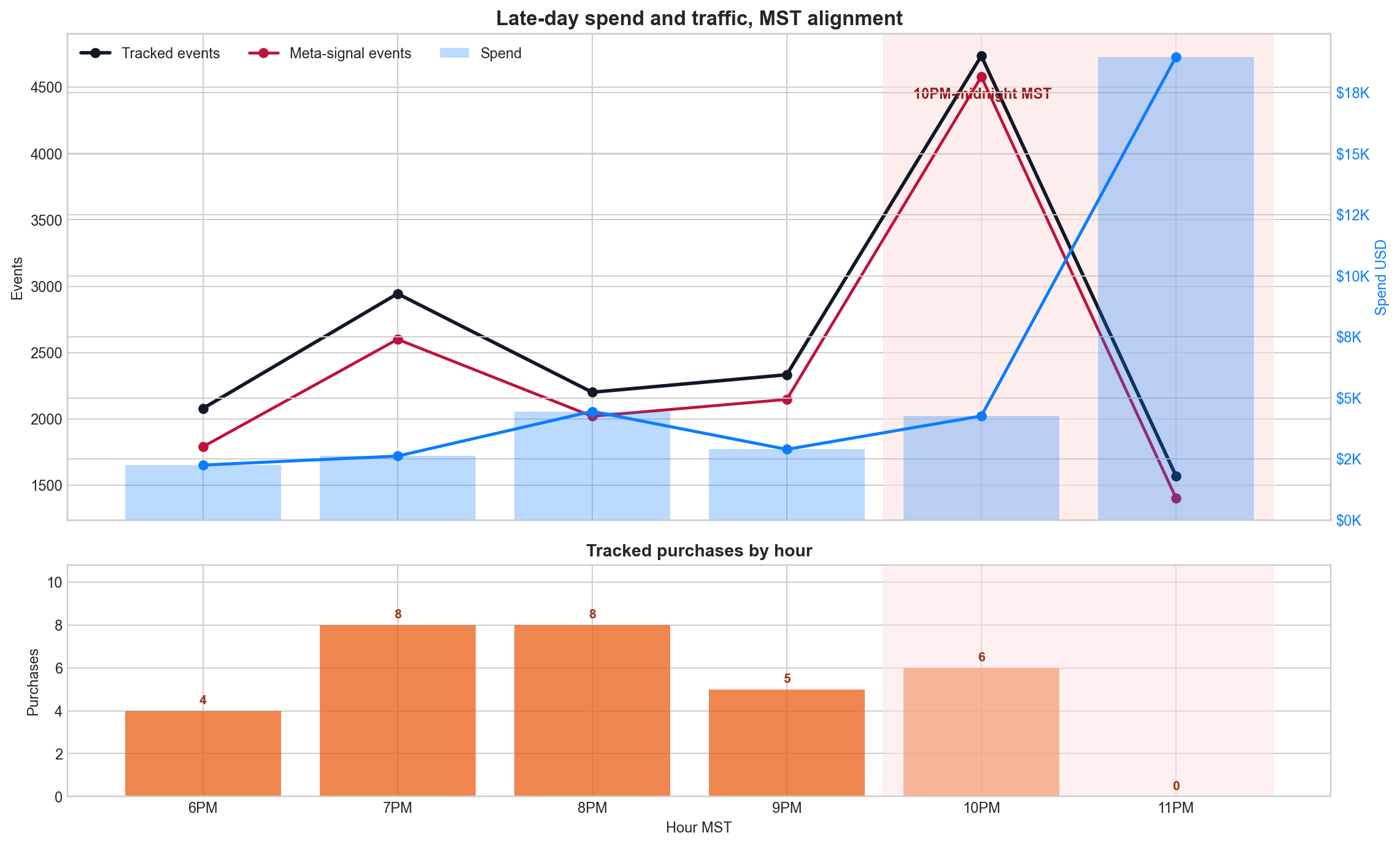
In the 10PM to midnight MST window, the site saw approximately:
- $23,219.63 in screenshot-digitized Meta spend.
- 6,307 tracked events.
- 5,984 Meta-signal events.
- 6 purchases.
- $582 in tracked purchase value.
- 0.0951% event-to-purchase rate.
Before 10PM MST, the event-to-purchase rate was 0.4131%.
That means the suspect window converted at roughly a quarter of the pre-10PM rate by raw tracked events.
The 11PM MST hour was even more concerning: approximately $18,959 in spend, 1,571 tracked events, and 0 purchases.
Important caveat: the spend values were digitized from a Meta screenshot, so the exact finance claim should be replaced by an official hourly Meta export before sending the final refund request. But the tracking pattern was strong enough to justify escalation and a platform-side delivery review.
The hidden cost: without tracking, this becomes a meeting instead of evidence
When teams do not have first-party attribution, this kind of incident turns into a long meeting.
Someone opens Ads Manager. Someone opens Shopify, WooCommerce, Stripe, HubSpot, Salesforce, GA4, or the CRM. Someone argues about timezones. Someone asks whether the platform data is delayed. Someone asks whether bots were involved. Someone manually exports a CSV. Someone creates a spreadsheet. Someone tries to match purchases back to ad clicks.
Hours disappear.
Worse, the final answer is often still weak because the data sources do not share a common event ID, timestamp, ad ID, or click ID.
With a real tracking system, the investigation has a shape:
- Pull all events for the date and timezone.
- Mark Meta-signal traffic using
fbclid,_fbc,_fbp, Meta-like UTM source/medium, and ad parameters. - Group traffic by hour and five-minute buckets.
- Split by OS, user agent, country, IP, ad ID, ad set, event type, and conversion outcome.
- Compare traffic volume against purchases, revenue, CRM acceptance, or backend order truth.
- Overlay hourly platform spend.
- Package the evidence into a support-ready narrative.
That is the difference between tracking as reporting and tracking as business protection.
What good tracking must capture before an overspend happens
You cannot collect the evidence after the money is gone
A tracking audit is only useful if the data was captured at the time of the visit.
For Meta Ads overspend, Facebook Ads attribution issues, refund requests, bot traffic investigations, and conversion quality audits, you want these fields available in a queryable place:
| Data point | Why it matters |
|---|---|
utm_source, utm_medium, utm_campaign, utm_content, utm_term | Proves the campaign path and keeps ad-platform naming readable. |
fbclid, _fbc, _fbp | Helps identify Meta click/session signals outside Ads Manager. |
ad_id, adset_id, campaign_id | Lets you isolate the exact ads and ad sets involved in the spike. |
| Event timestamp and timezone-normalized timestamp | Prevents the classic “Ads Manager timezone vs server timezone” mistake. |
| Event name | Separates PageView, Lead, InitiateCheckout, Purchase, and custom events. |
| Purchase value or lead quality status | Shows whether spend produced business value, not just traffic. |
| IP and user agent | Supports bot, geo, OS, device, hosting, proxy, and crawler analysis. |
| URL and referrer | Shows which pages received the traffic and whether funnel steps were real. |
| Visitor/session ID | Helps detect concentration, repeats, and multi-step journeys. |
| Consent state where applicable | Keeps the audit privacy-aware and explains expected data gaps. |
This is why a tool like UTMSimple, or a UTM Grabber-style first-party tracking setup, becomes more than a form-field utility.
It becomes the logbook for paid media truth.
If you already care about Facebook Ads UTM tracking, common tracking problems, AI bot traffic and conversion tracking, or Meta Event Match Quality, this is the next layer: can you defend your spend when the platform behaves strangely?
A refund-ready Meta overspend packet
A good evidence packet does not accuse first. It shows the pattern clearly enough that the platform has something specific to investigate.
Use this structure:
| Section | What to include |
|---|---|
| Incident summary | Date, timezone, account, campaign/ad set IDs, suspect hours, and total spend in the window. |
| Spend evidence | Ads Manager screenshot plus exact hourly export if available. Screenshot-digitized values should be labeled as approximate. |
| First-party traffic evidence | Tracked events by hour, Meta-signal events by hour, unique visitors, unique IPs, and OS/device split. |
| Conversion evidence | Purchases, leads, booked calls, revenue, CRM-qualified leads, or backend order value by hour. |
| Quality evidence | Event-to-purchase rate, purchase value per spend, geo distribution, IP concentration, user-agent patterns, proxy/hosting flags. |
| Affected assets | Top ad IDs, ad sets, campaigns, placements, and creative IDs involved in the suspect window. |
| Ask to the rep | Request pacing review, delivery-quality review, invalid traffic review, and refund or credit review for the suspect window. |
A practical message to Meta can sound like this:
During the 10PM-midnight MST window on June 23, our first-party tracking shows approximately $23.2K in Meta spend, 6,307 tracked events, 5,984 Meta-signal events, and only 6 purchases. The 11PM MST hour alone shows approximately $18.9K in spend and 0 purchases. Before 10PM MST, the event-to-purchase rate was materially higher. Please investigate whether spend pacing, delivery quality, or invalid traffic controls failed during this late-night window and provide a refund or credit review for affected delivery.
That framing is stronger than “Meta spent too much.”
It gives the rep a bounded window, measurable business impact, affected delivery quality, and a clear request.
How Codex and MCP-style workflows changed the audit speed
The tracking system made the data possible. Codex made the workflow fast.
The session behind this article used a practical AI-assisted workflow:
- Confirm AWS CLI access with the
handlprofile. - Query Amazon Athena against first-party tracking events stored in a data lake.
- Aggregate hourly traffic, Meta-signal traffic, OS groups, user agents, IPs, visitors, events, purchases, and purchase value.
- Pull Athena result files from S3.
- Generate charts locally.
- Digitize the Meta spend screenshot carefully and label it as approximate.
- Rebucket website events into the ad screenshot timezone.
- Pull IP geography and hosting/proxy flags for the suspect hour.
- Create a written evidence memo with charts and next-step language for the platform rep.
Normally, a senior analyst might spend hours moving between Ads Manager, Athena, spreadsheets, scripts, IP tools, screenshots, and report writing.
With Codex coordinating the local shell, AWS CLI, files, Python charting, and report generation, the useful version was done in about 30 minutes.
This is where MCP-style connected tools matter. MCP is designed to let AI applications connect to external systems such as files, databases, tools, and workflows. Codex also has tooling for shell, MCP/connectors, files, and local execution. That means the analyst no longer has to manually copy every number from system to system.
But AI did not replace the tracking system.
It amplified it.
If the click IDs, UTMs, event names, ad IDs, timestamps, IPs, user agents, and purchase data were never captured, Codex would have nothing reliable to query.
This is also a service business opportunity
A lot of companies already pay for this kind of work.
They need someone who can answer:
- Why did Meta spend so much yesterday?
- Was that traffic real?
- Did bots or crawlers trigger conversion events?
- Which campaigns, ad sets, or ads wasted the spend?
- Did the CRM receive matching leads?
- Did purchases or revenue justify the spend spike?
- Is there enough evidence to ask Meta, Google, TikTok, or another platform for a review?
A good tracking stack plus AI-assisted analysis lets agencies, consultants, and operators create a valuable service around paid media tracking audits, Meta overspend investigation, invalid traffic review, refund evidence packets, CAPI quality checks, and conversion tracking cleanup.
The service is not “run one report.”
The service is giving the business confidence when the ad platform, analytics tool, and CRM disagree.
That confidence comes from first-party data.
The practical audit workflow
Use this checklist when Meta Ads spend looks wrong
- Define the exact suspect window. Use the ad account timezone and the website/server timezone. Convert both.
- Export hourly Meta spend. If you only have a screenshot, label the spend as approximate until you get the export.
- Pull first-party events. Include all events, not only conversions, so you can see traffic volume and quality.
- Mark Meta-signal sessions. Use
fbclid,_fbc,_fbp, UTM source/medium, referrer, and ad IDs. - Calculate conversion quality. Compare event-to-purchase, event-to-lead, revenue per spend, or qualified lead rate before and during the suspect window.
- Check IP and user-agent concentration. A true bot issue often has concentration, strange user agents, hosting ranges, or repeated patterns.
- Check country and region. Do not assume bad traffic is foreign. Prove it.
- Break down by ad ID and ad set. A refund request is stronger when it names the affected assets.
- Write the ask carefully. Request a pacing review, delivery-quality review, invalid traffic review, and refund/credit review. Avoid overstating what the data does not prove.
- Fix tracking gaps afterward. If important fields were missing, improve the tracking system before the next incident.
The uncomfortable lesson is simple:
You do not need perfect tracking every day, until the day you suddenly need it very badly.