
How to Track UTM Parameters in Saleskick: Iframe, URL Parameters, and Webhooks
Saleskick can be excellent for application funnels, show-rate workflows, lead qualification, and sales operations. But if you embed a Saleskick form on a WordPress landing page and expect normal UTM tracking to magically follow the visitor into the form, you can lose the exact data your sales and ads teams need.
The reason is simple: Saleskick forms load inside an iframe/modal embed. The visitor lands on your page with utm_source, utm_medium, utm_campaign, gclid, fbclid, msclkid, referrer, first-touch, and other attribution values. But the Saleskick form is loaded from a separate iframe URL. Unless those values are pushed into that iframe URL before the form loads, Saleskick may never see them.
If you searched for Saleskick UTM tracking, Saleskick UTM parameters, or how to pass UTMs into Saleskick, this is the practical answer:
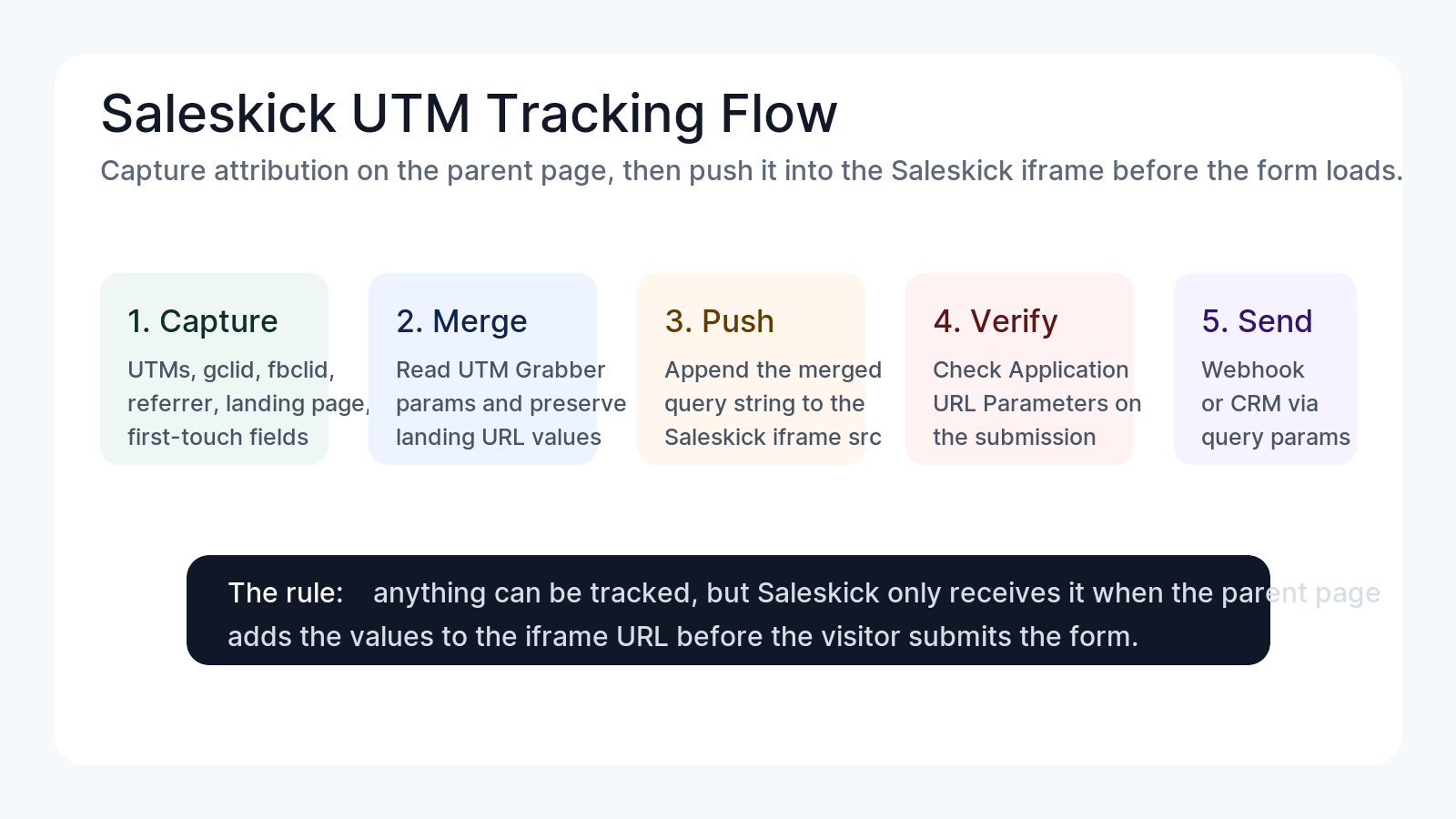
Capture attribution on the parent landing page with UTM Grabber, merge the tracked values into the Saleskick iframe URL, verify them under Saleskick Application > URL Parameters, then forward the full payload with Saleskick automations using {{submission.shareQueryParams}}.
At the time of writing, we could not find public Saleskick documentation for this exact UTM attribution setup. So yes, this guide and the companion Saleskick UTM Grabber documentation may be the only real implementation path a user finds when trying to solve this problem.
If Saleskick UTM tracking is not working
- Your ad URL has UTMs, but the Saleskick submission does not show campaign data.
- Google Ads leads arrive without
gclid,gbraid, orwbraid. - Meta leads arrive without
fbclid,fbc,fbp, or first-touch details. - Saleskick captures the contact, but your CRM cannot tell which campaign, ad, keyword, funnel, or landing page produced it.
- Your automation sends the lead to Zapier, Make, HubSpot, Salesforce, GoHighLevel, or a backend webhook, but the attribution fields are blank.
- You are checking the CRM first, when the real failure happened earlier: the iframe never received the query parameters.
The important part is not whether the value exists somewhere on the landing page. The important part is whether Saleskick receives it inside the iframe URL before the visitor submits.
Why Saleskick needs a different UTM tracking approach
Most UTM tracking guides assume the form is part of the same page. That is not the usual Saleskick embed pattern.
Saleskick ships a JavaScript embed that opens a modal form in an iframe. That iframe has its own src. If the iframe src is only something like this:
https://app.saleskick.com/form-YOUR-FORM-ID/your-form-slug
then Saleskick only knows what is included in that iframe URL and what the Saleskick app itself collects. It does not automatically inherit your WordPress page cookies, UTM Grabber values, first-touch data, or ad click IDs just because the parent page has them.
That is the key idea:
Anything can be tracked in Saleskick, but it has to be pushed into the iframe URL as query parameters.
That includes:
| Data type | Examples | Why it matters |
|---|---|---|
| Standard UTMs | utm_source, utm_medium, utm_campaign, utm_term, utm_content | Campaign, channel, ad group, keyword, creative reporting |
| Paid click IDs | gclid, gbraid, wbraid, fbclid, msclkid, ttclid | Google Ads, Meta Ads, Microsoft Ads, TikTok Ads attribution |
| UTM Grabber IDs | handlID, first_handlID | First-touch and visitor-level attribution joins |
| Referrer and landing data | handl_ref, handl_landing_page, handl_url | Original session context and funnel diagnostics |
| Traffic classification | traffic_source, organic_source_str | Organic/referral/direct classification |
| Technical context | user_agent, custom params | Debugging, enrichment, deduplication, CRM workflows |
The correct Saleskick UTM tracking flow
A working implementation has four layers.
- Capture on the parent page. UTM Grabber runs on the WordPress page and stores attribution values from the landing URL, referrer, cookies, and first-touch logic.
- Build the Saleskick iframe URL. Before the Saleskick iframe is created, your embed code reads the UTM Grabber values and adds them to the iframe
src. - Verify in Saleskick. After a test submission, open the Saleskick submission and check Application > URL Parameters.
- Forward downstream. Use Saleskick automations and
{{submission.shareQueryParams}}to send the full query string to your CRM, Zapier, Make, Google Sheets, data lake, or backend.
If any one of those layers is missing, attribution can break.
Step 1: Use the adapted Saleskick embed code
The companion documentation shows the production approach in detail: Track UTMs in Saleskick.
The simplified version looks like this:
<script>
(function () {
  const FORM_SRC = "https://app.saleskick.com/form-YOUR-FORM-ID/your-form-slug";

  function saleskickUrlWithUtmGrabberData() {
    const url = new URL(FORM_SRC);
    const params = typeof getAllHandLUTMParams === "function"
      ? getAllHandLUTMParams()
      : {};

    Object.entries(params).forEach(function ([key, value]) {
      if (value) url.searchParams.set(key, value);
    });

    return url.toString();
  }

  const iframe = document.createElement("iframe");
  iframe.src = saleskickUrlWithUtmGrabberData();

  // Keep the rest of your Saleskick modal/embed code here.
})();
</script>
The exact Saleskick embed may include modal behavior, button styling, mobile styling, close buttons, event handlers, or other platform-specific code. Do not rewrite the whole thing unless you know what you are doing.
The rule is much narrower:
Keep the Saleskick embed behavior, but replace the iframe URL assignment so the iframe src includes UTM Grabber parameters.
Also note the important V3 detail: use the UTM Grabber V3 helper/object from your documentation. Do not copy older examples from other tracking tools that reference window.HandL.getAll(). That belongs to a different implementation pattern.
Step 2: Test with a real UTM landing URL
Do not test this from a clean URL. Use a real test URL so the parent page has something to capture.
Example:
https://yoursite.com/saleskick-landing-page?utm_source=facebook&utm_medium=paid&utm_campaign=saleskick_test&utm_content=video_a&gclid=test-gclid&fbclid=test-fbclid
Then:
- Open the page in a fresh browser session.
- Wait for UTM Grabber to load.
- Open the Saleskick form.
- Submit a test lead.
- Open the Saleskick submission and inspect Application > URL Parameters.
If you do not see your UTMs there, do not move to CRM debugging yet. First fix the iframe handoff.
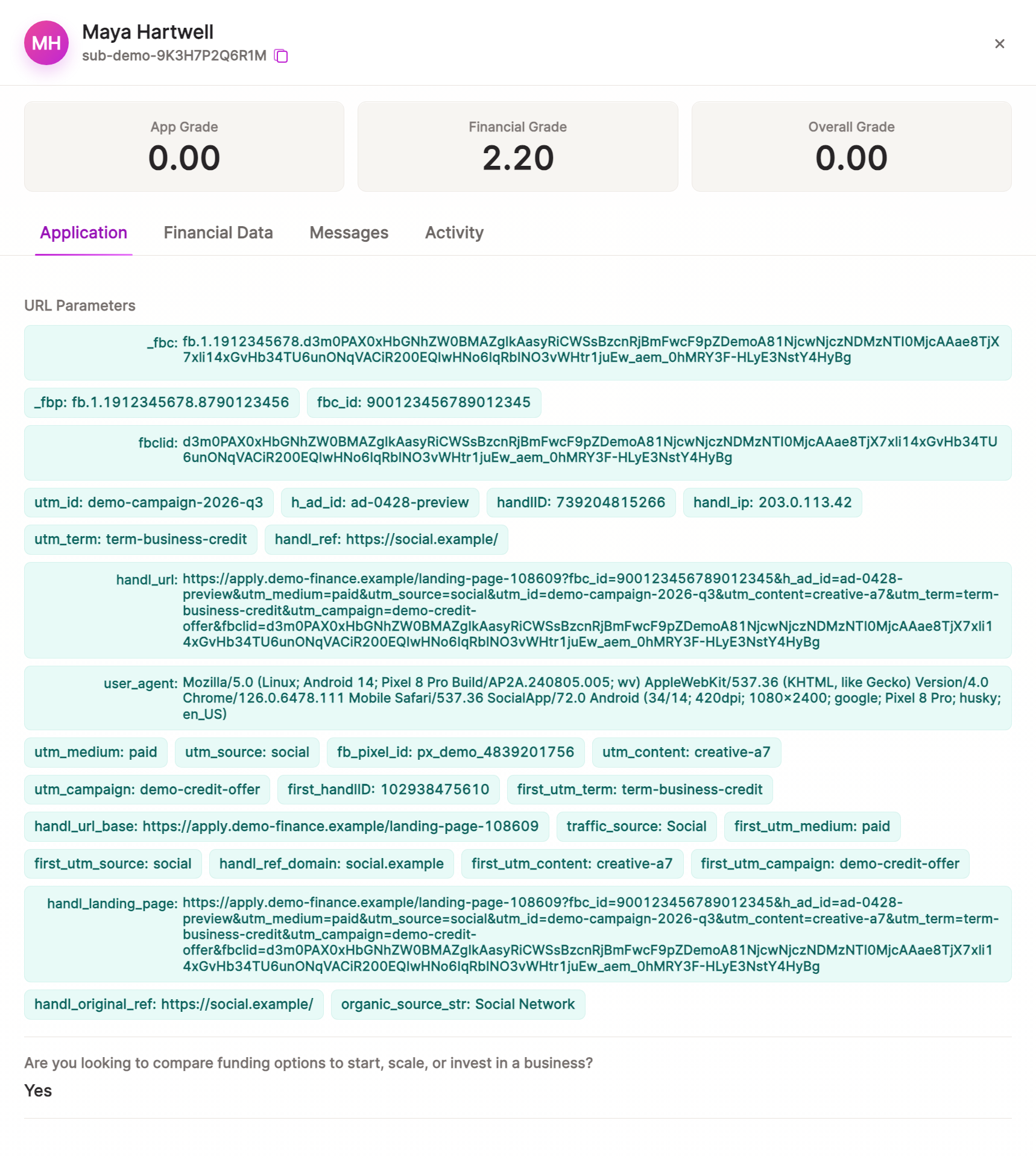
Step 3: Verify the fields Saleskick received
Inside Saleskick, the submission should show URL Parameters such as:
utm_sourceutm_mediumutm_campaignutm_termutm_contentgclid,gbraid,wbraidfbclid,msclkid, or other click IDshandlIDfirst_handlIDhandl_refhandl_landing_pagehandl_urltraffic_sourceorganic_source_struser_agent
This is the checkpoint that tells you whether the parent page successfully pushed attribution into the iframe.
If the values appear in Saleskick but not in the CRM, the problem is downstream mapping or automation. If the values do not appear in Saleskick, the problem is upstream capture or iframe URL construction.
Step 4: Send the attribution payload to your CRM or backend
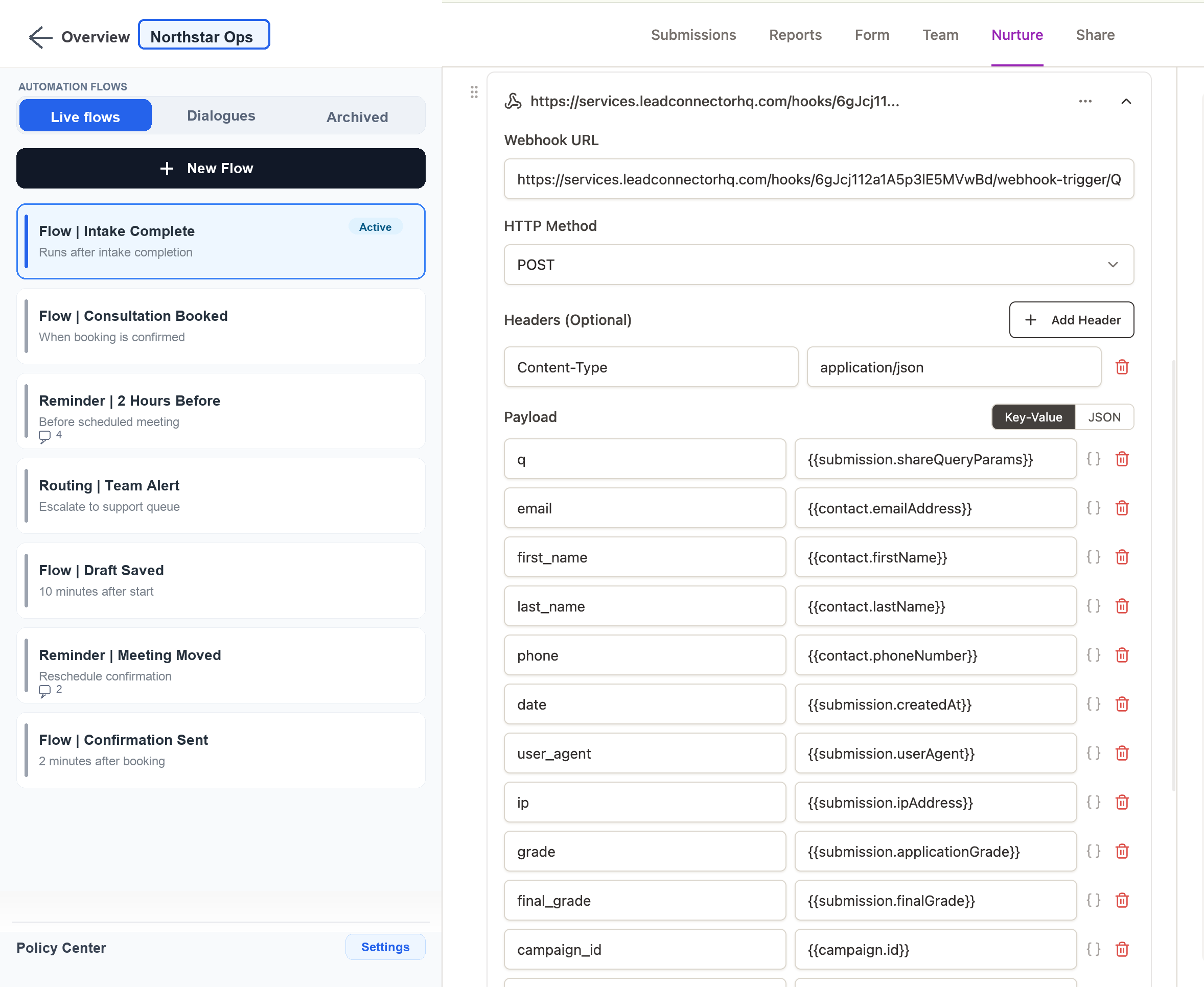
Saleskick automations can expose the captured URL parameter payload as a query string through {{submission.shareQueryParams}}.
That is useful because you do not have to map every possible parameter manually inside Saleskick. Instead, you can send one field called q to your backend, Zapier, Make, or CRM middleware and parse it there.
Example automation payload:
| Key | Value |
|---|---|
q | {{submission.shareQueryParams}} |
email | {{contact.emailAddress}} |
first_name | {{contact.firstName}} |
last_name | {{contact.lastName}} |
phone | {{contact.phoneNumber}} |
date | {{submission.createdAt}} |
Then parse the query string on your backend.
PHP example:
$params = [];
parse_str($request->input('q', ''), $params);

$utmSource = $params['utm_source'] ?? null;
$handlId   = $params['handlID'] ?? null;
$fbclid    = $params['fbclid'] ?? null;
$gclid     = $params['gclid'] ?? null;
JavaScript example:
const params = new URLSearchParams(payload.q || "");
const utmSource = params.get("utm_source");
const handlId = params.get("handlID");
const fbclid = params.get("fbclid");
const gclid = params.get("gclid");
See the full walkthrough here: Send Saleskick UTMs via Automation or Webhook.
What to map into your CRM
Once the payload leaves Saleskick, do not dump everything into one notes field and call it done. You want both raw and reportable fields.
Recommended CRM mapping:
| CRM field | Source parameter | Use |
|---|---|---|
| First UTM Source | first_utm_source or first-touch equivalent | Original acquisition channel |
| Latest UTM Source | utm_source | Last campaign touch before submission |
| First UTM Campaign | first-touch campaign | First campaign reporting |
| Latest UTM Campaign | utm_campaign | Latest campaign reporting |
| GCLID | gclid | Google Ads offline conversion import |
| GBRAID/WBRAID | gbraid, wbraid | iOS/web-to-app Google Ads attribution cases |
| FBCLID | fbclid | Meta click diagnostics and CAPI enrichment |
| HandL ID | handlID | Visitor/session join key |
| First HandL ID | first_handlID | First-touch join key |
| Landing Page | handl_landing_page | Funnel entry page |
| Referrer | handl_ref | Original referring source |
| Raw Query Payload | {{submission.shareQueryParams}} | Debugging and future backfills |
Keep the raw payload if your CRM allows it. It is incredibly useful when a field mapping changes later or when an ads team asks why one specific lead did not attribute.
Troubleshooting Saleskick UTM tracking
| Symptom | Likely cause | What to check first |
|---|---|---|
| No UTMs in Saleskick URL Parameters | Iframe URL was not decorated | Inspect the iframe src before submit |
| UTMs appear on page URL but not in Saleskick | Parent page captured them, iframe did not receive them | Confirm getAllHandLUTMParams() returns values before iframe creation |
| First-touch fields missing | Embed runs before first-touch data is ready | Wait for first_handlID before opening/creating the iframe |
| Saleskick has parameters but CRM does not | Automation or CRM mapping issue | Confirm q={{submission.shareQueryParams}} reaches your endpoint |
| GCLID or FBCLID missing | Ad click ID not captured, stripped, or not passed | Test with explicit gclid=test and fbclid=test first |
| Works in testing, fails on production | Caching, consent, script order, or tag manager timing | Check cache layer, consent manager, and whether UTM Grabber loads before Saleskick |
| Only latest touch appears | First-touch fields are not mapped downstream | Preserve first_handlID and first-touch UTM fields separately |
Why this matters for paid ads and lead quality
Saleskick is often used where lead quality, show rate, routing, and sales follow-up matter. That means attribution is not just a marketing dashboard decoration.
If you can connect Saleskick submissions back to campaigns, ad click IDs, landing pages, keywords, and first-touch data, you can answer questions like:
- Which campaign drives applications that actually book?
- Which ads create high-show-rate leads?
- Which landing page produces better sales-qualified opportunities?
- Which Meta or Google campaign deserves more budget?
- Which leads should be sent back to ad platforms as offline conversions?
That is where the iframe handoff becomes a revenue issue, not just a technical detail.
The clean implementation checklist
Use this checklist before you call the setup finished:
- UTM Grabber V3 is installed and active on the parent WordPress page.
- Your landing page test URL includes UTMs and click IDs.
- The Saleskick iframe
srcis decorated with UTM Grabber values before the form loads. - Saleskick Application > URL Parameters shows the expected values after submission.
- Saleskick automation sends
{{submission.shareQueryParams}}as a payload field. - Your backend or automation tool parses the query string correctly.
- CRM fields are mapped into reportable first-touch, latest-touch, click ID, and raw payload fields.
- You test with Google Ads, Meta Ads, and at least one organic/referral case.
- You verify the values in the CRM, not only inside Saleskick.
- You keep a raw payload field for debugging and future backfills.
Bottom line
Saleskick UTM tracking is very doable. The only trap is assuming the iframe can read everything the parent page knows.
It cannot.
The parent page has to capture the attribution, then push it into the Saleskick iframe URL. Once Saleskick receives the values, you can use Application > URL Parameters and {{submission.shareQueryParams}} to send that attribution downstream to the systems where reporting, routing, and ad optimization actually happen.
For the exact implementation, start with the Saleskick UTM Grabber docs, then test the iframe URL and webhook payload before relying on the data in your CRM.
UTM Grabber captures campaign, click ID, first-touch, referrer, landing page, and custom attribution data before Saleskick loads, then helps you pass it into the iframe and forward it to your CRM.