
Meta Event Parameters Blocked? How to Fix Meta Pixel and CAPI Policy Violations
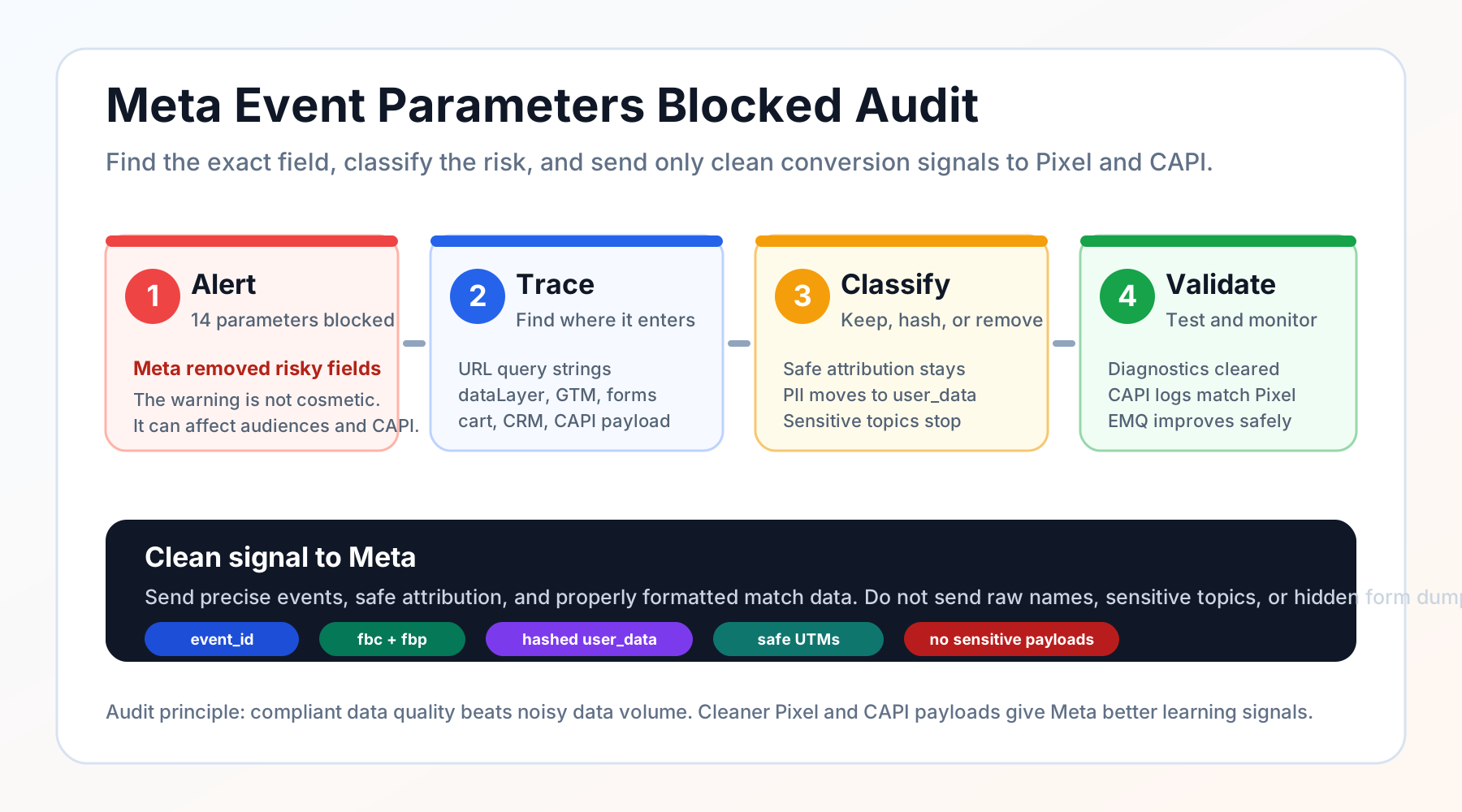
If Meta sends you an email that says "14 Event parameters blocked", treat it like a production tracking incident, not a minor Events Manager warning.
Meta is telling you that some of the data sent by your Meta Pixel, Conversions API, partner integration, GTM setup, cart, CRM, or URL parameters may violate the Meta Business Tools Terms. Those parameters are blocked, and repeated issues can lead to broader data restrictions, weaker custom conversions, smaller custom audiences, and lower-quality optimization feedback.
The fix is not to delete every parameter and starve the algorithm. The fix is to remove prohibited data, move allowed customer identifiers into the right hashed fields, keep clean attribution signals, and audit the full event payload before Meta sees it.
If you searched for Meta event parameters blocked
- You received a "Review parameters blocked by Meta" email.
- Events Manager shows blocked parameters by Meta or a potentially prohibited information warning.
- The flagged fields look like form, cart, or CRM fields such as
last_name,first_name,wj_lead_last_name, orthrivecart[customer][lastname]. - Your agency, plugin, server-side GTM container, or ecommerce platform says the Pixel is installed correctly, but Meta still blocks parameters.
- You want better Event Match Quality (EMQ), but you do not want to send unsafe data.
- You worry that blocked parameters will hurt Meta CAPI, custom audiences, custom conversions, retargeting, and campaign learning.
The practical question is not whether tracking matters. It is how to send enough clean data for optimization without sending data Meta does not allow.
The short answer
Meta blocks event parameters when its systems detect data that may be prohibited, improperly formatted, or shared in the wrong part of the event payload. Common causes include raw names or emails in custom_data, customer details in URL query strings, sensitive health or financial context, children-related data, credit card or government identifiers, and plugin/cart fields that dump too much information into the Pixel.
For most businesses, the clean fix is:
- Inventory every blocked parameter in Events Manager Diagnostics.
- Trace the source across URL, dataLayer, GTM, Pixel, CAPI, CRM, checkout, form plugin, and webhook payloads.
- Classify each field as safe attribution, allowed customer information, sensitive/prohibited data, or unnecessary noise.
- Remove unsafe fields from URLs,
custom_data, event names, content names, and CAPI payloads. - Send allowed customer identifiers only through Meta's expected customer information parameters, normalized and hashed where required.
- Keep non-sensitive attribution signals such as
utm_source,utm_campaign,fbclid,fbc,fbp,event_id, IP address, and user agent where appropriate. - Retest in Events Manager and monitor whether the warning moves from active to previously detected.
This article is educational, not legal advice. Sensitive-data analysis is context-specific. If your business touches healthcare, finance, children, insurance, regulated products, or protected personal data, involve privacy counsel before sending event data to Meta, Google, analytics tools, server-side GTM, or any ad platform.
Why Meta blocks event parameters
What "event parameters blocked" means
Meta's own help pages describe a few connected concepts:
- Meta may block events or parameters when it detects data that may violate its terms or policies.
- Meta's prohibited-information guidance references health information, financial information, other sensitive categories, information from or about children under 13, unhashed customer information where hashing is required, and identifiers such as Social Security numbers or credit card numbers.
- Meta's Conversions API documentation separates customer information parameters from other event parameters and marks many identity fields as hashing required.
That separation matters. A raw field called last_name inside custom_data can be a policy problem. A properly normalized and hashed ln value inside Meta's user_data object may be an accepted customer information parameter when you have the right basis to send it.
The same human fact can be allowed or disallowed depending on what it is, where it is sent, how it is formatted, and what it reveals.
Why this hurts more than reporting
Blocked parameters are not just a compliance badge in Events Manager. They can change what Meta can use.
When Meta removes data from an event, that data may no longer help:
- match the event to a person;
- deduplicate browser and server events;
- build or update custom audiences;
- evaluate custom conversions;
- train delivery on qualified leads, purchases, bookings, or subscriptions;
- diagnose Event Match Quality and data quality problems.
That is why the fix must protect both sides of the equation: privacy compliance and signal quality.
If you simply remove everything, the warning may go away but your pixel becomes weak. If you send everything, Meta may block it and restrict the dataset. The right setup is a clean allowlist.
The parameter safety map
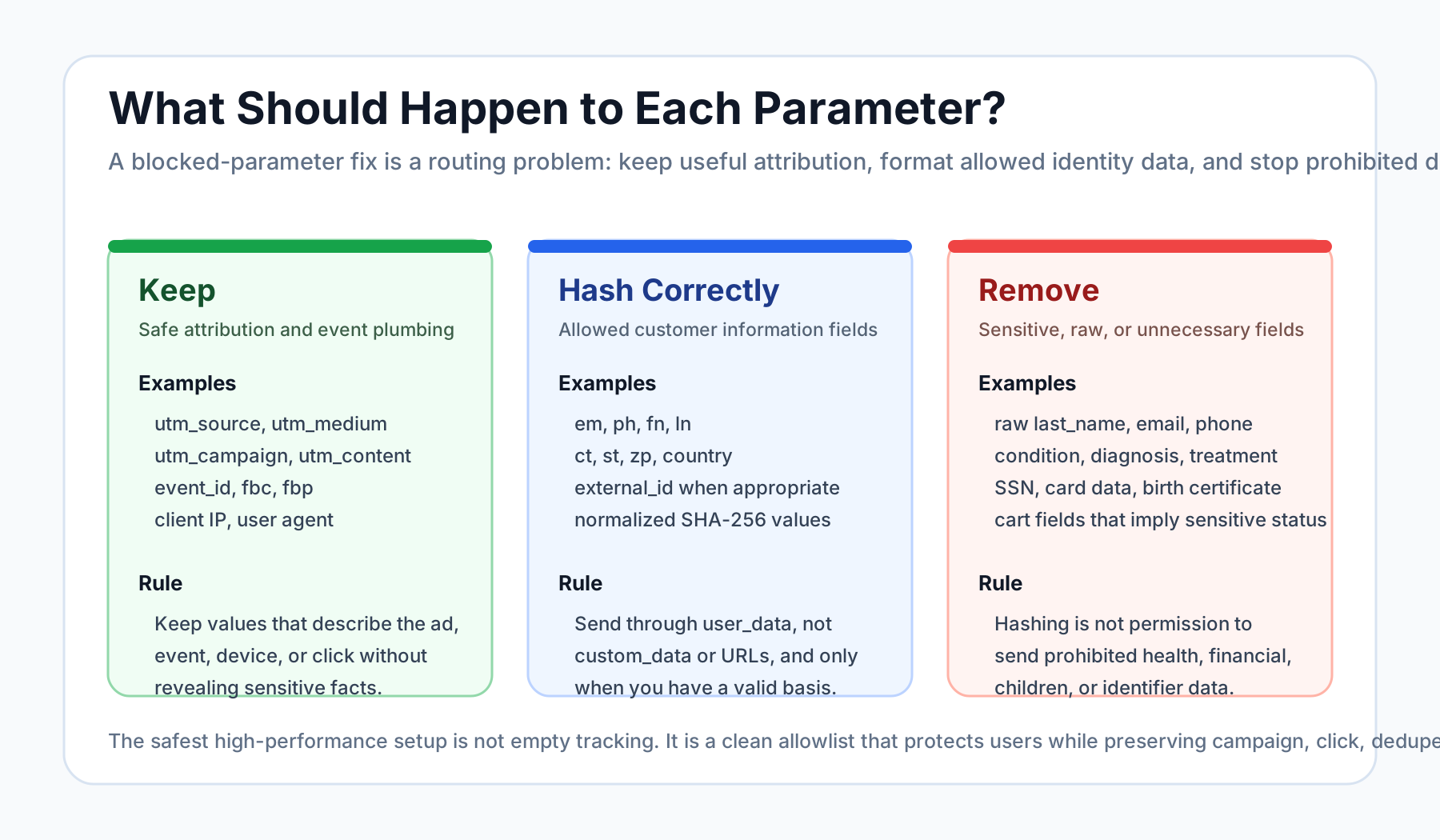
Use this as your first pass when reviewing a blocked-parameter email.
| Parameter type | Examples | What to do | Why |
|---|---|---|---|
| Safe attribution | utm_source, utm_medium, utm_campaign, utm_content, utm_term, fbclid, gclid | Keep when values do not reveal sensitive facts. | These explain the ad journey and help your CRM, reporting, and downstream conversion imports. |
| Meta click/browser IDs | fbc, fbp, event_id | Keep and send consistently. | These help click matching and deduplication. |
| Device/context signals | client_ip_address, client_user_agent | Send in the right Meta fields. Do not hash. | Meta uses them for event matching and quality checks. |
| Customer information requiring hashing | em, ph, fn, ln, ct, st, zp, country | Normalize and hash as Meta requires, then send through user_data. | Do not send raw PII as custom parameters or URL parameters. |
| Raw customer fields in custom payloads | last_name, first_name, email, phone, thrivecart[customer][lastname], wj_lead_last_name | Remove from custom_data, URL parameters, and browser payloads. Move allowed identifiers to proper hashed fields only. | This is a common cause of blocked parameters. |
| Sensitive context | diagnosis, condition, treatment, medication, debt amount, income, child info, insurance claim, credit card, SSN | Remove. Do not hash and send. | Hashing does not make prohibited sensitive data safe to send. |
| Overly detailed product/form data | product names that imply health status, appointment type, quiz answers, intake answers, provider specialty | Generalize or keep only in your first-party systems. | The value can reveal sensitive intent even if the key looks harmless. |
| Full URLs with query strings | /checkout?email=..., /booking?condition=..., /thank-you?last_name=... | Strip unsafe query strings before event dispatch. Preserve safe UTMs separately. | Pixel events can collect URL context automatically. |
Why examples like wj_lead_last_name and thrivecart[customer][lastname] get flagged
Fields like wj_lead_last_name or thrivecart[customer][lastname] look like implementation details. Meta may still treat them as customer data because the key name and value likely describe a person's name.
The issue is usually not that "last name can never be used." The issue is that last name is being sent in the wrong place.
Bad pattern:
{
  "event_name": "Lead",
  "custom_data": {
    "thrivecart[customer][lastname]": "smith",
    "utm_campaign": "meta_lead_gen"
  }
}
Cleaner pattern:
{
  "event_name": "Lead",
  "event_id": "lead_abc123",
  "user_data": {
    "ln": "6627835f...",
    "em": "ff8d9819...",
    "client_ip_address": "203.0.113.10",
    "client_user_agent": "Mozilla/5.0 ..."
  },
  "custom_data": {
    "lead_type": "consultation",
    "utm_campaign": "meta_lead_gen"
  }
}
Even that cleaner pattern still needs consent, legal basis, and a sensitive-data review. But structurally, the second example follows the right idea: identity goes into user_data; attribution and business context go into limited custom_data; sensitive data does not go to Meta.
The safest fix order
1. Start in Meta Events Manager Diagnostics
Open the affected dataset or Pixel in Events Manager and review the Diagnostics tab. Look for:
- blocked parameter names;
- affected event names such as PageView, Lead, CompleteRegistration, AddToCart, InitiateCheckout, Purchase, Schedule, or Contact;
- affected URLs;
- whether the issue is active, previously detected, blocked by Meta, or blocked by user;
- whether the event is coming from browser Pixel, server CAPI, partner integration, app events, or offline events.
Do not rely only on the email. The email usually gives a sample. The actual diagnostic panel can show the path you need to debug.
2. Trace the parameter back to the source
Blocked parameters usually enter from one of these places:
- URL query strings on landing pages or thank-you pages;
- form hidden fields;
- form plugin merge tags;
- ecommerce checkout payloads;
- dataLayer pushes;
- GTM web tags;
- server-side GTM transformations;
- partner integrations such as cart tools, CRMs, form builders, or booking systems;
- webhook payloads that are mirrored into CAPI;
- server-side code that forwards a full request body.
This is where many teams lose time. They inspect the visible Pixel snippet, but the real source is often a CRM redirect, checkout app, hidden field, or server event transformer.
3. Create a Meta payload allowlist
Your allowlist should answer four questions:
| Question | Example decision |
|---|---|
| Is this field needed by Meta for matching or optimization? | Keep event_id, fbc, fbp, IP, user agent, safe value, currency, and safe content info. |
| Is this customer information that Meta accepts in a specific field? | Move email to hashed em, phone to hashed ph, first name to hashed fn, last name to hashed ln. |
| Does this reveal sensitive intent or a protected category? | Remove condition, treatment, appointment reason, children data, financial status, or government identifiers. |
| Is this only needed in CRM or internal reporting? | Keep it inside your first-party database, not in Meta Pixel or CAPI. |
This is exactly where UTM Grabber can help inside an audit: it separates attribution you should preserve from payload data you should not send to Meta.
4. Strip unsafe URL parameters before the Pixel fires
Meta can receive more than the explicit parameters you pass. Browser events include page URL context. That means unsafe data in the URL can still create problems even if your Pixel code looks clean.
Examples to avoid:
/thank-you?email=jane@example.com/checkout?last_name=smith/booking?appointment_type=addiction-consult/offer?child_name=.../product?condition=diabetes
Safe pattern:
- capture UTMs and click IDs first;
- store attribution in first-party cookies or local storage;
- send the visitor to clean URLs;
- pass only approved fields to Pixel/CAPI;
- keep sensitive or operational fields inside your CRM, data warehouse, or compliant backend.
5. Keep attribution even when you remove risky data
Do not throw away UTMs because Meta blocked a name or cart field.
For ad optimization and revenue reporting, you still want:
utm_source;utm_medium;utm_campaign;utm_content;utm_term;fbclid;fbc;fbp;event_id;- landing page;
- referrer;
- first-touch and last-touch timestamps;
- CRM lead ID or order ID where safe and appropriate.
The goal is to preserve marketing attribution while removing prohibited personal or sensitive context.
What not to do
Do not rename a sensitive field and send it anyway
Changing diagnosis to field_12 does not solve the underlying problem if the value still reveals diagnosis. Meta systems can evaluate both keys and values.
Do not hash sensitive data and assume it is allowed
Hashing is a formatting requirement for certain customer information parameters. It is not a universal permission slip. A hashed medical condition, credit card number, SSN, or child-related identifier should not be sent to Meta.
Do not dump the whole form payload into CAPI
This is one of the most common server-side tracking mistakes. Server-side tracking gives you more control, but it also makes it easier to send too much.
Your CAPI payload should be intentionally shaped, not mirrored from the CRM request body.
Do not ignore the warning because Meta already blocked the field
If Meta blocked a parameter today, the immediate data may be removed. But repeated or unresolved issues can still lead to broader restrictions, reduced functionality, and weaker optimization data. Fix the source.
Do not remove every match signal
A panic cleanup can create a new problem: safe conversion signals disappear.
You still want properly formatted, compliant matching data. Clean event_id, fbc, fbp, IP, user agent, and hashed customer information can help Meta match events and optimize campaigns without sending raw or sensitive payloads.
How this improves Pixel quality and Meta's algorithm
Meta's delivery system learns from conversion events. But the algorithm can only learn from data Meta accepts and can trust.
A cleaner Meta Pixel and CAPI setup can improve:
- Event Match Quality, because allowed customer information is formatted correctly;
- deduplication, because browser and server events share the same
event_id; - coverage, because important events are sent consistently from both browser and server where appropriate;
- custom conversion reliability, because events are not polluted by blocked parameters;
- custom audience usefulness, because Meta is not removing the data the audience depends on;
- CPA and ROAS feedback, because the system receives cleaner conversion examples.
This is why compliance is not separate from performance. Privacy-safe data quality is performance infrastructure.
UTM Grabber audit checklist for blocked Meta parameters
Under a UTM Grabber audit, we would review:
- All active Meta Pixel and CAPI event payloads by event name.
- Blocked parameter names from Events Manager Diagnostics.
- URL query strings on landing, checkout, form, and thank-you pages.
- Hidden form fields and whether they are pushing raw customer data.
- dataLayer and GTM variables used by browser tags.
- Server-side GTM and CAPI transformations to make sure they are not mirroring full requests.
- CRM, webhook, cart, and booking payloads that may contain raw PII or sensitive answers.
- Allowed match data coverage, including
event_id,fbc,fbp, IP, user agent, email, phone, name, city, state, ZIP, and country where appropriate. - First-party attribution storage, so UTMs and click IDs survive redirects, caching, consent timing, iframe forms, and multi-step funnels.
- Before/after Meta diagnostics, so the cleanup is proven, not assumed.
The outcome should be a clean routing map:
- what stays in your CRM;
- what goes to Meta;
- what goes to Google Ads;
- what goes to analytics;
- what should never leave your first-party systems.
FAQ
Does hashing fix Meta blocked parameters?
Sometimes, but only for specific customer information parameters that Meta expects to be hashed, such as email, phone, first name, last name, city, state, ZIP, and country. Hashing does not make sensitive health, financial, child-related, credit card, SSN, or other prohibited data safe to send.
Should I remove UTMs from Meta Pixel or CAPI?
Usually no. UTMs are attribution fields, not customer identity fields. But review the values. A UTM like utm_campaign=summer_sale is different from a campaign value that reveals a medical condition, financial hardship, or another sensitive category.
Is server-side GTM or CAPI safer than the browser Pixel?
It can be safer because you can filter and shape data before it reaches Meta. But it can also be riskier if you mirror a full request body, CRM payload, or dataLayer object into CAPI. Server-side tracking is a control layer, not automatic compliance.
Will blocked parameters lower Event Match Quality?
They can. If Meta removes customer identifiers or blocks event data, your match quality and optimization feedback may weaken. The fix is not more random parameters. The fix is more allowed, normalized, hashed, and consistent match data.
Can I send first name and last name to Meta?
Meta's CAPI customer information parameters include first name and last name fields, but they must be formatted and hashed as required, sent in the correct location, and backed by the right legal basis. Do not send raw names as custom event parameters, URL parameters, or hidden field dumps.
What should I do first after receiving a "14 Event parameters blocked" email?
Open Events Manager Diagnostics, capture the affected parameters and events, pause any obvious raw PII or sensitive query-string leakage, then trace the source. Do not wait weeks for the warning to disappear on its own.
UTM Grabber helps separate safe attribution from risky payload data, so you can preserve useful Meta learning signals without sending blocked parameters.
Sources checked:
- Meta Business Tools Terms
- Meta troubleshooting page for prohibited information notifications
- Meta help page on reviewing blocked parameters in Events Manager
- Meta help page on event parameters
- Meta Conversions API customer information parameters
- Meta Conversions API parameters reference
- Stack Overflow discussion: "Review parameters blocked by Meta"
- WordPress.org support thread: "Review parameters blocked by Meta"
- Reddit discussion: Pixel event parameters being blocked
- Shopify community discussion on potentially violating personal data sent to Facebook