
How to Track UTM Parameters in Formidable Forms
Your ad URL has utm_source, utm_campaign, gclid, or fbclid, but your Formidable Forms entry or CRM still says nothing useful.
That is the whole problem. If the form submission does not carry the click and source data, your CRM cannot tell you which campaign created the lead.
Searchers usually describe this problem like this
- "How do I track UTM parameters in Formidable Forms?"
- "Why are my Formidable hidden fields empty?"
- "How do I pass UTMs from Formidable to my CRM, Zapier, or Make?"
- "Can I store GCLID, FBCLID, first touch, and last touch on a Formidable lead?"
- "Why does the URL have UTMs but the form entry has no source data?"
The fix is not just adding one hidden field. The fix is capturing the click data early, storing it reliably, and mapping it all the way into the system where revenue is measured.
The short answer
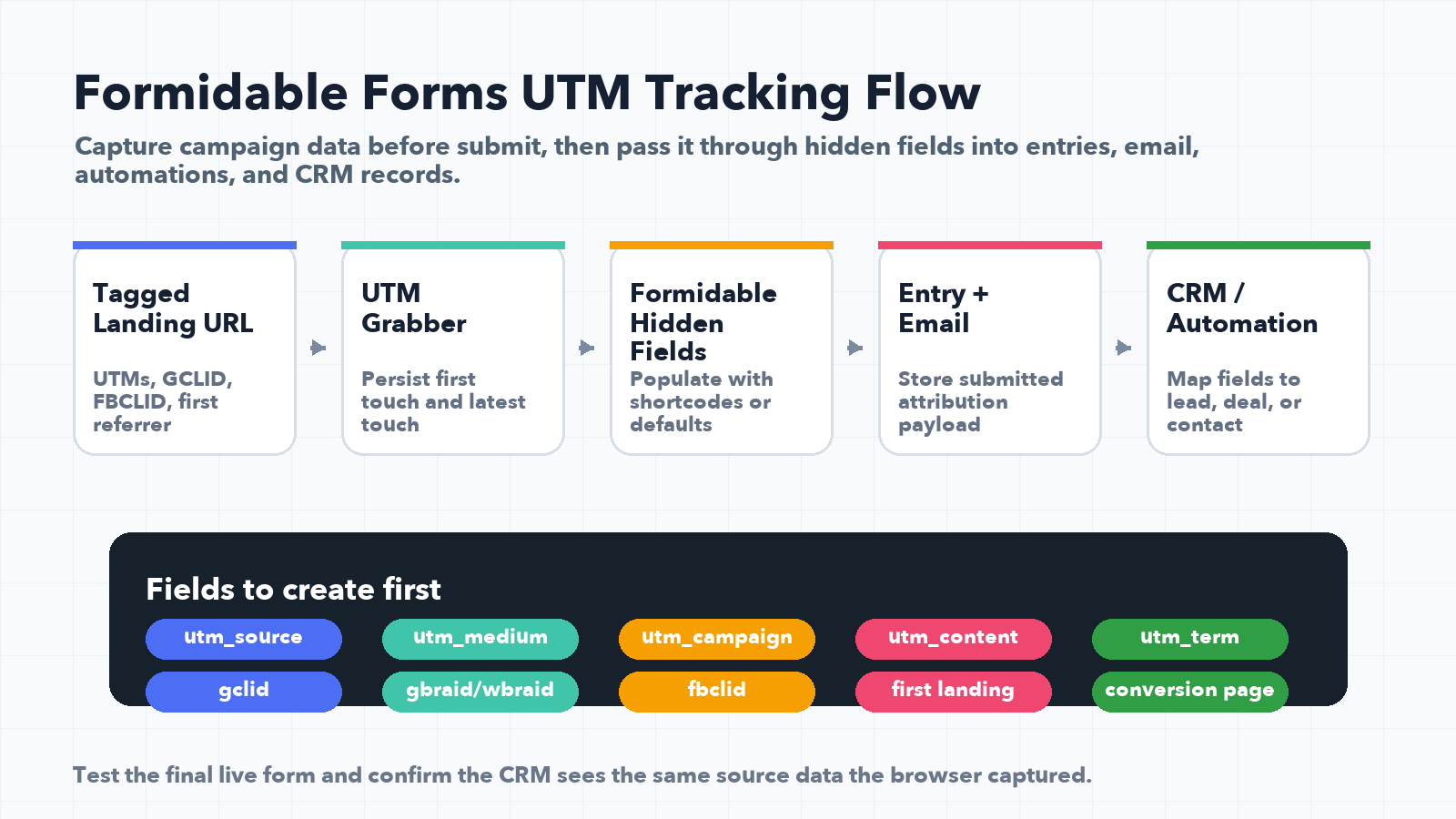
To track UTM parameters in Formidable Forms, create hidden fields for every attribution value you care about, populate those fields before submit, and map those fields into your CRM or automation tool.
At minimum, capture:
utm_source,utm_medium,utm_campaign,utm_term,utm_contentgclid,gbraid,wbraid,fbclid,msclkid- Landing page, referrer, page URL, form URL
- First touch and latest touch values
- Any internal lead source or funnel name your sales team uses
UTM tracking is useful only if the values survive the form submit. A pretty URL does not help if the CRM never receives the data.
Why Formidable Forms UTM tracking breaks
Formidable Forms can collect hidden values, but the lead source data has to be present when the form submits. In real accounts, the break usually happens in one of five places:
- The ad platform has no tracking template, so there are no UTMs in the first place.
- The form has hidden fields, but those fields are not populated with the right values.
- The visitor lands with UTMs, browses another page, then submits after the original query string is gone.
- The CRM, webhook, Zapier, or Make scenario does not map the UTM fields.
- A cache, consent banner, redirect, iframe, or multi-step funnel changes timing and the fields submit blank.
That is why persistent first-party capture is stronger than reading the URL only at submit time.
Formidable hidden fields vs dynamic default values
Formidable's own documentation describes hidden fields as fields that are not visible on the front end, but can store a calculation, a dynamic default value, or a static default value. That is exactly why they are useful for UTM tracking.
Formidable also supports dynamic defaults such as reading a query parameter from the URL. That can work for simple pages where the visitor lands and immediately submits the form.
But campaign journeys are rarely that simple.
If someone clicks a Google ad, lands on a service page, reads a pricing page, returns later, and then fills out the Formidable form, the original utm_campaign may no longer be in the URL. For attribution, the better pattern is to capture UTMs and click IDs as soon as the visitor arrives, store them first-party, then fill the Formidable hidden fields from the stored values.
The Formidable UTM field map to create first
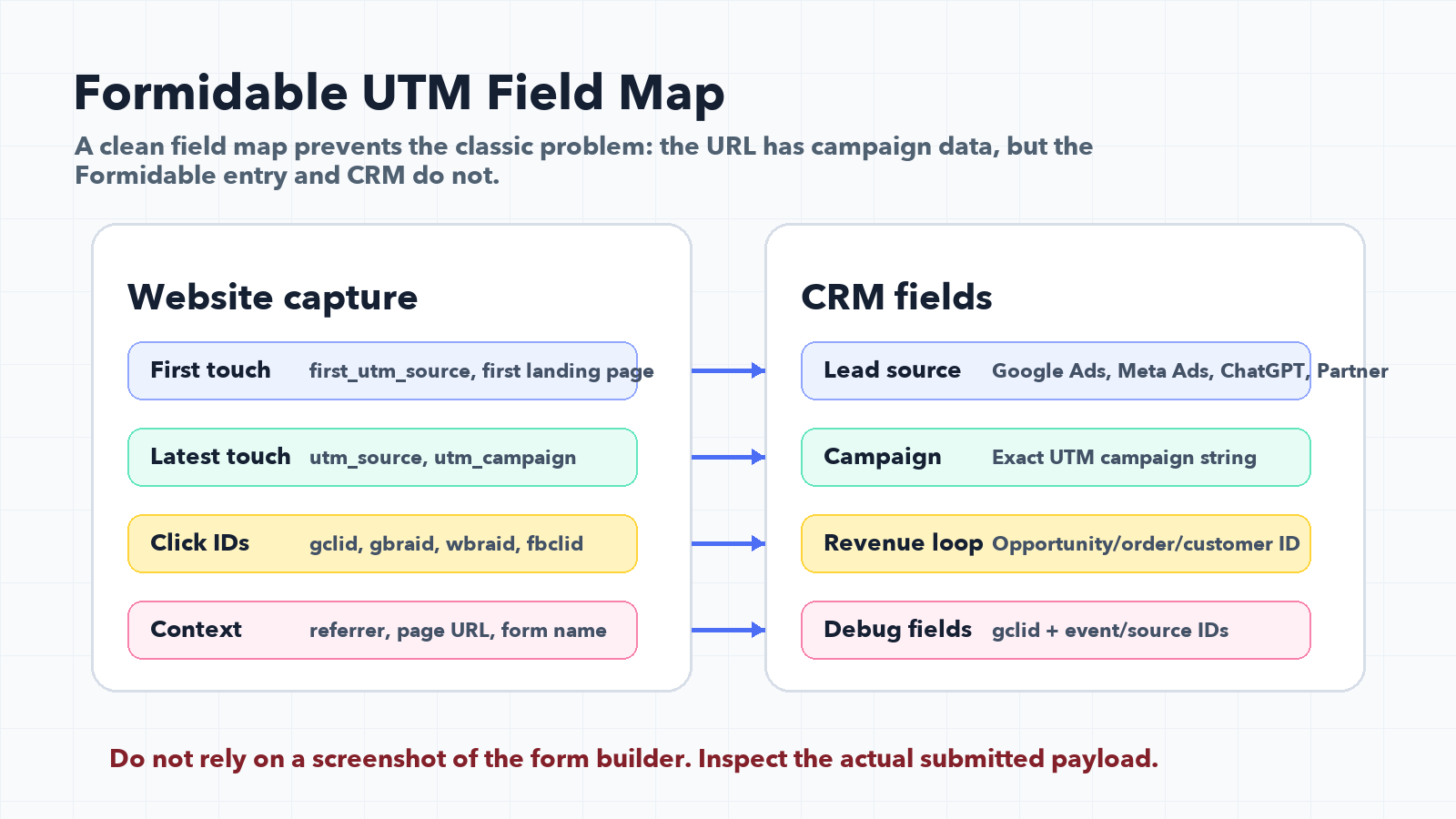
Before touching Zapier, Make, HubSpot, Salesforce, GoHighLevel, or your email notification template, create a clean field map.
| Field group | Recommended fields | Why it matters |
|---|---|---|
| Standard UTMs | utm_source, utm_medium, utm_campaign, utm_term, utm_content | Explains the channel, campaign, keyword, and creative. |
| Paid click IDs | gclid, gbraid, wbraid, fbclid, msclkid | Needed for Google Ads, Meta Ads, Microsoft Ads, offline conversion imports, and stronger match logic. |
| Page context | Landing page, current page, referrer | Helps debug which page or funnel created the lead. |
| Touch model | First source, latest source, all-touch values | Prevents last-click-only reporting from hiding the original acquisition source. |
| CRM fields | Lead source, lead source detail, campaign name | Makes the data usable by sales and reporting teams. |
How to implement Formidable Forms UTM tracking
1. Add hidden fields to the Formidable form
Create one hidden field per value. Do not squeeze everything into one "tracking" field.
Use separate fields because your CRM, spreadsheet, webhook, and reporting tools need clean columns:
- Source
- Medium
- Campaign
- Term
- Content
- GCLID
- GBRAID
- WBRAID
- FBCLID
- MSCLKID
- Landing page
- Referrer
- First touch source
- Latest touch source
The goal is not to collect more data for fun. The goal is to make every lead explain where it came from.
2. Populate the fields from persistent attribution values
If you are using UTM Grabber, the plugin stores attribution values and can populate hidden fields with the captured campaign and click ID data.
This matters because a visitor may submit Formidable Forms after:
- Navigating away from the landing page
- Returning from email
- Moving from one page to another
- Accepting or rejecting a cookie banner
- Waiting until a later session
Reading only the current URL can miss all of that.
3. Use Formidable dynamic defaults only when the URL is enough
Formidable's dynamic default values can read URL parameters. That can be helpful for quick tests, simple landing pages, or one-page funnels.
But if you care about reliable ad attribution, use dynamic defaults as a fallback, not your only attribution system.
A one-page demo form can read ?utm_source=google. A real sales funnel needs first-party persistence.
4. Map the Formidable fields into the next system
This is where many implementations quietly fail.
You can have perfect hidden fields inside Formidable and still lose the data if your automation step ignores them. Check every handoff:
- Formidable entry storage
- Admin email notifications
- Zapier action fields
- Make module mapping
- Webhook payloads
- CRM contact properties
- Deal or opportunity fields
- Google Sheet columns
- Slack notifications
If your sales team works in HubSpot, Salesforce, GoHighLevel, Pipedrive, or another CRM, the UTM values need to land there, not just in WordPress.
Google Ads and Meta Ads need more than UTMs
UTMs explain campaign context. Click IDs explain ad platform identity.
For Google Ads, store gclid, gbraid, and wbraid whenever available. Google documentation recommends capturing Google click IDs and storing them with the lead so offline conversions can be imported later. For some workflows, enhanced conversions for leads can also use user-provided data such as email to improve matching.
For Meta, store fbclid, fbc, fbp where available, and keep your event naming and identifiers consistent if you also use browser Pixel and Conversions API.
If your Formidable form only captures UTMs, you can report campaign names. If it also captures click IDs, you can feed conversion quality back into the ad platforms.
First touch vs latest touch in Formidable Forms
Most teams start with latest touch because it is easy. The last source before submit gets the credit.
That is useful, but incomplete.
For lead generation, first touch answers "which campaign introduced this person?" Latest touch answers "which campaign brought them back before submitting?" Both are valuable.
Store both when possible:
- First touch UTM source
- First touch UTM campaign
- Latest touch UTM source
- Latest touch UTM campaign
- Full path or all-touch history if your reporting needs it
This is especially important when SEO, paid search, paid social, AI search referrals, and email are all involved.
QA checklist for Formidable Forms UTM tracking
Run this before calling the integration done:
- Open a test URL with
?utm_source=google&utm_medium=cpc&utm_campaign=formidable_test&gclid=test123. - Submit the Formidable form from the landing page.
- Submit again after navigating to another page.
- Check the Formidable entry for every hidden field.
- Check the CRM record for every mapped field.
- Check Zapier or Make task history for missing fields.
- Test with and without a cookie banner consent choice.
- Test a cached page and a non-cached page.
- Confirm the sales team can see source data on the lead, contact, deal, or opportunity.
If the CRM record is blank, the implementation is not finished.
Common mistakes to avoid
Mistake 1: Only tracking utm_source
utm_source=google is not enough. You also need campaign, medium, click ID, landing page, and the CRM field mapping.
Mistake 2: Assuming a hidden field automatically fills itself
A hidden field is just a place to store data. Something still has to populate it.
Mistake 3: Testing only the first page load
Most real visitors do not submit instantly. Test page navigation, return visits, redirects, and consent behavior.
Mistake 4: Forgetting Google Ads and Meta Ads feedback loops
If you want offline conversions, enhanced conversions, Meta CAPI, or better campaign optimization, store the click IDs and identifiers early.
Mistake 5: Not logging raw values during QA
When something breaks, you need to see the exact UTM and click ID values that were captured, submitted, and sent to the CRM.
Where UTM Grabber fits
UTM Grabber captures source data early, stores it first-party, and fills your form fields so Formidable entries and CRM records keep the campaign context.
- Capture first touch and latest touch UTM parameters.
- Store Google, Meta, and Microsoft click IDs.
- Fill hidden fields in WordPress forms.
- Send source data into CRM, Zapier, Make, and webhook workflows.
- Keep attribution useful after page navigation, redirects, and delayed submissions.
Sources checked:
- UTM Grabber Formidable Forms integration documentation
- Formidable Forms hidden field documentation
- Formidable Forms dynamic default values documentation
- Google Ads Help: import conversions from clicks
Capture UTMs, click IDs, landing pages, and CRM-ready attribution fields before the lead is created.