
7 Common UTM Mistakes That Quietly Destroy Your Data
Your UTM tracking is broken. Not because you have bad tools. Not because the technology is complicated. Because of small mistakes that compound until your data is unrecognizable. Here are the errors we see most often and how to fix them before they ruin your next report.
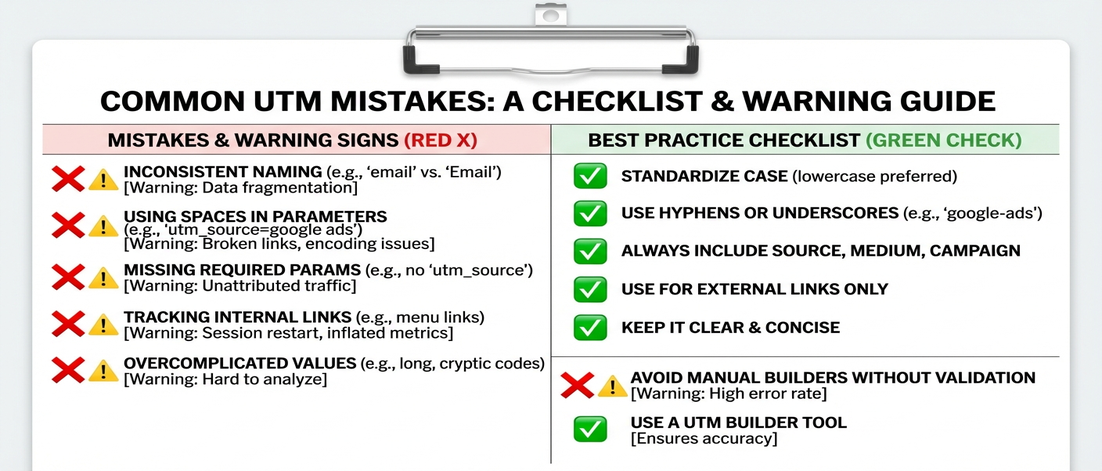
If this sounds familiar, you are not alone
- Your campaign names include spaces that become %20 in URLs, making them unreadable in reports
- You use capital letters inconsistently, creating Google, google, and GOOGLE as separate sources
- Your team uses different separators (underscores, hyphens, camelCase) in the same reports
- You include dates in campaign names that make historical comparisons impossible
- You add UTM parameters to internal links, inflating your traffic numbers
- You use utm_content for everything because you are not sure what it is for
- You rely on memory instead of tools, so new team members make all the same mistakes
These mistakes feel harmless. That is exactly why they are dangerous.
Why these mistakes happen and how to avoid them
1. Spaces become URL-encoded characters
When you use spaces in UTM values, they become %20 in URLs. summer sale becomes summer%20sale in your analytics. This creates separate entries for every accidental space.
Always use hyphens or underscores instead of spaces. summer-sale, not summer sale.
2. Case sensitivity creates duplicates
Analytics treats Google, google, and GOOGLE as different sources. Every capitalization variation creates a separate entry in your reports.
Pick one convention (lowercase is standard) and enforce it everywhere. Never mix.
3. Inconsistent separators break aggregation
Some team members use underscores, others use hyphens, someone uses camelCase. summer_sale, summer-sale, and summerSale are three different campaigns.
Pick one separator and make it your standard. Document it. Enforce it.
4. Dates in campaign names prevent historical comparison
Q1_sale_2026 and Q2_sale_2026 cannot be compared to yearly_sale. Date-specific names make it impossible to aggregate performance across time periods.
Use separate fields for campaign and time period if you need both.
5. Internal links get tagged by mistake
Adding UTM parameters to links within your own site creates fake traffic. Internal clicks appear as external sources in your analytics.
Only add UTM parameters to links that leave your domain.
6. Utm_content gets misused
Utm_content is for differentiating links to the same URL. It is not for additional metadata. Overusing it creates noise.
Use utm_content only when you have two links to the same URL and need to know which one generated the click.
7. No enforcement means no consistency
Every new team member makes every mistake again. Memory is not a system. Documentation is not enforcement.
The only way to maintain consistency is to automate it.
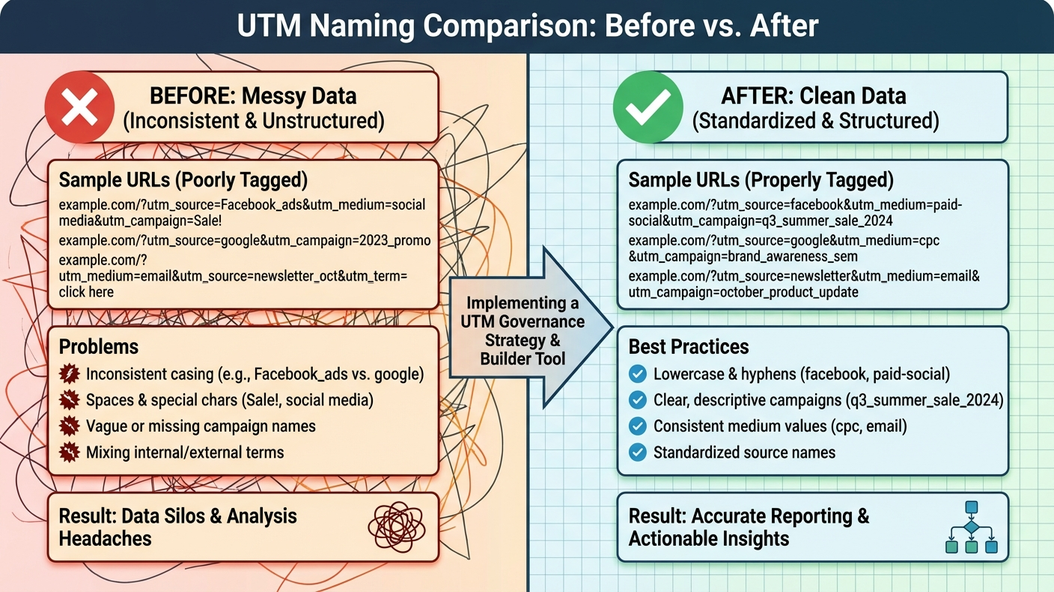
The real cost is not the errors - it is the analysis that never happens
- Your team spends hours manually cleaning data instead of analyzing it
- Decisions get made on partial data because full data is too messy to use
- Campaign performance comparisons become impossible
- Confidence in marketing analytics erodes until nobody trusts the numbers
When data is messy, people stop using it. The real cost is lost insights, not cleanup time.
What mistake-free tracking looks like
- Every campaign name follows the same format without exceptions
- All team members create identical links without thinking
- Reports aggregate correctly because everything uses the same naming
- New hires learn the system in minutes, not weeks
Good tracking is invisible. You never think about it because it just works.
Why being more careful does not work
This is exactly why we built UTM Grabber
UTM Grabber prevents every common mistake automatically - so your data stays clean without anyone thinking about it.
- Automatic correction of spaces, case, and formatting issues
- Validation that blocks impossible or inconsistent values
- Templates that make correct usage the only option
- Team-wide consistency without training or reminders
UTM Grabber is built for teams who want clean data without the effort
- Teams with multiple people creating UTM links
- Agencies with clients who notice data inconsistencies
- Growing companies where tracking was not a priority
- Anyone who has ever said we need to clean up our UTM data
If you are tired of fixing the same mistakes, this is for you.